|
|
This message is being sent to SSP, APD, Type B AAA, VEC, Central/Shared and OEP. If you do not need this message, please disregard.
 Having trouble viewing this email? View it as a Web page.
|
|
|
The Release Notes, posted after the build, details the issues that were resolved and any change requests and additional enhancements that went into this system update.
Interim Business Processes (IBP) retired with this build:
- Interim Business Process (IBP) 23-027: Authorized Work Search (AWS2) is not being applied correctly in instances of a permanent job loss based on Good Cause rules is retired with this build. ONE will correctly apply AWS2 for permanent job loss.
If you experience technical issues following the release, please clear your cache and cookies to see if this resolves the issue. If issues continue log a ONE CA Ticket.
 Priority enhancements from the Eligibility Continuous Improvement Committee (ECIC) and staff:
The "Cases Associated with Individual" section automatically displays in the Individual Summary screen.
Worker Portal
- The "Cases Associated with Individual" section automatically expands when the Individual Summary screen opens.
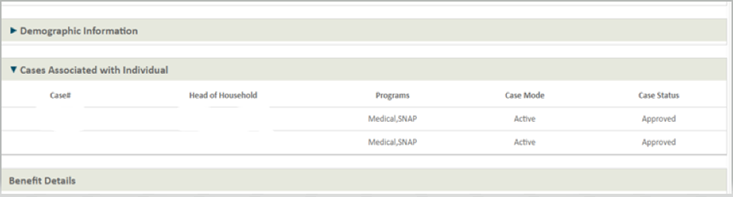 Cases Associated with Individual section.
Asset Verification Screen button will open a separate tab for Asset Verification data and resource detail check information.
Data Collection, Asset Verification screen (AVS)
- Selecting the AVS button will open a separate tab that lets workers view Asset Verification data and the resource details check information while navigating the case and completing data entry.
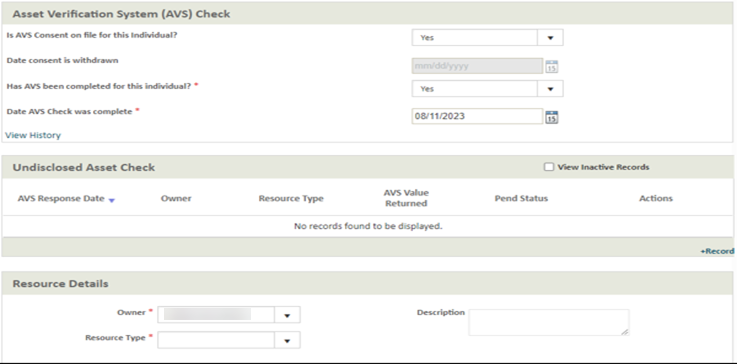 Asset Verification System (AVS) Check section.
|
|
Additional Enhancements and Fixes:
Eligibility override onscreen validation for CASH will not allow workers to select the State Family Pre-SSI/SSDI (SFPSS) checkbox when completing an override for Employment Payments (EPCA) in Worker Portal.
Eligibility Override screen for CASH
- The SFPSS checkbox cannot be marked if Employment Payments (EPCA) are approved with override. This change resolves payment issue associated with EPCA override eligibility determination groups (EDG) that have the SFPSS checkbox selected.
Job Participation Incentive (JPI) eligibility and screen changes in the Earned Income Details and Verification screen in Worker Portal.
- “Pay period begin date of JPI Hours below” added to the screen. This date is the start date of JPI hours used.
- Example: pay stub indicates pay periods of July 24 to July 30 and July 31 to August 6 for 40 hours per week.
- JPI Eligibility logic added. This discontinues JPI benefits sixth calendar months from the pay period begin date. This change aligns with the federal work participation requirements verifying JPI hours every six months.
- When new JPI hour verification is obtained and there is an update made to the “pay period begin date of JPI Hours” field, the system will re-evaluate JPI for the six calendar months.
- “Hours” added to the Week 1 and Week 2 descriptions.
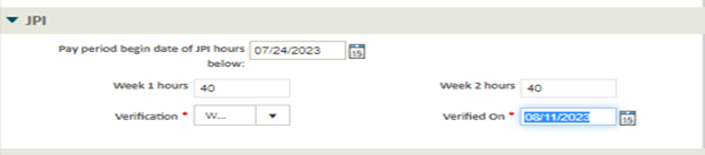 Job Participation Incentive screen.
- JPI discontinuance reason added SNAP Denial Discontinuance Disqualification Notice Reason text:
|
Correspondence Text
|
Worker Portal Text
|
|
Your Household does not meet the work hour requirements for the program.
|
Not Satisfying the JPI hours Criteria
|
|
There is no qualifying child parent relationship.
|
No Eligible Parent-Child Pair exists for JPI
|
|
Your Household is receiving a different TANF benefit.
|
Receiving other benefits not valid for JPI
|
|
Your Household is not receiving SNAP benefits.
|
Ineligible for JPI due to not receiving SNAP benefits
|
|
Your Household is over the income limit.
|
Ineligible for JPI due to over the Income limit.
|
- JPI discontinuance reasons are set at a household level for families who are no longer eligible for JPI benefits. Correspondence is sent when JPI is discontinued early; notices are not sent if JPI is denied. Worker Portal may display the denial reason to help the worker gather additional information needed for JPI eligibility such as missing marital status.
Location for Virtual Eligibility Center (VEC) is no longer required on the Prescheduled Appointment Unavailability screen.
Prescheduled Appointment Unavailability screen Search Criteria section
- Location dropdown is not required when the ‘Virtual Eligibility Center (VEC)’ option is selected for the office dropdown.
Changes to Disqualifying Transfer (DQ) period calculation for Medical Long-Term Care (LTC) Service Eligibility:
- If someone receives LTC services and has a DQ is report, the DQ period starts first day of the month following adverse action. This happens if the transfer was reported within the lookback period of the DOR of services.
- For example, on August 16 someone with ongoing LTCSERV reports they transferred an asset on August 1 and that transfer is determined to be disqualifying. The first date of the DQ period will be November 1.
- When someone re-applies for services and reports a previous period of service eligibility that had unreported asset transfer(s), those transfers will be considered against their current application and will be considered for DQ if they are within the lookback period for the current application.
- For example, someone receiving LTCSERV no longer meets eligibility criteria and LTCSERV closes. They re-apply later and report a transfer of assets not initially reported when they were receiving LTCSERV but is within the lookback period from the current Date of Request (DOR). The transfer is determined to be disqualifying and the disqualification period is applied to the current application.
Primary Caregiver Responsibility screen updates for SNAP when any case contains children less than 12 years of age and multiple caregivers.
- For SNAP, the primary caretaker screen will queue for all situations when any child (less than 12 years of age) has two parents, one parent and one caretaker, or more than one caretaker (individual with CCS).
Fixed Worker Portal Issue where Asset Verification Screening (AVS) question was unavailable.
- AVS Question “Has AVS been completed for this individual?” will always be available when results have not been returned:
- Permanent fix for AVS Review tasks generated when there has not been a response received.
- The “Has AVS been completed for this individual field?” question will be enabled when the request is “In Progress.”
- Please do not change the question to a “Yes” unless AVS results have been returned.
- Follow the process in the Medical Asset Check via AVS quick reference guide (QRG) when processing the AVS Review.
Fixed medical expense in Request for Information (RFI) Details screen redirecting worker to the Health Insurance Policy screen.
- RFI driver flow corrected for Medical Expense – Co pay / Co-Insurance:
- ONE will navigate to the Medical Expense screen instead of the Health Insurance Policy screen for the RFI when View/Edit RFI is selected.
*Correction from prior July 20, 2023, Build Summary Preview for General Assistance (GA) Medical Related Payment (MRP) per instance dollar limit.
- The correct amounts were correctly listed in ONE; however, the previous build Summary Preview listed the incorrect amounts. The correct amounts are in the table below.
|
Description
|
Per-Instance Limit
|
|
G5 - APD GA Housing Benefit
|
892.00
|
|
G6 - APD GA Utility Allowance
|
152.00
|
|
G7 - APD GA PIF
|
102.00
|
|
|
|
|

