|
Welcome!
Welcome to the monthly newsletter for the Center for Health Statistics (CHS), Vital Records office. Here you will find information that is important for you and your facility like OVERS changes, updates to Oregon laws, statistics, available reports and process reminders. In the table of contents on the left, choose a category to jump to a news article of interest.
CHS encourages everyone to read through other sections; something may pertain to you and your facility.
We would love to hear from you regarding future newsletter topics.
|
|
QR Codes for Links to Videos of AOP Statement of Rights and Responsibilities
Washington County recently had the idea to provide their customers who need to complete the Acknowledgment of Paternity (AOP) Form with QR codes that would send them directly to the video of the form’s Statement of Rights and Responsibilities. A QR code is a square bar code that is used to provide easy access to online information through the digital camera on a smartphone or tablet. Customers just need to point their camera at the image and the link to the video should appear on their phone. After Washington County contacted us with the idea about using these codes, we spoke with the Division of Child Support who then provided us with the QR codes along with permission for us and our partners to use them on our website and materials.
Washington County created a document that displays these codes (one for the English video and one for the Spanish video) and shared it with us. Kristen Ornelas, the County Registrar, said that they show the laminated document to customers so that when they come in, they have an easy way to locate the video instead of staff having to email them a link or having the customer having to look it up for themselves on the state website.
A modified version of this document is available on our website for counties or birth facilities to use. Feel free to modify it for your own use.
We appreciate Washington County’s creativity and collaborative spirit in finding new ways to serve their customers.
If you have any questions about using these QR codes, please contact Partner Services at CHS.PartnerServices@dhsoha.state.or.us.
|
|
The State Needs Your Help to Meet Federal Requirements for Paternity Establishment
Several programs that benefit children and their parents receive federal funding based on whether the State meets the 90% goal for paternity establishment set by the government. We need your help to make sure we meet this goal.
To reach this important target, facility Acknowledgments of Paternity (AOP) must be above 80% for births to unmarried mothers.
Birth Information Specialists and Midwives are instrumental in ensuring that the state of Oregon fulfills the paternity establishment percentage.
Responsibilities of Birth Information Specialists and Midwives in a Facility:
- Ensure parents have heard the Rights and Responsibilities before completing the AOP form.
- Check the form for accuracy and completeness before submitting to the state.
- Make sure parents have signed and dated the form.
- Check the form is witnessed and dated by hospital staff.
- Be sure the dates the parents sign the form match the witness dates.
- Mail the forms to us immediately. Do not hold in batches. They must be postmarked within 14 days of birth.
- Provide the Voluntary Acknowledgment of Paternity (45-31) form to parents as soon as you can. There is another option if the form can’t be signed at the hospital: you can provide the notarized Voluntary Acknowledgment of Paternity Affidavit (form 45-21) or direct the parents to the Vital Records website to download the form. There is no fee to submit the form if it is postmarked within 14 days of birth. If the form is postmarked after that date, then parents must include a $35 amendment fee.
- Our office can make this process easier for you by providing prepaid envelopes to return the Acknowledgment of Paternity form and various ways to access the forms.
- Envelopes and the 45-21 or 45-31 forms can be ordered using the form found here.
- The AOP form (45-31) is available to download in OVERS.
- The AOP Affidavit form (45-21) can now be downloaded from the Vital Records website.
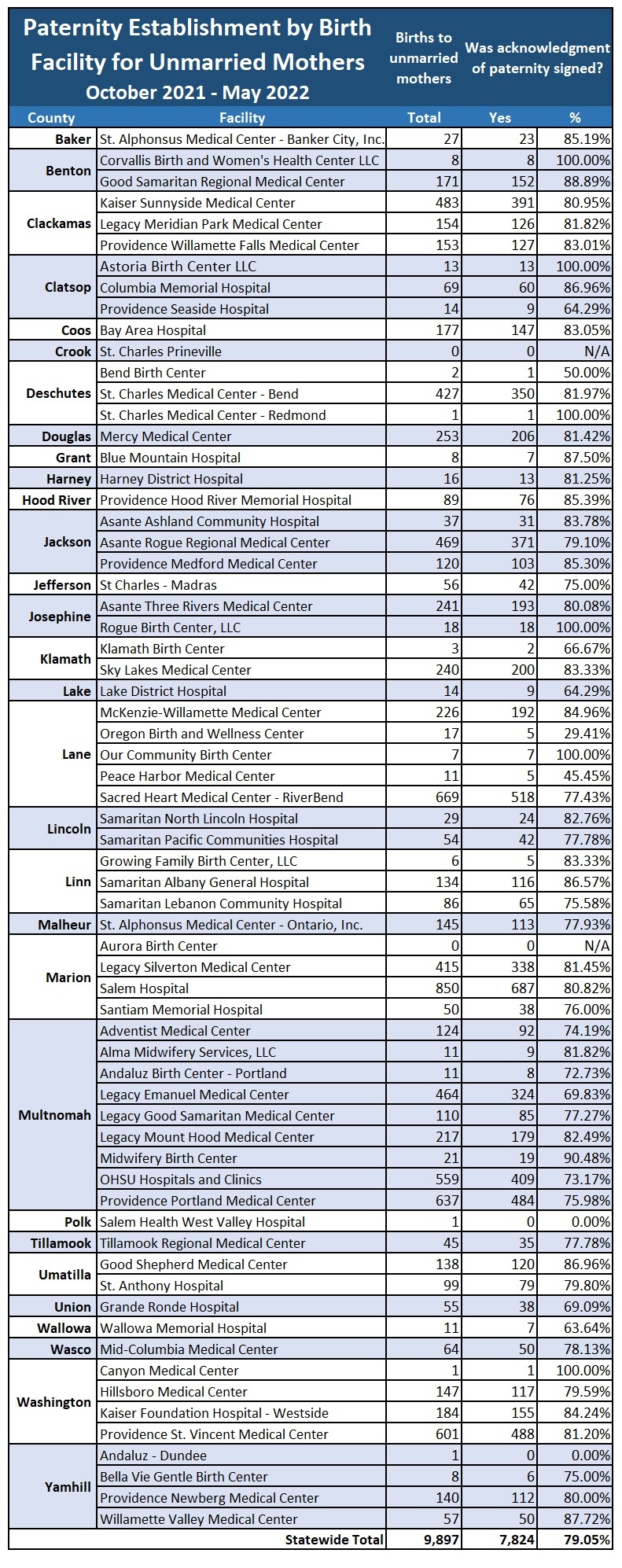
Below you will find the hospital paternity establishments for October 1, 2021, through May 31, 2022. Hospitals at 80% or higher - keep up the good work. Hospitals below 80% - every form makes a difference.
|
|
Changes to the Death Record Status Line
The status line provides a dynamic, real-time view of the status of a death record and can be viewed on any page of the death record below the decedent’s name. We have made some changes to the red numbers and wording within the status line. These changes will appear in OVERS on July 18.
Please see the Changes to the Death Record Status Line article in the COUNTY section of this newsletter for explanations and examples of these updated death record status lines.
|
|
Updated Death Certificate Worksheet
The Center for Health Statistics has recently updated the Death Certificate Worksheet. The Death Certificate Worksheet is a tool that funeral directors may use to gather information from a family member or other informant which is then used to complete the report of death. Completed worksheets can be easily reviewed and proofread by family members and the informant. We recommend that both the informant and the funeral director sign the worksheet once it has been completed and reviewed.
The Death Certificate Worksheet was updated with the following changes:
- Added the options for Natural Organic Reduction and Alkaline Hydrolysis as disposition methods.
- Added an explanation of when to include Domicile Unknown for decedents who were experiencing homelessness at the time of their death.
- Reordered a few items to more closely follow the order they are entered into OVERS.
-
Time of death was moved further in the worksheet (now # 31) right before Place of death.
- In Location of Death, County and State were switched to match OVERS.
The worksheet is available online as a fillable PDF and as a word document (for revision and printing on your own letterhead).
Please contact the Registration Unit at CHS.Registration@dhsoha.state.or.us if you have any questions.
|
|
Issuing Replacements
Occasionally you may receive requests from customers for replacement certificates. Replacements are commonly issued when a record has been amended and the customer wants an updated copy. You can only issue these records if it has been less than six months from the date of birth or date of death on the record.
For replacements after an amendment, please consult our certificate fee guidelines.
Every so often, certificates are lost in the mail. When a customer states that they have not received their certificates after 15 calendar days from the date they were mailed, replacements may be offered one time at no cost.
If certificates are issued to a customer and they are misaligned, upside down, or have other printing defects, they can also be replaced at no cost.
Except for certificates lost in the mail, the original certificates must be returned prior to issuing replacement copies. Certificates that are returned or lost in the mail should be reported to the State as voided through a regular report that is sent to CHS.VitalRecords@dhsoha.state.or.us. Please make a comment in OVERS for the order with an explanation for any replacement certificates.
For questions regarding the issuance of replacement certificates please contact CHS.PartnerServices@dhsoha.state.or.us.
Changes to the Death Records Status Line
The status line provides a dynamic, real-time view of the status of a death record and can be viewed on any page of the death record below the decedent’s name.
|
|
|
We are changing the names of some of the statuses to make them easier to understand. While most statuses are primarily used internally by CHS, two of the updates are intended to help alert you when a death certificate should not be issued. (Highlighted in the below chart.) Records that have “DO NOT ISSUE” in the status are ones that you already would not have been issuing because they were missing information like the funeral director or medical certifier’s signature; or the Time of Death, Manner of Death, and/or Cause of Death was blank. The renamed status lines help reinforce when a certificate should not be issued.
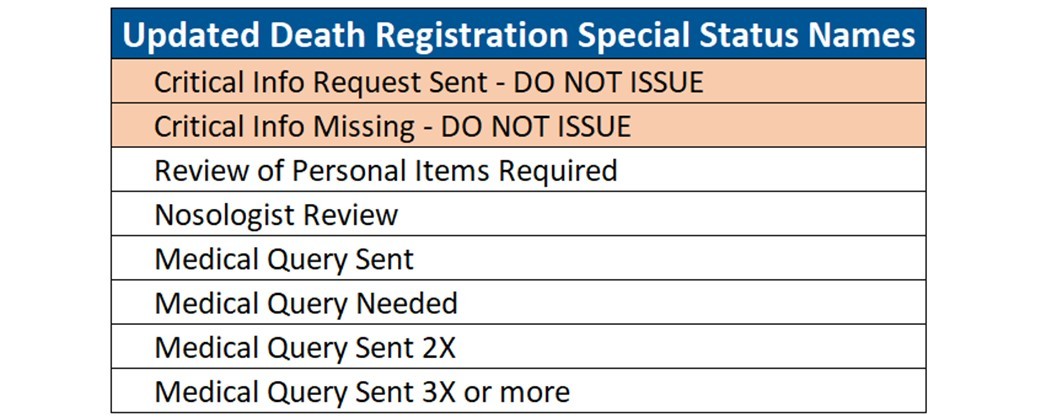 While you may see the other new status names in the status line, the only ones that pertain to you are the ones that contain the phrase “DO NOT ISSUE.”
These new status names will appear in OVERS on July 18.
 While seeing red text may seem like an error alert, this is not the case for the status line. Only statuses that say “DO NOT ISSUE” should prevent you from issuing a certificate. Otherwise, certificates may be issued as long as the record says “Registered,” or you have the legally sufficient paper or hybrid record in hand.
If you have questions regarding a status line, call the OVERS Help Desk at 971-673-0279.
|
|
For various reports on birth and death that can be broken down by factors like county, age, cause of death, etc., visit our Annual Reports Dashboard.
|
|
Amendments
Certification
Partner Services
Registration
Statistics |
|
|
|