|
|
A new feature has been added to Qless that may be helpful when handling visits that need to be transferred between locations.
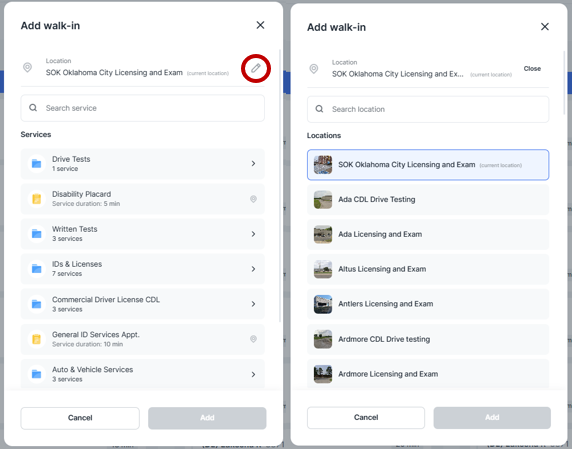
Qless users are now able to select the destination location when creating a new visit or editing an existing one. When creating a new visit or editing an existing visit, users will see an option to select a location in the top right-hand corner of the location selection box. Users may choose the desired destination location for the visit (e.g. SOK Oklahoma City Licensing and Exam). To edit the location, simply click the pencil in the upper right-hand corner. This allows you to specify where the customer should go, which can be especially useful for services like drive tests or other appointments that need to be reassigned.
Situations where a transfer might be appropriate include:
-
A customer unintentionally arrives at the wrong location
-
One office has a significantly longer wait time than another, and we offer to rebook the customer elsewhere
- A customer's transaction requires multiple visits, such as a CDL drive test
Please note that transferring a customer should only be done with the awareness and agreement of both the customer and the destination location. We want to ensure customers have a smooth and informed experience—not one where they’re unexpectedly redirected.
Also, be sure to include a comment in the customer’s visit record indicating the reason for the transfer. This helps maintain clear communication and continuity between locations.
The Training team is working on adding this update to our materials, but we wanted to ensure staff were aware of the feature.
|
|
|
|