October 2019
In this issue:
Chromebooks are used in numerous Oklahoma schools and many are aging to the point where they can no longer receive OS updates. You may be wondering what effect this will have on spring testing with Measure Progress.
eMetric/Cognia officially supports the three latest versions of ChromeOS. The kiosk installer will not prohibit use of unsupported ChromeOS versions, but there may be risks involved when using older versions.
According to eMetric, please see below pointers as possible risks for using an unsupported version of any operating system, not just ChromeOS though.
- They do not QA unsupported versions of operating systems and therefore cannot guarantee if the kiosk will work or the tools and accommodations will work properly.
- Students testing on devices that do not meet the technology guidelines are likely to encounter performance-related issues during testing.
- If users encounter technical issues eMetric may require them to update to a supported version of the operating system before they can assist them in resolving the issue.
- When manufacturers stop supporting a version of an operating system, there are always security risks as they would not be releasing updates, patches, and bug fixes.
eMetric updates their technology guidelines as soon as their compatibility testing is done on the latest stable versions.
Also, Emetric recommends visiting this Google link (https://support.google.com/chrome/a/answer/6220366?hl=en) to know which of their devices, based on manufacturers and models, will no longer be getting latest Chrome OS updates by the time 2020 Spring testing window begins.
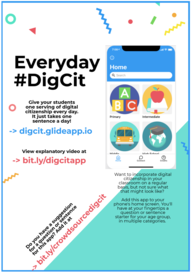
The week of October 14-19 is Digital Citizenship Week! As educators, it is important to help grow thoughtful and engaged students who use technology for good in our rapidly expanding digital world. Encourage teachers to take a few minutes each day to share digital citizenship tips with students. If teachers are unsure of where to start or are not familiar with digital citizenship themselves, they may be interested in a free app that provides discussion topics and questions for digital citizenship conversations with students. The app is named Everyday DigCit and can be accessed at digcit.glideapp.io. A user’s guide for this app can be found at bit.ly/digcitapp.
|
|
Common Sense Education offers a complete K-12 Digital Citizenship Curriculum. See the variety of materials and lessons available along with the application process on how your school and teachers can become part of the Common Sense Education Recognition Program:
|
|
 |
OETT/OK-ACTS Phase 1 Leadership Seminars
Oklahoma Achievement through Collaborations & Technology Support is the first of the K20 Center’s Five Phases Model for school transformation: Leaders learning.
OK-ACTS is a three day seminar in which head superintendents and principals come together to learn from the K20 Center and each other. Following the seminar, participants meet in smaller groups or “clusters” for cluster meetings.
OK-ACTS expands leaders’ technology skills and creates a collaborative network in which participants and K20 professionals collaborate, problem-solve, and work together toward systemic change.
WHY JOIN OK-ACTS?
Each participant receives an iPad for use in their school district and extensive training on classroom technology options/integration methods.
After attending this seminar, participants have access to the OK-ACTS website, a “cluster coach” (a current principal or superintendent who serves as a group mentor), and the network of fellow participants formed through the seminar.
OK-ACTS gives its leaders the tools, strategy, resources and vision to initiate major improvements in student learning and classroom technology.
Registration is still open for the December and March Seminars. For more information, click HERE.
MicroGrant Program from Educators of America
 |
|
If you are a teacher (or know of a teacher) that is in need of an effective technological tool that will assist in bettering student achievement, not only in your classroom, but throughout your entire institution, take the time to fill out this grant application. Classroom technology grant applications are reviewed on a quarterly basis and responses are given accordingly (April, July, October, January). Learn more HERE. |
|