New departments and initial guidance for FY 2026 Budget Work Programs
By statute, agencies must submit an organizational (hierarchy) chart with their annual Budget Work Program. The State Budget Office is updating requirements and providing new tools and streamlined processes for agencies to submit their organizational charts. This change is necessary, as agencies are unable to modify their organizational charts – those that are available in Workday@OK – so that they display the required positions and data.
This change will provide a much easier way for agencies to obtain and update the organizational data and allow them to reconcile their organizational chart to their position budget. It will also provide a standard submission format across all agencies.
Agencies are currently required to:
“Include your agency’s current organizational chart when you submit your Budget Work Program. Each position in the agency should be identifiable on the chart, and the chart should display the lines of authority within the agency. The organizational chart should match the position budget. If you have questions about the chart, contact your budget analyst.”
Agencies will now be required to include the following items for each position on a organizational chart:
- Position name.
- Position number.
- Division.
- Job code.
- Number of FTEs (e.g., 1, .5, etc.).
- Name of employee or Vacant.
For the State Budget Office to receive accurate and consistent information across all agencies, the Budget Office has collaborated with IS to make the organizational data listed above easily accessible in the form of new Workday@OK reports.
See examples:
|
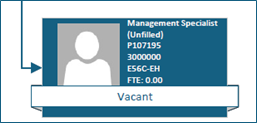
Vacant position example.
|
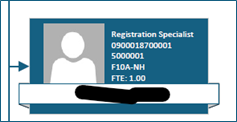
Employee example.
|
Clarification on authority order requests
State procurement professionals,
OMES would like to provide clarifying information regarding authority order (AO) requests to ensure a smooth transition for all users. The information in this announcement explains how and when to submit authority order requests via the new ServiceNow (SNOW) item.
You will only need to follow this process when you are creating a new AO that does not fall within one of the preapproved types of AOs from the Statewide Accounting Manual that are detailed below.
You do not need to put in a SNOW ticket to pay off an existing AO or to process an approved type of AO; those tasks will still take place in PeopleSoft. If you have any additional questions or concerns, please contact Nevin Jones or Jennifer Smith.
Agencies will be equipped with new resources and several options to provide charts in the required format.
To enable easier retrieval of the required information, two Workday@OK reports have been developed:
- RPT00558 - Active Workers for Org Chart Creation.
- RPT00559 - Open Positions for Org Chart Creation.
Agencies will use these reports in conjunction with Visio Plan 2 to create their organizational charts.
Agencies will contact their payroll partner to run the newly updated Workday@OK reports that contain the required information. Once they have the necessary information from the reports, the following options are available to create the charts.
Option 1: For small agencies, Microsoft 365 includes a basic Visio option that can be used to manually create simple organizational charts. This option does not include an integrated export feature that would generate reports for the agency.
Option 2: Larger agencies will need a Visio Plan 2 license, which will allow them to efficiently combine the data from these two new Workday@OK reports to create more complex charts; this license will come at a nominal cost to the agency.
Detailed instructions on how to use the reports to create the charts will be provided in the BWP Agency Guide. Agencies will be instructed to complete a SNOW ticket if assistance is needed to obtain a Visio Plan 2 license.
Option 3: If an agency is currently using a different tool to create an organizational chart, they can continue to use that tool, but the created chart must include the previously mentioned required data items for submission.
Additional information:
- Not all agencies have the Visio Plan 2 license. An agency can complete a SNOW ticket for assistance in procuring the license. The agency will pay a minimal monthly fee ($11.40) for this license.
- The agency will need an approved payroll partner to run the two Workday@OK reports.
Agency finance officers received an email with additional information in mid-May.
|