|
|
|
|
|
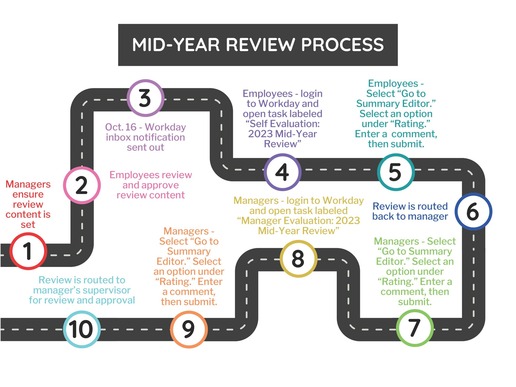
We are approaching the mid-point of the performance review cycle. At this point, employees and managers should have already established the responsibilities, goals, and competencies for performance reviews. Managers should have set the content for their employees’ performance reviews, and employees should have reviewed it. Managers should ensure these steps are completed before going any further.
Employees:
All employees will receive an inbox item on October 16th to complete their mid-year self-evaluation in Workday. Navigate to Workday and go through the following steps to complete your mid-year review.
- On your Workday homepage, you can either click the inbox icon in the top right corner of the screen, or click “Go to My Tasks” under the section labeled “Awaiting Your Action.”
- You will receive a notification which will read as follows:
- “Self-Evaluation: 2023 Mid-Year Review: Employee Name”
- Click on the notification, then select “Go to Summary Editor.”
- Under “Rating,” select an option from the drop-down menu to rate your performance since the beginning of the rating period (April 2023).
- You will choose one overall rating for your performance rather than rating each responsibility and competency individually.
- Enter any comments regarding your performance in the box provided.
- Click submit.
- Your mid-year review will then be routed back to your manager.
Managers:
All supervisors will receive an inbox item for the employees who are assigned to them in Workday. Navigate to Workday and go through the following steps to complete the mid-year review for each of your employees.
- On your Workday homepage, you can either click the inbox icon in the top right corner of the screen, or click “Go to My Tasks” under the section labeled “Awaiting Your Action.”
- You will receive a notification for each employee assigned to you which will read as follows:
- “Manager Evaluation: 2023 Mid-Year Review: Employee Name”
- Click on the notification, then select “Go to Summary Editor.”
- Under “Rating,” select an option from the drop-down menu to rate the employee’s performance since the beginning of the rating period (April 2023).
- You will choose one overall rating for their performance, rather than rating each responsibility and competency individually.
- Enter a comment regarding the employee’s performance in the box provided.
- Click submit.
- The mid-year review will now be routed to the manager’s supervisor for review and approval.
- If you receive an inbox item for an employee you do not supervise, or if you do not receive a notification for an employee you do supervise, please contact your local HR.
Don’t forget that there are resources to assist you in managing a successful performance review cycle:
We look forward to a great year of performance and will see supervisors for mid-year calibration in November.
|
|
|
|
|
|