Salary & Schedule Report
Due: September 30, 2022
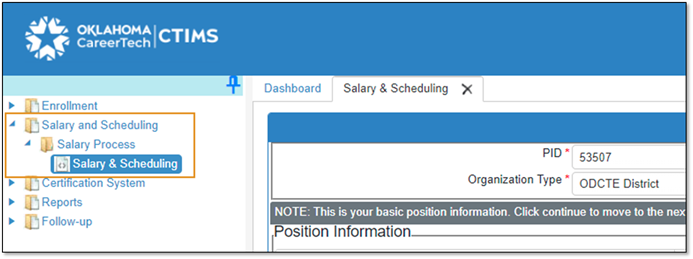
Where do I submit the Salary and Schedule Report?
What is my username and password on CTIMS?
-
Username: (school email address)
-
Password: A new 90-day password expiration rule has been implemented to all CTIMS users. There is a “Forgot your password?” link on the CTIMS log in screen that you can click on to reset your password. Or you can contact CTIMS Support to set up your account again.
If you are having trouble getting logged in please contact ctimssupport@careertech.ok.gov or 405.743.5134 for help.
Is there a training, tutorial or manual?
What will I need to complete the report?
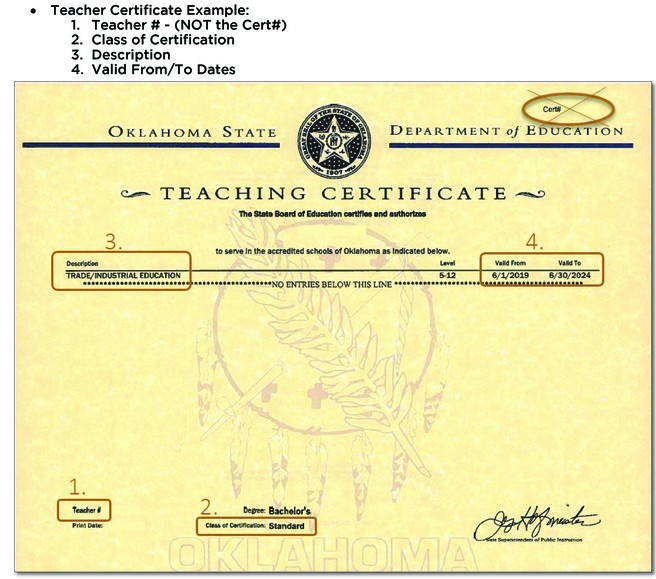
- Teaching Certificate Number
- Base Salary (Contact HR/Finance at your school)
- Health Insurance paid by school (Contact HR/Finance at your school)
- Teacher Retirement (Contact HR/Finance at your school)
- Contract Date
- School start and end dates (with students)
- Student course enrollment - student grade level and gender
- CareerTech Course Titles (See Course Description Guide)
- Schools may use different course titles CTIMS requires official titles
- Start and Stop Time of each period of your day (include both lunch and planning period)
 |
|
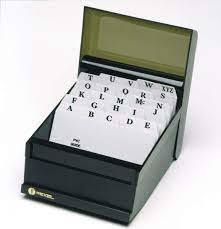
Create a card in your brainbox to help you access CTIMS in the future.
What is a brainbox? Each new teacher receives a brainbox to help remember important information about CareerTech such as:
- CTIMS login*
- Oklahoma Summit login*
- Cluster and Pathway
- PID
- ctYOU.org login*
* Write hints to passwords and usernames not complete information for security reasons
|
What is CTIMS?
CareerTech Information Management System
Why do I need to submit this information?
This information is used in our CareerTech annual report each year to make data driven decisions. It is also used to answer questions received from stakeholders.
Useful Links
Salary & Schedule Guidebook
Course Descriptions
Sample Salary & Schedule Report
ALL CTE OCAS Codes
|