|
|
Oklahoma Bureau of Narcotics
Vol. 1 No. 8 December 2024
|
|
End of Year Overview, OBN Notification Requirements, and PMP Resources
Message from the Editor:
Hello all! In this special seasonal edition, we are addressing various relevant OBN topics and taking a look back at this year's PMP data. This newsletter includes details about OBN PMP resources, reminders about notification requirements for OBN regarding licensure, reminders for prescription pad ordering and renewal, and a brief overview of the year.
|
|
|
OBN Notification Requirements
If you have received discipline from another enforcement agency or board, you are required to notify OBN. You can do so through either the pmpadmin@obn.ok.gov email or the obnddregistration@obn.ok.gov email.
Remember, if you are required to attend a PEER assistance program, you must notify OBN of your attendance when you enroll in the program, not after the program has been completed.
|
|
Renewal Reminder
If you have not renewed your OBN Registration, please do so now. After December 31st, all Registrations that are not renewed will be denied, which means that the Registrant will have to submit an entirely new application to have an active OBN Registration.
Make sure to pay attention to upcoming information concerning administrative changes to OBN Registration in the New Year.
|
|
|
PMP Resources
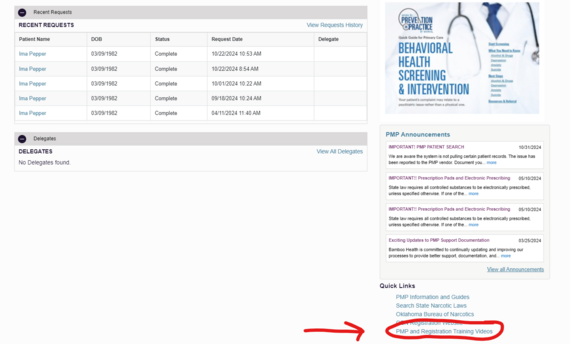
All relevant training videos are on a webpage linked within the PMP. If you need to access a previously reviewed video, or if you encounter a future question, you can check the training video webpage to see if it contains helpful information. (Image depicts a PMP account dashboard)
 PMP Resources
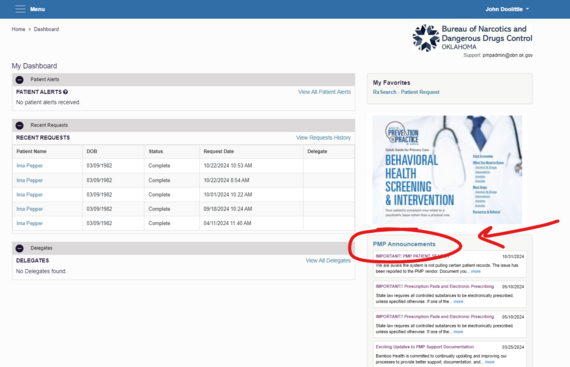
All previous and future PMP announcements are always accessible through the PMP. These announcements can also contain useful tips and information. (Image depicts a PMP account dashboard)
|
|
|
Yearly Overview
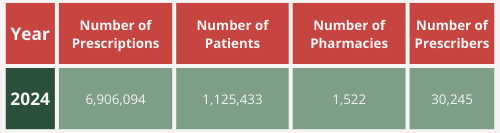
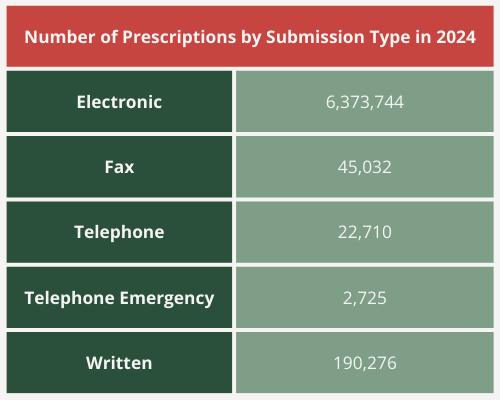
Find below a brief table of some insights from this year's PMP data. You can view additional data on the OBN Online Data Query.
|
|
Got Military Patients?
If you have patients who are active military, make sure to select the "Military Health System" option in the PMP. You can do this for an individual patient by running a patient request on the PMP AWARxE site and selecting Military Health System under the PMP InterConnect Search heading. If you have a large number of active military patients and would like to always run this data base, you can choose to do so through the Default PMPi States tab in the PMP Menu. Click here to view a video demonstration. |
|
We are close to the New Year! Make sure to order any required OBN prescription pads. You can do so on your OBN Registration account. View a video demonstration here. |
|
|
|