|
Dear Provider,
The Ohio Medicaid Electronic Visit Verification (EVV) enhancements went live on July 1!
Sandata EVV web portal, EVV Aggregator, and Sandata Zendesk users are now required to obtain a State of Ohio ID (OH|ID) and establish multi-factor authentication (MFA) via the state’s InnovateOhio Platform (IOP). Please refer to the OHID MFA Job Aide for assistance in creating an OHID and setting up MFA.
-
EVV Portal and Aggregator Login Page: Click here.
- Password resets for EVV or Aggregator are no longer completed in the Sandata EVV/Aggregator Portal. Your OHID is now the password reset tool.
- If you are encountering a 404 error:
- If you are an administrator, a 404 is expected if you try to reset your password in EVV/Aggregator.
- If you are a user, please go to the Sandata on Demand Landing page Ohio (OH ODM) – Sandata Technologies (zendesk.com) and log back into OH|ID. If that does not work, please call SandataSupport for assistance.
If you are a provider who uses Ohio’s Sandata system, follow the steps below to ensure a successful transition to the enhanced system:
- Complete EVV Enhancements, Sandata Aggregator, and optional Scheduling Module training by registering for self-paced courses in Sandata Learn.
- Review the "Ready, Set, Go Checklist" in Sandata Learn.
- Ensure Direct Care Workers (DCW) have downloaded and are using the newest version of the Sandata Mobile Connect application to capture visits.
If you are a provider who captures visit data through Telephonic Visit Verification (TVV) telephony, visit eTRAC and view the welcome letter to obtain your agency’s new unique telephone number. Agencies must share this new telephone number with their DCW's, because failure to use the new telephone number will result in an inability to capture the visit through TVV-telephony.
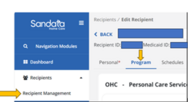
4. Authorizations in the Recipient Management menu, Program tab, are not necessary to capture a visit but are necessary for a visit to move to a Verified status. All visits must be in a Verified or Processed status to be eligible to be matched to a claim.
|
Without an authorization for the recipient that matches the payer, program, and service on the visit, the visit will show an Unauthorized Service exception. A correct authorization added after the visit is captured will be resolved automatically in the system if the authorization covers the date of the visit. For more information on creating authorizations visit Creating-an-Authorization on Sandata On-Demand.
The following resources and assistance are available to you:
- For technical help with the Ohio Department of Medicaid EVV system or an alternate EVV, please call the EVV Customer Call Line at 855-805-3505 or submit a request on Sandata On-Demand. When calling or submitting a request, please provide specific details around the issue you are encountering.
- Training for the EVV solution enhancements and optional scheduling module is still available through self-paced courses in Sandata Learn.
- If you need help logging in, visit the Ohio Medicaid Learner Access to the Sandata Learn page.
- For a list of Frequently Asked Questions, please visit EVV FAQs.
- Visit Ohio Medicaid’s Electronic Visit Verification webpage to find the latest news and updates on Ohio’s Electronic Visit Verification program.
|