|
Electronic Visit Verification Newsletter | June 2023 |
|
|
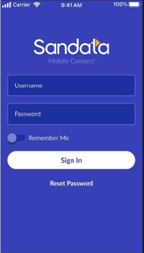
In July, a new Sandata Mobile Connect (SMC) application (app) will be available in the App Store and Google Play for download. This new app is an enhancement of the current, with a focus on the end user experience. In addition to an updated look and feel that simplifies navigation, the update includes a simplified login process and efficient reset password process. Below is a visual of the new login screen. In the new app, caregivers do not need to enter the company ID to log in. Upon entering the Username (email address) and Password, the caregiver can select the needed EVV account to log the visit.
 |
The new SMC app will be submitted to app stores on July 15 and be made available shortly after for download. Upon installing, users will be asked to reset their password. The reset email will indicate the new password is now the Universal Password to be used for all accounts/agencies across either version of the app. The current app will remain live until October 13, however it will not be updated after July 15. We encourage providers to download the new application once it is available.
More information will be shared in next month’s newsletter. In the meantime, if you have questions, please visit Sandata on Demand in Zendesk. Note – you will have to login to Zendesk to access. Below are helpful resources if you are not familiar with Zendesk:
If you have questions, please reach out to Sandata Customer Care at 855-805-3505.
|
|

All providers:
Question: I recently received an email from an MCO asking me about EVV claims matching. What does this email mean, and what are my next steps?
Answer: ODM is working with managed care organizations (MCO) and MyCare Ohio plans (MCOP) to increase claims matching rates for providers before claim edits impact payment. This matching process applies to all providers who bill claims for services that require EVV. If the MCO or MCOP says a high number of claims are unmatched, this means there was no EVV visit to support the claim as submitted. Examples of an unsuccessful match between the visit and claim may include:
- A mismatch of the payer or service information.
- Member Medicaid ID number is incorrect.
- Provider's Medicaid ID number on claim request is not correct or provider is logging visits in an EVV account with one Medicaid ID but billing under a different Medicaid ID.
- Not having enough units in EVV to support the claim.
The Sandata training team can help! Contact us to help investigate your claim requests sent to the Aggregator, visit information, and discuss next steps. Schedule an Ask a Trainer session for one-on-one assistance.
Independent providers using the Sandata system:
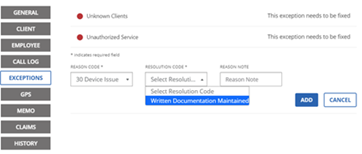
Question: When correcting exceptions in the Sandata system, why does the dropdown for the Resolution Code say: "Select Resolution Code" and "Written Documentation?"
Answer: The only appropriate resolution code is "Written Documentation." The dropdown showing "Select Resolution Code" just means that you need to select a resolution code from the below list.
|
|

Do you have questions about EVV?
Do you have questions about EVV? You can schedule a session at any time. The link allows you to book a private Zoom call with a Sandata trainer to discuss your EVV questions.
The following types of topics are addressed in the sessions:
- How to improve EVV claims matching.
- How to solve recurring exceptions.
- Getting started with EVV.
We will also share helpful training materials and resources based on the conversation. There is no limit to the number of sessions you can attend. If you cannot attend a session, please cancel in advance. Thank you!
|
|
|
Sandata regularly updates its EVV software via releases to ensure it runs smoothly. Below is the change you may have noticed in the Sandata EVV web portal in May:
- The loading time for the Aggregator Visit Review screen has been improved.
You can access Sandata Release Notes here. You need to have a Zendesk EVV account to view. Please sign up at the link if you do not have an account already.
Questions about releases or the system should be directed to the Sandata EVV Provider Hotline at 855-805-3505 or ODMCustomerCareemail@sandata.com.
The Sandata EVV Provider Hotline hours of operation are Monday-Friday from 7 a.m.-8 p.m. and Saturday and Sunday from 9 a.m.-5 p.m. You can give us a call or email anytime, and we will return your call during hours of operation.
|
Sandata provider hotline: technical assistance with a device or EVV portal
|
855-805-3505
|
ODMCustomerCareEmail@sandata.com
|
|
Sandata Alternate EVV support
|
844-289-4246
|
OHAltEVV@sandata.com
|
|
ODM EVV Team: general EVV questions, policy questions, or to report a problem
|
Leave a voicemail at 614-705-1082
|
ODMEVV@sandata.com
|
|
ODM provider assistance hotline: change contact information, claims questions, etc.
|
800-686-1516
|
|
|
|
|
|