|
Electronic Visit Verification | Sept. Issue |
|
ODM Disabling EVV Exception to Reduce Administration Burden
ODM continues to review the recommendations presented by the five small stakeholder groups in April’s stakeholder meeting. All five groups challenged ODM to reduce the administrative burden for providers using Electronic Visit Verification (EVV). A specific recommendation from the EVV Technical Small Group is to review the maintenance and time it takes to resolve exceptions in the system. ODM has vetted the current Sandata exceptions, and we are pleased to announce that the Unmatched Client Phone/ID exception will be disabled Oct. 6.
Currently, the Unmatched Client ID/Phone exception is triggered on every visit where a telephony call is made from a phone number that is not matched to the Client Profile in the Sandata system. Providers who do not attach a phone number in the Client Profile section of the Sandata portal because it is either not a preferred or practical choice see this exception every visit and have to acknowledge the exception each time. This causes burden and hardship to the provider. Due to the design of most alternate systems, there is no anticipated impact to Alternate (Alt) vendors.
Providers will stop seeing this exception on visits in the Sandata portal after the EVV release is completed Oct. 6. Please let us know if you have any questions about this change.
We appreciate the open dialogue with stakeholders resulting in positive changes for the EVV program.
|
|
Stakeholder Meeting
The next meeting of the EVV Stakeholder Advisory Group will be held virtually at 2 p.m., Oct. 20. Please register for the meeting ahead of time and send any suggestions for the agenda to EVVPolicy@medicaid.ohio.gov.
|
Managed Care Procurement
Learn more about the implementation of the Next Generation of Medicaid managed care in Ohio and the collective implementation of several strategic initiatives at the Managed Care Procurement website.
|
|

EVV Visits with the Ohio Department of Aging (ODA) as Payer
A number of providers of PASSPORT waiver services have contacted ODM recently with questions about the process used to match EVV visits to claims. When an EVV visit is created for a PASSPORT waiver service, the EVV visit is matched to a claim twice.
First, the EVV visit is checked against the claim submitted to the PASSPORT Administrative Agency (PAA)/ODA; you may see an edit or note on your remittance advice from the PAA/ODA if the EVV visit does not match the claim.
The second check happens when ODA submits the claim to ODM. This step updates your EVV visit in Sandata Aggregator from a “Verified” status to a “Processed” status if the EVV visit matches the claim.
If you have questions about your remittance advice for PASSPORT waiver services, please contact ODA at Provider_Inquiry@age.ohio.gov.
|
|
|
August Sandata EVV Data Entry Webinar FAQs
ODM and Sandata recently hosted a series of webinars covering data entry in the Sandata EVV system which generated several good questions from participants. Those asked most often are highlighted below here to help providers with data entry.
- When capturing EVV visits, is it OK to use different devices, such as the app on my iPhone and iPad or calling in on my iPhone?
Yes, you can start a visit using one visit-capture method and then end a visit using another visit-capture method. For example, you can start a visit using Sandata Mobile Connect and then end a visit using the telephony system.
- Where can I find a record in visit maintenance so I can correct any visit entries?
Providers using Sandata EVV can view and edit visit records in the Visit Maintenance section of the EVV portal at https://evv.sandata.com. Providers who use alternate systems complete visit maintenance in their alternate systems.
- What should we use eTRAC for?
The eTRAC portal is used to house Welcome Kit materials, which are helpful guides and tutorials that explain how to set up and use Sandata EVV. The eTRAC portal is one way providers can request Sandata EVV devices; the other way is in the client record in the EVV portal. The eTRAC portal is the only way a provider can track device shipments and begin device returns.
- Who connects services to a client record in the Sandata system?
Services are added into the Sandata system when the individual's record is created by the provider (non-agency and agency).
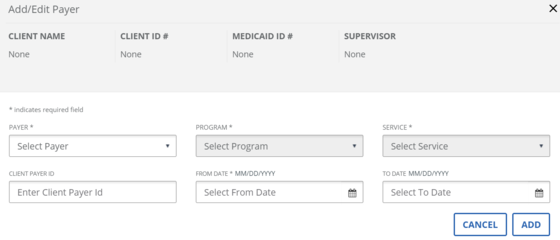
- What are the dates for in the client payer section and is the “to date” a required field?
The client payer “from date” is the first date the service is connected to the client record, and the “to date” is the final date the service is connected to the client record. If you try to record a visit after the end date, the visit will have a missing or unauthorized service exception. The client payer “to date” is not a required field. To remove the to date, sign in to Sandata EVV, open the client record, and then click the pencil icon next to the service. This will allow you to edit or remove the “to date” from the client record as appropriate.
- When a visit is verified but the length of the visit is greater than the scheduled length, should you modify the existing visit or should you omit that visit and manually enter the visit again?
The EVV visit should reflect what actually happened. A visit can be matched to a claim if the units for the EVV visit equal or are greater than the units on a claim. For example, if you log eight units in EVV, you can bill for up to eight units so long as all other program requirements are met.
- Where can I get 1-1 help with my EVV system?
Agency providers and non-agency providers can schedule a half-hour help session with a Sandata trainer to ask questions related to Sandata EVV. Sessions can be scheduled by going to: https://go.oncehub.com/ODMEVVHelp after completing the required training.
- As a provider, do I need to order a Sandata device for every client I provide service to?
You should request a Sandata EVV device for each individual who receives services subject to EVV requirements if you plan to use the device to record their visits. A list of the services subject to EVV requirements can be found on the Medicaid website. If you plan to use the Sandata Mobile Connect (SMC) application on a personal device (phone or tablet), telephony, or you are using an alternate (Alt) EVV vendor, then you do not need to request Sandata EVV devices.
|
|
Contact Us
|
| Hours of Operation |
Monday - Friday |
7 a.m. - 8 p.m. |
| |
Saturday - Sunday |
9 a.m. - 5 p.m. |
|
| EVV Provider Hotline: for technical assistance with a device or EVV portal |
855-805-3505 |
ODMCustomerCare
email@sandata.com
|
|
| Alternate EVV Support |
844-289-4246 |
OHAltEVV@Sandata.com |
|
| EVV Inbox: for general EVV questions or to report a problem |
Leave a voicemail at 614-705-1082
|
ODMEVV@sandata.com |
|
| ODM Provider Assistance Hotline: to change contact information, claims questions |
800-686-1516 |
|
|
|
|
|