AGENCY UPDATES
 |
|
Uploading and Managing Solicitation Documents
In the “Setup Documents” tab of a sourcing project, there are certain State documents that are displayed by default in the “General Documents” section. These documents are pre-populated as references for agencies to pull into their solicitations, if desired.
|
- Affirmation and Disclosure Form
- Independent Contractor Acknowledgment Form
- State Standard Terms and Conditions
These documents are not automatically displayed to suppliers or publicly posted. If the documents aren’t needed, users should leave these documents as-is.
Documents intended for the suppliers or the public to access (e.g., Main RFP document, Supplement 1) must be uploaded on the solicitation’s Documents tab.
 |
|
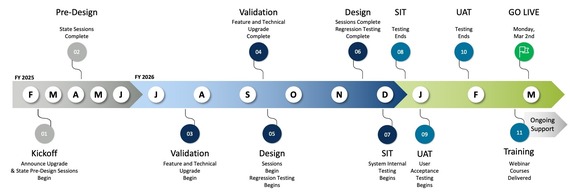
FY 26 Upgrade: Next Phase Begins
The OhioBuys upgrade project is completing the User Acceptance Testing (UAT) stage. Training materials are in their final stages, and Deployment plans are being reviewed.
|
Note OhioBuys will have an outage during the upgrade period.
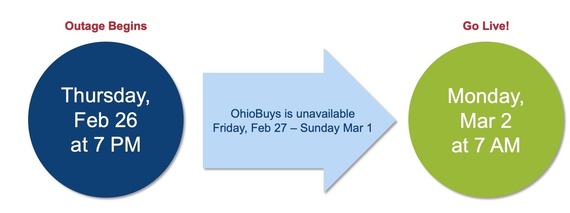
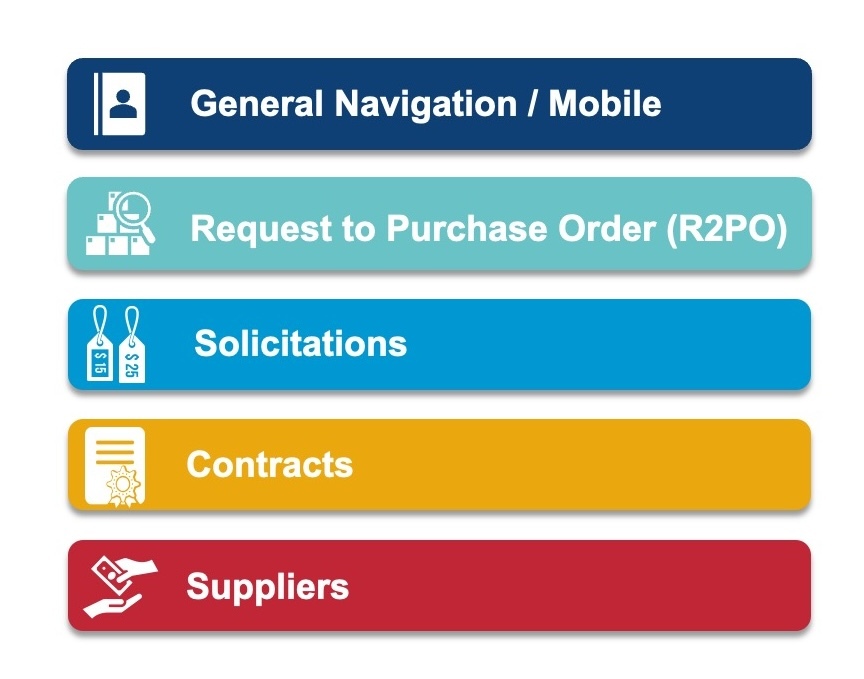
The OhioBuys v182 Upgrade will bring changes to some of the core OhioBuys modules.
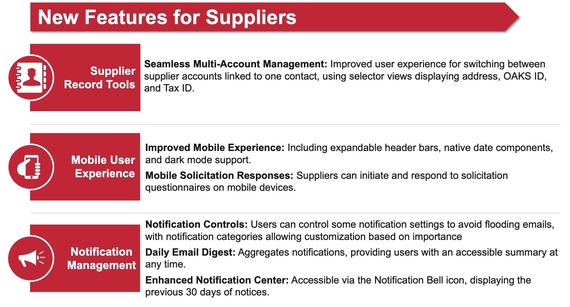
 For Suppliers, you can expect the following updates:
 TRAINING
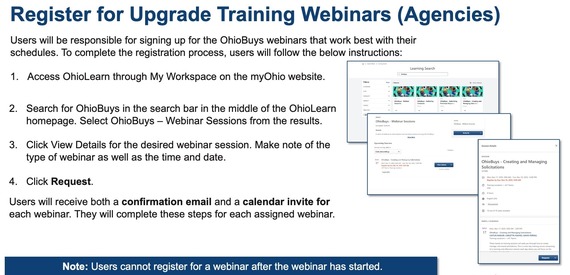
Webinar registration is now available in OhioLearn. Two webinars are available to agencies. The supplier webinar is also open to agency users.
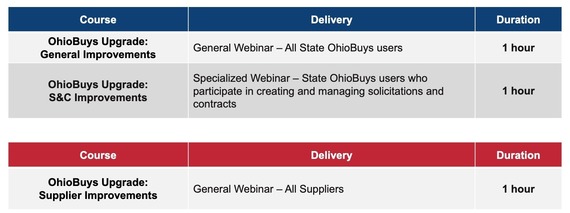 Webinars will be available multiple times from February 23rd to March 12th for agencies (through March 16th for suppliers).
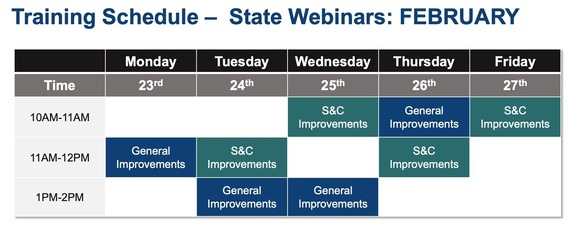
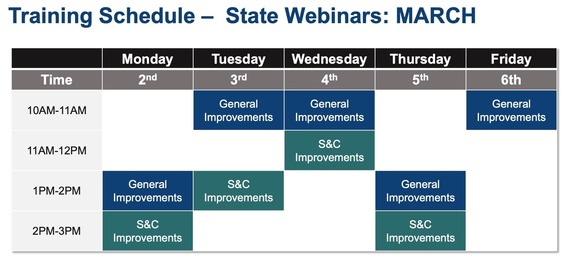
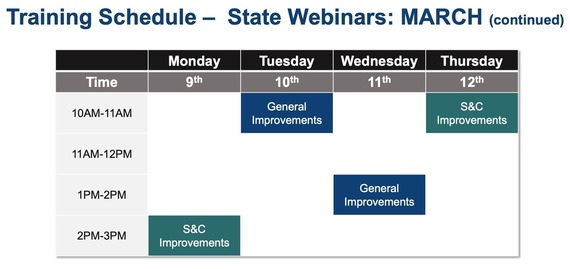
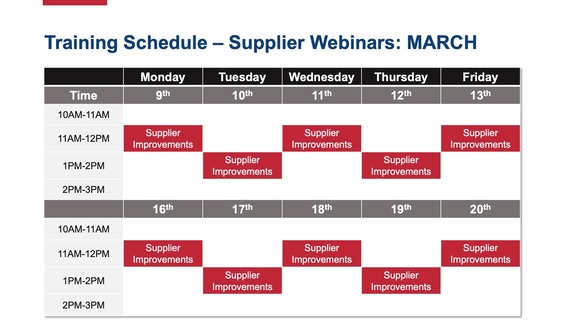
To register for upgrade training, please go to OhioLearn.
 To stay up-to-date on the FY26 OhioBuys Upgrade at the upgrade page on the OhioBuys website (in the Agency Training section).
SUPPLIER UPDATES
Supplier Status in OhioBuys
If talking to a supplier about their status in OhioBuys, please remind them to complete the following.
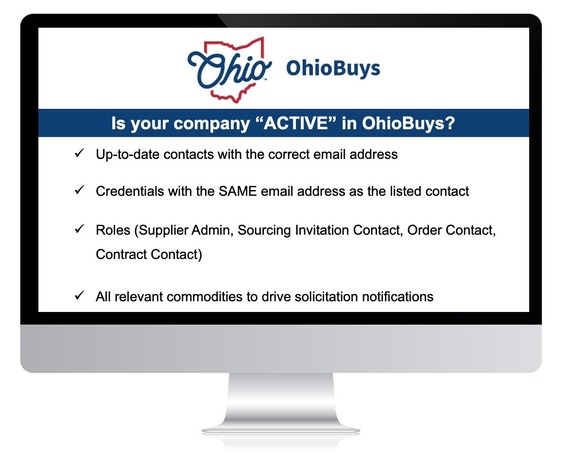 In addition, users should provide their company's demographic information to aid the agencies with the information needed for the Controlling Board submissions and approvals. This can be completed in the Addition Information Tab.
2026 Supplier Webinars
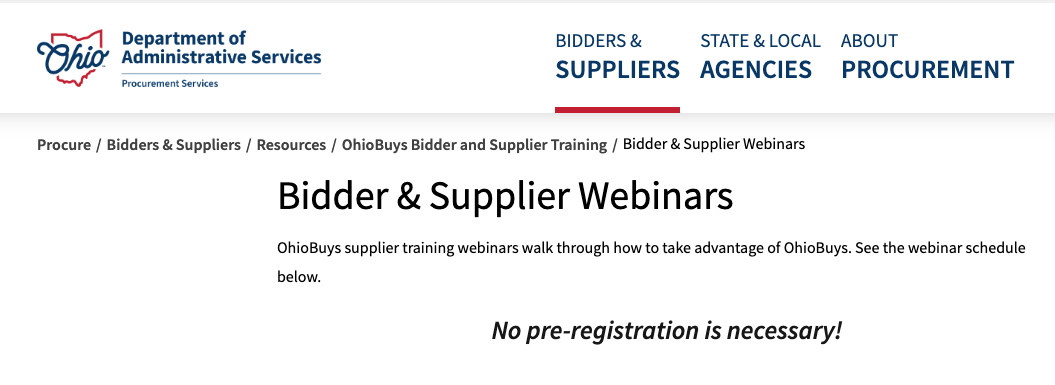
OhioBuys supplier training webinars walk through how to take advantage of OhioBuys. See the webinar schedule on the Bidder & Supplier Webinars webpage.
TRAINING TIPS
 |
|
Opus Training Tool & Access
Epilogue Opus, an OhioBuys training tool, is available to OhioBuys users. Users can access the OhioBuys Opus training materials using their existing OH|ID login credentials (via single sign-on).
This should help you quickly access the training information you need.
|
Existing Opus Users
Please access Opus through any of the following options:
- Direct Link: https://ohio.opuseps.com
- MyOhio App Store tile: “OhioBuys Agency Training Resources”
See more details on the Opus Information page on the OhioBuys website.
New Users
If you did not originally register an Opus account, you can access Opus without any registration steps, simply select the tile from the MyOhio App Store.
If you require additional assistance setting up your Opus account, please email OBM Contact Center (OBM.ContactCenter@obm.ohio.gov) or sign up for Opus Office Hours with the OhioBuys team.
 |
|
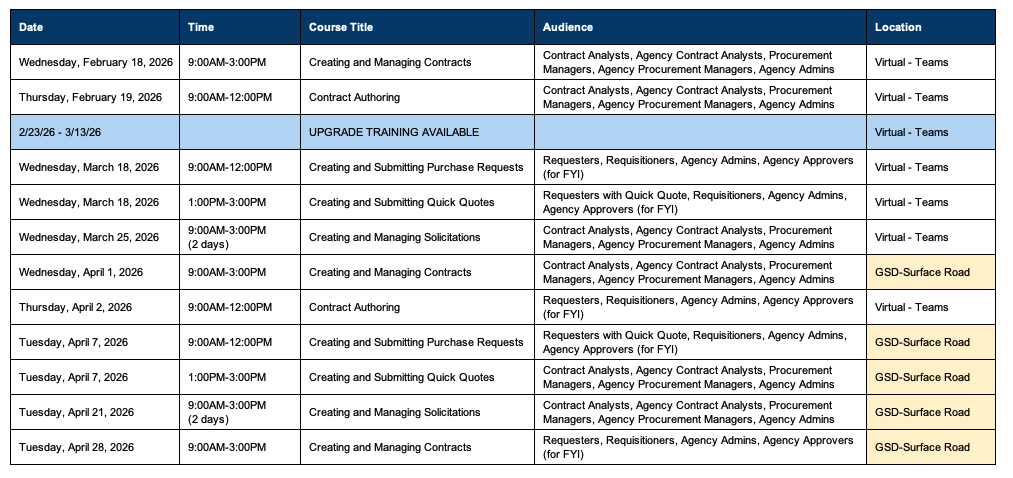
Training Calendar 2026
OhioBuys ongoing training is available virtually and on-site (see full calendar for dates through April 2026). Users can register for these sessions directly in OhioLearn. If your agency has a topic request for training or needs solicitation and/or contract training, please notify the project at: OPS.TrainingAcademy@das.ohio.gov.
|
 |
|
Office Hours
One of the resources available to assist your use of OhioBuys is the option to sign up for Office Hours. Users sign up for either 30 or 60-minute Office Hour sessions wherein a dedicated OhioBuys trainer can assist you with OhioBuys functionality.
|
Office Hours have been expanded with slots available Monday - Thursday from 9:00 AM - 12:00 PM, and 1:00 PM - 4:00 PM, pending availability.
We encourage you to take advantage of this resource as you acclimate to OhioBuys. To sign up for office hours, please follow the prompts on the Office Hours Booking page.
You will receive direct help on a specific transaction as you work through it!
These Office hours are available for your training-related questions (i.e., how to do something in OhioBuys). If your question(s) is regarding policy or system issues (e.g., why a purchase order is In Progress), users should submit a helpdesk ticket. In addition, anything that substantially involves R&Ps, OAKS, or OneSpan Sign will also need to go to the helpdesk. If you have not attended any OhioBuys training course, you will be redirected to training, and your office hours appointment will be canceled. Remember, if it's a question of "how," then office hours are the way to go. If it's a question of "why," it needs a helpdesk ticket.
SUPPORT
For log-in or system issues, please contact OBM Contact Center at 614-338-4781 or 1-877-644-6771 OR OBM.ContactCenter@obm.ohio.gov Remember to put “OhioBuys” in the subject line!
If you have questions about the project itself, please email: ohiobuys@das.ohio.gov.
Mike DeWine, Governor
Jim Tressel, Lt. Governor
Kathleen C. Madden, Director
|