AGENCY UPDATES
 |
|
Fiscal Year-End Plan
Fiscal Year End shutdown is scheduled for Monday, June 23rd at 5:00 PM. At this time:
|
- Fiscal year end configurations will be implemented
- Users will need to have resolved all pending items with budget dates in FY25 (including integration errors, budget errors, incomplete change orders, and incomplete purchase requisitions).
- All FY25 OhioBuys purchase requisitions and change orders must be in “Ordered” status.
- All FY25 POs must also be in “Ordered” status.
-
NOTE: Any transactions for FY25 that do not meet this requirement will be canceled or deleted beginning June 24th, and the user must re-create the transaction in the new fiscal year when the OhioBuys and OAKS re-open.
During the week of June 23rd, users will still be able to create sourcing events, contracts, exceptions, etc. The last contract interface to OAKS is expected to run at 4PM on Friday, June 27th and it will then be “paused” until OAKS reopens in the new fiscal year.
 |
|
Not to Exceed Values on Agency Competitive Selection Contracts
As contracts are renewed from one fiscal year to another, it may be necessary to increase their value. To accomplish this task, agencies can create contract amendments and increase the Contract Not to Exceed field.
|
Care should be taken when updating the value when renewing a contract with a Contract Not to Exceed value. Entering the wrong value in this field could prevent users from creating POs against the contract. Agencies should not replace the old Contract Not to Exceed value with the value of the amendment. Instead, the amount of the previous contract should be added to the value of the amendment to reflect the Contract Not to Exceed value for the entire term of the contract. This is done to account for the amount that was already spent on the contract, while still allowing the value of the renewal to be available for future purchases.
For example, a contract valued at $50,000 is being renewed for an additional year. The value of the renewal is $55,000. When creating the renewal amendment, the Contract Not to Exceed value in OhioBuys should be $105,000 ($50,000 + $55,000). This will allow the contract renewal amount of $55,000 to be encumbered in the new year.
 |
|
Loading Contract Documents
OhioBuys allows users to create and collaborate on contract documents directly within the system.
|
The Main Documents section on the Documents tab of a contract is where users can create and collaborate on contract documents and take advantage of OhioBuys contract authoring functionality. The Main Contract document type also allows users to assign approvers and route the document itself through a separate approval workflow from the contract record.
Supplemental Documents can also be uploaded to a contract record in OhioBuys. Documents uploaded in the Supplemental Documents section on the Documents tab of a contract are not compatible with Contract Authoring and should be completed outside of OhioBuys prior to being uploaded. Several different types of Supplemental Documents are available:
- Confidential Document: Only visible to the contract team in the confidential documents tab, and users with the Confidential Documents role. An example would be specific information related to a subcontractor like pricing.
- Internal Document: Visible to all agency users who can see that contract.
- Public Document: Documents that are to be posted publicly. An example would be a redacted version of the entire contract document (since an authored document is not posted to the public portal). These are visible to any agency users who can see the contract internally and all public visitors.
- Supplier Confidential Document: These documents are only visible to the contract team, Suppliers on the contract, and users with the Confidential Documents role. An example of this would be floor plans of building that should only be visible to the internal and supplier contacts on the contract, not all State users with access to the contract.
Agency administered contract shells that require a Release and Permit must have signed documents attached; scope of work, terms and conditions, and service level agreements must be visible, at a minimum.
For ongoing training opportunities related to managing contracts and contract authoring in OhioBuys, refer to the Training Calendar 2025 section of this newsletter.
 |
|
Selecting Appropriate Request Type on RTP
For RTPs that are routing to OPS, agencies should not be using the Request Type “Request for Agency Sourcing/Contract”. The “Request for Agency Sourcing/Contract” option is only to be used internally by agencies if agencies are using the RTP workflow for internal purposes.
|
Use of “Request for Agency Sourcing/Contract” causes confusion for OPS in determining what the agency is requesting (i.e. request to do an ACS or request for a release and permit to go to the Controlling Board) and may delay the determination by OPS as we must gather additional clarification from the requester.
RTPs that route to OPS should only be one of the following Request Types: Legacy IT R&P Request, Request for Agency Competitive Selection, Request for Amendment, Request for Controlling Board Release, and Request for DAS Sourcing/Contract.
 |
|
Update to Pricelist Tab
In the latest round of enhancements, we deployed an update to the pricelist tab of the contract. This fix updated the pricelist UI to only show currently active and valid (by validity date) items on the grid. This update makes the UI match the “pricelist export” download on the same tab of the contract.
|
This change means that you will no longer see items on the pricelist grid that are no longer valid or have validity dates in the future.
If you upload a catalog with items with the validity begin date in the future you can either view the items on the differing tab of the catalog import for that version of the contract or you can go to the Analytics tab—Browse queries and run the “STD - Supplier catalog import – KJ” query. This will bring up a pop-up window asking for the supplier, the contract (make sure you pull in the version you added/loaded items to) and for a date. The date will allow you to pull the pricelist associated on a specific date (past or future) of that version of the contract.
If you have questions or need assistance, please feel free to reach out to the OhioBuys Contracts team.
SUPPLIER UPDATES
Supplier Status in OhioBuys
If talking to a supplier about their status in OhioBuys, please remind them to complete the following.
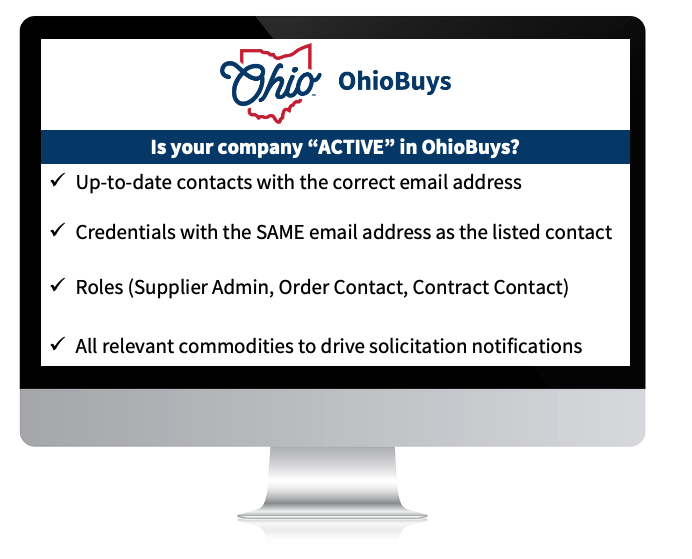 In addition, users should provide their company's demographic information to aid the agencies with the information needed for the Controlling Board submissions and approvals. This can be completed in the Addition Information Tab.
2025 Supplier Webinars
OhioBuys supplier training webinars walk through how to take advantage of OhioBuys. See the webinar schedule below or on the Bidder & Supplier Webinars webpage.

TRAINING TIPS
 |
|
Search 360 with Amazon
OhioBuys has introduced a new feature called Search360 that allows users to search for items across hosted and punchout catalogs in a single search on the Browse Items page.
|
When a user searches on the Browse Items page, search results include both hosted catalog items and external items from Search 360-enabled punchout catalogs.
Currently, Amazon is the only Search 360-enabled punchout catalog in OhioBuys, and items from Amazon will be searchable directly from the Browse Items page of OhioBuys. See the updated Shopping with the Amazon Punchout Catalog job aid for more information.
 |
|
Reminder: Customize Grid View
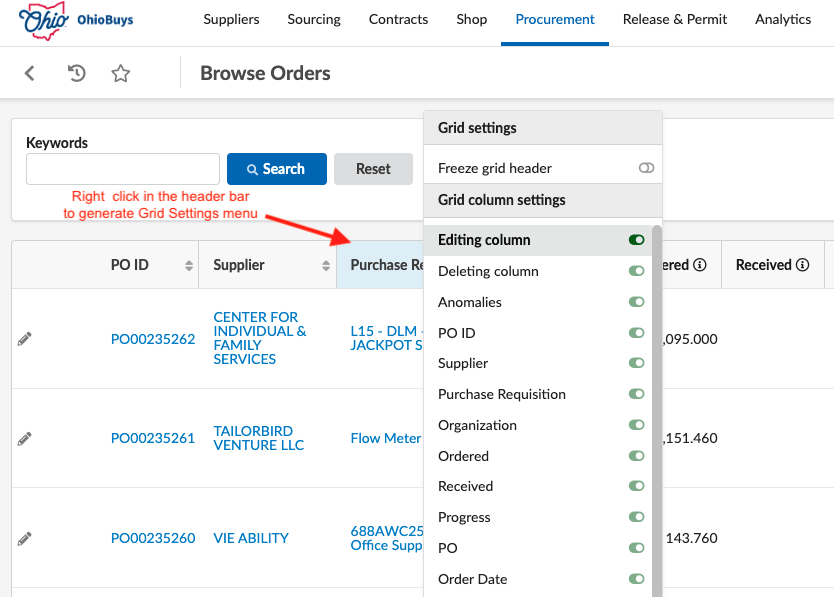
Remember, on any page with a grid (e.g., Browse Orders page), you can customize the way you view your search results on the search results page by right-clicking on a specific column header, selecting the name of the column header, and dragging/dropping it.
|
OhioBuys updated the default view of the Items & Services grid on requisitions on Wednesday, June 4th to reduce the need for scrolling from left to right to view other information in the requisition header. If you would like to restore visibility of some columns that are now hidden by default, follow the steps outlined above.
 |
|
Opus Training Tool & Access
Epilogue Opus, the new OhioBuys training tool, is available to OhioBuys users. Users can now access the OhioBuys Opus training materials using their existing OH|ID login credentials (via single sign-on).
This should help you quickly access the training information you need.
|
Existing Opus Users
Please access Opus through any of the following options:
- Direct Link: https://ohio.opuseps.com
- MyOhio App Store tile: “OhioBuys Agency Training Resources”
See more details on the Opus Information page on the OhioBuys website.
New Users
If you did not originally register an Opus account, you can access Opus without any registration steps, simply select the tile from the MyOhio App Store.
If you require additional assistance setting up your Opus account, please email OBM Contact Center (OBM.ContactCenter@obm.ohio.gov) or sign up for Opus Office Hours with the OhioBuys team.
 |
|
Training Calendar 2025
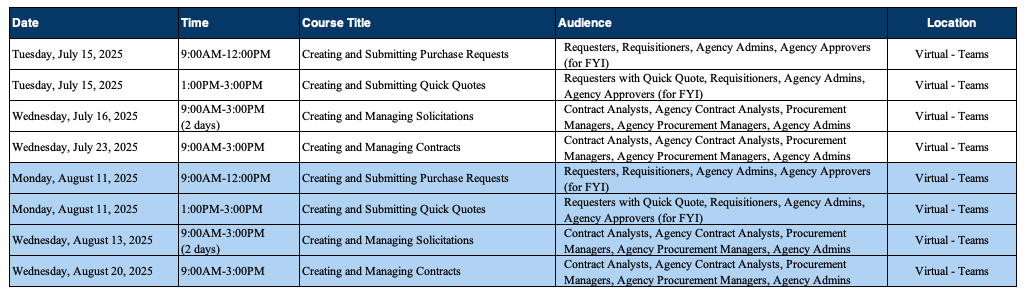
OhioBuys ongoing training is available virtually and on-site in 2025. Users can register for these sessions directly in OhioLearn. If your agency has a topic request for training or needs solicitation and/or contract training, please notify the project at: OPS.TrainingAcademy@das.ohio.gov.
|
2025
 |
|
Office Hours
One of the resources available to assist your use of OhioBuys is the option to sign up for Office Hours. Users sign up for either 30 or 60-minute Office Hour sessions wherein a dedicated OhioBuys trainer can assist you with OhioBuys functionality.
|
Office Hours have been expanded with slots available Monday - Thursday from 9:00 AM - 12:00 PM, and 1:00 PM - 4:00 PM, pending availability.
We encourage you to take advantage of this resource as you acclimate to OhioBuys. To sign up for office hours, please follow the prompts on the Office Hours Booking page.
You will receive direct help on a specific transaction as you work through it!
These Office hours are available for your training-related questions (i.e., how to do something in OhioBuys). If your question(s) is regarding policy or system issues (e.g., why a purchase order is In Progress), users should submit a helpdesk ticket. In addition, anything that substantially involves R&Ps, OAKS, or OneSpan Sign will also need to go to the helpdesk. If you have not attended any OhioBuys training course, you will be redirected to training, and your office hours appointment will be canceled. Remember, if it's a question of "how," then office hours are the way to go. If it's a question of "why," it needs a helpdesk ticket.
SUPPORT
For log-in or system issues, please contact OBM Contact Center at 614-338-4781 or 1-877-644-6771 OR OBM.ContactCenter@obm.ohio.gov Remember to put “OhioBuys” in the subject line!
If you have questions about the project itself, please email: ohiobuys@das.ohio.gov.
Mike DeWine, Governor
Jim Tressel, Lt. Governor
Kathleen C. Madden, Director
|