AGENCY UPDATES
Preparing for Fiscal Year-End Close Reports
With less than eight weeks until the Fiscal Year-End Close, please clean up any requisition, change order, and purchase order transactions from FY24 in OhioBuys which are incomplete or otherwise in error. Completing this task is crucial to prevent old transactions from falling into budget error in the new fiscal year.
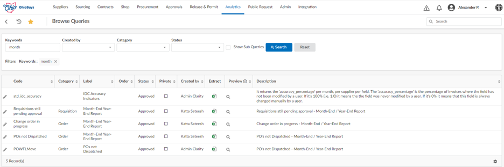
There are three queries in OhioBuys that allows you to find and identify incomplete transactions for clean-up. From the Analytics > Browse Queries page, you can use the keyword “End Year” to find all three queries.
The available queries are:
- Requisitions still pending approval – this will include anything that is not in “Ordered” status. (For ODOT users, this will bring back anything that is not in “ODOT Completed” status.) We recommend that you filter this query by “Budget FY” (column H) to only show transactions in the current fiscal year and any blanks. This will prevent you from accidentally deleting work that is intended for future fiscal years.
- Change order in progress – this will also include anything that is not in “Ordered” status.
- POs not Dispatched – this will include any PO that is currently “In Progress” and has not completed processing to an order.
Click the Extract icon for the query you would like to run. The queries will only display data from the agencies/organizations within your user scope.
 After running these queries, review each transaction and determine whether it will be complete in time for the fiscal year-end close or not. If not, you may want to cancel or delete the transaction. To assist you with reviewing your in-progress purchase requisitions and change orders, there are two job aids that are available:
-
Reviewing the Approval History of a Purchase Requisition: walks through how to find in-progress purchase requisitions on the Browse Requisitions page and explains what each of the purchase requisition statuses indicates. In addition, this job aid explains how to run the Requisitions still pending approval and the Change order in progress queries in OhioBuys.
-
Review PO Integration Messages: walks through how to find in-progress purchase orders that have encountered an integration error and explain the actions that need to be taken to resolve the displayed error. In addition, this job aid explains how to run the POs not Dispatched.
 |
|
Important Reminders for Fiscal Year-End Close
As a reminder, OAKS purchasing roles will be turned off at 5:00 PM on Friday, June 21st.
Please keep the following in mind:
|
- Users will need to resolve all pending items with budget dates in FY24 on or before June 21st (including integration errors, budget errors, incomplete change orders, and incomplete purchase requisitions).
- All FY24 OhioBuys purchase requisitions and change orders must be in “Ordered” status (or in the case of ODOT, in “ODOT Complete” status) on or before June 21st. All FY24 POs must also be in “Ordered” status on or before June 21st. Please note, any transactions for FY24 that do not meet this requirement will be canceled or deleted beginning June 22nd, and the user must re-create the transaction in the new fiscal year when the OhioBuys and OAKS re-open.
- If there are issues, users should sign up for office hoursor report them to the help desk immediately so, they can be addressed.
- Users will have “view only” access in both systems (OAKS/OhioBuys) for purchase requisition and purchase order functionality beginning June 22nd. Users will regain edit rights when OhioBuys and OAKS re-open. Between June 22nd – June 30th, OhioBuys users will still be able to create and manage sourcing events, contracts, exceptions, etc. Both systems will restore normal operations on July 1st (in concert with OAKS coming back online). If you have any trouble during the clean-up process, please consider signing up for office hours or email ContactCenter@obm.ohio.gov for assistance.
 |
|
Helpful Hints for Finding Supplier FY23 Direct Purchase Spend
With the end of the fiscal year approaching, you may want to check the direct purchase amounts your agency has spent for a particular supplier. The State Procurement Manual summarizes the Direct Purchase process and can be found here.
OhioBuys Navigation: Release & Permit > Threshold Status
|
Direct Spend Threshold Stat Breakdown:
-
Vouchered Amount displays the amount of direct spending already vouchered.
-
Encumbered Amount displays the amount of money encumbered for that supplier but not yet vouchered (unliquidated PO balances). This amount represents direct spending that will be carried forward to the next fiscal year.
Other Spend Threshold Stat Breakdown:
-
ECB Vouchered Amount displays the amount already vouchered that referenced a CB waiver. This amount does not go against an agency’s $50,000 spending threshold.
-
ECB Encumbered Amount displays the amount of money encumbered for that supplier that references a CB waiver but has not yet been vouchered (unliquidated PO balances). This amount does not go against an agency’s $50,000 spending threshold.
-
TC Vouchered Amount displays the amount already vouchered that referenced a contract. This amount does not go against an agency’s $50,000 spending threshold.
-
TC Encumbered Amount displays the amount of money encumbered for that supplier that references a contract but has not yet been vouchered (unliquidated PO balances). This amount does not go against an agency’s $50,000 spending threshold.
For additional details or questions about FY Direct Spend, please contact OBM.ContactCenter@obm.ohio.gov.
 |
|
Agency Competitive Selection Solicitations
When conducting Agency Competitive Selection (ACS) solicitations, it is important to remember that Round 1 must be posted for 10 business days. Prior to posting the solicitation, agencies should carefully review solicitations to ensure all information is included and accurate. If the need to amend Round 1 arises, amendments that cause Round 1 to be closed before the 10-business-day requirement is met will cause any resulting ACS contracts to encounter a blocking alert.
|
To avoid this issue, agencies should do one of the following:
- Let the original solicitation remain posted for 10 business days, then post an amendment. In this case, agencies may also post an inquiry informing suppliers that an amendment will be posted and/or the end date will be extended after the 10-business-day requirement is met if the Inquiry End Date has not yet passed; or
- Cancel the current sourcing project and begin a new one to restart; or
Please also keep in mind that while ACS awards to different suppliers by line item are permissible, pre-qualification/two-phase solicitations are not permissible.
|
|
Beginning Evaluations on Solicitations
Once the closing date on a solicitation is reached, the Sourcing Responsible user must navigate to the Prepare Solicitation tab and click Begin Evaluation to start the response evaluation process. Then, the user can navigate to the Analyze and Award tab and click the lock icon to unseal responses.
|
 |
|
Change Order Reminder
Keep in mind that users cannot delete items on a purchase order via change orders.
For more information on permissible uses of a change order, refer to the Creating a Change Order job aid.
|
SUPPLIER UPDATES
Supplier Status in OhioBuys
If talking to a supplier about their status in OhioBuys, please remind them to complete the following.
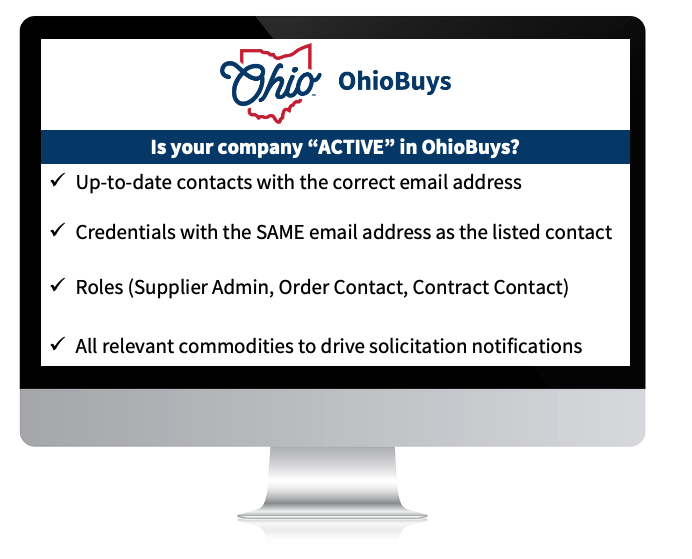 In addition, users should provide their company's demographic information to aid the agencies with the information needed for the Controlling Board submissions and approvals. This can be completed in the Addition Information Tab.
2024 Supplier Webinars
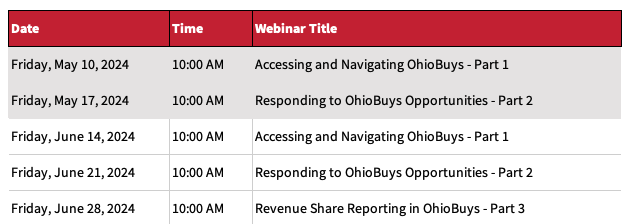
OhioBuys supplier training webinars walk through how to take advantage of OhioBuys. See the webinar schedule below or on the Bidder & Supplier Webinars webpage.
TRAINING TIPS
 |
|
Opus Training Tool & Access
Epilogue Opus, the new OhioBuys training tool, is available to OhioBuys users. Users can now access the OhioBuys Opus training materials using their existing OH|ID login credentials (via single sign-on).
This should help you quickly access the training information you need.
|
Existing Opus Users
Please access Opus through any of the following options:
- Direct Link: https://login.opuseps.com/
- Web Advisor (lightbulb): enter your email address to reach your OH|ID log-in box
-
MyOhio App Store tile: OhioBuys Agency Training Resources
See more details on the Opus Information page on the OhioBuys website.
New Users
If you did not originally register an Opus account, you can access Opus without any registration steps, simply select the tile from the MyOhio App Store.
If you require additional assistance setting up your Opus account, please email OBM Contact Center (OBM.ContactCenter@obm.ohio.gov) or sign up for Opus Office Hours with the OhioBuys team.
 |
|
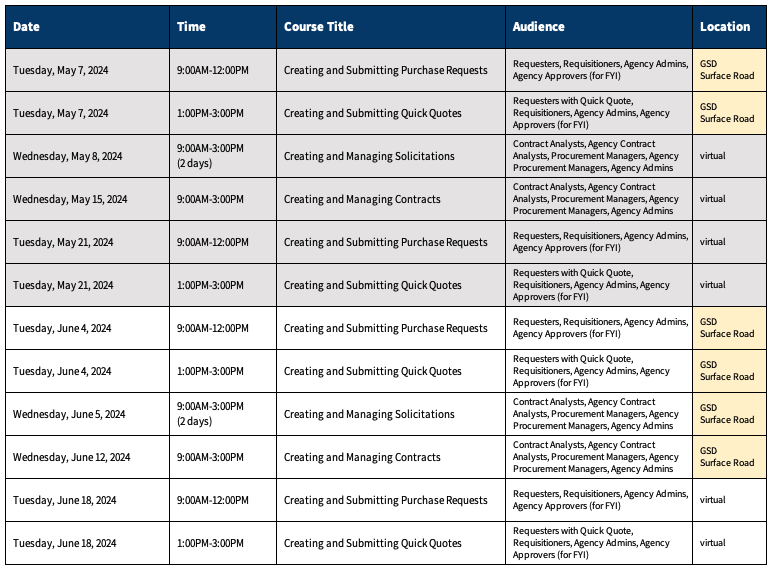
Training Calendar 2024
OhioBuys ongoing training will be available virtually and on-site starting in 2024. Users can register for these sessions directly in OhioLearn. If your agency has a topic request for training or needs solicitation and/or contract training, please notify the project at: OPS.TrainingAcademy@das.ohio.gov.
|
 |
|
Office Hours
One of the resources available to assist your use of OhioBuys is the option to sign up for Office Hours. Users sign up for either 30 or 60-minute Office Hour sessions wherein a dedicated OhioBuys trainer can assist you with OhioBuys functionality.
|
Office Hours have been expanded with slots available Monday - Thursday from 9:00 AM - 12:00 PM, and 1:00 PM - 4:00 PM, pending availability.
We encourage you to take advantage of this resource as you acclimate to OhioBuys. To sign up for office hours, please follow the prompts on the Office Hours Booking page.
You will receive direct help on a specific transaction as you work through it!
These Office hours are available for your training-related questions (i.e., how to do something in OhioBuys). If your question(s) is regarding policy or system issues (e.g., why a purchase order is In Progress), users should submit a helpdesk ticket. In addition, anything that substantially involves R&Ps, OAKS, or OneSpan Sign will also need to go to the helpdesk. If you have not attended any OhioBuys training course, you will be redirected to training, and your office hours appointment will be canceled. Remember, if it's a question of "how," then office hours are the way to go. If it's a question of "why," it needs a helpdesk ticket.
SUPPORT
For log-in or system issues, please contact OBM Contact Center at 614-338-4781 or 1-877-644-6771 OR OBM.ContactCenter@obm.ohio.gov Remember to put “OhioBuys” in the subject line!
If you have questions about the project itself, please email: ohiobuys@das.ohio.gov.
Mike DeWine, Governor
Jon Husted, Lt. Governor
Kathleen C. Madden, Director
|