Table of Contents
Agency Updates:Amazon Business Account Cleanup | Vie Ability Orders | PO and Invoice Unit Price Discrepancies | Setting Up MBE Set-Aside Solicitations
Supplier Updates: Supplier Contact Information | Supplier Webinars
Training Tips: Training Calendar | Office Hours | Support
Please share this newsletter with your agency users!
Remember to check the OhioBuys website for the latest user tips and information.
**IMPORTANT REMINDER - After March 2023, the training team will be focused on delivering training for the OhioBuys version upgrade. If users within your agency need sustainment training (e.g., to increase adoption of OhioBuys), they should register for sustainment training as soon as possible.**
**If you have any additional needs outside of ongoing training, including demos, unique office hours requests, or anything else, please email your request to: ohiobuys@das.ohio.gov. The OhioBuys Project Team will review your request and contact you to follow up.**
**IMPORTANT REMINDER - When you are submitting a helpdesk ticket for OhioBuys, make sure you are submitting it to OBM Shared Services OBM.SharedServices@obm.ohio.gov, with ‘OhioBuys’ in the subject line, and not to CSC.**
Agency Updates
AMAZON BUSINESS ACCOUNT CLEANUP
As part of the continued push to maximize usage of OhioBuys and an effort to clean up the State’s Amazon Business account, the OhioBuys team is asking users from onboarded agencies/boards/commissions to only make purchases by accessing the Amazon Business punchout through OhioBuys.
By using the Amazon catalog through OhioBuys, all purchasing and spending details can be captured in one place for each agency. Over the next few weeks, the OhioBuys team will work with Amazon to transition existing Amazon Business accounts for Agencies that have been onboarded into Ohio Buys to the Amazon punchout group. Once transitioned, users from agencies’ Amazon business accounts will no longer be able to place orders via the Amazon Business website and will be directed to use the punchout account via Ohio Buys.
Agencies can use this Job Aid for information to set up or use their Amazon account through OhioBuys. Additionally, if users experience issues, they may submit a helpdesk ticket via obm.sharedservices@obm.ohio.gov.
VIE ABILITY ORDERS
With more than 50,000 items from thousands of manufacturers on the Vie Ability Office Supplies contract, item price changes may occur. Agencies adding items to a shopping cart via the punchout catalog may encounter price changes on those items if the requisition approval process takes too long in OhioBuys. To minimize those instances where a price change occurs after the user has checked out from the punchout catalog, but before the purchase order (PO) is dispatched, the Community Rehabilitation Program (CRP) and Vie Ability have come to an agreement that any price changes on the contract will now take place on the first day of each month.
Agencies should ensure that all in-flight requisitions are completed and dispatched to a PO in OhioBuys no later than 5:00 PM on the last day of the month. Doing so will ensure that the State is invoiced at the same price as listed in the PO.
If the PO cannot be dispatched in the same month it was started in, agencies should double-check the pricing in the punchout catalog after the monthly pricing updates are applied on the first of the month to ensure the price is the same. If the pricing has changed, the requisition must be updated to reflect the current price to avoid invoicing issues.
PO AND INVOICE UNIT PRICE DISCREPANCIES
Occasionally, agencies may need to make a purchase in which they expect to get credit from the supplier (e.g., trading in old equipment for new equipment). In these instances, the price the agency is paying will be less than what is listed on the associated catalog item in OhioBuys, and it’s important the unit price on the line item is updated to match the unit price that will ultimately be invoiced. When a unit price is updated and doesn’t match the catalog price, users will encounter an alert in OhioBuys. They will need to populate the Supplier Quote ID field to indicate the reason for the change and clear the alert.
Failing to make these updates on the requisition line could create issues downstream at voucher creation, and Ohio Shared Services may not be able to force-price the voucher to match the invoice – forcing a new PO to be created before the invoice can be paid.
SETTING UP MBE SET-ASIDE SOLICITATIONS
When setting up MBE Set-Aside solicitations, users should apply the MBE Set-Aside Slider on the Add Suppliers tab of the sourcing project before inviting suppliers to the solicitation. Doing so will ensure that only MBE suppliers can be invited to respond to the solicitation – reducing the risk that non-MBE suppliers are invited to an MBE set-aside solicitation that they will be unable to participate in.
Supplier Updates
SUPPLIER STATUS IN OHIOBUYS
If talking to a supplier about their status in OhioBuys, please remind them to complete the following.
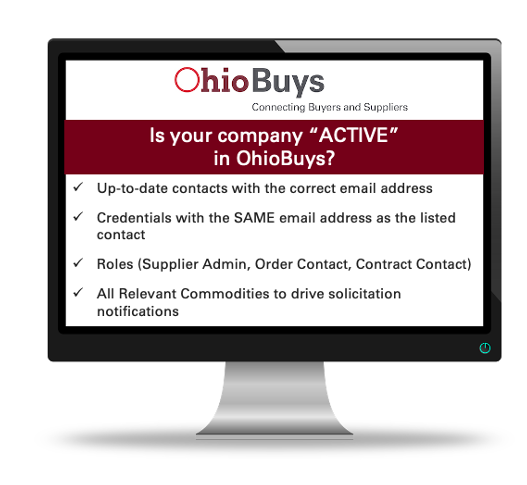 In addition, users should provide their company's demographic information to aid the agencies with the information needed for the Controlling Board submissions and approvals. This can be completed in the Addition Information Tab.
2022 SUPPLIER WEBINARS
The OhioBuys supplier/bidder webinar series has been updated with dates through March 2023.
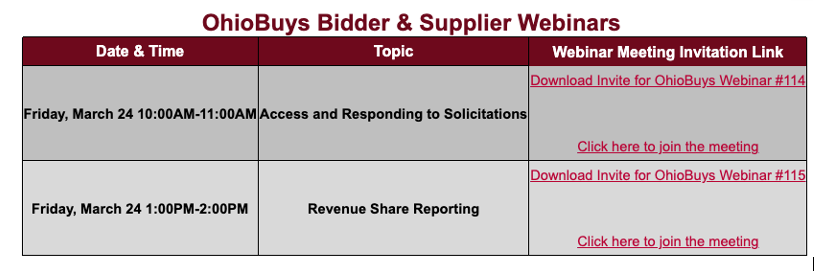 Each supplier/bidder training webinar will be one hour on the dates listed below. Please download the webinar meeting invitation file, unzip it, and click the .ics file to add to your calendar.
In addition, a revised Supplier Fact Sheet & Quick Start Guide is available to learn more about the Supplier log-in process and share it with your suppliers. Agency representatives are also welcome to join these webinars to learn more about how suppliers access and use OhioBuys.
Anyone interested in attending Supplier webinars can download the meeting invites from the Supplier Webinar page of the OhioBuys website.
Training Tips
TRAINING CALENDAR
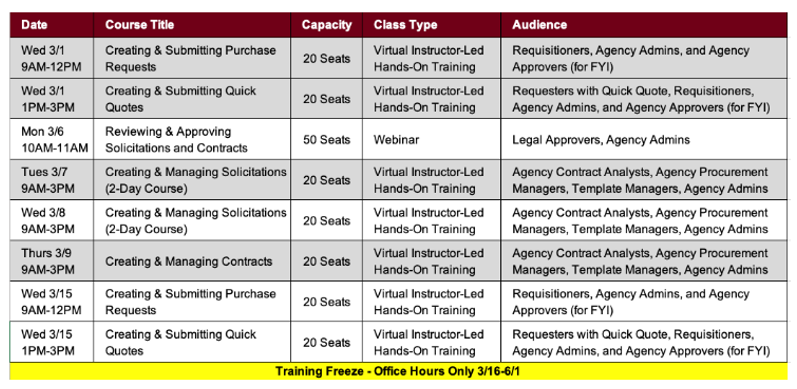
Ongoing OhioBuys training sessions are now scheduled through March 2023. For the complete list, see the schedule of upcoming sessions below or visit the Ongoing Training page.
Users can register for these sessions directly in OhioLearn if they could not previously attend OhioBuys training or if they would like a refresher course on a particular topic. If your agency has a topic request for training or needs solicitation and/or contract training, please notify the project at: OPS.TrainingAcademy@das.ohio.gov.
OFFICE HOURS
One of the resources available to assist your use of OhioBuys is the option to sign up for Office Hours. Users sign up for either 30 or 60-minute Office Hour sessions wherein a dedicated OhioBuys trainer can assist you with OhioBuys functionality.
Office Hours have been expanded with slots available Monday - Thursday from 9:00 AM - 12:00 PM, and 1:00 PM - 4:00 PM, pending availability.
We encourage you to take advantage of this resource as you acclimate to OhioBuys. To sign up for office hours, please follow the prompts on this page: https://outlook.office365.com/owa/calendar/OhioBuysTest@ohiodas.onmicrosoft.com/bookings/
You will receive direct help on a specific transaction as you work through it!
These Office hours are available for your training-related questions (i.e., how to do something in OhioBuys). If your question(s) is regarding policy or system issues (e.g., why a purchase order is In Progress), users should submit a helpdesk ticket. In addition, anything that substantially involves R&Ps, OAKS, or OneSpan Sign will also need to go to the helpdesk. If you have not attended any OhioBuys training course, you will be redirected to training, and your office hours appointment will be canceled. Remember, if it's a question of "how," then office hours are the way to go. If it's a question of "why," it needs a helpdesk ticket.
Support
For log-in or system issues, please contact OBM Shared Services Center at 614-338-4781 or 1-877-644-6771 OR OBM.SharedServices@OBM.Ohio.Gov Remember to put “OhioBuys” in the subject line!
If you have questions about the project itself, please email: ohiobuys@das.ohio.gov.
Mike DeWine, Governor
Jon Husted, Lt. Governor
Kathleen C. Madden, Director
|