Table of Contents
-
Agency Updates: OhioBuys Planned Outage | Grant Agreements and Purchases in OhioBuys | Request to Purchase vs Purchase Requisition | Appropriate Use of Change Orders | Change Orders to Update Chartfields on POs in "Ordered" Status | State Term Schedule Contracts in OhioBuys | Do Not Block
-
Supplier Updates: Supplier Webinars
-
Training Tips: Solicitation End Dates | Naming Conventions | OneSpan File Size Limits | Help Desk Checklist | Training Calendar | Office Hours
Please share this newsletter with your agency users!
Remember to check the OhioBuys website for the latest user tips and information.
**If you have any additional needs outside of ongoing training, including demos, unique office hours requests, or anything else, please email your request to: ohiobuys@das.ohio.gov. The OhioBuys Project Team will review your request and contact you to follow up.**
**IMPORTANT REMINDER - When you are submitting a helpdesk ticket for OhioBuys, make sure you are submitting it to OBM Shared Services OBM.SharedServices@obm.ohio.gov, with ‘OhioBuys’ in the subject line, and not to CSC.**
Agency Updates
OHIOBUYS PLANNED OUTAGE
OhioBuys will have a planned maintenance outage beginning at 10 PM EST on Saturday, December 3rd through 3 PM EST, Sunday, December 4th to coincide with an OAKS Maintenance outage.
GRANT AGREEMENTS AND PURCHASES IN OHIOBUYS
For agencies that have not reached full adoption due to grant transactions, remember that OhioBuys allows users to set up and manage Grant Agreements as a type of Agency Administered contract.
Agencies are highly encouraged to utilize OhioBuys to manage these types of agreements, which provides the following benefits:
- Ability to create and negotiate agreements; this includes the ability to upload documents associated with the agreement.
- Flexible workflow to accommodate agency-specific approval workflows/requirements, as well as transparency to view workflow status.
- Ability to electronically sign agreements through the enterprise eSignature solution (OneSpan Sign).
- Ability to maintain and amend agreements.
- Seamless integration with other OhioBuys modules to allow for the association of the agreement with other related objects (e.g., requisitions and purchase orders).
You can find more information on using the contracting module in the Creating and Managing Contracts in OhioBuys Learner Guide.
While OhioBuys is not a full grants management solution, it does allow agencies to conduct procurement activities related to grants. In other words, if an agency needs to create an encumbrance for purchases that will use grant funding, those requisitions can be created in OhioBuys. OhioBuys can also be used to create encumbrances that will be used to disburse grant funds to recipients.
REQUEST TO PURCHASE VS. PURCHASE REQUISITION
One of the most common questions users have when using OhioBuys is around when they should create a request to purchase (RTP) and when they should go directly to creating a purchase requisition (PR).
An RTP should be created to place IT and non-IT sourcing and contracting requests with the DAS Office of Procurement Services (OPS).
Purchases from a State contract established by the Office of Procurement Services (OPS) do not require an RTP.* If you are attempting to purchase items off an existing OPS State contract or are making a purchase from a Requisite Procurement Program (e.g., OPI), you can proceed directly to creating a PR.
*Except for services being requested under the Third-Party Administrator (TPA) for Facility Maintenance and Repair Projects contract (Index # GDC160 Contract #CSP905120-1) and competitive selection two phase prequal contracts, in which case an RTP is required.
Non-IT Purchases
If you are making a purchase that does not reference an existing OPS State contract, the next thing for you to consider is the total dollar amount of the purchase need. For purchases that do not reference an OPS State contract, you should proceed directly to creating a PR if the total value of the purchase need is:
- Less than $25,000; or
- Less than $50,000 (when the PR is going to be submitted in OhioBuys).
If your purchase does not reference an OPS State contract and the total value of the purchase need is above these dollar thresholds, you are required to submit a RTP to start the purchasing process. In addition, if the total value of your purchase would result in your agency’s Direct Purchase Authority (DPA) being exceeded with a particular supplier, an RTP is required.
There are a few exceptions to these guidelines. An RTP is not required if the purchase is covered by an existing non-IT Blanket Release & Permit (R&P), or if the purchase is exempt from DAS authority under the Ohio Revised Code.
IT Purchases
If you are making an IT purchase that does not reference an existing OPS State contract and need an IT R&P, the following needs to be considered:
1. Sole or Single Source – create either a PR referencing an IT account code or
Agency-administered contract using the IT checkbox to identify the contract as IT.
a. Attach supporting documentation and include the draft Controlling Board
request if using Controlling Board purchase authority, or documentation to
demonstrate compliance with PM-01 Section 2.6.5 if using Direct Purchase
authority.
i. Create Agency-administered contract - you can create an agency-
administered contract in OhioBuys, flag it as an IT contract using the IT
checkbox and populate the Contract Not to Exceed field on the
Negotiated Terms tab of the contract.
If you are requesting biennium Controlling Board approval as part of
this contract, select the Biennium Fiscal Year 1 and Biennium Fiscal
Year 2 and then enter the Biennium Fiscal Year Amount for each fiscal
year.
Once your contract is submitted, it will automatically route for the
necessary IT approvals (e.g., IT SIM, IT SME, EITC Analysts, etc.).
After IT has completed their review, an IT R&P number will be
generated and will be linked on the Release & Permit field on the
header of the contract. The Contract Responsible user will receive an
email notification once the necessary approvals have been received.
2. If you have a procurement need that is not on an OPS contract or is not provided
via a sole or single source provider over $50,000.00, you are required to submit a
RTP to determine the appropriate procurement method. For example, a Request
for proposal, Invitation to Bid, new DAS contract, or IT agency-released solicitation.
Please reference the below flowchart to help determine whether a RTP is necessary is for your purchase:
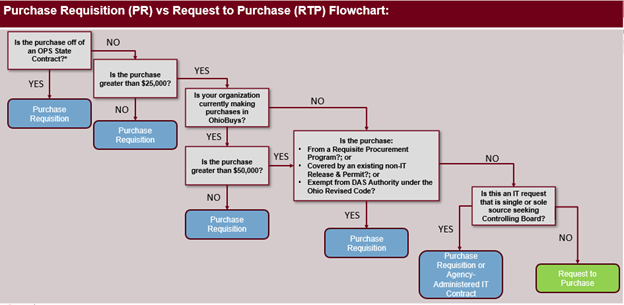 For additional guidance regarding State of Ohio purchasing procedures, please refer to PM-01.
APPROPRIATE USE OF CHANGE ORDERS
If your agency is planning to create a change order for any existing orders that do not have rounding errors, please keep in mind that the following information cannot be altered in a change order:
- Requisition Type
- Label
- Requester
- Supplier
- UOM
- Budget Date
Users should also not attempt to add new lines or remove existing lines as part of a change order. If additional lines (i.e., items) need to be purchased, a new purchase requisition should be created for those items. If lines need to be removed and the PO has a budget date in the current fiscal year, users should close/cancel the original PO and submit a new order for any outstanding items. If the PO is from a prior fiscal year, users should not close it until it is no longer needed.
These guidelines are also captured in the Create a Change Order job aid.
CHANGE ORDERS TO UPDATE CHARTFIELDS ON POs IN “ORDERED” STATUS
If an agency is entering a Change Order to only to change chartfield information after the PO is in “Ordered” status, then the amended PO will not flip to “Ordered” status on its own. This is a known issue that is being addressed. Until a fix is in, agencies should open a case with the Help Desk so the OhioBuys team can move the transaction in to “Ordered” status. This workaround is only an option when the PO has a valid budget status.
STATE-TERM SCHEDULE CONTRACTS IN OHIOBUYS
If your agency is looking to purchase from a State Term Schedule contract (STS), you are required to obtain at least three quotes. If the agency does not obtain at least three quotes, but still wishes to reference the contract on their purchase orders, they must attach the draft Controlling Board request to the requisition, reference the Controlling Board request number in the Request Description section of the requisition, and submit a request to the Controlling Board for approval. The remainder of the purchasing process is the same (i.e., the agency will not need to obtain a non-IT release and permit from DAS if they intend to use STS as the purchase authority and reference the STS contract and not the CB number on the purchase order; however, purchases referencing an IT STS contract established by DAS will still route for an IT release and permit). Agencies must wait to approve the requisition at the Final Approver step until the Controlling Board request has been approved.
Once the Controlling Board approves, the purchase order (PO) should be run through the normal process in OhioBuys and purchased from the contract catalog. Users should reference the STS contract on the PO and mention the Controlling Board number in the comments section for documentation purposes; in these cases, do not attempt to populate the Controlling Board Number field on the requisition line item.
It is important to follow these steps to help agencies with their overall experience and protection with their purchase. The benefits of using STS contracts in OhioBuys are:
- No use of direct purchase authority
- Leverage the existing catalog in OhioBuys to ensure clear communication with the supplier about which items are being purchased
- Have the built-in protections of the standard Terms and Conditions of STS contracts, including the ability to work with DAS on any necessary exceptions
For more information regarding STS contract purchases, please visit the State Purchasing Procedures (PM-01) on the OhioBuys website.
DO NOT BLOCK
There have been a few questions about email notifications not being received by some end users. Please take a moment to make sure that the email address no-reply-ohio@ivalua.com is not blocked by your email client. If it is, please make sure you add it to your ‘never blocked’ list, and this will prevent missing any OhioBuys-related emails from Ivalua.
Supplier Updates
2022 SUPPLIER WEBINARS
The OhioBuys supplier/bidder webinar series continues through December 2022.
Each supplier/bidder training webinar will be one hour and held on the dates listed below. Please download the webinar meeting invitation file, unzip it, and click the .ics file to add to your calendar.
In addition, a revised Supplier Fact Sheet & Quick Start Guide is available to learn more about the Supplier log-in process and share it with your suppliers. Agency representatives are also welcome to join these webinars to learn more about how suppliers access and use OhioBuys.
Anyone interested in attending Supplier webinars can download the meeting invites from the Supplier Webinar page of the OhioBuys website.
Training Tips
SOLICITATION END DATES
When you are creating a solicitation, please be mindful to not post solicitations with an end date that falls on a state holiday. This will mitigate the risk of support being unavailable to suppliers who are attempting to submit their proposals on the due date.
NAMING CONVENTIONS
To help suppliers when they receive an email for solicitation that matches their commodity codes, we encourage you to use a detailed naming convention for the sourcing event.
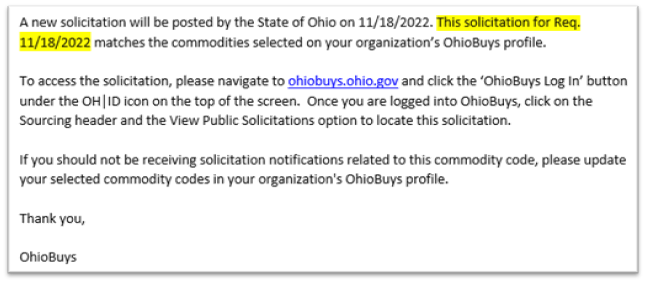
This is important because suppliers will see the solicitation label in the email notifications they receive informing them about the solicitation. A label like “Req. 11/21/2022” will not give the supplier a clear understanding of what the solicitation is for (example below) and may not generate enough interest for them to seek out more information. For suppliers to see truly understand what the solicitation is for , they must open it in OhioBuys to review the information provided.
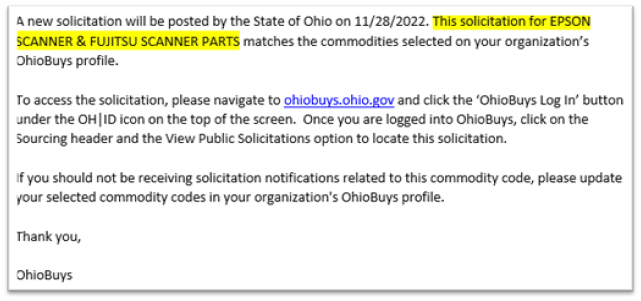
 We recommend changing the label (outlined below) better to identify the good or service on the front end. Doing so will help ensure that the notification makes it clear about what the solicitation is for and increase the likelihood that suppliers will be interested enough to review the solicitations in more detail and minimize the need for questions.
ONESPAN FILE SIZE REQUIREMENTS
When utilizing the OneSpan, please note that there is a limit of 16 MB for files being packaged in a OneSpan signature transaction; if users have multiple files that total more than 16 MB, the documents should be sent in separate, individual signature transactions.
HELP DESK CHECKLIST
To serve you better, we have included helpful tips on how/when to submit tickets to the help desk for OhioBuys.
Looking for help?
When users have questions or are looking for assistance, there are a few things they can do to help find solutions before submitting a help desk ticket:
1. Users should utilize the training materials (Learner Guides, Job Aids, and videos)
on the OhioBuys website.
2. Register for sustainment training in OhioLearn using the search term ‘OhioBuys.’
3. Contact your Agency Administrator to see if they can answer your question.
4. Sign up for Office Hours (Instructions Below)
If a help desk ticket is needed:
-
When submitting a ticket, please make sure to include OhioBuys in the subject line and attach all related screenshots and/or attachments.
-
Once a case is submitted, end-users should try not to make any additional changes to the transaction in the system. Subsequent changes can make it more difficult to troubleshoot and identify the cause of the issue.
Don’t Forget!
Please remember that when submitting a ticket, they should refer to functional issues or questions. If users have a question regarding a specific procurement policy, they should contact Steve Meese via email or Teams at steve.meese@das.ohio.gov.
Is it an emergency?
If you have a case requiring immediate attention, please make sure you always submit a ticket to the help desk and be as specific as possible when describing the issue. This way, the case can be reviewed, expedited to an appropriate member of the OhioBuys team, and tracked through the resolution of your ticket.
TRAINING CALENDAR
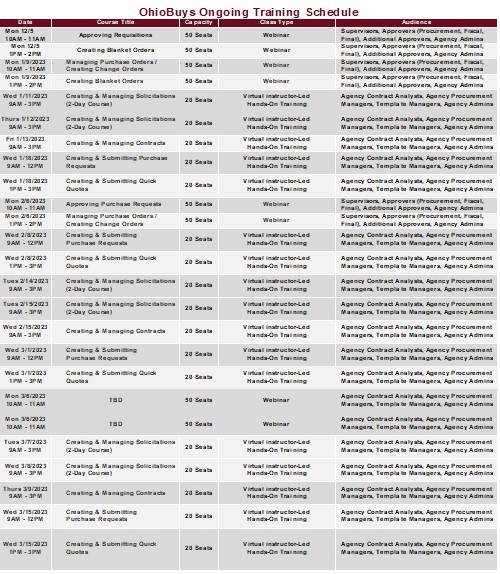
Ongoing OhioBuys training sessions are now scheduled through December 2022. For the complete list, see the below schedule of upcoming sessions or visit the Ongoing Training page.
Users can register for these sessions directly in OhioLearn if they could not previously attend OhioBuys training or if they would like a refresher course on a particular topic. If your agency has a topic request for training or needs solicitation and/or contract training, please notify the project at: OPS.TrainingAcademy@das.ohio.gov.
OFFICE HOURS
One of the resources available to assist your use of OhioBuys is the option to sign up for Office Hours. Users sign up for either 30 or 60-minute Office Hour sessions wherein a dedicated OhioBuys trainer can assist you with OhioBuys functionality.
Office Hours have been expanded with slots available Monday - Thursday from 9:00 AM - 12:00 PM, and 1:00 PM - 4:00 PM, pending availability.
We encourage you to advantage of this resource as you get acclimated to OhioBuys. To sign up for office hours, please follow the prompts on this page: https://outlook.office365.com/owa/calendar/OhioBuysTest@ohiodas.onmicrosoft.com/bookings/
You will receive direct help on a specific transaction as you work through it!
These Office hours are available for your training-related questions (i.e., how to do something in OhioBuys). If your question(s) is regarding policy or system issues (e.g., why a purchase order is In Progress), users should submit a help desk ticket. In addition, anything that substantially involves R&Ps, OAKS, or OneSpan Sign will also need to go to the help desk. If you have not attended any OhioBuys training course, you will be redirected to training, and your office hours appointment will be canceled.
Remember, if it's a question of "how," then office hours are the way to go. If it's a question of "why," it needs a help desk ticket.
Support
For log-in or system issues, please contact OBM Shared Services Center at 614-338-4781 or 1-877-644-6771 OR OBM.SharedServices@OBM.Ohio.Gov Remember to put “OhioBuys” in the subject line!
If you have questions about the project itself, please email: ohiobuys@das.ohio.gov.
Mike DeWine, Governor
Jon Husted, Lt. Governor
Kathleen C. Madden, Director
|