Table of Contents
-
Agency Updates: Welcome to OhioBuys | State Solicitation and Contract Information Available through OhioBuys | PO Pending Validations Clean-Up | Updating Supplier Contacts
-
Supplier Updates: VIE Ability Update | OPI Sales Changes | Supplier Webinars
-
Training Tips: Training Calendar | Office Hours
-
Key Term: My Pending Validations
Agency Updates
WELCOME TO OHIOBUYS
We want to welcome the following agencies moving to OhioBuys as of January 31st.
- The Adjutant General’s Department
- Department of Agriculture
- Department of Developmental Disabilities
- Department of Higher Education
- Tuition Trust Authority
The OhioBuys team looks forward to working with you as we continue to grow and streamline the procurement process for State agencies, State requisite programs, local governments, and higher education institutions across Ohio.
SOLICITATIONS AND CONTRACTS ON OHIOBUYS
This week, OhioBuys sent out a communication to inform you that as of January 31st, 2022, the state’s procurement website will no longer be used to post solicitations or hold state contract information. OhioBuys will become the only resource available to post this information, which will also be available via the OhioBuys public portal.
If you are a user with current, active solicitations posted on the procurement website, you will still be able to use the website to respond to inquiries and post amendments until those solicitations’ end dates are reached. The Procurement Opportunity Search Results page will still be visible and contain information on current, active solicitations already posted on the procurement website.
You can read the original communication here for more information, which details the pages that will be redirected to on the OhioBuys public portal as of January 31st, 2022.
For more assistance, the OhioBuys team will be holding limited Office Hours through February 11, 2022. Office Hours will be available from 11AM-12PM and 1PM-2PM Mondays-Thursdays to assist users with OhioBuys functionality. The full schedule of office hours will return starting Monday, February 14th. Full sustainment training for Solicitations and Contracts is available Monday-Thursday, February 14-17th. Please sign up in OhioLearn so the team can plan for your attendance.
PO PENDING VALIDATIONS CLEAN-UP
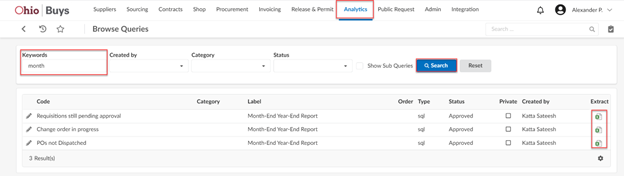
As we have passed the midway point of FY22, we wanted to remind you that at the end of each month, it would be an excellent opportunity to run three different queries in OhioBuys that will allow you to find and identify incomplete transactions for clean-up. When you are in OhioBuys, you can access these queries by clicking Analytics > Browse Queries page. From there, you can use the keyword “month” to find all three.
The available queries are:
1. Requisitions still pending approval – this will include anything that is not in
“Ordered” status. (For ODOT users, this will bring back anything that is not in “ODOT
Completed” status.) We recommend that you filter this query by “Budget FY” (column
H) to only show transactions in the current fiscal year and any blanks. This will prevent
you from accidentally deleting work intended for future fiscal years.
2. Change order in progress – this will also include anything not in “Ordered” status.
3. POs not Dispatched – this will include any PO that is currently “In Progress” and
has not completed processing to an order.
Next, click the Extract icon for the query you would like to run. The queries will only display data from the agencies/organizations within your user scope.
 After running these queries, please review each transaction and determine whether it is still needed. If not, cancel or delete the transaction.
To assist you with reviewing your in-progress purchase requisitions and change orders, two job aids are available:
-
Review Purchase Requisition Status and Approval History: walks through how to find in-progress purchase requisitions on the Browse Requisitions page and explains what each purchase requisition status indicates. In addition, this job aid explains how to run the Requisitions still pending approval and the Change order in progress queries in OhioBuys.
-
Review Purchase Order Integration Errors: walks through how to find in-progress purchase orders that have encountered an integration error and explains the actions that need to be taken to resolve the displayed error. In addition, this job aid describes how to run the POs not Dispatched query.
If you have any trouble during the clean-up process, please consider signing up for office hours using one of the links in the Training Tips section below or email OBM.sharedservice@obm.ohio.gov for assistance.
UPDATING SUPPLIER CONTACTS
As a general rule, OhioBuys State Admins do not make changes to supplier profiles based on requests from agencies (the lone exception is if there are any discrepancies between OAKS and OhioBuys due to an integration/interface issue). Suppliers contacts are responsible for working with their admins to add/change their users’ profiles. If the supplier does not know who their admins are, or State Admins’ intervention is needed, they need to contact OSS and have a helpdesk ticket opened for assistance. Agencies are not allowed to open a case on-behalf of the supplier to facilitate any change. It must be initiated directly by the supplier.
Supplier Updates
VIE ABILITY UPDATE
Exciting news! As many of you may be aware, the Office of Procurement Services’ Community Rehabilitation Program (CRP) has been working with VIE Ability to update the Office Supplies contract to incorporate the two existing VIE Ability contracts that supply Paper Towel & Rolled paper Products (GDC718, CRP30428-1) and Hand Sanitizer Products & Disinfecting wipes (GDC715, CRP30486-1) into the Office Supply contract GDC900, CRP30580.
Effective Tuesday, February 1st, Office Supplies, Paper Towel & Rolled Paper Products, and Hand Sanitizer Products & Disinfecting Wipes will all be available within the VIE Ability Punchout catalog. To access in Ohio Buys please navigate to the GDC900, CRP30580 VIE Ability Punchout.
OPI SALES CHANGES
As you may be aware, OPI is currently in the process of hiring new sales representatives. To ensure that their customers continue to receive excellent customer service, please make sure that you list Zach Taubenheim as the Supplier Contact on all of your requisitions. If you have any questions, you can reach Zach directly at zachary.taubenheim@odrc.state.oh.us.
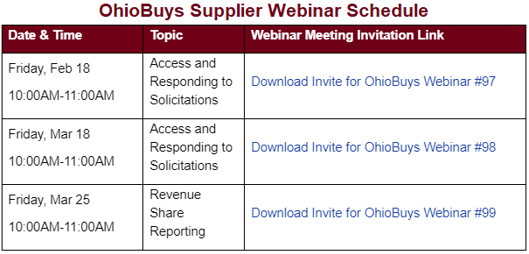
2022 SUPPLIER WEBINARS
We are excited to continue our OhioBuys supplier/bidder webinar series and have added a Reporting Revenue Share webinar.
Each supplier/bidder training webinar will be one hour and held on the dates listed below. Please download the webinar meeting invitation file, unzip it, and click the .ics file to add to your calendar.
In addition, a revised Supplier Fact Sheet & Quick Start Guide is available to learn more about the Supplier log-in process and share with your suppliers. Agency representatives are also welcome to join these webinars to learn more about how suppliers access and use OhioBuys.
Anyone interested in attending Supplier webinars can download the meeting invites from the Supplier Training page of the OhioBuys website.
Training Tips
TRAINING CALENDAR
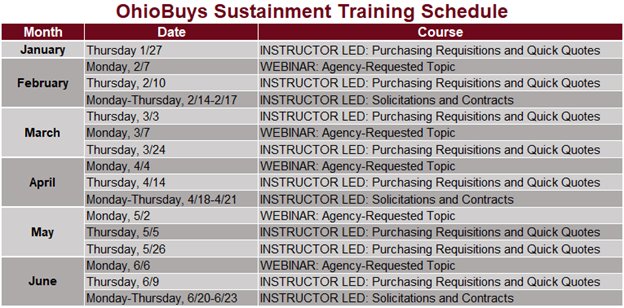
Ongoing OhioBuys training is now scheduled through June 2022. For the complete list, see the below schedule of upcoming sessions.
Users can register for these sessions directly in OhioLearn if they could not previously attend OhioBuys training or if they would like a refresher course on a particular topic. If your agency has a topic request for training or needs solicitation and/or contract training, please notify the project at: OPS.TrainingAcademy@das.ohio.gov.
OFFICE HOURS
This week, the OhioBuys team began holding limited Office Hours through February 11, 2022. Office Hours will be available from 11AM-12PM and 1PM-2PM Mondays-Thursdays to assist users with OhioBuys functionality.
*Please remember to check the OhioBuys website for any scheduling updates.
These Office hours are available for your training-related questions (i.e., how to do something in OhioBuys). If your question(s) is regarding policy or system issues (e.g., why a purchase order is In Progress), users should submit a helpdesk ticket. In addition, anything that substantially involves R&Ps, OAKS, or OneSpan Sign will also need to go to the helpdesk. If you have not attended any OhioBuys training course, you will be redirected to training, and your office hours appointment will be canceled.
Remember, if it's a question of "how," then office hours are the way to go. If it's a question of "why," it needs a helpdesk ticket.
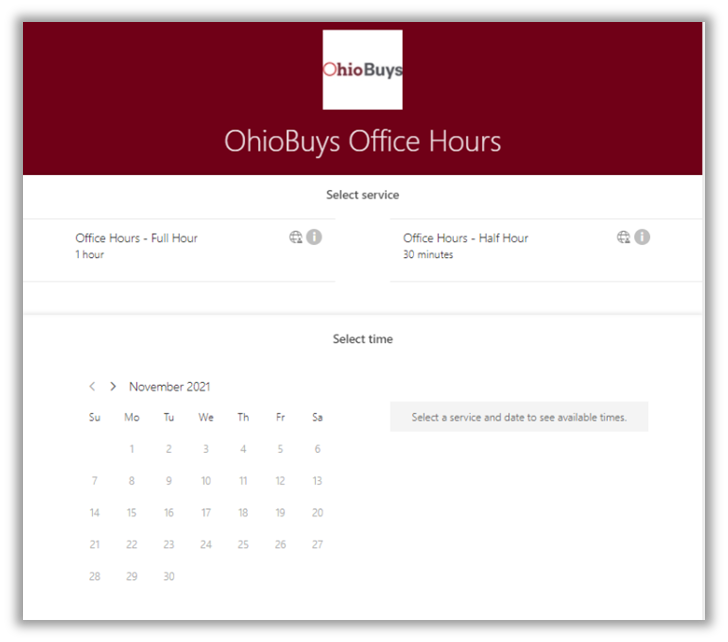
To sign up for these full hour or half-hour office hour sessions:
1 – Determine which item you need to shop for, which requisition you are working on, your active quick quote, solicitation, contract, or template you would like help with, and have that ready to share at the appointment.
2 – Navigate to: OhioBuys Office Hours (office365.com)
3 – Select if you would like a full hour or half-hour appointment and then select a day, time, and an available trainer. There are two appointments available for every hour and half-hour time slot. Appointments are available on a first-come, first-serve basis.
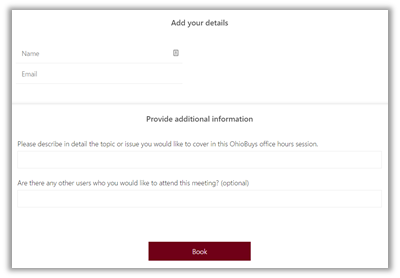
4 – Enter your Name and Email. In the box titled “Please describe in detail the topic or issue you would like to cover in this OhioBuys office hours session.” be sure to include details regarding what you like assistance with (e.g., a specific solicitation, quick quote, etc.).
5 – Click Book to complete your reservation and receive an Outlook/Teams confirmation appointment. Invite anyone from your team you would like to have involved in this session.
6 – At your appointment: Be logged into OhioBuys so you can proceed with your activity. Trainers will advise you on how to complete your transaction, but they will not be driving.
NOTE: Office Hours are not a substitute for opening a helpdesk ticket when there is a technical issue. Trainers can direct you to the help desk if your questions warrant opening a ticket.
These links and instructions are also available on the OhioBuys website.
Key Term
MY PENDING VALIDATIONS
This window on your Ohio Buys home page shows items that require your attention or action as part of your role and organizational scope.
For More Information
In addition, please refer to:
Support
For log-in or system issues, please contact OBM Shared Services Center at 614-338-4781 or 1-877-644-6771 OR OBM.SharedServices@OBM.Ohio.Gov Remember to put “OhioBuys” in the subject line!
If you have questions about the project itself, please email: ohiobuys@das.ohio.gov.
Mike DeWine, Governor
Jon Husted, Lt. Governor
Kathleen C. Madden, Director
|