|
Coming Soon: Welcome to TFFR
New Member Campaign Rolls Out This Fall

TFFR welcomes hundreds of new members every year. This fall, RIO will roll out a campaign to help newly enrolled members take their first steps toward understanding their retirement benefit.
The campaign will provide resources on how TFFR differs from traditional retirement plans, how members become vested, and how retirement benefits are calculated. Members will also learn how to access and navigate the MyTFFR Member Self-Service Portal.
⮞ Curious about these new resources? Visit TFFR's New Member webpage.
|
|
|
MyTFFR Reporting Tips and Tricks
Is a contribution report refusing to upload? This is one of the most common questions we receive from Business Partners. Our File Level Errors and Adjustments Guide walks you through finding and fixing errors.
Not sure which Pay Code to use? When you’re unsure how to report a TFFR member’s salary, refer to Pay Code Definitions.
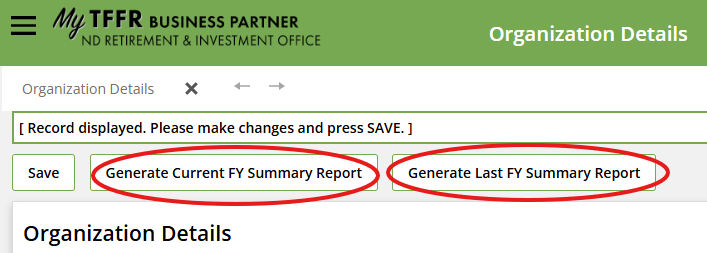
Need to verify your Annual Contributions totals? Here’s how to produce a Summary Report:
- From your Dashboard, select the hamburger menu (☰) in the upper-left corner.
- Scroll down to Organization Information and select Organization Details.
- At the top of the page, choose "Generate Current FY Summary Report" or "Generate Last FY Summary Report." See the screenshot below for reference.
External auditors use these reports to verify annual contribution totals.
|
|
MyTFFR: Adding Organization Contacts and Assigning Roles
Business Partners can add additional Organization Contacts in MyTFFR and assign each one a role: Contribution Reporting, Human Resources, Finance, Viewing or Web Administration. Each school may designate only one Business Manager, who typically holds the Primary Role
Tip: Give your Organization Contacts the Web Administration role so they can submit contact tickets when needed.
⮞To learn more, see Create & Maintain Organization Information in the MyTFFR Employer Self-Service Handbook. Role descriptions are in Appendix 1.
|
|
Employer Action Required
Retiree Enrollment
When a retired TFFR member returns to TFFR-covered employment, you must complete a new Retired Member Employment Enrollment with the first contribution report on which they appear.
- Select “New Enrollment” as the enrollment option.
- The process is required every year a retiree returns to TFFR-covered position.
- Employers must complete within 30 days of the retiree's return to work.
- Late submission may result in a $250 employer penalty and loss of one month of benefits for the retiree.
⮞ For complete requirements and guidance, employers should review the TFFR Employer Guide available on the TFFR Employer webpage
|
|
Retiree Return to Work Rules
Employers who hire retired TFFR members should be aware of the rules governing post-retirement employment and annual reporting requirements.
After the required waiting period, retirees may return to TFFR-covered teaching, supervisory, or administrative positions under one of three Return to Work options:
⮞ Option 1 – General Rule: After a 30-day waiting period, retirees may work up to an annual hour limit based on their contract length. TFFR employer and employee contributions are required, while the retiree continues receiving their TFFR benefit.
- 9-month contract: 700 hours
- 10-month contract: 800 hours
- 11-month contract: 900 hours
- 12-month contract: 1,000 hours
⮞ Option 2 – Critical Shortage Area (CSA): After a one-year waiting period, eligible retirees may exceed the annual hour limit without suspending their retirement benefit if all CSA requirements are met. For the 2026–27 school year, all content-area teaching positions have been designated as critical shortage areas; no administrator positions have been designated. TFFR employer and employee contributions are required.
⮞ Option 3 – Benefit Suspension and Recalculation: After a 30-day waiting period, retirees may exceed the annual hour limit. Their TFFR benefit will be suspended beginning the first of the month following the month they reach the limit. Contributions are required, and benefits will be recalculated upon subsequent retirement.
|
|
Where to Get Answers
Start with MyTFFR's Built-In Tools

Many questions can be answered in minutes. Click the "Help" button in the lower-right corner of your MyTFFR Dashboard to search for answers and watch step-by-step training videos. For more detailed guidance, see the MyTFFR Employer Self-Service Handbook.
|
Still Stuck? Submit a Support Request
 |
|
Select the "Contact Us" tile on your MyTFFR Dashboard to submit a ticket. Requests are tracked and handled in the order received. Please allow extra time around the 15th of the month, when reports are due, as responses may take several business days. |
|
|
Join RIO for a Live Event
-
MyTFFR Open Forums – Oct. 14 and Dec. 2. Ask RIO staff your questions about MyTFFR and the pension program. We'll share tips and walk through the issues we're seeing most often in contact tickets during these virtual meetings.
-
TFFR Reporting 101 – Nov. 4. New to TFFR reporting, or want a refresher? This introductory webinar covers your TFFR responsibilities as an employer.
|
|
Retirement Reminders
Helping Your Employees Get Ready
Retirement is an exciting milestone, and a little preparation helps the application process go smoothly. If you have TFFR members considering retirement, encourage them to take these steps:
-
Check their MyTFFR account. Log in to MyTFFR to review and update their demographic information and confirm that relationships and beneficiaries are current.
-
Explore their options. Use the Estimate My Benefit tool to compare annuity options and confirm an anticipated retirement date.
-
Gather documents. Before applying, teachers should have their proof of age document, resignation letter, and current teaching contracts ready.
-
Follow the checklist. RIO's Retirement Application Checklist walks members through each step of the process.
⮞ Timing Tip: RIO recommends waiting until within 60 to 90 days of the planned retirement date to submit an application.
Group Benefit Presentations
Have TFFR members with lots of retirement questions? Encourage them to attend the virtual Group Benefit Presentation on Nov. 4. Learn more.
|
|
Members Manage Their MyTFFR Accounts
Members manage their own retirement account details through the MyTFFR Member Self-Service Portal, including updating contact information and designating beneficiaries.
Employers no longer submit Member Action or Return to Work forms. New TFFR members can log in once they have been reported for the first time.
Encourage your employees to log in and explore MyTFFR. A good first step is to add their current mailing address, email address, and phone number under the My Profile tile. Members can also:
- View salary, service credit, and account balance
- Purchase service credit
- Estimate or apply for retirement benefits
- Add or update their beneficiaries
If they need help, direct them to MyTFFR's Help Center or the Member Self-Service videos on RIO's YouTube channel.
|
|
Connections: Meet a Business Partner
Mitzi Beutler
Montpelier Public School & James River Special Education Cooperative Business Manager

My name is Mitzi Beutler. I previously was the Business Manager for 13 years at Sheyenne Valley Special Education. I recently became the Business Manager for Montpelier Public School and James River Special Education Cooperative.
I grew up in Hawarden, Iowa. I am a widow with three grown sons. I now live with my two dogs and I have invited my 88-year old mother and her two cats to live with me in Valley City.
What is your favorite tv show? I am a sucker for forensic shows and Cold Case Files.
Where is your favorite place to vacation? I love going to Big Sky and skiing. I am the queen of the "snow plow".
What is your favorite hobby? I love building things, construction.
What do you like best about your job? I like how, doing payroll, you are a popular person once or twice a month!
What advice/tips would you offer other Business Managers? Just remember, each obstacle you hit will give you valuable experience later. I know it doesn't feel like it at the time, but it will be a learning experience. You can do it!
|
Connections: Meet a Team Member
Rhiannon (Rhi) Wenzel
Multimedia Specialist

Tell us about life before you joined the Retirement and Investment Office team? Prior to joining the RIO team, I worked as an optician, while finishing my degrees and working as a freelance graphic designer and photographer on the side.
What is your educational background? I have an AAS in Graphic Design and Communications from Bismarck State College, and a BS in Communications with a minor in Digital Design from Valley City State University.
Why did you choose to work for the North Dakota Retirement and Investment Office? I chose to work for this agency because I truly believe that having effective visual communication is something that is extremely important, especially when you are trying to convey important information to a lot of different kinds of people! I knew that my efforts and skills could be put to good use at RIO.
What aspects of your job do you find the most challenging? The most challenging part of my position is often trying to interpret what someone wants or needs so that I, in turn, can effectively design or plan those communications. Sometimes getting on the same page and really listening to what the request is asking for is key to success.
What do you enjoy doing in your free time away from work? I enjoy cooking, reading, drinking coffee, the mountains, photography, graphic design, live music, and love spending time with my family and my 12-year-old feline fur baby, Rhubarb.
|
|
|
Connect with Retirement Services Staff at
Upcoming Events:
The retirement services staff will have a booth at the following events:
⮞ NDCEL Fall Conference Oct. 22, 2026, in Bismarck, ND
|
|
TFFR Board of Trustees:
Dr. Robert Lech, President (active)
Alexis Rasset, Vice President (active)
Mike Burton, Trustee (retired)
Scott Evanoff, Trustee (retired)
Cody Mickelson, Trustee (active)
Levi Bachmeier, Superintendent of
Public Instruction
Thomas Beadle, State Treasurer
|
Staff Serving TFFR Members:
Jodi Smith, Executive Director
Chase Kauffeld, Chief Retirement Officer
Denise Weeks, Retirement Program Manager
Jayme Heick, Retirement Specialist
Denise Leingang-Sargeant, Retirement Specialist
Rachelle Smith, Administrative Assistant
Sarah Mudder, Communications Director
Rhiannon Wenzel, Multimedia Specialist
|
|
Our Mission: "To provide prudent and transparent investment services for our client funds and support North Dakota public school educators with responsible benefit administration." |
|
|
|
|