MyTFFR year-end reporting problems
The Retirement and Investment Office (RIO) has received reports from Teachers' Fund for Retirement (TFFR) business partners who are experiencing issues with year-end reporting. The two primary problems experienced:
- Payroll software (i.e., SUI, Tyler, etc.) is not including previously reported data (e.g., total hours worked and last day taught) in June reports.
- Business partners did not enter total hours worked and last day taught in the month the employee had their final earnings.
Background
In TFFRs' old pension administration system (i.e., CPAS), employers reported last day taught and total hours in June. The new system (i.e., MyTFFR) was built to capture the Last Day Taught and Hours Worked, along with salary and contributions, when the event occurs.
Because many of our Business Partners have not adopted this practice, a fix has been provided to accept Last Day Taught and Hours for employees who had terminated at any point during the fiscal year. The salary and contributions can be zero for such records.
How to address year-end reporting errors
A fix has been run allowing MyTFFR to accept Last Day Taught and Hours Worked for employees who terminated at any point during the fiscal year. If needed, salary and contributions can be zero.
As part of your June report:
Example 1: If the member terminated in March 2025 and the business partner submitted the last contribution and termination in the March report but did not report hours worked or last day taught. As part of the June report, submit Last Day Taught and Hours Worked with salary and contributions reported as zero.
Example 2: If the member terminated in November 2024 and the business partner submitted last contribution in the old system but did not report the last day taught or hours worked. As part of the June report, submit Last Day Taught and Hours Worked with salary and contributions reported as zero.
If manual corrections are required
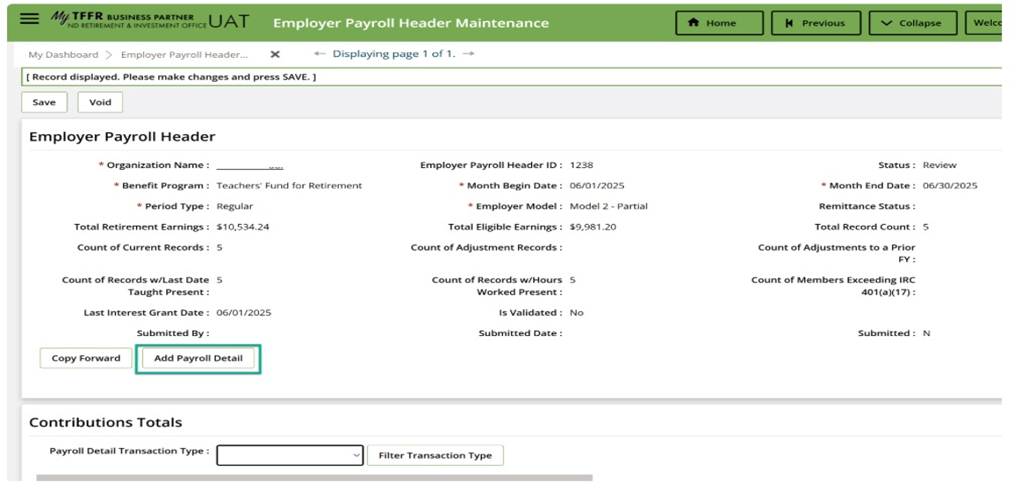
If your payroll software does not include employees without June earnings, after creating the June payroll month header, you will need to manually add the employee records.
- On Employer Payroll Header, select “Add Payroll Detail” (see Screenshot #1).
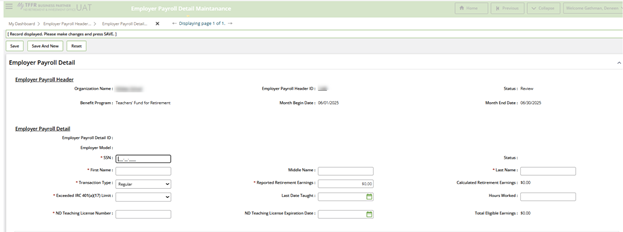
- Enter the required information on the next screen and submit (see Screenshot #2).
  Upcoming System Enhancements
RIO and MyTFFR's software vendor will write and run a query periodically to identify employees with reported salary/contributions but missing Last Day Taught and Hours Worked. This data will be refined and added as a new report for business partners in Employer Self-Service.
Reminder: use MyTFFR's Contact Us tile for assistance
Since all reporting and payment activities are handled in MyTFFR, business partners are reminded to seek support by submitting a ticket by selecting the “Contact Us” tile on MyTFFR's Dashboard. Using this system ensures requests for assistance are tracked, responded to in the order received, and not overlooked.
Please note due to high volumes, response times may take several business days.
For immediate answers to common questions, refer to the MyTFFR Employer Self-Service Handbook, visit RIO's YouTube channel, or select the "Help" button on MyTFFR Dashboard.
|
|