Annual Enrollment for the 2023 calendar year: October 17 through November 4.
ACA Temporary Employee Special Enrollment for the Health Insurance Plan ONLY: November 21 and end on December 9.
Don't keep a stack of printed forms
NDPERS forms are regularly updated. Some of the updates are critical to clarify or update the options members have. Hence, NDPERS is unable to accept old versions of forms.
Do NOT keep a stack of printed forms. It is NDPERS policy to return any outdated forms to the member.
A great tip is - if your form has the NDPERS former address in downtown Bismarck, it is definitely an invalid form. Go ahead and recycle it.
Visit the topic of your interest on the NDPERS website and find the most up-to-date forms. Employees are able to update certain enrollments on Member Self Service (MSS). Any approved changes will be listed on your monthly Benefit Enrollment Report.
Leaving employment: what to do about unused sick leave
When employees separate from employment, they have options to make the most out of their unused sick leave. Members must take action prior to leaving employment and will need your assistance to complete either Option 1 or 2.
Option 1.
Coordinate payout of unused sick leave with employer
At termination, eligible employees may use each 173.3 hours of unused sick leave to purchase service credit. This option is not available in all participating organizations.
This option is appealing for employees as it can increase the retirement benefit (pension) upon their retirement.
Assist the employee by completing Part F of the Conversion of Unused Sick Leave Application (SFN 58358) if pretax funds are being rolled to NDPERS.
Employees that transfer to another NDPERS participating organization may have the option to transfer their unused sick leave.
Each employer may accept or reject unused sick leave hours for transferring employees. Notify employees that only documented hours at NDPERS can be purchased upon terminating employment.
Interested employees must complete the Transfer Forms.
Your responsibility: When you recruit new employees, enter your new team member's information into Employer Self Service (ESS) as close to the hire date as possible. This is how your organization officially notifies NDPERS of the new hire.
NDPERS responsibility: Once you add your new team members in ESS, NDPERS creates and assigns a unique NDPERS Member ID to each of your new hires. Members will receive the NDPERS welcome kit in the mail, and it includes their unique NDPERS Member ID alongside other essential benefit information.
2. Eligible Retirement Contributions: Wages vs Salary
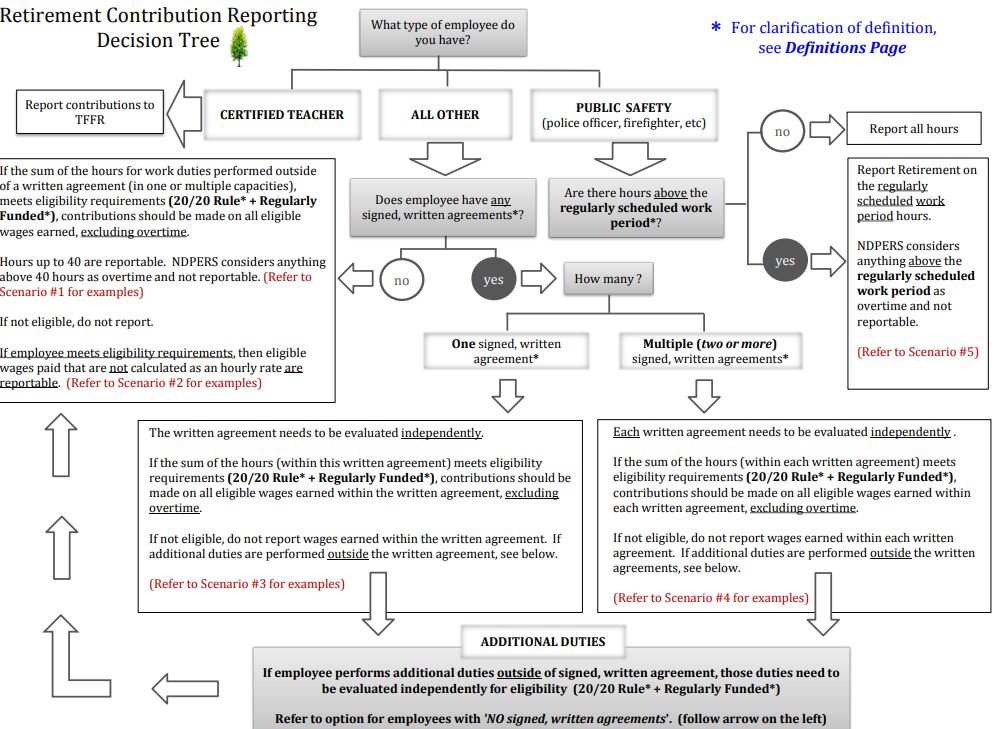
Use the Retirement Contribution Decision Tree to determine if an employee’s earnings (wages or salary) should be considered an eligible agreement/contract, and, if so, reported to NDPERS.
Remember 2 facts:
Not all earned wages are eligible to be reported to NDPERS as retirement contributions (reference wages & salary).