November 12, 2026
WHAT'S NEW:
- NCSIS Grade Level Retention and Promotion Reporting (RP)*
- Attendance Code 2P Updates*
- Data Quality Focus*
- NCSIS Now*
- State Reporting Corner*
- NCSIS Knowledge Base Updates*
- Upcoming Training Information*
- November Digital Leaders Exchange Register NOW!*
REMINDERS:
- Recording Mid-Year Promotions for Reading Retained Students
- NCSIS Coordinator Collaborative
- CRDC Coordination Brief SY2025-26 Updates
- NCSIS Resources
- Requesting Technical Support Points of Contact
*indicates new or updated information
WHAT'S NEW:
 |
|
NCSIS Grade Level Retention and Promotion Reporting (RP)*
New validation reports to collect and review the retention and promotion information from 2025-26 were added to production on Friday, November 6, 2026. NCSIS Knowledge Base articles were published to assist with reviewing the report on Monday, November 9. There will be a webinar hosted on Monday, November 16 to go over the process. This webinar will be recorded and posted to the NCSIS Knowledge Base | NC Department of Public Instruction.
Final collection of data is December 5, 2026.
Webinar
|
Attendance Code 2P Updates*
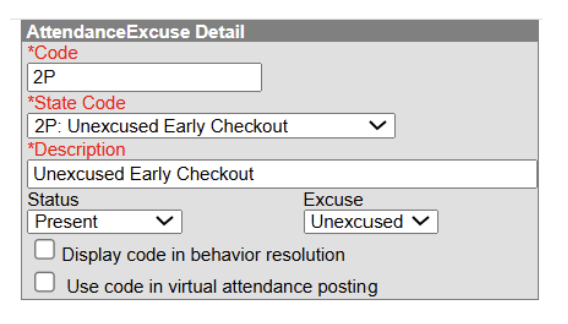
In response to field feedback and ongoing efforts to refine attendance processes, it has been determined that an update to the 2P: Unexcused Early Checkout attendance code must be made.
Public School Units (PSUs) must update the Attendance Code Setup for the 2P status to Present by November 30. This timeline provides PSUs with time to review system impacts, make necessary setup adjustments, and prepare internal or community communications as needed.
If a PSU has not updated the code status by this deadline, NCDPI will apply the update automatically across production instances.
Attendance Code Setup Change
Navigation: Attendance Office > Settings > Attendance Code Setup > 2P Code
- Change the Status to Present.
- Select Save.
A Few Impacts
-
Reporting & Displays: Overnight attendance aggregation refresh will automatically update all impacted tables and reports. The Attendance Aggregation Refresh | Infinite Campus process can be completed to force attendance updates prior to the overnight refresh. Please note that this task should only be completed after school hours.
-
Absence Aggregation: The 2P code is currently displayed/counting as an Absence. Following the overnight or manual attendance aggregation refresh, the status will be updated to Present and no longer display/count as an Absence.
-
Attendance Entry Wizard: Students assigned a 2P code will not be available to select when using the Check-in mode within the Attendance Entry Wizard since the code no longer has a status of absence.
-
PMR Calculations: This change does not alter how PMR calculations function. Present minutes on each attendance record will continue to drive PMR calculations, so maintaining accurate minute entries remains critical.
Test and verify this setup change in your Sandbox before applying the update in Production.
Data Quality Focus*
Welcome to the Data Quality Focus section! Each edition will highlight specific types of data to review, audit and/or correct, helping improve data quality and consistency across the state.
State-Defined Values and Primary Teacher Verification
All courses and/or sections must have State Defined Values (formerly Course Attributes) assigned as appropriate. Use the (NC) Section & Course Attribute Verification validation report to validate this data. The report includes three groups of values:
- Section-level fields
- Course (calendar-level) fields
- Course master fields
Section-level values will be inherited from the course information at the calendar level. If values exist on the course, the section values only need to be completed if they differ from the course.
Additionally, ensure each section has a Primary Teacher assigned in Section Staff History. This information is used by multiple downstream systems and reports. The (NC) Section & Course Attribute Verification validation report also lists the primary teacher for each section; if a section shows no value and is taught by a local or NCVPS teacher, a primary teacher must be assigned.
|

NCSIS Now*
NCSIS Now highlights timely processes, helpful tips, or important reminders that you can put to use right away.
Several PSUs have requested a statement to give to parents to encourage them to answer the FERPA questions that they are asked annually. Please feel free to use the statement below.
Your choices matter! The Family Educational Rights and Privacy Act (FERPA) is a federal law that protects the privacy of student education records and gives families rights concerning access to and disclosure of those records.
This annual form lets you tell us how your student’s information may be shared—for school publications and recognition and, when applicable, military career information, college and scholarship outreach, and sharing ACT scores with North Carolina colleges and universities. For questions 2–4, you will see only the questions relevant to your student.
Please answer each question presented so we can honor your preferences and protect your student’s privacy. You may choose “Yes” for some questions and “No” for others. Thank you for helping us keep your family’s choices up to date!
With the collection of military information recently, there have been questions about the types of information that the military may request. Please see the following information:
Contact Information for Recruitment
Federal law—Section 8528 of the Elementary and Secondary Education Act (20 U.S.C. § 7908) and 10 U.S.C. § 503(c)—requires PSUs receiving federal education funding to provide secondary students’ names, addresses, telephone and mobile phone numbers, and email addresses to military recruiters upon request, subject to applicable opt-outs. Use school-provided email addresses when available. Requests must be addressed within 30 days.
Before sharing, check for an opt-out submitted by the parent or student in the FERPA section of NCSIS.
NC PSUs should direct recruiters requesting recruitment contact lists to the U.S. Army Recruiting Battalion (Raleigh).
Individual Records for Enlistment
When a recruiter requests a student’s transcript or school-maintained ASVAB (Armed Services Vocational Aptitude Battery) scores to support enlistment, the PSU must obtain signed and dated written consent from the parent or eligible student before releasing the records. An eligible student is a student who is 18 or older or attends a postsecondary institution.
The consent must identify the records to be shared, the purpose of the disclosure, and the recipient. Share only the records authorized by the consent.
Not opting out of recruitment contact sharing does not authorize the release of transcripts or ASVAB scores.
|
State Reporting Corner*
PSUs should review the following state reporting due dates and ensure that data is accurate before each applicable deadline. Please note that not all reports require a submission; some are collected through a data pull at COB on the due date.
-
November 30: Academically and Intellectually Gifted (AIG) Headcount
-
Extended to December 4: Dropout Data Collection
-
Extended to December 4: Grade Level Retention/Promotion Data Collection
-
Recurring: Principal’s Monthly Reports 1–9 are due 5 calendar days after each reporting interval.
Due dates and related information may be updated as additional details become available. Visit the State Reporting Due Dates article for the most current schedule, report resources, and data-review locations
|
Upcoming Training Information*
Mark your calendars!
We are excited to offer dedicated professional development for NCSIS Coordinators on March 1st and 2nd in Raleigh! Session plans include comprehensive 1.5-hour workshops and specialized scheduling work sessions.
To ensure these sessions cover what matters most to you during this time of year, please share your topic preferences via this Survey Link by November 18th (COB).
Stay tuned for registration details!
YES! Series - Sign Up!
Check out the November series options! Discovery Week allows you to learn about new topics and branch out to areas and products of Infinite Campus that you may not have used before.
November YES Series Discovery Week Sessions.pdf
Visit the YES Dashboard to register for upcoming events, access recordings, view agendas, and explore available resources. A few hours of training today can save hours of work throughout the school year!
DLSC Events
Be sure to review the DLSC Signature Events Calendar and Eventbrite for upcoming in-person and virtual regional meetings, webinars, and training sessions. These opportunities are designed to keep staff connected, informed, and supported throughout the school year.
*In the DLSC Signature Events Calendar, use the arrows at the bottom of the screen to scroll to monthly event calendars, including upcoming NCSIS webinars!
NCSIS Teacher Training Information
Please use the link below to access teacher training resources for NCSIS. Additional details can also be found at ncsis.gov.
If you have any questions regarding Teacher Resources, please contact Erin Wolfhope at erin.wolfhope@dpi.nc.gov with questions!
|
November Digital Leaders Exchange Register NOW!*
Calling All Digital Leaders!
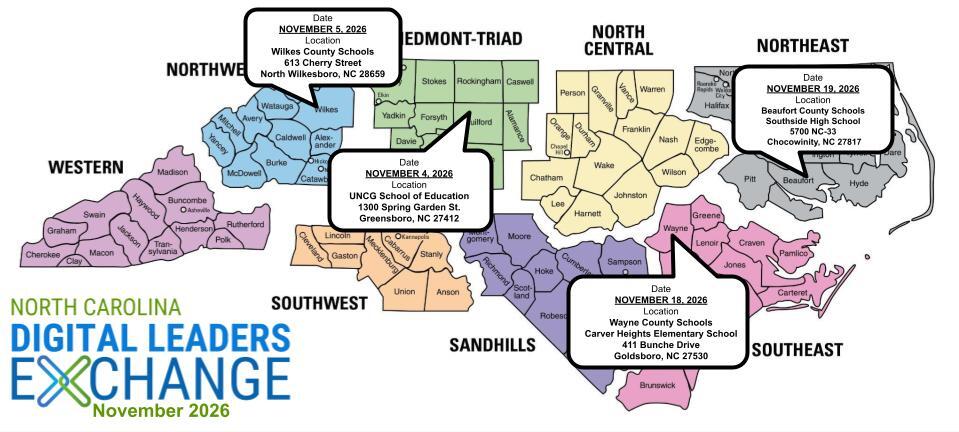
We're excited to bring educators and district leaders from across North Carolina together for our November 2026 Digital Leaders Exchange (DLE)!
This round of DLEs will focus on 𝗖𝘂𝗿𝗿𝗶𝗰𝘂𝗹𝘂𝗺 & 𝗜𝗻𝘀𝘁𝗿𝘂𝗰𝘁𝗶𝗼𝗻, aligned with North Carolina's Digital Learning Plan, and provide opportunities to collaborate, share strategies, explore resources, and connect with colleagues doing similar work across the state.
To provide more targeted and meaningful learning opportunities, this DLE will feature two distinct paths, both centered on Curriculum & Instruction:
𝗣𝗮𝘁𝗵 𝟭: SIS Coordinators — Dedicated learning and collaboration opportunities designed specifically for those supporting student information systems.
𝗣𝗮𝘁𝗵 𝟮: Digital Leaders & Other Participants—Designed for HR Directors, Technology Directors, School Library Media Directors, and other district and school leaders supporting digital learning and instructional initiatives.
Whether you're supporting systems, leading instructional initiatives, or helping shape digital learning in your PSU, there's a place for you at DLE!
📍 Choose the Date & Location That Works Best for You!
|
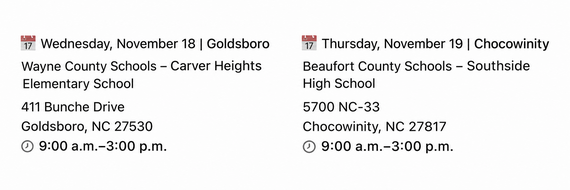 |
🍽️ Lunch will be catered at each location!
Come ready to connect with colleagues, exchange ideas, and explore strategies that support meaningful digital learning and instruction across North Carolina.
Check out our AGENDA: go.ncdpi.gov/novDLE26agenda
REMINDERS:

Recording Mid-Year Promotions for Reading Retained Students
If a student demonstrates at or above grade level performance by November 1, the student's RtA Program should be ended using the following steps:
Navigation: Menu > Student Information > State Programs > Read to Achieve
- Click View on the Read to Achieve program to open the program information.
- Enter the End Date in MM/DD/YYYY format or click the calendar icon to select the date. This should be the date that the student attained proficiency. In this situation, the date should be on or before November 1.
- Select "MYP: Mid-Year Promotion - RtA (by Nov 1)" under the Program Exit Status.
- Enter comments (optional).
- Click Save to end the program.
Note: Entering an Exit Status Reason is no longer required by NCDPI. It is, however, required by the system if you are entering a record manually. If you import data through the Federal/State Update Wizard, the Exit Status Reason is not required.
This information should be entered no later than November 13, 2026. For additional information, please see the Read to Achieve Program (RtA) Article.
Read to Achieve Program (RtA) | NC Department of Public Instruction
|
NCSIS Coordinator Collaborative
Stay up-to-date on the latest NCDPI news, updates, and announcements by participating in the NCSIS Coordinator Collaboratives.
IMPORTANT! Please register for each session in Eventbrite below BEFORE the event starts. If Eventbrite will not allow access at the time of the meeting, we will email all current registrants with the Teams Meeting link—we want you to be on that list!
Upcoming Collaboratives
Please register for each session using the individual links below:
Agenda and supporting materials: https://go.ncdpi.gov/NCSISCoordinatorCollab
Missed a Session?
Recordings of previous Coordinator Collaboratives are available on the Coordinator Collaboratives | NC Department of Public Instruction Knowledge Base.
|
CRDC Coordination Brief SY2025-26 Updates
CRDC Coordination Brief: SY2025–26 Updates
The SY2025–26 CRDC federal submission system opens December 7, 2026, with a final submission deadline of March 5, 2027. PSUs should wait for NCDPI notification before loading or working with data in the federal system while NCDPI completes the state-level data transfer.
Prepare now:
- Review CRDC Coordinator information in both EDDIE and the federal CRDC Submission System. Contact-review instructions are available in the Quick Links section of the CRDC Canvas course.
- Download the SY2025–26 LEA and School Forms from CRDC Communities and review them with the updated Collection by Entity, available in the Quick Links section of Canvas, to identify data that must be collected locally.
- Check the Canvas calendar for upcoming CRDC webinars and support sessions.
Contact the SEA CRDC Coordinator with questions at NC.OCR.CRDC@dpi.nc.gov.
|

NCSIS Resources
Technology Maintenance Windows | Infinite Campus lists dates and times that Infinite Campus may not be available due to routine maintenance.
Campus Community contains the information you need to learn how to use Infinite Campus through product documentation, videos & simulations, study guides, forums, and much more. Whether you are a teacher, data manager, or Infinite Campus user, you will find the learning resources in a clearly defined pathway for a seamless transition from PowerSchool.
Campus Passport is a collection of on-demand, self-paced courses that can be assigned to new and existing staff. Accessed through the Campus Community, you will find Instructor-Led Training, specific E-Learning courses, or select a learning plan based on your district role.
NCSIS Knowledge Base | NC Department of Public Instruction contains articles, video recordings and other resources about North Carolina processes.
GitHub Vendor Integrations Repository is a website where examples of 3rd party extract formats can be found (these are crowd sourced and should be vetted fully before implementing in your PSU).
Ad Hoc Filter Sharing Community is a shared Google folder for Ad Hoc filters that PSUs have created. Please add any helpful filters/reports you have created, and use others as you need. These are not guaranteed to work in your PSU and should be vetted fully.
-
Naming Convention: Ad Hoc Name - PSU Name
- You’re welcome to include your email address within the document (optional).
-
Permissions: You have editing access—please proceed with caution!
-
PII: Do not upload any PII to the shared folder
NCSIS website (http://ncsis.gov) contains links to previous bulletins, as well as the latest information about events held throughout the year.
Click on the link below to learn how to sign up to receive this weekly NCSIS bulletin.
How to Subscribe to a NC DPI DTL Bulletin/Newsletter
|
Requesting Technical Support Points of Contact
Please review the information below on how to submit support tickets:
Contact Infinite Campus for assistance with:
NCSIS Application/Support Issues
Submit a case: https://support.infinitecampus.com
Infinite Campus Enhancement Requests—Please use the link below to share the areas of the product your PSU would most like to see improved, suggest new functionality, and indicate whether you’d like to participate in future discussions.
Infinite Campus Enhancement Requests
Contact DPI for assistance with:
- NCDPI Business Questions
- Duplicate Students
- Amplify/Missing Students
Submit a request: https://go.ncdpi.gov/help
For additional technical support contacts, please refer to the document below:
Requesting Help
|
|
 |
|