October 29, 2026
WHAT'S NEW:
- Recording Mid-Year Promotions for Reading Retained Students*
- NCSIS .2639.14 Upgrade*
- Attendance Code 2P Updates*
- Data Quality Focus*
- NCSIS Now*
- November Digital Leaders Exchange Registration is OPEN!*
REMINDERS:
- IMPORTANT UPDATE: ATR Designations in NCSIS
- PMR Submission Update
- State Reporting Corner
- NCSIS Coordinator Collaborative
- NCSIS Knowledge Base Updates
- Upcoming Training Information
- CRDC Coordination Brief SY2025-26 Updates
- NCSIS Resources
- Requesting Technical Support Points of Contact
*indicates new or updated information
WHAT'S NEW:

Recording Mid-Year Promotions for Reading Retained Students*
If a student demonstrates at or above grade-level performance by November 1, the student's RtA Program should be ended using the following steps:
Navigation: Menu > Student Information > State Programs > Read to Achieve
- Click View on the Read to Achieve program to open the program information.
- Enter the End Date in MM/DD/YYYY format or click the calendar icon to select the date. This should be the date that the student attained proficiency. In this situation, the date should be on or before November 1.
- Select "MYP: Mid-Year Promotion - RtA (by Nov 1)" under the Program Exit Status.
- Enter comments (optional).
- Click Save to end the program.
Note: Entering an Exit Status Reason is no longer required.
This information should be entered no later than November 13, 2026. For additional information, please see the Read to Achieve Program (RtA) Article.
Read to Achieve Program (RtA) | NC Department of Public Instruction
|
NCSIS .2639.14 Upgrade*
NCSIS, powered by Infinite Campus, was upgraded to Campus.2639.14 on the evening of October 26, 2026. This update contains important information for state reporting. Please ensure this information is shared with the appropriate staff members.
Please note that this update does not require or indicate a break in submission of PMRs. Please continue to submit PMRs 1 and 2.
Please see these articles for a comprehensive list of updates:
HIGHLIGHTED UPDATES include:
Principal’s Monthly Report (PMR)
- Performance improvements to reduce report execution times
- Warn-06 has moved from the WARNING Validation groups to Fatal-26 in the FATAL Validation groups
- Enrollment Start Date column has been added to the Fatal-26 rule
- Fatal-26 rule now uses the same reporting population and attendance calculation logic as the PMR Student Day Detail report
- Students identified as either Absent Att. or Absent Sch. for more than 50% of instructional minutes on their first instructional day of enrollment will show on the FATAL-26 rule
- The Fatal-26 rule now shows the present minutes and percent present for a student on their first instructional day
- Month 2 (M2) PMR Validation Groups (FATAL, WARNING, and INFO) will now also run the validation for Month 1 (M1) PMR
- Year-Long (YL) PMR Validation Groups (FATAL, WARNING, and INFO) have been inactivated
- The PMR Summary Report now has columns at the end that show the timestamp and user who generated, reviewed, and submitted the report
Legislative Class Size (LCS) Report
- Class Size and Class Size Average now correctly account for cross-enrolled students
- All LCS Reports can be generated, reviewed, and submitted when there is no data to report
|
Attendance Code 2P Updates*
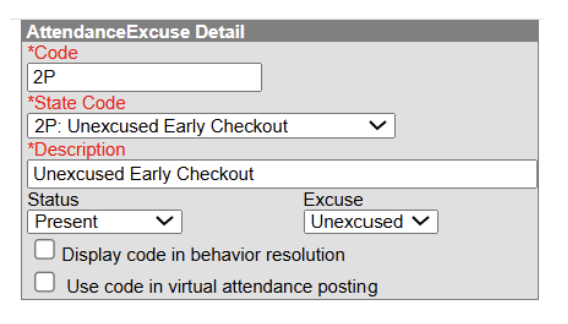
In response to field feedback and ongoing efforts to refine attendance processes, it has been determined that an update to the 2P: Unexcused Early Checkout attendance code must be made.
Public School Units (PSUs) must update the Attendance Code Setup for the 2P status to Present by November 30. This timeline provides PSUs with time to review system impacts, make necessary setup adjustments, and prepare internal or community communications as needed.
If a PSU has not updated the code status by this deadline, NCDPI will apply the update automatically across production instances.
Attendance Code Setup Change
Navigation: Attendance Office > Settings > Attendance Code Setup > 2P Code
- Change the Status to Present.
- Select Save.
A Few Impacts
-
Reporting & Displays: Overnight attendance aggregation refresh will automatically update all impacted tables and reports. The Attendance Aggregation Refresh | Infinite Campus process can be completed to force attendance updates prior to the overnight refresh. Please note that this task should only be completed after school hours.
-
Absence Aggregation: The 2P code is currently displayed/counting as an Absence. Following the overnight or manual attendance aggregation refresh, the status will be updated to Present and no longer display/count as an Absence.
-
Attendance Entry Wizard: Students assigned a 2P code will not be available to select when using the Check-in mode within the Attendance Entry Wizard since the code no longer has a status of absence.
-
PMR Calculations: This change does not alter how PMR calculations function. Present minutes on each attendance record will continue to drive PMR calculations, so maintaining accurate minute entries remains critical.
Test and verify this setup change in your Sandbox before applying the update in Production.
Data Quality Focus*
Welcome to our new section, Data Quality Focus! Each edition will highlight specific types of data to review, audit, and/or correct, helping improve data quality and consistency across the state.
Updated Validation Report: (NC) Attendance Code Audit
- (NC) 1P/2P > 50% of Day
Identifies students with a 1P or 2P attendance code whose total absent minutes associated with that code exceed 50% of the calendar's configured Student Day minutes.
- (NC) Attendance Code Configuration Verification
Verifies that all 28 required NC attendance codes are correctly configured for each calendar. Each Code must match its State Code and have the required Status and Excuse. Missing, duplicate, and unauthorized codes are identified. Uses the End Year, District, School, and Calendar Context Menu settings.
The Code Validation column displays:
- *Correct - Code is configured correctly.
- *Missing Code! - Required code is missing.
- *Unauthorized Local Code! - Code is not state-approved.
- *Duplicate Attendance Code! - Code exists more than once.
- *Incorrect State Code! - Shows required State Code.
- *Incorrect Status! - Shows required Status. *Incorrect Excuse! - Shows required Excuse.
- *Incorrect Status and Excuse! - Shows both required values.
The report also displays Total Codes, Required Codes, and Count Validation to identify missing, extra, or duplicate codes.
|

NCSIS Now*
NCSIS Now highlights timely processes, helpful tips, or important reminders that you can put to use right away.
Academically and Intellectually Gifted (AIG) Headcount - Fall
The Fall AIG Headcount is collected through a state data pull; there is no “submit” button in NCSIS. It includes students who were enrolled on November 15 and have a Gifted program record with a start date of November 15 or earlier. Data will be collected from all LEAs and all charter schools with a 2025–2028 Local AIG Plan.
Please review your data and make any needed corrections by close of business on November 30, 2026.
Run AIG Fall Headcount Detail and Summaries, located under System Owned in the Data Validation Group list.
- Select the appropriate SIS context, since the results depend on the context chosen.
- This report includes all detail and summary reports. AIG Fall Headcount Reports 1–10 are also available separately.
- Review the Detail List to confirm that all students your PSU has identified as gifted are included and that their gifted placement information is accurate.
Also, review the (NC) AIG Transfers Report to confirm that all transfer students have the appropriate program assignments in your PSU.
Resources:
AIG (Gifted) Program | NC Department of Public Instruction
AIG Headcount Report | NC Department of Public Instruction
AIG Headcount Resources - Google Drive
|
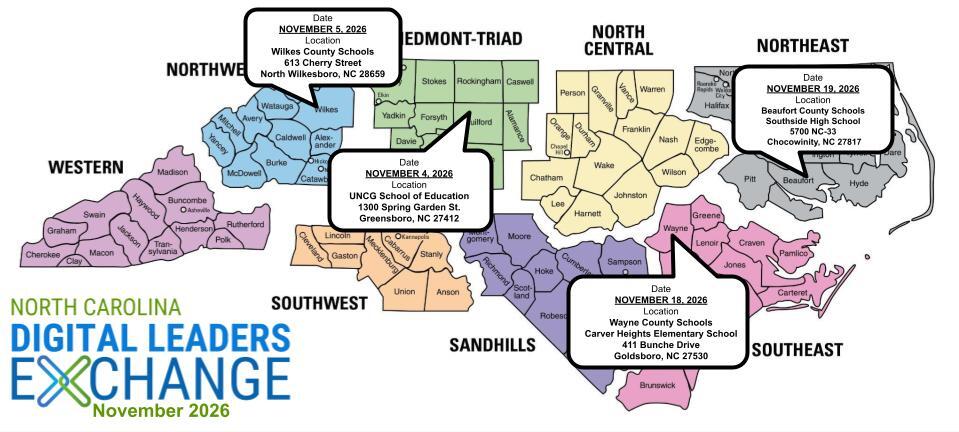

November Digital Leaders Exchange Registration is OPEN!*
Calling All Digital Leaders!
We're excited to bring educators and district leaders from across North Carolina together for our November 2026 Digital Leaders Exchange (DLE)!
This round of DLEs will focus on 𝗖𝘂𝗿𝗿𝗶𝗰𝘂𝗹𝘂𝗺 & 𝗜𝗻𝘀𝘁𝗿𝘂𝗰𝘁𝗶𝗼𝗻, aligned with North Carolina's Digital Learning Plan, and provide opportunities to collaborate, share strategies, explore resources, and connect with colleagues doing similar work across the state.
To provide more targeted and meaningful learning opportunities, this DLE will feature two distinct paths, both centered on Curriculum & Instruction:
𝗣𝗮𝘁𝗵 𝟭: SIS Coordinators — Dedicated learning and collaboration opportunities designed specifically for those supporting student information systems.
𝗣𝗮𝘁𝗵 𝟮: Digital Leaders & Other Participants—Designed for HR Directors, Technology Directors, School Library Media Directors, and other district and school leaders supporting digital learning and instructional initiatives.
Whether you're supporting systems, leading instructional initiatives, or helping shape digital learning in your PSU, there's a place for you at DLE!
📍 Choose the Date & Location That Works Best for You!
|
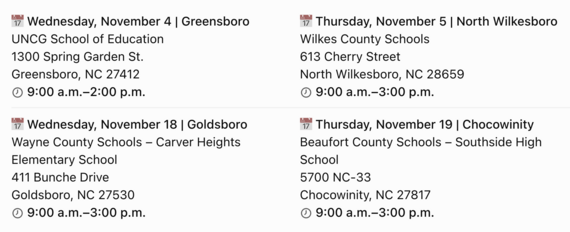 🍽️ Lunch will be catered at each location!
Come ready to connect with colleagues, exchange ideas, and explore strategies that support meaningful digital learning and instruction across North Carolina.
Check out our AGENDA: go.ncdpi.gov/novDLE26agenda
REMINDERS:

IMPORTANT UPDATE: ATR Designations in NCSIS
Thank you for your work over the last several weeks to input ATR designations in the student information system. This is an important new step for ATR monitoring and reporting, and we sincerely appreciate your efforts.
We have heard from several districts that when you add Adult Leadership/Collaborative Impact Leader teachers to the sections of teachers they support, ATR teachers then get access to the gradebook, attendance records, and Canvas sites for those courses. We understand that having access to such a large number of student records can be overwhelming for teachers and concerning for principals.
Given these concerns, we would like to offer districts the option to input ATR teachers as “Section Staff” for sections of teachers they support, rather than as teachers for those sections. This option does not automatically give the ATR teachers access to the gradebook, attendance records, etc. for those sections.
If your district would like to list ATR teachers as “Section Staff” instead of "Teacher," the article linked below provides instructions on how to do so. If you decide to make this change, we ask that it be completed by Friday, November 6.
Note: This is an optional step. If your district is comfortable with having ATR teachers listed as a teacher on the sections of teachers they support, no change is necessary.
Advanced Teaching Roles (ATR) | NC Department of Public Instruction
|
PMR Submission Update
Version 2639.12 was deployed to production and resolves the previously identified PMR issues. PSUs can now submit their PMRs. Please review the scenarios below to determine the appropriate next steps.
Scenario 1: You have not submitted PMR1 or PMR2
Generate, review, and submit PMR1 immediately. The deadline to submit PMR1 was 11:59 pm on October 21st. If you have not submitted, do so now. Generate, review, and submit PMR2 according to the established schedule.
Note: To review the schedule of PMR due dates, run the (NC) School Month Verification validation.
Scenario 2: You have submitted PMR1, but not PMR2
No actions necessary. You do not need to regenerate PMR1. When you generate PMR2, the system will generate PMR1R to reflect any changes that have occurred. Generate, review, and submit PMR2 according to the established schedule.
Scenario 3: You have submitted PMR2
All previously submitted PMR2s must be regenerated and resubmitted. DPI has deleted those submissions so you can regenerate, review, and resubmit immediately. There is no need to request a snapshot delete of PMR2.
Thank you for your patience and continued partnership as we worked to resolve these issues.
|
|
 |

State Reporting Corner
PSUs should review the following state reporting due dates and ensure that data is accurate before each applicable deadline. Please note that not all reports require a submission; some are collected through a data pull at COB on the due date.
-
Extended to December 4: Dropout Data Collection
-
Extended to December 4: Grade Level Retention/Promotion Data Collection
-
November 10: English Learner (EL) Headcount
-
November 10: Legislative Class Size (LCS)
-
November 30: Academically and Intellectually Gifted (AIG) Headcount
-
Recurring: Principal’s Monthly Reports 1–9 are due 5 calendar days after each reporting interval.
Due dates and related information may be updated as additional details become available. Visit the State Reporting Due Dates article for the most current schedule, report resources, and data-review locations.
Upcoming NCDPI Data Pulls:
Military Recruitment—pull scheduled for November 2
- Recipient: US Army Recruiting Battalion (Raleigh)
- Population: Students in Grades 11, 12 and 13 and their address information
- Criteria: Students who respond "NO" to the FERPA Military Question will be excluded. Students with a response of "YES" or null/no response will be included in the pull
- Data to Validate: FERPA questions, household and address information
College Recruitment—pull scheduled for November 2 and Spring TBD
- Recipient: NC Community Colleges, UNC System Office, and NC Independent Colleges and Universities
- Population: Students in Grades 09, 10, 11, 12 and 13 and their ACT score and address information
- Criteria: FERPA College Question MUST be YES to be included in the pull
- Criteria: FERPA ACT Questions MUST be YES to have their ACT score included
- Data to Validate: FERPA questions, household and address information
Note that if all FERPA questions are not completed for students, they can be imported through the Federal/State Program Update Wizard. More information can be found here: Federal/State Program Update Wizard - Start here | Infinite Campus.
|
NCSIS Coordinator Collaborative
Stay up-to-date on the latest NCDPI news, updates, and announcements by participating in the NCSIS Coordinator Collaboratives.
IMPORTANT! Please register for each session in Eventbrite below BEFORE the event starts. If Eventbrite will not allow access at the time of the meeting, we will email all current registrants with the Teams Meeting link—we want you to be on that list!
Upcoming Collaboratives
Please register for each session using the individual links below:
Agenda and supporting materials: https://go.ncdpi.gov/NCSISCoordinatorCollab
Missed a Session?
Recordings of previous Coordinator Collaboratives are available on the Coordinator Collaboratives | NC Department of Public Instruction Knowledge Base.
|
Upcoming Training Information
Mark your calendars!
We are excited to offer dedicated professional development for NCSIS Coordinators on March 1st and 2nd in Raleigh! Session plans include comprehensive 1.5-hour workshops and specialized scheduling work sessions.
To ensure these sessions cover what matters most to you during this time of year, please share your topic preferences via this Survey Link by October 29th (COB).
Stay tuned for registration details!
YES! Series - Sign Up!
Check out the November series options! Discovery Week allows you to learn about new topics and branch out to areas and products of Infinite Campus that you may not have used before.
November YES Series Discovery Week Sessions.pdf
DLSC Events
Be sure to review the DLSC Signature Events Calendar and Eventbrite for upcoming in-person and virtual regional meetings, webinars, and training sessions. These opportunities are designed to keep staff connected, informed, and supported throughout the school year.
*In the DLSC Signature Events Calendar, use the arrows at the bottom of the screen to scroll to monthly event calendars, including upcoming NCSIS webinars!
NCSIS Teacher Training Information
Please use the link below to access teacher training resources for NCSIS. Additional details can also be found at ncsis.gov.
If you have any questions regarding Teacher Resources, please contact Erin Wolfhope at erin.wolfhope@dpi.nc.gov with questions!
|
CRDC Coordination Brief SY2025-26 Updates
CRDC Coordination Brief: SY2025–26 Updates
The SY2025–26 CRDC federal submission system opens December 7, 2026, with a final submission deadline of March 5, 2027. PSUs should wait for NCDPI notification before loading or working with data in the federal system while NCDPI completes the state-level data transfer.
Prepare now:
- Review CRDC Coordinator information in both EDDIE and the federal CRDC Submission System. Contact-review instructions are available in the Quick Links section of the CRDC Canvas course.
- Download the SY2025–26 LEA and School Forms from CRDC Communities and review them with the updated Collection by Entity, available in the Quick Links section of Canvas, to identify data that must be collected locally.
- Check the Canvas calendar for upcoming CRDC webinars and support sessions.
Contact the SEA CRDC Coordinator with questions at NC.OCR.CRDC@dpi.nc.gov.
|

NCSIS Resources
Technology Maintenance Windows | Infinite Campus lists dates and times that Infinite Campus may not be available due to routine maintenance.
Campus Community contains the information you need to learn how to use Infinite Campus through product documentation, videos & simulations, study guides, forums, and much more. Whether you are a teacher, data manager, or Infinite Campus user, you will find the learning resources in a clearly defined pathway for a seamless transition from PowerSchool.
Campus Passport is a collection of on-demand, self-paced courses that can be assigned to new and existing staff. Accessed through the Campus Community, you will find Instructor-Led Training, specific E-Learning courses, or select a learning plan based on your district role.
NCSIS Knowledge Base | NC Department of Public Instruction contains articles, video recordings and other resources about North Carolina processes.
GitHub Vendor Integrations Repository is a website where examples of 3rd party extract formats can be found (these are crowd sourced and should be vetted fully before implementing in your PSU).
Ad Hoc Filter Sharing Community is a shared Google folder for Ad Hoc filters that PSUs have created. Please add any helpful filters/reports you have created, and use others as you need. These are not guaranteed to work in your PSU and should be vetted fully.
-
Naming Convention: Ad Hoc Name - PSU Name
- You’re welcome to include your email address within the document (optional).
-
Permissions: You have editing access—please proceed with caution!
-
PII: Do not upload any PII to the shared folder
NCSIS website (http://ncsis.gov) contains links to previous bulletins, as well as the latest information about events held throughout the year.
Click on the link below to learn how to sign up to receive this weekly NCSIS bulletin.
How to Subscribe to a NC DPI DTL Bulletin/Newsletter
|
Requesting Technical Support Points of Contact
Please review the information below on how to submit support tickets:
Contact Infinite Campus for assistance with:
NCSIS Application/Support Issues
Submit a case: https://support.infinitecampus.com
Infinite Campus Enhancement Requests—Please use the link below to share the areas of the product your PSU would most like to see improved, suggest new functionality, and indicate whether you’d like to participate in future discussions.
Infinite Campus Enhancement Requests
Contact DPI for assistance with:
- NCDPI Business Questions
- Duplicate Students
- Amplify/Missing Students
Submit a request: https://go.ncdpi.gov/help
For additional technical support contacts, please refer to the document below:
Requesting Help
|
|
 |
|