NCED CONNECTION
OCTOBER
UPCOMING EVENTS & NEWS
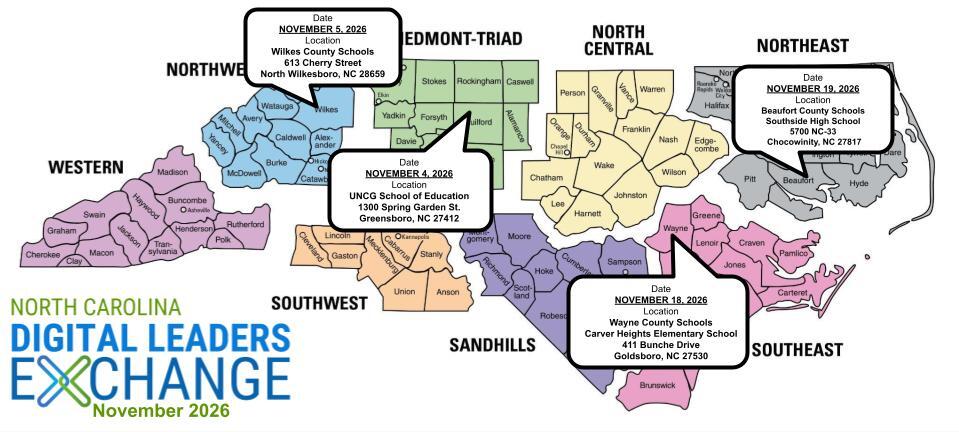
November Digital Leaders Exchange Registration is OPEN!*
Calling All Digital Leaders!
𝗡𝗼𝘃𝗲𝗺𝗯𝗲𝗿 𝗗𝗶𝗴𝗶𝘁𝗮𝗹 𝗟𝗲𝗮𝗱𝗲𝗿𝘀 𝗘𝘅𝗰𝗵𝗮𝗻𝗴𝗲 𝗥𝗲𝗴𝗶𝘀𝘁𝗿𝗮𝘁𝗶𝗼𝗻 𝗶𝘀 𝗢𝗣𝗘𝗡!
We're excited to bring educators and district leaders from across North Carolina together for our November 2026 Digital Leaders Exchange (DLE)!
This round of DLEs will focus on 𝗖𝘂𝗿𝗿𝗶𝗰𝘂𝗹𝘂𝗺 & 𝗜𝗻𝘀𝘁𝗿𝘂𝗰𝘁𝗶𝗼𝗻, aligned with North Carolina's Digital Learning Plan, and provide opportunities to collaborate, share strategies, explore resources, and connect with colleagues doing similar work across the state.
To provide more targeted and meaningful learning opportunities, this DLE will feature two distinct paths, both centered on Curriculum & Instruction:
𝗣𝗮𝘁𝗵 𝟭: SIS Coordinators — Dedicated learning and collaboration opportunities designed specifically for those supporting student information systems.
𝗣𝗮𝘁𝗵 𝟮: Digital Leaders & Other Participants—Designed for HR Directors, Technology Directors, School Library Media Directors, and other district and school leaders supporting digital learning and instructional initiatives.
Whether you're supporting systems, leading instructional initiatives, or helping shape digital learning in your PSU, there's a place for you at DLE!
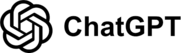
📍 Choose the Date & Location That Works Best for You!
DTL Signature Events
Be sure to check the DTL Signature Events Calendar* or Eventbrite for upcoming in-person and virtual regional meetings and training sessions. Don’t miss out on valuable opportunities to connect, learn, and stay informed!
DTL Signature Events Calendar
|
|
|
 |
SCHOOLNET
Schoolnet Updates
The Schoolnet Secure Browser has been updated to resolve the cache issue reported earlier. Please follow the instructions below to update the application to the latest version.
If you have any questions or encounter any issues during the update process, please submit a ServiceNow case for Schoolnet support.
Updated Secure Browser Installation Guide
Schoolnet Webinars
2026-27 Schoolnet webinars have been scheduled and are available to register via Eventbrite. Registration is also available on the Schoolnet homepage.
All previous recordings are available on our Schoolnet YouTube page.
Check it out here:
Schoolnet YouTube Playlist
CANVAS
Accessibility Resources in Canvas
Canvas Release Notes and Product Updates
- Revised CLASS Document
- Upcoming
NCSIS for EDUCATORS
 |
|
Campus Learning Monthly Updates
Checkout the newest update as well as updates made available in previous versions of Campus.
Campus Learning Feature Updates
|
|
 |
|
Transitioning from Canvas to Campus Learning
Are you considering using Campus Learning as your LMS? These resources can help you prepare your teachers for the move from Canvas to Campus Learning.
Transition to Campus Learning
|
|
Supporting new teachers with NCSIS
Need training resources for new teachers? Check out this resource for links to Knowledge Base articles and videos, practice tasks to try, and professional development presentations. Link to training resource doc.
|
EMERGING TECHNOLOGIES
AI Solve-A-Thon
-
Save the Date! The AI Solve-a-Thon will be in Raleigh on March 2, 2026
-
Tracks:
- Student Teams
- Track I: Proposal: Develop a proposal for using AI to address a school or community challenge.
- Track II: Implementation: Build an AI-powered solution to address a school or community challenge.
- Educator Teams
- Track III: Develop an innovative way to teach an AI concept or create an AI-powered tool to improve classroom instruction, communication, or efficiency.
- More information is coming soon!
MagicSchool Professional Learning
|
|
 |
Statewide AI Goals
- Session Law 2026-41
- AI Policy
- DPI must provide a model policy by 1.15.27
- All PSUs must adopt an AI policy by 6.30.27
- AI Training
- Friday Institute must provide 10-hr training course by 6.30.27
- All NC teachers must complete training by 6.30.28
- North Carolina Statewide AI Strategic Roadmap
- AI Guidelines
- PSUs adopt AI guidelines by March 2027
- Shifting that goal to adoption by June 2027
AI Wednesday Webinars
- All webinars are 3:30 - 4:30 pm
- Registration: go.ncdpi.gov/AIwebinar
-
YouTube Channel for recordings
-
Weds 10/28/26 - From Learning About AI to Learning Alongside AI: Explore NC’s K–12 Continuum for Student Use with Stacy Lovdahl
- Description: What should students know and be able to do with AI as they progress through school? Grounded in NCDPI’s Laying the Foundation for Student AI Use guidance, this session explores the progression from AI Awareness → AI Literacy → AI Fluency and what developmentally appropriate AI learning looks like across grade spans. Using a practical Know → Do → See → Support framework, participants will examine what students should know and do, see classroom examples that make the continuum visible in practice and explore resources for supporting safe, ethical and purposeful student AI learning.
- Weds 11/11/26 - No webinar, Veteran’s Day
- Weds 11/25/26 - No webinar, day before Thanksgiving
-
Weds 12/9/26 - Vibe Coding for Educators: The BETA Model with Meredith Ward Hill
- Description: Explore how to use AI to create custom classroom tools without coding experience. Through live demonstrations and hands-on practice, participants will use the BETA framework (Build, Examine, Try Again, Apply) to design standards-aligned games and interactive activities that strengthen student thinking and agency. Learn to evaluate AI-generated tools for instructional quality, accessibility, privacy, and security, and understand what to consider before sharing them with students. Leave with practical strategies for creating, refining, and responsibly using AI-built resources.
|
SLMC
Beyond the Books: Putting IMPACT into Practice
What does an effective school library program look like in today's schools and how can school and district leaders help it thrive?
North Carolina's revised IMPACT Guidelines provide a framework for strengthening school library programs and connecting their work to literacy, inquiry, digital learning, and student success. From developing readers and critical thinkers to navigating AI, evaluating information, and creating meaningful learning experiences, school librarians are important partners in addressing today's instructional priorities.
Our IMPACT webinar series is moving beyond the Guidelines to explore what implementation looks like in practice, with sessions available on demand.
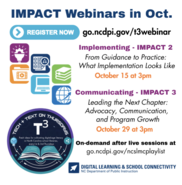
Coming October 29 at 3 PM: Leading the Next Chapter — Advocacy, Communication, and Program Growth. We'll explore how school librarians and leaders can use the language and lens of IMPACT to communicate program value, demonstrate student learning, connect with school and district priorities, and build support among stakeholders.
School librarians, administrators, instructional coaches, digital learning leaders, and other education partners are welcome!
🔗 Register for the October 29 webinar | Must use your email associated with an NC school system; only registered participants will be sent the link the day of the webinar.
|
Community Media Advisory Committees: Shared Resources & District Collaboration
As North Carolina public school units navigate the new Community Media Advisory Committee requirements established through the 2026 Appropriations Act, NCDPI has created a Community Media Advisory Committees Shared Padlet to support collaboration and information-sharing across districts.
District leaders are invited to contribute and explore:
-
PSU Policies: Publicly shareable board policies, adopted or under consideration.
-
PSU Procedures: Local processes, manuals, and implementation resources.
-
FAQs from PSUs: Questions and considerations emerging as districts navigate implementation.
-
Resources: Legislative references, professional resources, and other relevant information.
This is a community-sourced space, not an official implementation guide or collection of NCDPI-approved resources. The goal is to help districts learn from one another, share local approaches, and identify common questions and needs.
Whether your district has resources to share or questions still being explored, your participation is welcome and valuable.
NCEES
 |
Site and District Admin Office Hours
NCDPI is introducing monthly NCEES Office Hours to provide informal support for District Administrators, Site Administrators, and Principals. These sessions are designed to give you direct access to the NCEES team for questions, troubleshooting, and guidance throughout the school year. There is no presentation or set agenda. Join for a few minutes to ask a quick question or stay for the full hour. Note: CEUs are not awarded for participation in these support sessions.
2026 to 2027 Meeting Dates: November 9, December 14, 2026; January 11, February 8, March 8, April 12, May 10, and June 14, 2027.
District Administrator Office Hours
When: Second Monday of each month, 8:30 to 9:30 a.m.
District Administrator Meeting Link: Click the link to join. No pre-registration is required.
Site Administrator and Principal Office Hours
When: Second Monday of each month, 10:00 to 11:00 a.m.
Site Administrator Meeting Link: Click the link to join. No pre-registration is required.
|
New for 2026: On-Demand NCEES Courses
Missed a webinar but still want credit? Many NCEES webinars are now available as on-demand learning opportunities. Find courses by searching the PD Catalog or the training opportunities documents:
To receive credit, register for the course, watch the entire video, and score at least 80% on the quiz.
|
|
 |
November NCEES Reporting Webinars
Reports: Staff Evaluations, Dashboard, and Quick in NCEES
November 18, 2026;10:00–11:00 a.m.
Participants will learn about reports available in Staff Evaluations, Staff Dashboards, and how to create a local library of NCEES Quick reports to support your PSU evaluation and professional development reporting needs. Includes how to schedule the system to run your Quick reports.
Target audience: Site and district administrators
Reports: Staff Evaluations, Dashboard, and Quick in NCEES — Click here to register
Reports: Ad-Hoc Reporting and Export to PDF in NCEES
November 19, 2026; 10:00–11:00 a.m.
NCEES District Administrators—take your reporting to the next level with Ad-Hoc Reporting. In this session, you’ll learn how to create both raw data and graphical reports, and how to publish Ad-Hoc reports that allow Site Administrators (Principals) to apply field-level filters for customized data views. We'll also cover how to schedule Ad-Hoc reports to run automatically for consistent data access.
Additionally, discover how to create and run Export to PDF reports that generate individualized PDFs for each staff member—ideal for BT audits and End-of-Year Summary Evaluations
Target Audience: NCEES District Administrators
Reports: Ad-Hoc Reporting and Export to PDF in NCEES — Click here to register
|
Application Window Open: New Remote Academies for the 2027-2028 School Year
Dear Superintendents, Chief Academic Officers, and Technology Directors,
The application window is open for Local Education Agencies (LEAs) interested in establishing a new Remote Academy for the 2027–2028 school year. Under Session Law 2022-59, the North Carolina State Board of Education must approve each Remote Academy plan for a five-year term.
Please submit your application by November 30, 2026. We plan to submit applications to the North Carolina State Board of Education in December, with a first read anticipated in January and a vote anticipated in February.
Prepare a Draft: Click here to make a copy of the draft preparation document
Submit Your Application: Click here to complete the application
In your application, please explain why you want to continue operating your Remote Academy, how it benefits students, and how you will prepare, train, and support educators to teach effectively in a remote setting.
Office Hours: We will host two sessions to answer questions and provide support with the application process.
Please contact us with any questions.
Thank you for your ongoing efforts to support student success.
EBSCO
Share Your Research Success Story!
Are you using Britannica or EBSCO to support a project, paper, lesson plan, or personal research? We'd love to hear about it!
Both resources provide trusted, high-quality information that helps users find accurate answers, explore new topics, and build confidence in their research. Whether you uncovered a key source through EBSCO's extensive databases or gained valuable background knowledge from Britannica's expert-reviewed content, your experience can inspire others to make the most of these powerful tools.
Tell Us:
- How did Britannica or EBSCO help with your research?
- What information did you find that made a difference?
- How did these resources save you time or improve your results?
Share your story and help us showcase the real-world impact of reliable research tools. Your feedback may encourage fellow researchers, students, educators, and lifelong learners to discover new ways to succeed.
We look forward to hearing how Britannica or EBSCO has supported your research journey!
SEND TO AUDREY.LONG@DPI.NC.GOV
Ebsco Webinars 2026-27
These sessions provide opportunities for educators and staff to learn more about EBSCO resources, explore helpful features and tools, and discover ways to support teaching and learning. Be sure to check out the 2026-27 EBSCO webinar information for upcoming sessions and details.
BRITANNICA
Webinar offered through Britannica
Hit Play on What’s Next
Build your lineup with upcoming webinars from Britannica Education.
Explore upcoming sessions designed to bring fresh ideas, practical strategies, and expert insights to your classroom. Check out the lineup, save your spot, and rock on.
Upcoming Webinars - Britannica Education - US
NOTE: You will receive a certificate of participation if you attend the LIVE webinar.
Indigenous People Celebration
Britannica invites you to explore their collection of resources celebrating Indigenous cultures, histories, and traditions. These materials provide valuable insights into the rich heritage, contributions, and perspectives of Indigenous communities. Take a moment to learn, reflect, and deepen your understanding as we honor and recognize Indigenous peoples and their enduring legacy.
Indigenous Peoples’ Day Resource Hub
Britannica Webinars 2026-27
These webinars are designed to help educators make the most of Britannica resources. Topics include exploring new features in Britannica School and Britannica Escolar, strengthening research and digital literacy skills, and using gamification to make research more engaging for students.
Check out BRITANNICA 26-27 for the full webinar schedule, session descriptions, and registration links.
DIGITAL ACCESSIBILITY
Digital Accessibility: Building Accessibility Into Job Roles
Sustainable digital accessibility work depends on more than tools, checklists, or the efforts of one accessibility specialist. Accessibility also needs to be reflected in the responsibilities and skills of the people who create instructional materials, select technology, lead schools, support educators, manage information technology, and make purchasing decisions.
The K–12 Accessibility Skills Hiring Toolkit, developed by Teach Access in partnership with NCADEMI, can help school systems incorporate accessibility into job descriptions and hiring processes.
The toolkit provides role-specific examples for positions across school leadership, teaching, curriculum and instruction, educational technology, information technology, special education, assessment, and assistive technology. Depending on the position, the guidance includes:
- Suggested accessibility responsibilities
- Required and preferred qualifications
- Knowledge, skills, and abilities
- Examples of what success may look like
- Pre-screening and interview questions
- Learning and professional-development resources
The toolkit is not a recommendation to copy every item into every position or to expect every applicant to arrive as an accessibility expert. Instead, it can serve as a menu that Human Resources staff, hiring managers, and position supervisors can adapt within their local hiring and classification processes.
It may also help teams review existing positions, clarify where accessibility responsibilities belong, and identify professional-learning needs for current staff.
The next time a position is created, revised, or filled, consider asking: What accessibility responsibilities are connected to this role, and what knowledge or support will the employee need to carry them out successfully?
Learn More: NCDIT A11y Community of Practice
The N.C. Department of Information Technology hosts a monthly Digital Accessibility Community of Practice, also known as the A11y CoP. The group is open to anyone interested in digital accessibility, whether they are new to the topic or already working in this area.
The next meeting will be held Tuesday, October 27, from 11 a.m. to noon. Meetings feature guest speakers and conversations about accessibility practices, technical challenges, solutions, and emerging issues.
Join the NCDIT A11y Community of Practice to receive meeting invitations and presentation details.
Try This Accessibility Habit: Use Built-In Headings
A heading is more than text that is bold, larger, or a different color. Built-in heading styles give a document or webpage meaningful structure that assistive technologies can identify and use for navigation. They also make longer content easier for everyone to scan.
Use the heading tools built into Word, Google Docs, Canvas, and other content editors:
- Use the document title or Heading 1 for the main title.
- Use Heading 2 for major sections.
- Use Heading 3 for subsections within a Heading 2 section.
- Keep headings brief, clear, and descriptive.
- Follow a logical order rather than skipping heading levels.
Less helpful: Manually making a section title bold and increasing its font size.
More helpful: Applying the Heading 2 style to identify the text as the beginning of a major section.
Choose a heading level based on the content’s structure, not on how the heading looks. If the default style does not match the design you want, change the appearance of the style rather than selecting an incorrect heading level.
As a quick check, open the Navigation Pane in Microsoft Word or the Document Outline in Google Docs. Your headings should create a clear and logical outline of the content.
Before sharing your next document, ask: Could someone understand and navigate this content by reviewing its headings alone?
Resource Spotlight: Upcoming Learning Opportunities
Several upcoming virtual learning opportunities may be helpful to staff working in education, technology, communications, procurement, and digital accessibility:
-
How Accessibility and Digital Teams Are Using AI — October 28 at 9 a.m. Eastern. This free AbilityNet and Microsoft webinar will explore how accessibility teams are using artificial intelligence, where automated testing fits alongside expert and disabled-user testing, and the limitations, risks, and governance considerations involved. A recording will be provided to everyone who registers.
-
Accessibility Before Accommodation — The remaining sessions in this NCADEMI series will be held November 10 and December 8 from 3–3:50 p.m. Eastern. The November session focuses on embedding accessibility into procurement. The December session addresses evaluating websites, videos, digital activities, and other resources educators select for classroom use.
-
Accessibility in Government Projects: Insights from the Contractor’s Side — November 12 from 11 a.m.–noon Eastern. This no-cost IAAP webinar will examine how contractors approach accessibility in public-sector projects and how agencies can strengthen early planning, solicitations, vendor collaboration, and documentation.
-
The Accessibility Equation: What ADA Title II Means for STEM Education — November 12 from 2–3 p.m. Eastern. This free American Chemical Society webinar will address Title II expectations and accessibility challenges involving equations, scientific notation, chemical structures, graphs, and other complex STEM content. Although the session is framed around higher education, many of the considerations are also relevant to secondary education.
Please consider participating and sharing these opportunities with colleagues whose work involves creating, selecting, purchasing, reviewing, managing, or distributing digital content.
MICRO-CREDENTIALS
Micro-Credential Design Team Applications are OPEN!
Micro-Credential Design Team Applications are OPEN!
DPI is designing the next round of educator micro-credentials and looking for designers!
The design teams will develop pathways that help educators create accessible digital materials and integrate the NC Digital Learning Standards for Students into instruction.
- Digital Accessibility Basics
- Integrating Digital Learning Standards for Students: Empowered Learner
- Integrating Digital Learning Standards for Students: Computational Thinker
Applications close on October 29th.
More information and the application link can be found here
State-Wide Micro-Credentialing Cohorts
The North Carolina Department of Public Instruction’s Digital Learning and School Connectivity is opening an interest application for upcoming state-wide professional learning micro-credential pathways for educators and Data Managers. These pathways support job-embedded professional learning aligned to statewide priorities in artificial intelligence, data privacy, digital citizenship,student knowledge construction, and NCSIS Basics.
Seats are limited, and this form is intended to gauge interest only; completion does not guarantee enrollment. To ensure equitable access, each Public School Unit (PSU) will be prioritized for one seat per pathway before additional participants from the same PSU are considered, based on availability. Educators will be asked to rank their pathway preferences to support placement if a first-choice pathway reaches capacity.
All cohorts will run from September 1, 2026, to April 30, 2027.
Applications will be taken on a rolling basis, and the application will be readvertised throughout the year.
Available Professional Learning Pathways include:
- Basic AI for Educators
- Basic AI for K–2 Classrooms
- Basic AI for 3–5 Classrooms
- Basic AI for 6–8 Classrooms
- Basic AI for 9–12 Classrooms
- Data Privacy for Educators
- Digital Citizenship in the Curriculum
- Student Knowledge Construction in the Curriculum
- NCSIS Basics (For Data Managers)
Please share this opportunity with educators and Data Managers in your PSU who may be interested and encourage them to complete the interest form by
Link to Interest Form
Additional details, including selection notifications and next steps, will be shared after interest submissions have been reviewed.
Thank you for your continued partnership in supporting high-quality, flexible professional learning opportunities across North Carolina
CYBERSECURITY
K-12 Cybersecurity Webinar Series
K-12 Cybersecurity Webinar: Privacy in the Age of AI
- Privacy is still possible in an AI-driven world. Join Diane Dulaney (NCDPI) to explore how personal information is collected, shared, and used by data brokers and AI-powered technologies. Participants will learn practical strategies to protect privacy, reduce digital footprints, and strengthen student privacy and digital citizenship in schools.
Program Updates
I have Cybersecurity questions..
|