September 17, 2026
WHAT'S NEW:
- Statewide Parent Portal Message*
- Graduation Programs & Course Code Updates*
- Data Validation Updates*
- Data Quality Focus*
- Infinite Campus Change Architect Award*
- New SASA Manual Approved*
- NCSIS Now*
- State Reporting Corner*
- NCSIS Coordinator Collaborative Recordings*
- Knowledge Owl*
- It's Almost Time—Have you registered for the 2026 NCED Connect Symposium yet?*
REMINDERS:
- CRDC Coordination Brief
- NCSIS Resources*
- Requesting Technical Support Points of Contact
*indicates new or updated information
WHAT'S NEW:

Statewide Parent Portal Message*
There is a statewide message that is being displayed to parents in the NCSIS Parent Portal. It started September 16, 2026 and will continue through September 20, 2026.
Please see the contents of the post here:
The following message is from the North Carolina Department of Public Instruction
As of Today, Your Senior is Eligible* for Direct Admission to College in NC!
Exciting News for Seniors & Families! NC College Connect, North Carolina's direct admission portal, is open!
Beginning today, your senior* can log in at nccollegeconnect.org (using their existing CFNC student account) to check their eligibility for direct admission into select NC colleges and universities. With direct admission, students are automatically admitted to college -- without a traditional application.
Through the NC College Connect portal, students can:
- View the colleges and universities where they have been directly admitted.
- Complete the NC College Connect form to accept their admission offer(s).
- Receive next steps from the college about enrollment, financial aid, and more.
We also want every student to find their fit and build their future. Whether that path leads to a four-year college or university, a community college, an apprenticeship or straight into the workforce, North Carolina is building more ways than ever for students to discover what fits them and to take their next step with confidence.
Learn more about eligibility, the process, and participating schools here.
*Eligible seniors are those who are on track to graduate with a diploma and in membership and not visiting students.
NOTE: Make sure your senior's CFNC account name matches their NCSIS/Infinite Campus name exactly. The account names must match for direct admission offers to appear.
Thank you,
NC Department of Public Instruction
|

Graduation Programs & Course Code Updates*
9/17/2026 Arts Ed Grad Req Middle School Validation Report Updates
NCDPI will publish optimized versions of the Arts Education Graduation Requirement MS Validation rules on Thursday afternoon, September 17, 2026.
The three rules have been optimized for faster processing when run for All Schools or an individual school calendar. The rules return students in grades 6–8 and support historical, current, and future selected years, including summer inactive/not-yet-rolled students, and appropriately handle transfers, withdrawals, and no-shows.
- (NC) Arts Ed Grad Req – MS Met
- Students that have passed a qualifying Middle School Arts course recorded on the transcript. If multiple courses qualify, the student’s earliest qualifying transcript course is displayed.
- The Met Date is formatted as YYYY-MM-DD.
- (NC) Arts Ed Grad Req – MS Not Met – No Qualifying Course is Scheduled
- Students who have not passed a qualifying transcript course and do not have a qualifying course scheduled.
- (NC) Arts Ed Grad Req – MS Not Met – Qualifying Course is Scheduled
- Students who have not passed a qualifying transcript course but do have a qualifying course scheduled.
-
Scheduled Term reflects the course’s full term, such as Q3, Q1-Q2, Q3-Q4, or Q1-Q4 or other term setup used by the PSU.
- Roster and term dates are formatted as YYYY-MM-DD. The Roster End Date may reflect a student’s withdrawal date from the course.
- The three rules are mutually exclusive, so a student appears in only one result for the selected year. The student’s latest identity record is used to prevent duplicate results following a name change.
-
Selected-Year Grade is the student’s grade for the calendar year in which the report is run. It may represent a historical, current, or future assigned grade.
Navigation: Reporting > Data Validation > Data Validation Report > State Owned
- Select the report.
- Keep Local Data Set selected and select the desired output options.
- For a large data set, select Submit to Batch Queue and then select Generate.
Resources
For Arts Graduation Policy or Course Code Crosswalk questions, please contact Brandon Roeder, NCDPI K–12 Music and Theatre Consultant.
For system-related questions, please submit a ticket to the Infinite Campus Support Desk.
|
Data Validation Updates*
Data Validation Group: (NC) Section & Course Attribute Verification
- Name Change to (NC) Section & Course State Defined Fields Verification
- Removed the (NC) Section & Course Attributes - NULL rule. All information is included in the first rule and can be filtered to find any NULL values.
- Updated the Section Term Type Override Code column to display the “Same as Course” or “Not Set on Course” messaging.
- For more information, please see this article: (NC) Section & Course State Defined Fields Verification | NC Department of Public Instruction
|
Data Quality Focus*
Welcome to our new section, Data Quality Focus! Each edition will highlight specific types of data to review, audit and/or correct, helping improve data quality and consistency across the state.
Data Validation Group: (NC) UID Errors
Rule to Focus on: (NC) Race/Ethnicity Missing Values
Date Due: November 1, 2026
How to fix:
- Search for any student on the report.
- Navigate to Census > People > Demographics.
- Locate Race/Ethnicity and click Edit.
- Choose the appropriate value for “Is the individual Hispanic/Latino?” and mark the appropriate checkbox(es) for “Is the individual from one or more of these races? (check all that apply)”.
- Click Save at the top of the screen.
Possible setup reasons data is incorrect (please check and fix if necessary):
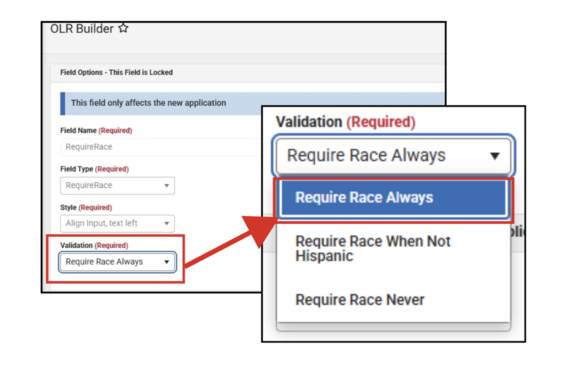
If you use Online Registration (OLR), navigate to OLR Builder (System Settings > Online Registration Setup > OLR Builder). Ensure that the RequireRace Element (Student > RaceEthnicity pleat) has “Require Race Always” in the Validation field:
Infinite Campus Change Architect Award*
Do you know a leader that is making a real difference in your PSU through tools or data contained in Infinite Campus?
The Change Architect Award, co-sponsored by Infinite Campus and NorthStar Education Advisors, honors exceptional district leaders who are transforming K12 education® and reimagining what’s possible for students and communities. If a district leader (including yourself) comes to mind, we invite you to submit a nomination for the Change Architect Award.
Award nominations must be submitted by October 23. Winners will be selected by our committee in November and recognized at the Change Architect Cocktail Reception in Atlanta during the AASA Conference in February 2027.
Submit nominations here: https://www.infinitecampus.com/about/news/change-architect
|
|
 |
 |
|
New SASA Manual Approved*
An updated School Attendance and Student Accounting (SASA) Manual was approved by the NC State Board of Education at their September monthly meeting.
Student Accounting | NC DPI
Catherine Mau from Student Business Services was able to attend our last NCSIS Coordinator’s Collaborative to discuss the SASA changes more in-depth.
You can access the recording of her presentation in the recording of the NCSIS Coordinator’s Collaborative, September 10: Coordinator Collaboratives | NC Department of Public Instruction
The presentation she shared is linked here: SASA Updates 260910
|
NCSIS Now*
NCSIS Now highlights timely processes, helpful tips, or important reminders that you can put to use right away.
PMR Time!
For many of us, the first 20 days are coming to a close and now is the time to be running data validations for your PMR. PMR Validations FATAL, PMR Validations WARNING and PMR Validations INFO all have important information to guide you to a successful PMR reporting season. Please run them early and run them often.
Please see this article for more information on the PMR Validation reports: PMR Validation Review | NC Department of Public Instruction
Deleting Calendars
Any calendars in schools numbered 300 and above that are not being used and have no student enrollments should be deleted.
These calendars should be marked for deletion on the Calendar Information tool, then must be deleted by completing the Delete Calendar Wizard.
|
|
 |
State Reporting Corner*
PSUs should review the following state reporting due dates and ensure that data is accurate before each applicable deadline. Please note that not all reports require a submission; some are collected through a data pull at COB on the due date.
-
October 1: Immigrant Headcount
-
October 15: Advanced Mathematics Course Enrollment Data Collection (AMC)
-
November 1: English Learner (EL) Headcount
-
November 4: Dropout Data Collection
-
November 4 (Anticipated): Grade Level Retention/Promotion Data Collection
-
November 10: Legislative Class Size (LCS)
-
Recurring: Principal’s Monthly Reports 1–9 are due 10 days after each reporting interval.
Due dates and related information may be updated as additional details become available. Visit the State Reporting Due Dates article for the most current schedule, report resources, and data-review locations.
Upcoming NCDPI Data Pulls:
Finish the FAFSA—pull scheduled for September 25 and January 15
- Recipient: CFI/CFNC
- Population: Students in Grades 12 and 13 and their addresses
- Data to Validate: Household and address information
Military Recruitment—pull scheduled for November 2
- Recipient: US Military Recruiting Office
- Population: Students in Grades 11, 12 and 13 and their address information
- Criteria: FERPA Military Question MUST be YES to be included in the pull
- Data to Validate: FERPA questions, household and address information
College Recruitment—pull scheduled for November 2 and Spring TBD
- Recipient: NC Community Colleges, UNC System Office, and NC Independent Colleges and Universities
- Population: Students in Grades 09, 10, 11, 12 and 13 and their ACT score and address information
- Criteria: FERPA College Question MUST be YES to be included in the pull
- Criteria: FERPA ACT Questions MUST be YES to have their ACT score included
- Data to Validate: FERPA questions, household and address information
CFS/Common Follow-up System—pull scheduled TBD
- Recipient: Department of Commerce
- Population: Students age 12 or older
- Criteria: Enrollment and Course Information
- Data to Validate: Student enrollment and course/section enrollment for last year
Note that if all FERPA questions are not completed for students, they can be imported through the Federal/State Program Update Wizard. More information can be found here: Federal/State Program Update Wizard - Start here | Infinite Campus.
|

NCSIS Coordinator Collaborative Recordings*
Stay up-to-date on the latest NCDPI news, updates, and announcements by participating in the NCSIS Coordinator Collaboratives.
IMPORTANT! Please register for each session in Eventbrite below BEFORE the event starts. If Eventbrite will not allow access at the time of the meeting (like last week), we will email all current registrants with the Teams Meeting link—we want you to be on that list!
Upcoming Collaboratives
Please register for each session using the individual links below:
-
September 24 - NEW LINK! NCSIS Coordinator Collaborative - October 8th Tickets, Thursday, October 8 • 1 PM - 2:30 PM EDT | Eventbrite
-
October 8 - NEW LINK! NCSIS Coordinator Collaborative - October 8th Tickets, Thursday, October 8 • 1 PM - 2:30 PM EDT | Eventbrite
-
October 22 - NEW LINK! NCSIS Coordinator Collaborative - October 22nd Tickets, Thursday, October 22 • 1 PM - 2:30 PM EDT | Eventbrite
-
December 3 - NEW LINK! NCSIS Coordinator Collaborative - December 3rd Tickets, Thursday, December 3 • 1 PM - 2:30 PM EST | Eventbrite
-
December 17 - NEW LINK! NCSIS Coordinator Collaborative - December 17th Tickets, Thursday, December 17 • 1 PM - 2:30 PM EST | Eventbrite
Agenda and supporting materials: https://go.ncdpi.gov/NCSISCoordinatorCollab
Missed a Session?
Recordings of previous Coordinator Collaboratives are available on the Coordinator Collaboratives | NC Department of Public Instruction Knowledge Base.
|
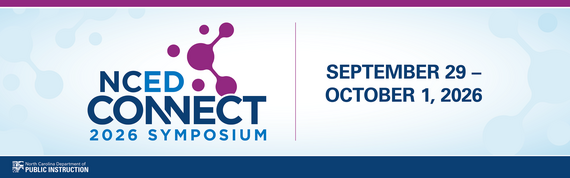 It's Almost Time—Have you registered for the 𝟮𝟬𝟮𝟲 𝗡𝗖𝗘𝗗 𝗖𝗼𝗻𝗻𝗲𝗰𝘁 𝗦𝘆𝗺𝗽𝗼𝘀𝗶𝘂𝗺 yet?*
📅 September 29–October 1, 2026
📍 Koury Convention Center | Greensboro, NC
Explore the Fall 2026 NCED Connect Highlights Booklet for an overview of the professional learning and sessions scheduled for this year’s symposium.
Whether your work centers on 𝗱𝗶𝗴𝗶𝘁𝗮𝗹 𝗹𝗲𝗮𝗿𝗻𝗶𝗻𝗴, 𝗔𝗜, 𝗶𝗻𝘀𝘁𝗿𝘂𝗰𝘁𝗶𝗼𝗻𝗮𝗹 𝘁𝗲𝗰𝗵𝗻𝗼𝗹𝗼𝗴𝘆, 𝘀𝗰𝗵𝗼𝗼𝗹 𝗹𝗶𝗯𝗿𝗮𝗿𝘆 𝗺𝗲𝗱𝗶𝗮, 𝘀𝘁𝘂𝗱𝗲𝗻𝘁 𝗶𝗻𝗳𝗼𝗿𝗺𝗮𝘁𝗶𝗼𝗻 𝘀𝘆𝘀𝘁𝗲𝗺𝘀, 𝗹𝗲𝗮𝗱𝗲𝗿𝘀𝗵𝗶𝗽, 𝗼𝗿 𝗼𝘁𝗵𝗲𝗿 𝗲𝗱𝘂𝗰𝗮𝘁𝗶𝗼𝗻𝗮𝗹 𝗶𝗻𝗶𝘁𝗶𝗮𝘁𝗶𝘃𝗲𝘀, there’s something for you at the NCED Connect Symposium.
✨ Connect with educators and leaders from across North Carolina
💡 Discover ideas and strategies you can bring back to your school or district
🤝 Grow your professional network
- General Registration (Sept 12 - 27) ($350)
- Late Registration (Beginning Sept 28) ($450)
Also, our hotel room block deadline is tomorrow, September 18th. To receive the negotiated conference rate, please reserve your room using the link below:
REMINDERS:
CRDC Coordination Brief
CRDC Coordination Brief: New CRDC Contact Step: Update Both Systems
As we prepare for the SY2025–26 Civil Rights Data Collection, PSUs should ensure CRDC Coordinator information is current in both the federal CRDC submission system and EDDIE.
Federal CRDC ContactsThe federal CRDC team maintains its collection contacts through the federal submission system. These contacts receive federal communications and information needed to establish system access. To add or update a CRDC Coordinator, contact the CRDC Partner Support Center using the Contact Us Form.
EDDIE ContactsReview your PSU’s CRDC contacts in EDDIE and submit needed updates by October 1. NCDPI uses EDDIE contacts for state CRDC communications, resources, and collection support. PSUs are encouraged to maintain two CRDC Coordinators. Visit the NCDPI EDDIE webpage for instructions and assistance.
Keeping both sources current helps ensure the appropriate staff receive federal and NCDPI information throughout the collection.
Contact the SEA CRDC Coordinator with any questions at NC.OCR.CRDC@dpi.nc.gov.
|

NCSIS Resources*
Technology Maintenance Windows | Infinite Campus lists dates and times that Infinite Campus may not be available due to routine maintenance.
Campus Community contains the information you need to learn how to use Infinite Campus through product documentation, videos & simulations, study guides, forums, and much more. Whether you are a teacher, data manager, or Infinite Campus user, you will find the learning resources in a clearly defined pathway for a seamless transition from PowerSchool.
Campus Passport is a collection of on-demand, self-paced courses that can be assigned to new and existing staff. Accessed through the Campus Community, you will find Instructor-Led Training, specific E-Learning courses, or select a learning plan based on your district role.
NCSIS Knowledge Base | NC Department of Public Instruction contains articles, video recordings and other resources about North Carolina processes.
GitHub Vendor Integrations Repository is a website where examples of 3rd party extract formats can be found (these are crowd sourced and should be vetted fully before implementing in your PSU).
Ad Hoc Filter Sharing Community is a shared Google folder for Ad Hoc filters that PSUs have created. Please add any helpful filters/reports you have created, and use others as you need. These are not guaranteed to work in your PSU and should be vetted fully.
-
Naming Convention: Ad Hoc Name - PSU Name
- You’re welcome to include your email address within the document (optional).
-
Permissions: You have editing access—please proceed with caution!
-
PII: Do not upload any PII to the shared folder
NCSIS website (http://ncsis.gov) contains links to previous bulletins, as well as the latest information about events held throughout the year.
Click on the link below to learn how to sign up to receive this weekly NCSIS bulletin.
How to Subscribe to a NC DPI DTL Bulletin/Newsletter
|

Requesting Technical Support Points of Contact
Please review the information below on how to submit support tickets:
Contact Infinite Campus for assistance with:
NCSIS Application/Support Issues
Submit a case: https://support.infinitecampus.com
Infinite Campus Enhancement Requests—Please use the link below to share the areas of the product your PSU would most like to see improved, suggest new functionality, and indicate whether you’d like to participate in future discussions.
Infinite Campus Enhancement Requests
Contact DPI for assistance with:
- NCDPI Business Questions
- Duplicate Students
- Amplify/Missing Students
Submit a request: https://go.ncdpi.gov/help
For additional technical support contacts, please refer to the document below:
Requesting Help
|
|