NCED CONNECTION
JUNE
UPCOMING EVENTS & NEWS
2026-2027 NCED Connect Opt-In Process - IS OPEN!
- The 2026-27 NCED Connect Opt-In process is open!
- Districts and charter schools must complete the NCED Connect opt-in process annually to maintain access to these statewide digital tools and services.
- The Opt-In deadline is tentatively set as July 31, 2026.
- Please visit the NCDPI NCED Connect Opt-In website for additional information.
- The price is $1.50 per ADM
Included at NO COST: • IAM• Infinite Campus• NCEES (Evaluation Component)• #GoOpenNC• EBSCO• Britannica
Opt-In Components ($1.50/ADM-Based Cost):• Schoolnet• NCEES (Local Professional Development Office Component)
Additional Components via convience contract: (ADM-Based Cost):• PRoPL (formerly Transcend)• NAVVY
|
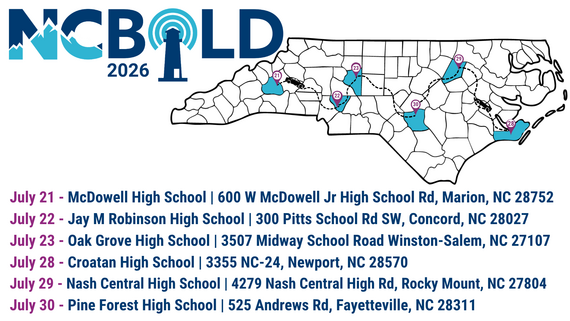 NCBOLD 2026 - There's still time to register!
The #NCBOLD2026 Session Guide Preview is LIVE!
Want a sneak peek at the incredible learning opportunities waiting for you this summer? Explore the preview and start planning your NCBOLD experience today:
go.ncdpi.gov/NCBOLD2026SessionPreview
From AI and digital learning to leadership, literacy, STEM, school improvement, and more, you'll find sessions designed to inspire new ideas and provide practical strategies you can bring back to your school, district, or classroom.
 Have you registered yet? Have you registered yet?
Choose the location that works best for you:
 West Week | July 21–23 West Week | July 21–23
Marion • Concord • Winston-Salem
East Week | July 28–30
Newport • Rocky Mount • Fayetteville
Join educators from across North Carolina for a summer of learning, collaboration, and innovation. Don't just hear about it—be part of it.
Register today: go.ncdpi.gov/NCBOLD2026Registration
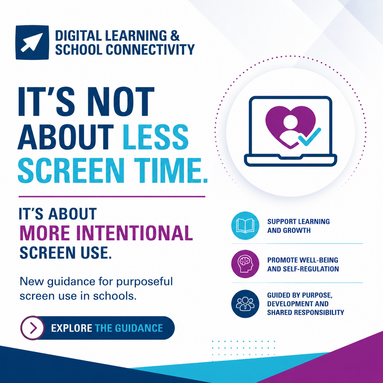
New Guidance for Purposeful Screen Use in Schools
The North Carolina Department of Public Instruction's Office of Digital Learning & School Connectivity has released new 𝗚𝘂𝗶𝗱𝗮𝗻𝗰𝗲 𝗳𝗼𝗿 𝗣𝘂𝗿𝗽𝗼𝘀𝗲𝗳𝘂𝗹 𝗦𝗰𝗿𝗲𝗲𝗻 𝗨𝘀𝗲 𝗶𝗻 𝗦𝗰𝗵𝗼𝗼𝗹𝘀 to support educators, school leaders, and families in fostering healthy digital habits among students.
As technology continues to play an important role in teaching and learning, this guidance encourages schools to move beyond one-size-fits-all approaches to screen time and focus instead on intentional, developmentally appropriate, and purpose-driven use of digital tools. The resource provides research-informed considerations and practical strategies that support learning, student well-being, and self-regulation.
The goal is not to eliminate screens, but to help students use technology in meaningful ways that enhance learning and prepare them for a digitally connected world.
Access the guidance: go.ncdpi.gov/NCDPIGuidanceForPurposefulScreenUse
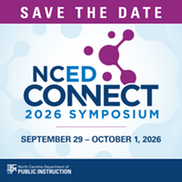
NCED Connect Symposium - Save the Date!
NCED Connect Symposium 2026
September 29–October 1, 2026
Koury Convention Center | Greensboro, NC
As North Carolina's premier educational technology and digital learning conference, the NCED Connect Symposium brings together educators, technology leaders, instructional coaches, administrators, media coordinators, and support staff from across the state to learn, collaborate, and innovate.
This year, we're planning our largest symposium yet, with expanded learning opportunities in:
- Artificial Intelligence (AI) in Education
-
NCSIS for All—including sessions for Data Managers, SIS Coordinators, Teachers, Coaches, Administrators, Central Office Staff, and Support Personnel
- EdTech Innovation+
- Instructional Strategies and Best Practices
- School Library Media
-
NCED Connect Services – including NCEES, Instructional Improvement System (Schoolnet), Canvas, and Open Educational Resources (OER)
-
Leadership Tracks designed for CTOs, Principals, Instructional Coaches, and Central Office Leaders
We invite educators and education professionals from across North Carolina to share their expertise, innovative practices, and success stories.
Registration opens soon—stay tuned for additional details!
|
Emergency Remote Instruction Plans - Due June 30th
Emergency Remote Instruction Plans (RIP):
PSUs that plan to use remote instruction during emergency closures must annually submit an Emergency Remote Instruction (RI) Plan to NC DPI. §S.L. 2022-74/HB 103 authorizes the use of Remote Instruction for emergency closures under §S.L. 115C-84.3(b).
By June 30, 2026, please complete one of the following actions for the 2026–2027 school year:
- Create and submit a new RI Plan for emergency closures, or
- Indicate that your PSU will not complete an RI Plan.
This year, PSUs must choose one of these options. The option to “Utilize the current plan" is not available this year.
Please note that RI Plans cannot be accepted after the deadline. We encourage PSUs to complete the RI Plan Worksheet first and then submit the plan in Qualtrics.
Please reach out to your Regional Consultant regarding any questions. Please share with your PSU’s leadership if you are not the person who submits this RIP.
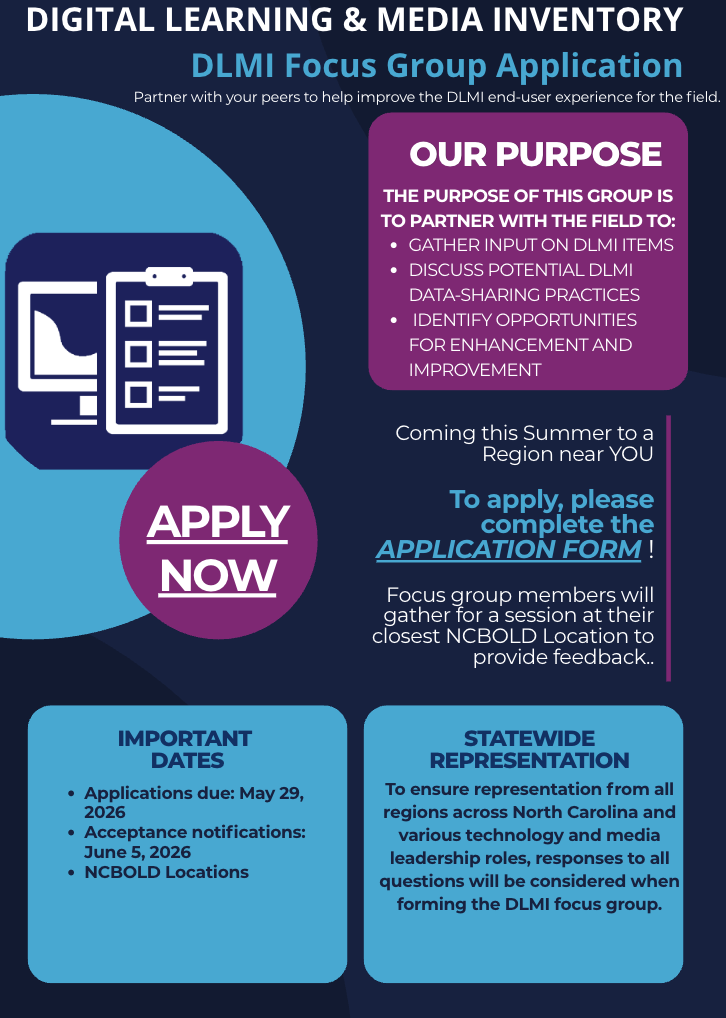
DLMI Focus Group
Join us this summer for the DLMI focus group!
Digital Learning Media Inventory - Due July 10, 2026
The DLMI is open now and is due on Friday, July 10, 2026.
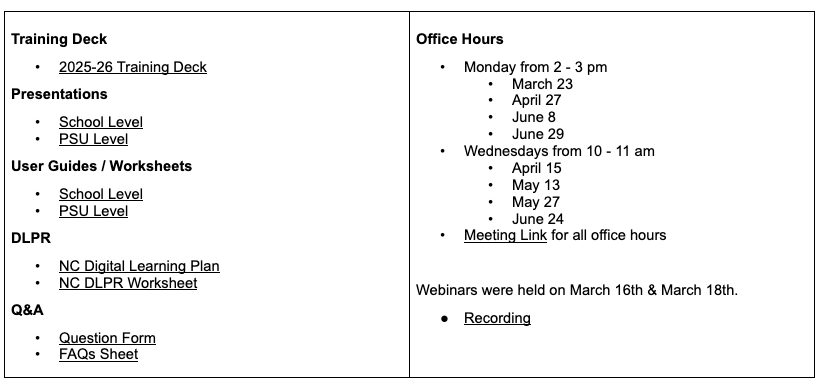
We are here to support you! Information about user guides, slide presentations, webinar dates, and office hours are available on the following slide. Changes to this year’s DLMI include some minor question revisions as well as the addition of Break/Fix items as legislated in HB 378.
 |
|
July Webinar & Events Content Calendar
There are many great webinar opportunities for Technology Directors, teachers, administrators, media coordinators, and staff this May, all led by Digital Learning & School Connectivity!
👉 View our At-A-Glance webinar calendar
👉 Register for upcoming DTL webinars
We encourage you to explore these sessions and share these learning opportunities with your staff.
|
 |
|
DTL Signature Events
Be sure to check the DTL Signature Events Calendar* or Eventbrite for upcoming in-person and virtual regional meetings and training sessions. Don’t miss out on valuable opportunities to connect, learn, and stay informed!
DTL Signature Events Calendar
|
|
SCHOOLNET
Schoolnet Updates
Schoolnet will be having its yearly rollover from June 26 to July 6. The system will be unavailable during this time. After the rollover, the platform will be in the 2026-27 school year, and teachers can begin copying assessments for the future year.
|
|
 |
Upcoming Schoolnet Webinars
2026-27 Schoolnet webinars are currently being scheduled, but all previous recordings are available on our Schoolnet YouTube page.
Check it out here:
Schoolnet Playlist
|
|
 |
CANVAS
Accessibility Resources in Canvas
IgniteAI Announcements
-
Changes to Ignite AI Feature Access starting July 1.
- Canvas will now have tiers of AI products, with some being paid features. Please see the information below on what features are included.
- https://www.instructure.com/products/canvas-tiers
- Reach out to your CSM if you would like to request pricing information for upgraded tiers
Canvas Release Notes and Product Updates
- Revised CLASS Document
- Upcoming
- Deploy Notes
- Release Notes
|
 NCSIS for EDUCATORS
Campus Learning Monthly Updates
🆕 Campus.2615 adds the ability to copy curriculum from My Curriculum to the Curriculum Library. This new feature allows educators without scheduled sections to create and share curriculum content with the PSU. Checkout the newest update as well as updates made available in previous versions of Campus.
Campus Learning Feature Updates
|
|
|
 |
Transitioning from Canvas to Campus Learning
Are you considering using Campus Learning as your LMS? These resources can help you prepare your teachers for the move from Canvas to Campus Learning.
Transition to Campus Learning
|
|
|
 |
Supporting new teachers with NCSIS
Need training resources for new teachers? Check out this resource for links to Knowledge Base articles and videos, practice tasks to try, and professional development presentations. Link to training resource doc.
|
|
|
 |
EMERGING TECHNOLOGIES
 |
|
Meredith Ward Hill Named Emerging Technologies Consultant
We’re pleased to announce that Meredith Ward Hill has been named Emerging Technologies Consultant. In this role, Meredith will lead North Carolina’s artificial intelligence initiatives, supporting the development of guidance, professional learning, and resources to help PSUs navigate the opportunities and challenges of emerging technologies.
|
AI Guidance on Protecting Students' Images Online: New AI-Related Photo Sharing Guidance
In a recent webinar, NCDPI shared updated guidance for public school units (PSUs) on how emerging risks are reshaping best practices for sharing student photos and videos. The session highlighted how schools can make informed, responsible decisions about content posted on social media and public websites.
The Internet Watch Foundation has reported a 26,362% increase in photo-realistic, AI-generated child sexual abuse material in 2025. Additionally, bad actors are using publicly available images to create realistic, manipulated content of specific children—sometimes to extort victims by threatening distribution to family members, peers, or online communities.
In light of these risks, PSUs should carefully evaluate their practices and consider limiting the posting of identifiable student images on public platforms, opting for safer alternatives when possible.
Slides and a recording of the webinar are available for those who would like to learn more about recommended best practices for PSUs. For questions, please contact Privacy@dpi.nc.gov.
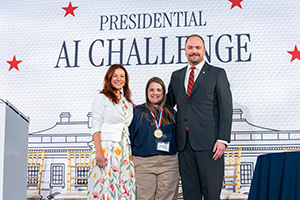
Carrie Robledo, National Champion in the Presidential AI Challenge
Join us in congratulating 🎉Carrie Robledo, second-grade teacher and teacher leader at Star Elementary School, on being selected as a National Champion in the Presidential AI Challenge for her innovative project, AI Insect Detectives: Teaching Machine Learning Through Local Entomology. Through this engaging and forward-thinking project, Carrie introduced second-grade students to the fundamentals of artificial intelligence and machine learning through authentic scientific investigation. By connecting emerging technology with hands-on science learning, students developed foundational AI literacy while strengthening critical thinking, scientific inquiry, and problem-solving skills. Carrie’s work exemplifies the innovative teaching and learning happening across North Carolina classrooms and demonstrates how educators can thoughtfully integrate emerging technologies to create meaningful learning experiences for students.
AI in Education Learning Opportunities
AI Literacy Webinars from Digital Learning & School Connectivity | Registration: go.ncdpi.gov/AIwebinar
-
Wed 7/8/26 From Data to Design: Partnering with AI to Build High-Impact Professional Learning with Lauren Boucher
-
Wed 7/15/26 Leading Responsible Use of AI in K-12 Schools for Principals and School Leaders
ISTE+ASCD Member Webinar
Microcredentials | More information: https://go.ncdpi.gov/MCHandbook
-
For Staff:
-
AI for Educators: Introduces educators to how AI works and supports the use of AI in their daily workflows
-
Teaching Basic AI Literacy in the Classroom: Available by grade band (K-2, 3-5, 6-8, 9-12). Teaches educators how to design age-appropriate learning experiences introducing AI concepts that foster critical thinking and develop digital literacy.
- Grouped into thematic pathways, each pathway contains 10 individual microcredentials that can be taken in any order.
- Completing a single microcredential earns a digital badge. Completing all 10 in a pathway earns a full credential shareable in NCEES.
- Developed NC educators, they can be imported via Canvas Commons or exported as Common Cartridge files for other LMS platforms.
-
Data Privacy: Helps educators understand data privacy laws, evaluate digital tools, protect student information, and foster a culture of digital responsibility
-
For Students:
-
AI Literacy and Ethics
-
K-2: Exploring AI in Everyday Life Safely
-
3-5: Building Responsibility with AI
-
6-8: Safe Use of AI Tools
-
9-12: Career Ready Use of AI
AI Literacy Canvas Courses
-
Human-Centered AI for Educators: Moving from Awareness to Fluency will be released soon for piloting. This 9-module overview of teaching and learning in the age of AI will be available through Canvas and synced with NCEES for CEUs. Intended for use by individual educators, small groups, or PLCs.
- This course is the first in a three-course series. The next two courses will focus on school administrators and district leaders and will be released later this year.
SLMC
IMPACT Guidelines for School Libraries Launce at NCBOLD!
Developed through years of collaborative review, writing, and statewide feedback, the updated guidance reflects the evolving role of school libraries in literacy, inquiry, digital learning, and student success. Be among the first to explore the new guidelines at NCBOLD this summer, where participants will get a first look at the framework, reflect on key updates, and gather ideas and resources to support conversations and planning for the new school year.
|
|
 |
SLMC Webinars & On-Demand
Did you miss our recent NCEES/SLMC webinar? Catch Evaluating the Impact: A Guide for Administrators Supervising SLMCs on-demand along with all 2025-26 SLMC webinars at go.ncdpi.gov/ncslmcplaylist
- Slides at: go.ncdpi.gov/evalslmcs26
- We encourage you to watch, share, and remix this content for your local needs! The slides include detailed speaker notes to help use them in local trainings and we’d be happy to provide materials to support you as you lead discussions and professional learning around evaluating SLMCs.
Free Summer PD Opportunity!
NC State University Librarians are sponsoring a free in-person professional development workshop for high school librarians across the state of North Carolina on August 3, 2026, at James B. Hunt Library in Raleigh, NC. The event will focus on understanding and addressing research skill gaps in order to increase student readiness for college-level research and writing. Registration is now open and will be limited to the first 150 participants. Please feel free to share the event with your professional networks. To participate in the workshop, please fill out the registration form by July 3rd.
High school librarian registration will be prioritized, but if you are a lower school librarian, classroom teacher, or administrator, please reach out to Shira Greer at sggreer@ncsu.edu.
For more information and to register for the event, visit the website. If you have any questions, please feel free to contact bridging-wolfpack@ncsu.edu.
|
|
 |
NCEES
EBSCO
BRITANNICA

Summer Reading 2026 with Britannica
This year's summer reading is going to be fossil-tastic. We asked educators and librarians across the United States to share their favorite books for school-age readers—and the recommendations stomped in faster than a racing Velociraptor! 🦖 Now it’s your turn to make the book list and dino-sized activity kit all yours! Visit for more information and to register.
https://pages.britannicaeducation.com/summer-reading-2026
|
Britannica Education 2026 Summer Reading Kit
Britannica Education 2026 Summer Reading Kit: “Can You Dig It?”
Summer reading season is around the corner! Britannica Education’s 2026 “Can You Dig It?” digital summer reading kit is now available to help libraries and schools inspire curiosity and keep young readers engaged all summer long. The kit includes ready-to-use printable activities, reading materials, and promotional resources designed for school-age readers.
Libraries and schools can download the full digital kit and also request themed bookmarks and stickers to support their summer reading programs. Please note that printed materials are available while supplies last.
USA 250 Commemoration with Britannica
Britannica has created a new resource page to support educators as they begin planning around the USA 250 commemoration. It includes curated Britannica content and materials that can be easily shared with schools and libraries.
Feel free to explore and share with your network:
https://pages.britannicaeducation.com/usa-250
DIGITAL ACCESSIBILITY

Digital Accessibility: Keep the Momentum Going After GAAD
Global Accessibility Awareness Day, observed on May 21, was a reminder that accessibility is part of the everyday work we do when creating documents, presentations, Canvas and LMS content, websites, forms, videos and digital resources.
This month, consider choosing one accessibility habit to strengthen: use built-in heading styles, add meaningful alt text, write descriptive links, check color contrast, caption videos or review PDFs for accessibility before sharing.
A great way to keep learning is through the NCDIT A11y Community of Practice monthly meeting, which is open to anyone interested in digital accessibility. The June 30 meeting will focus on real-world challenges in building accessibility momentum and practical, no-cost first steps teams can take.
To join the NCDIT A11y Community of Practice: Visit the NCDIT Digital Accessibility Community of Practice Registration Page and complete the webform.
Please consider attending and sharing this opportunity with colleagues who create, review, purchase or share digital content.
|
Try This Accessibility Habit: Write Better Links
One simple accessibility habit is to make link text descriptive. Instead of writing “click here” or “read more,” use words that tell the reader where the link will take them or what action they are taking regardless of the other text surrounding the link.
For example:
Less helpful: Click here to register.
More helpful: Register for the NCDIT A11y Community of Practice meeting.
Descriptive links are helpful for everyone, but they are especially important for people using screen readers, people scanning a page quickly, and anyone navigating a document with a list of links. Clear link text also makes newsletters, websites, Canvas pages and shared documents easier to understand out of context.
When adding a link, ask: Would this link still make sense if someone read it by itself?
|
ISTE+ASCD and CoSN ANNOUNCEMENTS
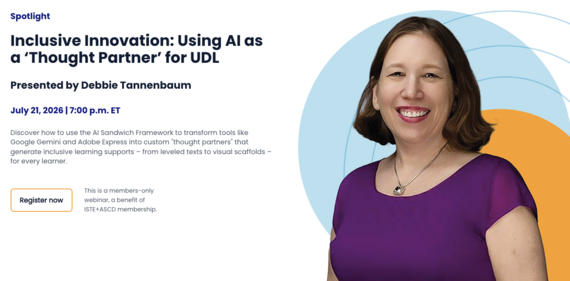 Upcoming ISTE+ASCD Member Webinar: Using AI as a Thought Partner for Inclusive Learning
Join ISTE+ASCD on July 21, 2026, at 7:00 p.m. ET for an engaging webinar that explores how educators can use the AI Sandwich Framework to transform tools such as Google Gemini and Adobe Express into personalized “thought partners” that support every learner.
Participants will discover practical strategies for leveraging AI to create inclusive learning supports, including leveled texts, visual scaffolds, sentence frames, and other resources designed to increase access and engagement for diverse student populations. The session will highlight how intentional AI prompting can help educators personalize instruction while maintaining a focus on equity and Universal Design for Learning (UDL).
Whether you are new to AI or looking to deepen your instructional practice, this webinar offers actionable ideas for using AI to enhance learning experiences and support student success.
Register for Using AI as a Thought Partner Webinar: https://iste-ascd.org/expert-webinars
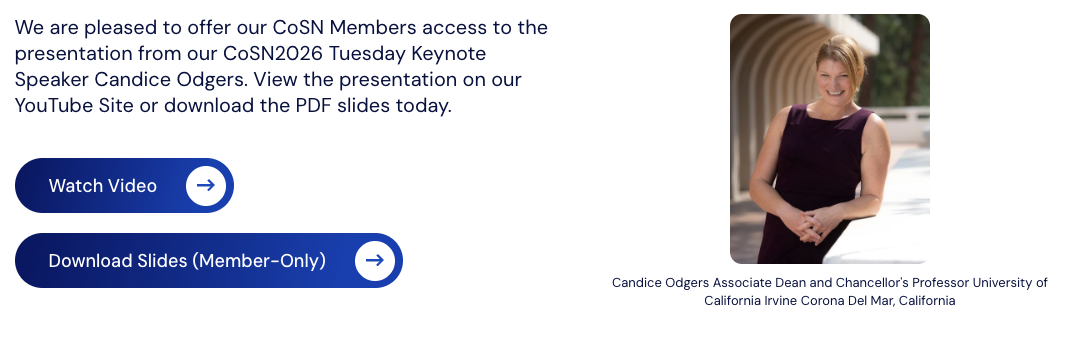 Special Release! CoSN2026 Keynote Speaker Candice Odgers' Presentation is available!
Check out this podcast recorded live at CoSN2026, Dr. Candice Odgers, Associate Dean and Chancellor's Professor at the University of California, Irvine, shares insights from more than 25 years of research on adolescent mental health and digital technology. Drawing on decades of longitudinal research following thousands of young people, Dr. Odgers explores what the evidence actually tells us about smartphones, social media, and youth well-being. She examines the growing gap between headlines and scientific findings, discusses the risks of fear-driven technology policies, and explains why supporting young people requires addressing broader factors that shape their lives.
Watch the CoSN2026 keynote here: https://www.youtube.com/watch?v=X2I8ZpVi2WY or view the slide presentation in your CoSN member account.
CYBERSECURITY
 NCEdCloud IAM Service MFA Requirement
Starting July 1, 2026, all NCEdCloud IAM Service staff users statewide must use multi‑factor authentication (MFA). PSU users without an existing MFA setup will be prompted to configure it at login, and those already using MFA are unaffected. PSUs may enable MFA earlier at their own pace, per individual employee, by uploading a staff UID list, by school code (applies only to current staff), or for the entire PSU (applies to current and future staff). Users should use any TOTP‑capable authenticator. LEA/Admin/Help Desk roles can “Reset OTP” for users (LEA Admin TOTPs can only be reset by another LEA Admin), and employees can reset their own OTP from their profile after login. Updated user instructions are on the NCEdCloud Docs site below.
-
NCEdCloud IAM SErvice MFA Requirement Webinar Recording
K-12 Cybersecurity Webinar Series
Demystifying Your PSU Incident Response Plan
- Join the K-12 Cybersecurity Program team to get an overview of the PSU Incident Response Plan. Our team will break down the components of the plan and guide you step by step with how to consume and utilize it effectively in your PSU.
- Submit requests for cybersecurity topics to cover:
I have Cybersecurity questions..
|