May 21, 2026
WHAT'S NEW:
- NCSIS Updates May 2026*
- 2024-2025 Retention/Promotion Reporting Update*
- Summer School Survey*
- Incident/Discipline Pre-EOY Edit Checks*
- NEW NCSIS Coordinator Collaborative*
- NEW Agricultural Survey Custom Tool*
- North Carolina Homeless Education Program*
- End-of-Year (EOY) Resources and Support*
- KnowledgeOwl*
- NCBOLD 2026 Registration is OPEN!*
- Save the Date & Call for Proposals - NCED Connect Symposium*
- Upcoming Training Information*
- CRDC Coordinators Brief*
REMINDERS:
- NCSIS 2615.10 Upgrade
- EDDIE Year End 2026
- Online Registration DLD Pleat Update
- NC College Connect Launch
- Parent Message
- NCSIS Resources
- Teacher Tips
- Requesting Technical Support Points of Contact
*indicates new or updated information
WHAT'S NEW:
NCSIS Updates May 2026*
With Infinite Campus now fully implemented statewide for nearly a full year, we are ready to move into the next phase of this work: a sustainability and optimization phase focused on long-term support, consistency, and continued partnership. This next phase will allow us to maintain a high level of support for PSUs across North Carolina while strengthening processes, improving consistency, and ensuring the system continues to serve schools and districts well over time.
As we move into the next phase of support for Infinite Campus, the Infinite Campus Support Ticketing System will serve as the first line of support for PSU assistance. This process will help ensure support requests are documented, tracked, and addressed consistently through the established service level agreement, providing greater transparency and equitable access to support for all PSUs across North Carolina.
- PSUs will continue to have access to a variety of self-service resources, including the Infinite Campus Community, Campus Passport (24/7 on-demand autonomous training), and the NCSIS Knowledge Base.
- When additional assistance is needed beyond those tools, authorized PSU contacts may submit tickets through the Infinite Campus Support Portal. For urgent needs or escalations, PSUs can also contact their PSU Client Relationship Manager, David Zimmermann.
Continued Professional Learning
As Infinite Campus moves from statewide implementation to ongoing support, professional learning will continue with a stronger focus on sustainability, shared practices, and PSU collaboration.
Due to the conclusion of time-limited implementation funding, SIS Support staffing has been reduced. To support PSUs moving forward, NCDPI will continue to emphasize available training and support resources, including:
-
Campus Passport through June 30, 2030, pending State Board of Education approval (June 2026)
- Campus Community
- NCSIS Knowledge Base
- NCSIS Website
Statewide training will remain an important part of the support model, with a focus on shared business processes, operational best practices, documentation, and collaboration across PSUs.
Ongoing support opportunities will include virtual office hours during key operational periods such as BOY, EOY, and reporting cycles; biweekly SIS Coordinator calls for updates and shared learning; and statewide events such as NCBOLD, NCEd Connect Symposium, and Digital Leaders Exchange.
NCDPI is proud of the collaboration, commitment, and hard work demonstrated by PSUs throughout this statewide transition. We are grateful for your continued partnership as NCSIS continues to mature, evolve, and strengthen in support of students, educators, and families across North Carolina.
|
2024-2025 Retention/Promotion Reporting Update*
The 2024-2025 Grade Level Promotion and Retention Report is now available on eMFTS in the homebase/reporting folder for PSUs to use for internal tracking and reporting.
NCSIS coordinators who have not yet requested access to the eMFTS exchange service should refer to this link.
|
|
 |
 |
|
Summer School Survey*
Please complete the Summer School Survey so that NCDPI can collect data on how PSUs are using summer school calendars this year in NCSIS.
|
Incident/Discipline Pre-EOY Edit Checks*
To help PSUs/districts check and verify their discipline data, pre-EOY summary totals and edit checks have been run on all data that has been synced to the State as of Monday, May 18, 2026, at 11:00pm. A spreadsheet with the results can be located and downloaded from the secure eMFTS Apex file exchange service in the “homebase/reporting” folder. It is named “DISC--00-4081-PSUXXX--Behavior_EditChecks25JUN25.xlsx” / “DISC--00-4081-PSUXXX--Actions_EditChecks25JUN25.xlsx”
NCSIS coordinators who have not yet requested access to the eMFTS exchange service should refer to this link.
- Descriptions of each Edit Check can be found here.
- It is possible that an incident will be flagged by one of the edit checks even though it was entered correctly. When this happens, just ignore that check for that incident.
- Another round of edit checks will be run; please adjust information by Wednesday, May 27 for changes to show in the next edit checks.
Discipline Audit Office Hours will be held Thursday, May 28, 2026, at 1 pm. Please register in Eventbrite at the following link:
https://www.eventbrite.com/e/discipline-audit-office-hours-tickets-1990100783014
NEW NCSIS Coordinator Collaborative*
As we move from implementation into ongoing operations, learning and collaboration will shift to online bi-weekly meetings starting next week. This will be a time to share updates from NCDPI as well as walk through new processes. Note that any future regional meetings held by NCDPI will be cancelled, and the first NCSIS Coordinator Collaborative was held Thursday, May 21st, at 1 pm.
Please register for future NCSIS Coordinator Collaboratives in Eventbrite:
Thursday, June 4, 2026, at 1 pm:
https://www.eventbrite.com/e/ncsis-coordinator-collaborative-tickets-1989542513214
Thursday, June 18, 2026, at 1 pm:
https://www.eventbrite.com/e/ncsis-coordinator-collaborative-tickets-1989542731868
NEW Agricultural Survey Custom Tool*
A new tool has been created to store the answers from the Agricultural Survey given to parents of new students starting in 2026-27 and will be inserted into each PSU’s instance of NCSIS on Monday, May 18. Data can be inserted manually or mapped from the NCDPI provided Online Registration pleat.
For more information on the custom tool and instructions on how to map your 2026-27 OLR pleats, view the document linked here: https://go.ncdpi.gov/OLRAgSurveyTool26
Please note that tool rights need to be added to users to access the Custom Tool.
|
|
 |
 |
|
North Carolina Homeless Education Program*
McKinney-Vento homeless liaisons are responsible for the collection of accurate homeless education data on students identified within their Local Education Agency (LEA) [42 U.S.C. § 11432(g)(6)(A)(I)]. The deadline to submit this data is May 31, 2026.
|

End-of-Year (EOY) Resources and Support*
Please watch all videos and review all Knowledge Base articles.
EOY Focus of the Week
-
Data Audit Focus: Use the State Enrollment Overlap Report to clean up overlapping enrollments before switching the active year.
- The new Local End Statuses EYC: End of Year Completer and EYCN: End of Year Completer New School, will be available soon. Please do not use other Local End Statuses such as PR, PRN, or W1 when ending enrollments for the school year. Any incorrect end statuses used will be removed.
- Do not enter Diploma Dates until after final grades have been posted. Entering diploma dates early may cause incomplete transcripts to be sent to colleges through E-Transcripts.
Questions and Answers
As you review the webinars and guidance materials, please submit any questions using the NCSIS Questions Form: go.ncdpi.gov/NCSIS25Questions. Responses can be viewed on the NCSIS Answer sheet: go.ncdpi.gov/NCSIS25Answers.
NCSIS EOY Office Hours
Tuesday, May 26th at 10:00 AM
https://www.eventbrite.com/e/ncsis-eoy-office-hours-tickets-1989541313626
|
 NCBOLD 2026 Registration is OPEN!*
Get ready for a summer of 𝗯𝗼𝗹𝗱 ideas, innovative learning, and powerful connections with educators across North Carolina.
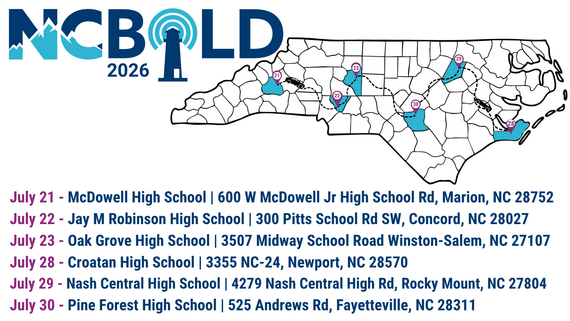
📍 Two weeks. Six locations. One 𝗯𝗼𝗹𝗱 experience.
- West Week (July 21–23): Marion | Concord | Winston-Salem
- East Week (July 28–30): Newport | Rocky Mount | Fayetteville
Whether you're exploring new strategies, diving into edtech, or connecting with peers—𝗡𝗖𝗕𝗢𝗟𝗗 𝗶𝘀 𝘄𝗵𝗲𝗿𝗲 𝗶𝘁 𝗵𝗮𝗽𝗽𝗲𝗻𝘀.
Secure your spot today:
👉 go.ncdpi.gov/NCBOLD2026Registration
Spots fill fast—claim your spot and experience one of NC’s most impactful professional learning events!
 Save the Date & Call for Proposals - NCED Connect Symposium*
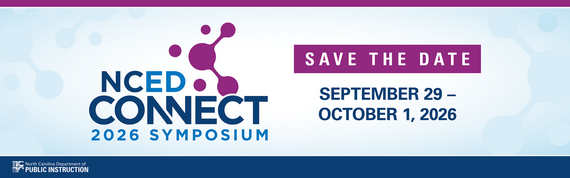
𝗦𝗔𝗩𝗘 𝗧𝗛𝗘 𝗗𝗔𝗧𝗘 & 𝗖𝗔𝗟𝗟 𝗙𝗢𝗥 𝗣𝗥𝗢𝗣𝗢𝗦𝗔𝗟𝗦!
We’re excited to announce the next NCED Connect Symposium—a premier statewide event connecting people, platforms, and possibilities across North Carolina’s education community.
📅 September 29 – October 1, 2026
📍 Koury Convention Center | Greensboro, NC
The NCED Connect Symposium brings together digital teaching and learning leaders, technology directors, central office teams, instructional coaches, NCSIS data managers, district innovators, and more—for three days of powerful collaboration and forward-thinking sessions.
🤝 Connect with peers
💡 Explore new ideas
🚀 Shape the future of education
✨ This year, we are planning an even larger symposium and expanding our offerings around:
- AI in Education
- NCSIS for All (Data Managers, SIS Coordinators, Teachers, Coaches, Admins, Central Office & Support Staff)
- EdTech Innovation+
- SLMC sessions
- Instructional Strategies
- NCED Connect Services (NCEES, Schoolnet, Canvas, OER)
- Leadership tracks for CTOs, principals, coaches, and central office staff
📣 Call for Proposals is open!
We invite you to share your expertise and help shape this year’s symposium by submitting a session proposal.
Please complete the Call for Proposals by June 15th using the link below:
Submit Your Proposal Here
Mark your calendar and stay tuned—more details coming soon!
Upcoming Training Information*
Be sure to review the DTL Signature Events Calendar and Eventbrite for upcoming in-person and virtual regional meetings, webinars, and training sessions. These opportunities are designed to keep staff connected, informed, and supported throughout the school year.
*In the DTL Signature Events Calendar, use the arrows at the bottom of the screen to scroll to monthly event calendars, including upcoming NCSIS webinars!
NCSIS Teacher Training Information:
Please use the link below to access teacher training resources for NCSIS. Additional details can also be found at ncsis.gov.
Infinite Campus Training Resources
If you have any questions, please contact Erin Wolfhope at erin.wolfhope@dpi.nc.gov with questions.
|
CRDC Coordinators Brief*
Begin Local Data Collection Planning
As preparation continues for the SY2025–26 Civil Rights Data Collection, PSUs should begin identifying data elements that are not collected by NCDPI and must be tracked locally during the current school year.
The NC CRDC Canvas course includes a Collection by Entity document from the most recent submission cycle, which can be used as a starting point for local planning. This resource reflects prior requirements and may not include future updates.
PSUs should use current processes and available documentation to begin tracking applicable data and monitor future communications for updates as federal guidance becomes available.
Ensure CRDC contact information in EDDIE remains current to support ongoing communication.
Contact the SEA CRDC Coordinator with any questions at NC.OCR.CRDC@dpi.nc.gov
REMINDERS:
NCSIS 2615.10 Upgrade
NCSIS, powered by Infinite Campus, was upgraded to 2615.10 on May 14, 2026. . Please ensure this information is shared with the appropriate staff members.
Please see these articles for a comprehensive list of updates:
HIGHLIGHTED UPDATES included in Release Pack Campus.2615.10:
Scheduling Board - Load Balance Options for Programs
The Scheduling Board now includes a Load Balance option for Programs in the Section Balance side panel. This feature lets schedulers distribute students with program records across either a small number or many course sections, supporting equitable placement.
Sent Message Log 2.0 Enhancements
Sent Message Log 2.0 has been reformatted to accommodate different message criteria and support the future consolidation of sent messages from various Messenger tools into a single location.
Flags Marked as "Statemanaged" in Database Erroring When Assigned To Student
State Edition customers reported that assigning students flags marked as "Statemanaged=YES" in the database returned the error "the credit group for this state program must be properly mapped prior to assigning to students". This error was occurring at both the State and District level. This has been resolved.
North Carolina – Enrollment End Statuses
Two new Enrollment End Statuses have been added for selection on a student's Enrollment record.
- EYC: EOY Completer
- EYCN: EOY Completer - New School
Replaced End Statuses have been inactivated with an end year of 2024-25.
Activate and Update Migrant Programs in North Carolina
There are new tools that are available for Migrant programs. Previous tools have been made Read Only. Processes surrounding the Migrant program have not changed.
State ID Error Message
The error message received when using the Assign NC Student ID button has been updated from “There was an unexpected error” to "There has been an unexpected delay registering with NCDPI network. Try again later."
North Carolina – Read to Achieve Updates
The fields available on the Read to Achieve tool have been reorganized to meet state requirements, and some fields have been updated with new or modified options.
North Carolina – PMR ADA Logic
The Average Daily Attendance calculation for the PMR has been updated for the following:
- Student day minutes are used in the calculation. Previously, the calculation used the student's scheduled minutes.
- Day events with a standard code of 'AD' are now included in the calculation.
|
EDDIE Year End 2026
- EDDIE Subscribed Users: Do not enter updates for 2026-27 until July 1, 2026, unless entering Approved Grade Levels or School Closing Dates.
- See the Year End Memo - May 7, 2026
Online Registration DLD Pleat Update
There has been an update to the OLR Digital Learning Dashboard pleat. OLR configurations for the 2026-27 school year can be adjusted in one of two ways:
- If you have not opened OLR to parents for next year, disable the NCDPI_Digital Lrning Dashbrd_v1(or v2) and import the NCDPI_DigitalLrningDashbrd_v2_PleatExport_05-12-2026.txt
- If you have already opened OLR to parents for next year, adjust the Digital Learning Dashboard Pleat manually.
- Navigate to System Settings > Online Registration Setup > OLR Literals Bank
- Select the configuration you want to update from the configuration dropdown.
- In the OLR Literals Bank Category, click the arrow beside Student to expand the group.
- Click “NCDPI_Digital Lrning Dashbrd_v2” to show all the literals in the pleat
- Find “student.NCDPI_DigitalLrningDashbrd_v2.customfield.NCDPI_DLDv2_LINK_10.url“
- Replace “https://go.ncsu.edu/speedtest” with “https://dpi.speedtest.friday.institute/ “
- Click Save at the bottom.
Directions for updating pleats can be found on the Online Registration Pleat Updates document.
|
Parent Message
As part of ongoing efforts to strengthen communication with families, Superintendent Green will periodically send messages to parents through the Parent Portal.
A message was placed in the parent portal on Monday, May 11, 2026.
Previous and future parent letters are available at https://www.dpi.nc.gov/blog-category/superintendent-letters-parents. If you have any questions, please send them to communications@dpi.nc.gov.
|
|
 |

NCSIS Resources
PSUs have access to the Campus Community, where they can acquire product knowledge, glean tips and tricks, and engage in networking opportunities with other districts. The Campus Community offers convenient single sign-on access from the Campus system to a wealth of resources, including the knowledge base, forum discussions, learning tools, support site, upcoming events, and more.
Campus Community contains the information you need to learn how to use Infinite Campus through product documentation, videos & simulations, study guides, forums, and much more. Whether you are a teacher, data manager, or Infinite Campus user, you will find the learning resources in a clearly defined pathway for a seamless transition from PowerSchool.
Campus Passport is a collection of on-demand, self-paced courses that can be assigned to new and existing staff. Accessed through the Campus Community, you will find Instructor-Led Training, specific E-Learning courses, or select a learning plan based on your district role.
NCSIS Knowledge Base | NC Department of Public Instruction contains articles, video recordings and other resources about North Carolina processes.
GitHub Vendor Integrations Repository is a website where examples of 3rd party extract formats can be found (these are crowd sourced and should be vetted fully before implementing in your PSU).
Ad Hoc Filter Sharing Community is a shared Google folder for Ad Hoc filters that PSUs have created. Please add any helpful filters/reports you have created, and use others as you need. These are not guaranteed to work in your PSU and should be vetted fully.
-
Naming Convention: Ad Hoc Name - PSU Name
- You’re welcome to include your email address within the document (optional).
-
Permissions: You have editing access—please proceed with caution!
-
PII: Do not upload any PII to the shared folder
NCSIS website (http://ncsis.gov) contains links to previous bulletins, as well as the latest information about events held throughout the year.
Click on the link below to learn how to sign up to receive this weekly NCSIS bulletin.
How to Subscribe to a NC DPI DTL Bulletin/Newsletter
|

Requesting Technical Support Points of Contact
Please review the information below on how to submit support tickets:
Contact Infinite Campus for assistance with:
NCSIS Application/Support Issues
Submit a case: https://support.infinitecampus.com
Infinite Campus Enhancement Requests—Please use the link below to share the areas of the product your PSU would most like to see improved, suggest new functionality, and indicate whether you’d like to participate in future discussions.
Infinite Campus Enhancement Requests
Contact DPI for assistance with:
- NCDPI Business Questions
- Duplicate Students
- Amplify/Missing Students
Submit a request: https://go.ncdpi.gov/help
For additional technical support contacts, please refer to the document below:
Requesting Help
|
|