April 30, 2026
WHAT'S NEW:
- End-of-Year (EOY) Resources and Support*
- Reminder—Fix Errors in Section Data by May 1, 2026*
- Preschool in NCSIS*
- KnowledgeOwl*
- Save the Date & Call for Proposals - NCED Connect Symposium*
- NCBOLD 2026 Registration is OPEN!*
- Thank You for Attending DLE*
- Upcoming Training Information*
- Charter School Corner*
REMINDERS:
- Default Admission Status
- Arts Education Graduation Requirements
- CFNC Electronic High School Transcript System Protocols and Processing Start Date for Infinite Campus EOY 2026
- CRDC Coordinators Brief
- Teacher Tips
- NCSIS Resources
- Requesting Technical Support Points of Contact
- Want to Stay in the Loop?
*indicates new or updated information
WHAT'S NEW:

End-of-Year (EOY) Resources and Support*
To support PSUs with End-of-Year (EOY) processes, the SIS Professional Learning team has published new and updated EOY guidance and resources. Please watch all videos and review all Knowledge Base articles.
As you review the webinars and guidance materials, please submit any questions using the NCSIS Questions Form: go.ncdpi.gov/NCSIS25Questions. The SIS Professional Learning team will monitor questions and provide responses, which can be viewed on the NCSIS Answer Sheet: go.ncdpi.gov/NCSIS25Answers.
NCSIS EOY Office Hours
Tuesday, May 5th at 10:00 AM
Register here: https://www.eventbrite.com/e/1988090352763?aff=oddtdtcreator
|
Reminder—Fix Errors in Section Data by May 1, 2026*
Some PSUs currently have course sections in NCSIS with data issues, including missing term types, missing teacher assignments, or term types that do not align with the actual course dates.
For example, a course may be scheduled to run from January through June but is assigned a Semester 1/Fall term type.
At this time, the NCSIS course section validation report that will identify these issues is still under development. Until that report is fully available, PSUs can access a discrepancy report identifying these course section issues through PSU Test Coordinator access to the Accountability and Testing Collection Status Viewer and Secure Shell.
All corrections to data issues must be made directly in NCSIS. Updates should be completed no later than May 1, 2026, to ensure accurate and complete reporting.
|
|
 |
 |
|
Preschool in NCSIS*
The Office of Early Learning (OEL) collaborated with other partners within NCDPI to create an enrollment resource specific to Preschool in NCSIS that is now available on the NCSIS Knowledge Base. Please review guidance for enrolling and scheduling preschool students in the NCSIS. DPI is committed to ensuring accurate data collection and reporting. Also, DPI is working towards rostering pre-K classes, teachers, and students into Teaching Strategies GOLD and the FINCH Literacy Screener for the 2026-2027 school year. Accurate rostering will rely on accurate and complete NCSIS enrollment for preschool students in the 2026-2027 cohort.
|
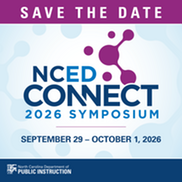
Save the Date & Call for Proposals- NCED Connect Symposium*
𝗦𝗔𝗩𝗘 𝗧𝗛𝗘 𝗗𝗔𝗧𝗘 & 𝗖𝗔𝗟𝗟 𝗙𝗢𝗥 𝗣𝗥𝗢𝗣𝗢𝗦𝗔𝗟𝗦!
We’re excited to announce the next NCED Connect Symposium—a premier statewide event connecting people, platforms, and possibilities across North Carolina’s education community.
📅 September 29 – October 1, 2026
📍 Koury Convention Center | Greensboro, NC
The NCED Connect Symposium brings together digital teaching and learning leaders, technology directors, central office teams, instructional coaches, NCSIS data managers, district innovators, and more—for three days of powerful collaboration and forward-thinking sessions.
🤝 Connect with peers
💡 Explore new ideas
🚀 Shape the future of education
✨ This year, we are planning an even larger symposium and expanding our offerings around:
- AI in Education
- NCSIS for All (Data Managers, SIS Coordinators, Teachers, Coaches, Admin, Central Office & Support Staff)
- EdTech Innovation+
- Instructional Strategies
- NCED Connect Services (NCEES, Schoolnet, Canvas, OER)
- Leadership tracks for CTOs, principals, coaches, and central office staff
📣 Call for Proposals is open!
We invite you to share your expertise and help shape this year’s symposium by submitting a session proposal.
Please complete the Call for Proposals by June 15th using the link below:
Submit Your Proposal Here
Mark your calendar and stay tuned—more details coming soon!
|
 NCBOLD 2026 Registration is OPEN!*
We’re excited to kick off planning for 𝗡𝗖𝗕𝗢𝗟𝗗 𝟮𝟬𝟮𝟲—and we’re coming to YOU!
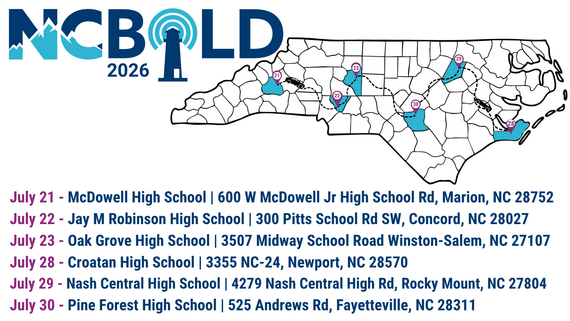
This summer, we’ll host sessions across North Carolina, covering both the Western and Eastern regions:
West Week (July 21–23):
📍 Marion | Concord | Winston-Salem
East Week (July 28–30):
📍 Newport | Rocky Mount | Fayetteville
✨ Registration is OPEN! The NCBOLD Eventbrite Collection can be found here.
 Thank You for Attending DLE*
Thank you to all that attended the virtual Digital Leader’s Exchange (DLE) Tuesday.
Links to the NCSIS presentations from DLE can be found here:
Now Available! Recordings of the NCSIS sessions are on the NCSIS Knowledge Base.

Upcoming Training Information*
Be sure to review the DTL Signature Events Calendar and Eventbrite for upcoming in-person and virtual regional meetings, webinars, and training sessions. These opportunities are designed to keep staff connected, informed, and supported throughout the school year.
*In the DTL Signature Events Calendar, use the arrows at the bottom of the screen to scroll to monthly event calendars, including upcoming NCSIS webinars!
NCSIS Teacher Training Information:
Please use the link below to access teacher training resources for NCSIS. Additional details can also be found at ncsis.gov.
Infinite Campus Training Resources
If you have any questions, please contact Erin Wolfhope at erin.wolfhope@dpi.nc.gov.
|
 |
|
Charter School Corner*
Legislative Class Size Collection
The Legislative Class Size Collection will now produce data for charter schools. A revised submission deadline for charter schools will be communicated soon.
|
REMINDERS:
Default Admission Status
At the end of March, the default admission status for new enrollees was changed to MST1. However, this change did not function as expected and left the admission status field as null, resulting in issues with the PMR.
As of Friday, April 17, NCDPI has corrected this by updating all enrollment records where the admission status was null to MST1. In addition, the dictionary has been updated to remove the default indicator for the MST1 admission status.
Action Required:
- Check all students’ admission status for accuracy.
- Going forward, staff must manually select and complete the Admission Status field during the enrollment process to ensure accurate reporting.
|
|
 |

Arts Education Graduation Requirements
NCDPI has published to PSUs the following Arts Education Graduation Requirement state validation reports:
-
(NC) Arts Education Graduation Requirement HS Validation
- This validation has three rules for students that have
- (NC) Arts Ed Grad Req - HS Met
- (NC) Arts Ed Grad Req - HS Not Met - No Qualifying Course is Scheduled
- (NC) Arts Ed Grad Req - HS Not Met - Qualifying Course is Scheduled
- (NC) Arts Education Graduation Requirement MS Validation
- This validation returns three rules for students that have
- (NC) Arts Ed Grad Req - MS Met
- (NC) Arts Ed Grad Req - MS Not Met - No Qualifying Course is Scheduled
- (NC) Arts Ed Grad Req - MS Not Met - Qualifying Course is Scheduled
-
NOTICE: This report currently does not pull Standards' Final Grades nor Locally designed Grading Scales' Final Grades from the Transcript. NCDPI will communicate when this is added.
Navigation:
-
Reporting > Data Validation > Data Validation Report > State Owned: Select report
- Keep bullet on Local Data Set
- Select Output Options
- If running for a large data set, please select Submit to Batch Queue
- Generate
Resources:
Arts Graduation Policy or Crosswalk questions? Please contact Brandon Roeder, NCDPI K-12 Music and Theatre Consultant.
If you have any system questions, please place a ticket with the Infinite Campus Support Desk.
|

CFNC Electronic High School Transcript System Protocols and Processing Start Date for Infinite Campus EOY 2026
To allow ample time for schools to store final marks and ensure that the “Diploma Date” fields are populated correctly, NCDPI has requested that CFNC begin the electronic high school transcript system on Thursday, June 18, 2026. This will be the start date to release queued final transcripts. The CFNC system automatically creates these queued requests for seniors who sent a non-final transcript earlier in the year. The CFNC transcript system will remain available for regular functions such as new transcript requests.
This schedule means it is critical that all final marks are posted to transcripts before June 18, 2026, and all graduates have their “Diploma Date” field populated on the student Graduation screen within Infinite Campus.
Based on the standard system protocol, CFNC will automatically release queued final transcripts on the morning of June 18. As a reminder, the standard system protocol is for the automatic release of queued final transcripts ten days after your school's last instructional day in the Infinite Campus calendar when two conditions are met:
- The Diploma Type is populated.
- The Infinite Campus “Diploma Date” field is populated (not blank).
If either of the two conditions mentioned above are not met when the CFNC system attempts to release the final transcript, the e-transcript requests will enter a nine-day processing loop. During this period, the system will make three additional attempts every three days until the conditions are met. If the conditions are met by the end of the nine-day processing loop, the final e-transcript will still be processed and released to colleges through CFNC. However, if the conditions are not met by the end of the nine-day processing loop, the final e-transcript request(s) will fail, and the student will be automatically notified by email. This underscores the importance of meeting the protocol requirements on time.
Incomplete final e-transcripts occur when final marks are not posted to transcripts within ten days, and students have their “Diploma Date” and “Diploma Type” populated within Infinite Campus. Schools must post grades to transcripts within the specified period to prevent this to ensure proper processing. This reiteration emphasizes the necessity and responsibility of adhering to the protocol.
Again, e-transcript services will continue as normal through CFNC. Still, to allow schools time to store final marks and ensure that the “Diploma Date” fields are populated correctly, the CFNC electronic high school transcript system will wait until Thursday, June 18, 2026, to start releasing queued final transcripts.
|
CRDC Coordinators Brief
Begin Local Data Collection Planning
As preparation continues for the SY2025–26 Civil Rights Data Collection, PSUs should begin identifying data elements that are not collected by NCDPI and must be tracked locally during the current school year.
The NC CRDC Canvas course includes a Collection by Entity document from the most recent submission cycle, which can be used as a starting point for local planning. This resource reflects prior requirements and may not include future updates.
PSUs should use current processes and available documentation to begin tracking applicable data and monitor future communications for updates as federal guidance becomes available.
Ensure CRDC contact information in EDDIE remains current to support ongoing communication.
Contact the SEA CRDC Coordinator with any questions at NC.OCR.CRDC@dpi.nc.gov
|

NCSIS Resources
PSUs have access to the Campus Community, where they can acquire product knowledge, glean tips and tricks, and engage in networking opportunities with other districts. The Campus Community offers convenient single sign-on access from the Campus system to a wealth of resources, including the knowledge base, forum discussions, learning tools, support site, upcoming events, and more.
Campus Community—contains the information you need to learn how to use Infinite Campus through product documentation, videos & simulations, study guides, forums, and much more. Whether you are a teacher, data manager, or Infinite Campus user, you will find the learning resources in a clearly defined pathway for a seamless transition from PowerSchool.
Campus Passport—are on-demand, self-paced courses that can be assigned to new and existing staff. Accessed through the Campus Community, you will find Instructor-Led Training, specific E-Learning courses, or select a learning plan based on your district role.
KnowledgeOwl—KnowledgeOwl will include articles (QRDs) that are created and updated by the SIS Professional Learning team.
NCSIS Knowledge Base | NC Department of Public Instruction
GitHub Vendor Integrations Repository: 3rd-party extract formats can be found below.
GitHub Vendor Integrations Repository
Ad Hoc Filter Sharing Community: Shared Google folder for Ad Hoc filters PSUs have created. Ad Hoc Community
-
Naming Convention: Ad Hoc Name - PSU Name
- You’re welcome to include your email address within the document (optional).
-
Permissions: You have editing access—please proceed with caution!
-
PII: Do not upload any PII to the shared folder
NCSIS Crosswalk Document—will contain Infinite Campus and PowerSchool terms with their meanings to assist users with learning the new NCSIS terminology. This is a working document and will be updated regularly. NCSIS Crosswalk Document
IC Role Specific Resources—can be viewed by clicking on http://ncsis.gov, going to the Phase I PSU’s tab, and scrolling to the IC Role Specific Resources section. It includes information for specific staff roles, as well as a guide for parents & students.
Webinar Recording Links and FAQs—can be found at http://ncsis.gov under the Professional Learning tab. Please check for recently added webinars.
|

Requesting Technical Support Points of Contact
Please review the information below on how to submit support tickets:
Contact Infinite Campus for assistance with:
NCSIS Application/Support Issues
Submit a case: https://support.infinitecampus.com
Infinite Campus Enhancement Requests—Please use the link below to share the areas of the product your PSU would most like to see improved, suggest new functionality, and indicate whether you’d like to participate in future discussions.
Infinite Campus Enhancement Requests
Contact DPI for assistance with:
- NCDPI Business Questions
- Duplicate Students
- Amplify/Missing Students
Submit a request: https://go.ncdpi.gov/help
For additional technical support contacts, please refer to the document below:
Requesting Help
|
|