WHAT'S NEW:
WHAT'S NEW:
- Student Flags Reminder*
- Release .2611.6*
- NEW AIG Validation Report Available*
- Spring Legislative Class Size (LCS) Now Available*
- April Digital Leaders Exchange (DLE)
- NCBOLD 2026 Survey
- NCBOLD Call For Presenters—Due April 6th!*
-
Upcoming Training Information*
REMINDERS:
- Default Admission Status
- 2025-2026 Good Cause Exemption (GCE) Data Collection
- ECATS Virtual Office Hours Planned for April 9
- CRDC Coordinators Brief
- Teacher Tips
- Records Request Survey
- Premium Product Training Requests Reminder
- Master Scheduling Resources
- NCSIS Resources
- Requesting Technical Support Points of Contact
- Want to Stay in the Loop?
*indicates new or updated information
Student Flags Reminder*
EC, AIG, 504, EL, Migrant, and Military flags are automatically applied based on active programs associated with a student (or a relative, for Military).
Do not add these flags manually.
Once a program is added, the appropriate flag will appear shortly thereafter. If this functionality does not work, please place a support ticket with Infinite Campus.
|
|
 |
 |
|
Release .2611.6*
Infinite Campus Version .2611.6 was installed in production on 4/1/2026. Highlights of this version include:
- Updated Student Attendance tool now shows start time, end time and duration for each period, along with a lunch indicator for any period that includes lunch time
- Present minutes accurately transfer for cross-enrolled students based on the value recorded at the school taking attendance, and home school staff can now edit if necessary
- Scheduling Board now contains the option to load alternates
- Enrollment End Action now imports through Records Transfer
- Student Gap Scheduler will now automatically navigate to Walk-In Scheduler when a student is selected from the Search results
- Legislative Class Size Report fixes
For a full list of release notes see Release Pack Campus.2611 - March 2026 | Infinite Campus and Rx Pack - Campus.2611 | Infinite Campus.
|

NEW AIG Validation Report Available*
Beginning on Thursday, April 2, 2026, NC SIS users will be able to access the new (NC) AIG Transfers data validation report. This new report will generate a list of all students within a PSU who have prior Gifted Program history and do not have a current gifted record within the PSU. Running the NC AIG Transfers data validation provides a list of these students who had data transferred into the PSU before the email notifications process was working to alert users of AIG student transfers.
To support effective use of this new resource:
- SIS Coordinators, please ensure that the correct personnel have access to this data validation report to run at the school and/or district level.
- AIG Coordinators are encouraged to run the report and review the Gifted program records for each student to determine how each student will be identified and served in the PSU.
For additional information, please review the "Events & Action” guidance document. To assist with questions related to the AIG Transfer functionality, the new data validation report, and general AIG headcount questions, the Office of Advanced Learning and Gifted Education team will be hosting a series of Office Hours throughout the month of April.
Feel free to drop in on any of the following dates or reach out via email to Stephanie Cyrus (stephanie.cyrus@dpi.nc.gov).
|
Spring Legislative Class Size (LCS) Now Available*
The Spring Legislative Class Size (LCS) Report submission window opens April 1, 2026, and closes April 20, 2026.
Who: All LEAs, Charter Schools, Lab Schools, and the Regional Schools, regardless of class size exemption status. Even if a PSU/school is exempt, every PSU must submit the required reports for all schools to meet federal reporting requirements.
What’s new: Use the “Spring” snapshot to generate, review and submit reports. LCS reports will include all schools and appropriate grade levels in the PSU. Exempt schools and courses will be removed after submission and before compiling class size averages.
Required Reports:
-
K-13 Class Size (Required; informational) Displays data for each class in each grade in each school, such as the lead teacher and number of students. This report may include college/university classes, NCVPS classes, and community/technical school courses.
-
K-3 Class Size Average (Required; LCS Compliance) Average class size of standard ELA in each grade and school, K-3.
-
Program Enhancement Teachers (Required; informational) Displays data for each program enhancement class and associated teacher(s) in the school (Arts disciplines, including dance, music, theater, and the visual arts; Physical education and health programs; World languages)
Resources:
School Attendance and Student Accounting Manual (SASA), Chapter 6
Legislative Class Size (LCS) | NC Department of Public Instruction
NC Legislative Class Size Collection | Infinite Campus
Note: To request a deletion of a Spring LCS snapshot, use the Snapshot Deletion Tool in NCSIS:
State Report Deletion Requests | NC Department of Public Instruction
Thank you for your timely submission of the LCS report. Please contact your Professional Learning Consultant with questions about reports in Infinite Campus, or Catherine Mau for policy-related questions.
|
 April Digital Leaders Exchange (DLE)
Our April DLE will be VIRTUAL—April 21st from 8:30am to 12pm.
These sessions will offer valuable updates, resources, and opportunities to connect—all from the convenience of your workspace.
View the agenda and register here:
NCBOLD 2026 Survey
NCBOLD 2026 will be coming your way again this summer! We would like your input on what sessions you would like to have presented. Please also take a few minutes to complete the NCBOLD survey so we ensure we bring you learning opportunities that meet your needs and wants. The link to the survey is available HERE or by going to go.ncdpi.gov/ncbold26survey.
NCBOLD Call For Presenters—Due April 6th!*
𝗡𝗖𝗕𝗢𝗟𝗗 𝟮𝟬𝟮𝟲 – 𝗖𝗮𝗹𝗹 𝗳𝗼𝗿 𝗣𝗿𝗲𝘀𝗲𝗻𝘁𝗲𝗿𝘀 𝗶𝘀 𝗢𝗽𝗲𝗻!
We’re excited to begin planning for 𝗡𝗖𝗕𝗢𝗟𝗗 𝟮𝟬𝟮𝟲, and we’re looking for educators and leaders ready to share bold ideas, innovative practices, and lessons learned from the field.
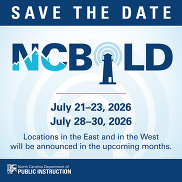
- July 21–23, 2026 (West)
- July 28–30, 2026 (East)
One week in the East, one week in the West (locations coming soon!)
Do you have strategies that inspire? Tools that empower? Leadership lessons that others can learn from? We want to hear from you! 𝗔𝗽𝗽𝗹𝘆 𝗯𝘆 𝗠𝗼𝗻𝗱𝗮𝘆, 𝗔𝗽𝗿𝗶𝗹 𝟲𝘁𝗵.
Presenter space will be limited, so don’t wait.
Submit your proposal here:
go.ncdpi.gov/NCBOLD26CFP
Tag a colleague who should apply and help us make NCBOLD 2026 our boldest yet!
|
Upcoming Training Information*
Upcoming Training: End-of-Year (EOY) Resources and Support:
To support PSUs with End-of-Year (EOY) processes, the SIS Professional Learning team will be providing a series of recorded EOY training sessions that PSUs can view at their convenience.
Along with the recordings, a shared Q&A document will be available for PSUs to submit questions related to the EOY processes. The SIS PL team will review submitted questions and post responses so that all PSUs can view the questions and answers.
In addition, the SIS PL team will host EOY Office Hours to review commonly asked questions and provide additional clarification. PSUs will have the opportunity to attend these sessions and receive further guidance.
EOY recordings and related resources are expected to be available by mid-April. Additional details and links will be shared in upcoming NCSIS Weekly Bulletins.
Be sure to review the DTL Signature Events Calendar and Eventbrite for upcoming in-person and virtual regional meetings, webinars, and training sessions. These opportunities are designed to keep staff connected, informed, and supported throughout the school year.
*In the DTL Signature Events Calendar, use the arrows at the bottom of the screen to scroll to monthly event calendars, including upcoming NCSIS webinars!
NCSIS Teacher Training Information:
Please use the link below to access teacher training resources for NCSIS. Additional details can also be found at ncsis.gov.
Infinite Campus Training Resources
If you have any questions, please contact Erin Wolfhope at erin.wolfhope@dpi.nc.gov.
|
REMINDERS:
Default Admission Status
The admission status for a student is now automatically set to “Member - Standard Day Program (MST1)” upon enrollment in all PSUs.
It is important to review this field after enrollment and update it if needed, as admission status directly impacts funding. Please ensure the status accurately reflects each student’s situation.
|
|
 |
 |
|
2025-2026 Good Cause Data Exemption (GCE) Data Collection
The OEL and the NCSIS team are working with Infinite Campus to test the collection of Good Cause Exemption Data for the 25-26 school year. Good Cause Exemption Data Collection will occur as usual through the Accountability and Testing data collection process. PSUs will also need to enter the data into the Infinite Campus RtA Program to end the applicable students’ RtA program records by selecting one GCE exit status reason using the instructions under the “Good Cause Exemption” section in the Read to Achieve Program (RtA) | NC Department of Public Instruction article. By providing the data in both ways this year, NCDPI will be able to ensure data accuracy and ensure the data can be pulled from IC for reporting purposes in the 26-27 school year.
|
ECATS Virtual Office Hours Planned for April 9
Plan to join us for a joint virtual Office Hours session, “ECATS + NCSIS: Working Better Together,” for EC and NCSIS staff on April 9 at 11 a.m. This session covers best practices for NCSIS calendar setup, an overview of Teacher Day, guidance and best practices for use of the NCSIS OLR from a special education lens, and some validations to help align your PSU’s data for a successful start to the 2026-27 academic year in ECATS.
If you would like to enter a question in advance of the session, please submit it online at https://forms.gle/9b1BmJomurKPruh2A. Remember: Do not include any PII.
Join us via Webex on April 9, 11 a.m. https://ncgov.webex.com/ncgov/j.php?MTID=me5d8ae198d1359d0a40e67aa90d1bff6
|
|
 |
CRDC Coordinators Brief
Begin Local Data Collection Planning
As preparation continues for the SY2025–26 Civil Rights Data Collection, PSUs should begin identifying data elements that are not collected by NCDPI and must be tracked locally during the current school year.
The NC CRDC Canvas course includes a Collection by Entity document from the most recent submission cycle, which can be used as a starting point for local planning. This resource reflects prior requirements and may not include future updates.
PSUs should use current processes and available documentation to begin tracking applicable data and monitor future communications for updates as federal guidance becomes available.
Ensure CRDC contact information in EDDIE remains current to support ongoing communication.
Contact the SEA CRDC Coordinator with any questions at NC.OCR.CRDC@dpi.nc.gov
|
Records Request Survey
Action Needed: Records Request Process Form:
To ensure clarity and consistency across PSUs, please complete the form indicating how you would like other PSUs to request student records from your school(s).
Responses will be compiled into a statewide list and shared to help guide appropriate records request procedures and prevent miscommunication between districts.
Records Request Survey
|
|
 |
Premium Product Training—Requests Reminder
Premium Product training is available for both Phase I and Phase II PSUs. If your PSU has not yet submitted a request, please do so as soon as possible.
Additional reminders:
- All Premium Product training must be completed by June 30, 2026.
- We encourage PSUs to request training even if you are not implementing the product immediately, as all recordings can be downloaded for future use.
- If your PSU has already completed a training, please ensure you download and save all training recordings for ongoing reference.
|
|
 |

Master Scheduling Resources
As PSUs continue preparing for master scheduling, the following resources are available to support your work:
- On-demand Virtual Scheduling Series recordings
- YES, master scheduling recordings
- SIS PL Lunch & Learn sessions focused on scheduling
- Scheduling Office Hours with an Infinite Campus trainer
PSUs are encouraged to take advantage of these resources and schedule time with an Infinite Campus trainer.
|

NCSIS Resources
PSUs have access to the Campus Community, where they can acquire product knowledge, glean tips and tricks, and engage in networking opportunities with other districts. The Campus Community offers convenient single sign-on access from the Campus system to a wealth of resources, including the knowledge base, forum discussions, learning tools, support site, upcoming events, and more.
Campus Community—contains the information you need to learn how to use Infinite Campus through product documentation, videos & simulations, study guides, forums, and much more. Whether you are a teacher, data manager, or Infinite Campus user, you will find the learning resources in a clearly defined pathway for a seamless transition from PowerSchool.
Campus Passport—are on-demand, self-paced courses that can be assigned to new and existing staff. Accessed through the Campus Community, you will find Instructor-Led Training, specific E-Learning courses, or select a learning plan based on your district role.
KnowledgeOwl—KnowledgeOwl will include articles (QRDs) that are created and updated by the SIS Professional Learning team.
NCSIS Knowledge Base | NC Department of Public Instruction
GitHub Vendor Integrations Repository: 3rd-party extract formats can be found below.
GitHub Vendor Integrations Repository
Ad Hoc Filter Sharing Community: Shared Google folder for Ad Hoc filters PSUs have created. Ad Hoc Community
-
Naming Convention: Ad Hoc Name - PSU Name
- You’re welcome to include your email address within the document (optional).
-
Permissions: You have editing access—please proceed with caution!
-
PII: Do not upload any PII to the shared folder
NCSIS Crosswalk Document—will contain Infinite Campus and PowerSchool terms with their meanings to assist users with learning the new NCSIS terminology. This is a working document and will be updated regularly. NCSIS Crosswalk Document
IC Role Specific Resources—can be viewed by clicking on http://ncsis.gov, going to the Phase I PSU’s tab, and scrolling to the IC Role Specific Resources section. It includes information for specific staff roles, as well as a guide for parents & students.
Webinar Recording Links and FAQs—can be found at http://ncsis.gov under the Professional Learning tab. Please check for recently added webinars.
|
 |
|
Requesting Technical Support Points of Contact
Please review the information below on how to submit support tickets:
Contact Infinite Campus for assistance with:
NCSIS Application/Support Issues
Submit a case: https://support.infinitecampus.com
Infinite Campus Enhancement Requests—Please use the link below to share the areas of the product your PSU would most like to see improved, suggest new functionality, and indicate whether you’d like to participate in future discussions.
Infinite Campus Enhancement Requests
Contact DPI for assistance with:
- NCDPI Business Questions
- Duplicate Students
- Amplify/Missing Students
Submit a request: https://go.ncdpi.gov/help
For additional technical support contacts, please refer to the document below:
Requesting Help
|
|