WHAT'S NEW!
- 3-Year Accelerated Graduation Pathway Flag Timeline*
- Thank You to Our PSUs*
- Premium Product Training Requests Reminder*
- Upcoming Training Information*
REMINDERS:
- NCSIS Premium Products—PSU Feedback Requested
- AIG Transfer
- PMR Delete
- Knowledge Owl
- Master Scheduling Resources
- Campus Release 2551.11
- Master Course List Updates
- Teacher Tips
- Charter School Corner
- NCSIS Resources
- Requesting Technical Support Points of Contact
- Want to Stay in the Loop?
|
*indicates new or updated information
|
|
WHAT'S NEW!

3-Year Accelerated Graduation Pathway Flag Timeline*
Dear PSU Coordinators,
Tomorrow, NCDPI will deploy the 3-Year Accelerated Graduation Pathway flag in NCSIS-IC for all Public School Units (PSUs) to support required state and legislative reporting under SBE policy GRAD-006 (Session Law 2023-134, House Bill 259).
Action is required by end of business day March 6, 2026:
- Apply the flag to currently enrolled students participating in the 3-Year Accelerated Graduation Pathway
- Apply the flag to students who graduated earlier in SY 25-26 and participated in the 3-Year Accelerated Graduation Pathway
- Ensure written documentation confirming student agreement is maintained prior to assigning the flag.
The flag will support accurate state reporting to the North Carolina General Assembly (NCGA).
Thank you for your attention to this required data update.
|
 Thank you to our PSUs*
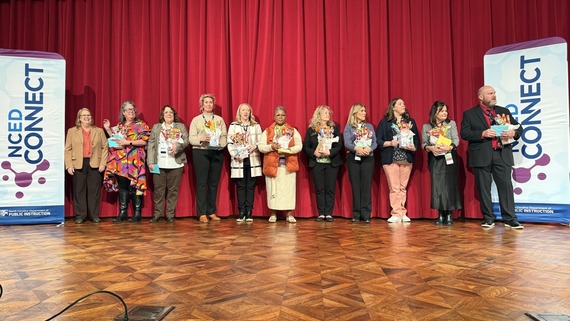
The SIS Professional Learning Team would like to extend a sincere thank you to our PSUs for the thoughtful gifts shared with our team during the NCED Connect Symposium. Your generosity and support truly meant a great deal to us.
We are grateful for the opportunity to partner and work alongside you in support of North Carolina’s schools. Your dedication to providing the very best for staff and students across the state shines through every day in the work you do.
A special shout-out to the NCSIS Steering Committee, whose guidance, collaboration, and leadership have been instrumental in the successful implementation of NCSIS. Your insight and commitment continue to help move this work forward in meaningful ways.
Thank you for your continued collaboration, kindness, and commitment to student success. We are honored to serve and support you.
 |
|
Premium Product Training—Requests Reminder*
Premium Product training is available for both Phase I and Phase II PSUs. Training requests were due February 11th. If your PSU has not yet submitted a request, please do so as soon as possible.
Additional reminders:
- All Premium Product training must be completed by June 30, 2026.
- We encourage PSUs to request training even if you are not implementing the product immediately, as all recordings can be downloaded for future use.
- If your PSU has already completed a training, please ensure you download and save all training recordings for ongoing reference.
|

Upcoming Training Information*
Upcoming Training Sessions & Webinars:
Scheduling Lunch and Learn Series! All webinars start at 12 pm. Get your tickets now!
Other Webinar Opportunities
Be sure to review the DTL Signature Events Calendar and Eventbrite for upcoming in-person and virtual regional meetings, webinars, and training sessions. These opportunities are designed to keep staff connected, informed, and supported throughout the school year.
*In the DTL Signature Events Calendar, use the arrows at the bottom of the screen to scroll to monthly event calendars, including upcoming NCSIS webinars!
Charter School Virtual Office Hours are offered twice a month to provide ongoing support and answer your questions.
📅 When: 2nd & 4th Thursday of each month (Date change started in August)
⏰ Time: 9:00 AM – 10:00 AM
🔗 Join us for Bi-Monthly Charter School Support Virtual Office Hours!
NCSIS Teacher Training Information:
Please use the link below to access teacher training resources for NCSIS. Additional details can also be found at ncsis.gov.
Infinite Campus Training Resources
If you have any questions, please contact Erin Wolfhope at erin.wolfhope@dpi.nc.gov with questions!
|
REMINDERS:
 |
|
NCSIS Premium Products - PSU Feedback Requested
Please take a few minutes to complete this survey and share your feedback on NCSIS Premium Products. This survey will help us better understand which premium products PSUs are currently using or planning to use, what’s working well, and where additional support or improvements may be needed.
https://forms.gle/bz8vSmPKwitnFMtC8
|

AIG Transfer
NEW Event and Action functionality for AIG transfers - LIVE in Infinite Campus!
The NEW event and action feature into the Infinite Campus production instances is now LIVE for PSUs. This feature allows an automated email notification to be sent to a locally determined group of users, when any student transfers into the PSU with a prior AIG record. This functionality will support AIG Coordinators at the school and district level to have more immediate access to a student’s AIG program record, so that the district or charter school can determine how to support and serve the newly enrolled student.
Thanks to everyone who joined the team this week for an Office Hour opportunity to answer questions and demo next steps of the process. Listen to the webinar recording and review the accompanying slides. Both resources (the recording and accompanying slides) can also be found in the OALGE Coordinator Corner, along with the AIG Student Transfer - Event & Action Quick Guide. For questions regarding the email alerts or general functionality, please contact Stephanie Cyrus, in the Office of Advanced Learning and Gifted Education.
|
 |
|
PMR Delete
PMR Snapshot Deletion
The new State Report Snapshot Deletion tool allows PSUs to submit requests directly within the SIS to delete a specific state report snapshot. This enables PSUs to regenerate and resubmit state reports as needed.
PSUs no longer need to open a DPI support case to request a snapshot deletion.
Resources:
|
 |
|
Master Scheduling Resources
As PSUs continue preparing for master scheduling, the following resources are available to support your work:
- On-demand Virtual Scheduling Series recordings
- YES Master Scheduling recordings
- SIS PL Lunch & Learn sessions focused on scheduling
- Scheduling Office Hours with an Infinite Campus trainer
PSUs are encouraged to take advantage of these resources and schedule time with an Infinite Campus trainer.
|

Campus Release 2551.11
Release Update
Release Pack Campus Version 2551.11 was successfully installed in production on the evening of Wednesday, January 28, 2026. Please review the key updates below and share this information with appropriate staff:
Release 2551.11 Communication.pdf
Course Plan Update
Infinite Campus has identified a system bug that affects rising 9th-grade students' ability to add courses to their Course Plan and staff’s ability to enter planned courses in Course Recommendations. The issue has been reported and is scheduled to be resolved in an upcoming version release. We appreciate your patience and will continue to share updates as they become available.
|

Master Course Code List Updates
Please note the following updates regarding Master Course Code Lists:
- All current and historical Master Course Code Lists can be located here:
- New Version 25-26 Published:
- SY 25.26 Master Course Code List 01.22.26 V9b PUBLISH
- View the Notes tab to see updates
- New Version 26-27 Published:
- SY 26.27 Master Course Code List 01.22.26 V2 PUBLISH
- View the Notes tab to see updates
- The 2026-2027 SY Full Course Codes tab now lists all courses with name changes, credit changes, and new courses for SY 26-27.
- Note that in NCSIS-IC PSU instances the course name changes and credit changes will be published in the SIS on July 1, 2026.
|

Teacher Tips
New Bulletin Category: Teacher Toolbox
Campus Learning Updates: Check this space for ongoing updates about Campus Learning feature updates and improvements. Check it out here: Campus Learning Updates
Spotlight This Week: Transition to Campus Learning—Resources and information comparing Canvas and Campus Learning, exporting Canvas cartridges, and importing into Campus Learning.
|

Charter School Corner
Important Notes for Charter Schools Using Third-Party Lottery Vendors
As charter schools prepare for the upcoming school year and utilize third-party vendors for their lottery and registration processes, please keep the following in mind:
- If your vendor collects student registration data, do not import household or census data directly into Infinite Campus. This can lead to data integrity issues. Importing data into Infinite Campus should only be done with direct assistance from Infinite Campus support or an Infinite Campus channel partner.
- Due to North Carolina’s Student UID system, students cannot be imported into Infinite Campus using external files.
- Instead, each student who has accepted a seat must be enrolled using the Student Locator Wizard within Infinite Campus to ensure proper identity matching and compliance.
Please feel free to reach out to your NCSIS Professional Learning Consultant with any questions.
Charter School Virtual Office Hours
- Held the 2nd and 4th Thursday of each month at 9am, please register in Eventbrite
Charter schools now have a dedicated SIS professional contact!
Jennifer Fogleman is your dedicated NCSIS Professional Learning Consultant for Charter Schools. Jennifer brings a wealth of experience in the Student Information System (SIS) and is committed to providing you with the same high level of service you've come to expect from our team.
To reach Jennifer: jennifer.fogleman@dpi.nc.gov
The NCSIS Professional Learning Consultant team is here to support you. Please don't hesitate to contact Jennifer if you have any questions or concerns.
|

NCSIS Resources
PSUs have access to the Campus Community, where they can acquire product knowledge, glean tips and tricks, and engage in networking opportunities with other districts. The Campus Community offers convenient single sign-on access from the Campus system to a wealth of resources, including the knowledge base, forum discussions, learning tools, support site, upcoming events, and more.
Campus Community—contains the information you need to learn how to use Infinite Campus through product documentation, videos & simulations, study guides, forums, and much more. Whether you are a teacher, data manager, or Infinite Campus user, you will find the learning resources in a clearly defined pathway for a seamless transition from PowerSchool.
Campus Passport—is on-demand, self-paced courses that can be assigned to new and existing staff. Accessed through the Campus Community, you will find Instructor-Led Training, specific E-Learning courses, or select a learning plan based on your district role.
KnowledgeOwl—KnowledgeOwl will include articles (QRDs) that are created and updated by the SIS Professional Learning team.
NCSIS Knowledge Base | NC Department of Public Instruction
GitHub Vendor Integrations Repository: 3rd party extract formats can be found below.
GitHub Vendor Integrations Repository
Ad Hoc Filter Sharing Community: Shared Google folder for Ad Hoc filters PSUs have created. Ad Hoc Community
-
Naming Convention: Ad Hoc Name - PSU Name
- You’re welcome to include your email address within the document (optional).
-
Permissions: You have editing access—please proceed with caution!
-
PII: Do not upload any PII to the shared folder
NCSIS Crosswalk Document—will contain Infinite Campus and PowerSchool terms with their meanings to assist users with learning the new NCSIS terminology. This is a working document and will be updated regularly. NCSIS Crosswalk Document
IC Role Specific Resources—can be viewed by clicking on http://ncsis.gov, go to the Phase I PSU’s tab and scroll to the IC Role Specific Resources section. It Includes information for specific staff roles, as well as a guide for parents & students.
Webinar Recording Links and FAQs—can be found at http://ncsis.gov under the Professional Learning tab. Please check for recently added webinars.
|

Requesting Technical Support Points of Contact
Please review the information below on how to submit support tickets:
Contact Infinite Campus for assistance with:
NCSIS Application/Support Issues
Submit a case: https://support.infinitecampus.com
Infinite Campus Enhancement Requests- Please use the link below to share the areas of the product your PSU would most like to see improved, suggest new functionality, and indicate whether you’d like to participate in future discussions.
Infinite Campus Enhancement Requests
Contact DPI for assistance with:
- NCDPI Business Questions
- Duplicate Students
- Amplify/Missing Students
- PMR Deletes in Infinite Campus
Submit a request: https://go.ncdpi.gov/help
For additional technical support contacts, please refer to the document below: Requesting Help
|
|