WHAT'S NEW!
- Legislative Class Size (LCS) Report*
- Census Cleanup: Merge Duplicated Persons with the Same UID (Student Number)*
- IC Support Cases*
- Premium Product Training*
- 2024-2025 Dropout Reporting Procedures*
- Transfer of Student Records*
- Attendance Aggregation Preferences - Action Needed*
- Knowledge Owl*
- Join us for the NCED CONNECT Symposium 2026!*
- Upcoming Training Information*
REMINDERS:
- Happening Soon! Digital Leaders Exchange November!
- Teacher Tips
- Charter School Corner
- CTE Updates
- NCSIS Resources
- Requesting Technical Support Points of Contact
- Want to Stay in the Loop?
|
*indicates new or updated information
|
|
WHAT'S NEW!
Legislative Class Size (LCS) Report*
The Legislative Class Size (LCS) Report submission window opens November 1, 2025, and closes November 10, 2025. Please refer to the following articles for information about requirements for this report:
NC Legislative Class Size Collection | Infinite Campus
Legislative Class Size (LCS) | NC Department of Public Instruction
Census Cleanup: Merge Duplicated Persons with the Same UID (Student Number)*
NCDPI and Infinite Campus are continuing to work on statewide census data cleanup. To support this work, we’re asking PSUs to merge any duplicate Person records where the UIDs are the same.
1. Run the Validation Report (NC) UID Errors and review errors for current students. The “Any Year Student with Duplicate State IDs” section of this report will list duplicate Person records where the UID is the same.
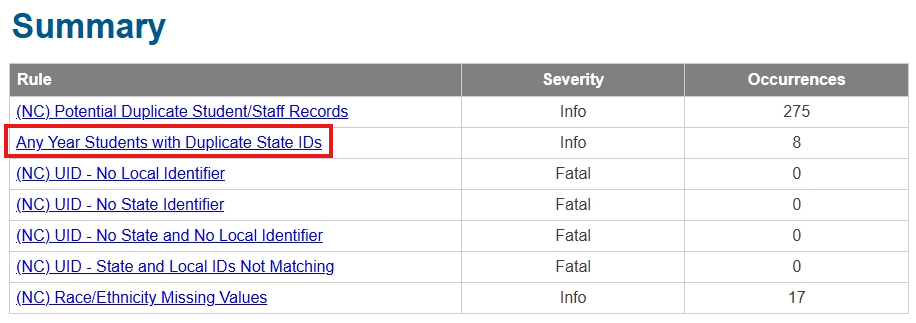 2. Duplicate records where the UID is the same on both copies should be merged at the PSU level. See the NCSIS QRD: Combining Persons at the PSU Level for more information.
We intend to run our next cleanup script on October 31st, 2025. Please merge all duplicate persons with the same UID value prior to this date. Merging duplicates with the same UID will help ensure our script works as intended. Thank you!
IC Support Cases*
Reminder: Respond to IC Support Requests Promptly
Please review and respond to any open IC Support cases awaiting your input. Timely responses ensure issues can be resolved efficiently and prevent cases from being closed due to inactivity.
|
|
 |
 |
|
Premium Product Training*
Phase II PSUs:
Please request training for all Premium Products ASAP if you have not already. All training must be complete by June 30, 2026. It is recommended to request training even if you are not implementing the product at this time; the recordings can be downloaded for later reference. If you have already received training, please be sure to download any training videos. This is for Phase II PSUs only - the window for Phase I Premium Product training has ended.
|
2024-2025 Dropout Reporting Procedures*
2024-2025 Dropout Reporting Procedures
Schools and PSU should use the Dropout Program tool in the NCSIS to report all 2024-2025 dropouts to NCDPI by COB November 4th, 2025. NCDPI will pull the active dropout program records after 7:00 pm on November 4th that will be used for Federal and State Reporting.
Dropout Reporting Resources and Documentation
Dropout Data Manual
The North Carolina Data Reporting and Procedure Manual: Dropout Data can be found here under the Documents section of the webpage.
State Student Locator
The State Student Locators is a collection of tools that can be used to determine a student's most recent enrollment in any PSU in the state or to find if a student has overlapping or duplicate enrollments in one or more PSUs. Information on how to access and use the State Student Locator can be found here.
NCSIS Dropout Reporting and Verification Report
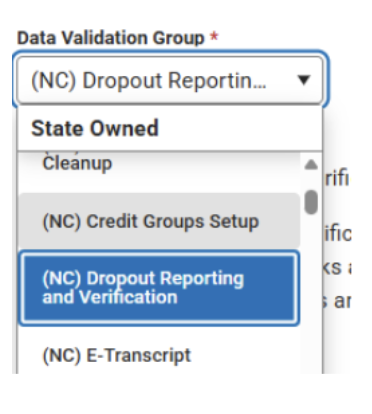
The Dropout Reporting and Verification report produces a set of sub-reports that can be used to track dropouts during the school year and can be used to research and report verified dropouts for state and reporting in the current (next school year). The report is available in the NCSIS Reporting Module → Data Validation Report → (NC) Dropout Reporting and Verification Group.
This report looks at student enrollment and dropout records based on the school year selected in the context menu and will look forward to the next school year when checking for potential dropouts and later enrollments. The report should be run under the reporting year calendar. Therefore, after June 30th of the reporting year, the calendar in the NCSIS context menu will need to be changed to the reporting year.
Please find the recorded webinar on Dropout on the State Reporting | NC Department of Public Instruction.
PSU Dropout Data Coordinator Contact Information
Dropout Data Coordinator Contact Information is now being collected in EDDIE!
Each PSU can designate up to two Dropout Data Contacts. Please work with your PSU’s EDDIE coordinator to have the contact information entered. Email EDDIE@dpi.nc.gov for questions if you are unsure of the EDDIE coordinator for your PSU.
Transfer of Student Records*
Update: Our message below from last week contained quotes from official documentation around the retention and disposition of records. Here are some clarifying statements:
- Without your PSUs official adoption of the records schedule, records cannot legally be destroyed, and should be maintained indefinitely. Confirm adoption of the records schedule with your local board and/or Superintendent prior to destroying records.
- If the sending PSU is unable to obtain confirmation of receipt of the cumulative record by the receiving PSU, they should not destroy the records.
- Confirmation of receipt from the receiving PSU should be maintained in local records.
- PSUs should maintain records indefinitely once a student graduates or leaves the public school system.
Please refer to the State Archives’ K–12 Records Retention and Disposition Schedule for guidance on maintaining student records - including, but not limited to Attendance, Discipline, and Health records.
Please note: Releasing a student’s electronic record in Infinite Campus does not fulfill the obligation to send the student’s physical cumulative record when requested. You must send the student’s physical record in addition to releasing the record in Infinite Campus.
According to the State Archives’ K–12 Records Retention and Disposition Schedule:
“For students who transfer to another school, transfer the student’s cumulative record to the school receiving the transfer. Destroy the original school’s cumulative record for that student upon confirmation of the record’s receipt.”
Additionally, per the North Carolina Records Retention and Disposition Schedule, SIS data alone does not constitute a sufficient permanent record. Public School Units (PSUs) are required to maintain analog cumulative records to ensure proper and permanent preservation.
Reminder from the SASA (School Attendance and Student Accounting Manual) and G.S. 115C-403:
"When any child transfers from one school system to another school system, the receiving school shall, within 30 days of the child's enrollment, obtain the child's record from the school from which the child is transferring.[…]Upon receipt of a request, the principal or the principal's designee of the school from which the child is transferring shall not withhold the record or verification for any reason, except as is authorized under the Family Educational Rights and Privacy Act."
Thank you for your cooperation in this matter.
|
Attendance Aggregation Preferences - Action Needed*
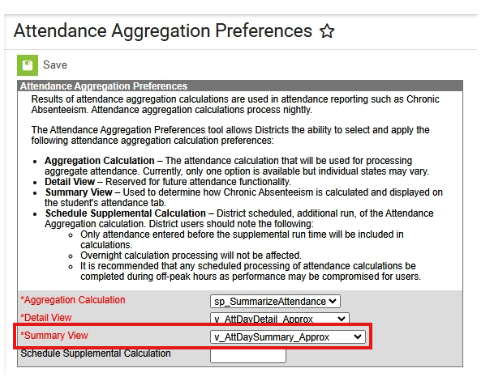
Update: The Detail View field on the Attendance Aggregation Preferences tool does not impact current functionality in the system, since it is “reserved for future attendance functionality” according to the text on the screen.
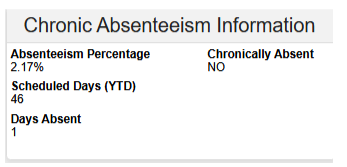
The Chronic Absenteeism Information on the Student’s Attendance tab will not display attendance as expected if the Attendance Aggregation Preferences are not set correctly.
Path: Attendance Office > Settings > Attendance Aggregation Preferences
Please verify that the Summary View field is set to v_AttDaySummary_Approx in order for the Chronic Absenteeism Information on the Attendance Screen for a student to be displayed correctly.
 |
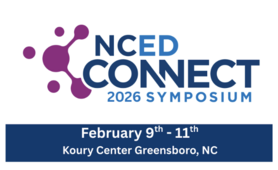
Join Us for the NCED CONNECT Symposium 2026!*
February 9–11, 2026 Koury Convention Center, Greensboro, NC
The NCED Connect Symposium brings together North Carolina’s digital teaching and learning leaders, technology directors, central office leadership, instructional coaches, NCSIS data managers and leads, as well as district innovators for three days of powerful collaboration and forward-thinking sessions.
This statewide event is designed to connect people, platforms, and possibilities across North Carolina’s education ecosystem.
Attendees will explore the latest updates on NCED Connect (NCEES, Schoolnet, LMS), NCSIS (Infinite Campus), School Connectivity, E-Rate, Cybersecurity, and Digital Teaching & Learning initiatives—all while engaging with hands-on sessions led by DPI teams, regional experts, and district practitioners.
Through keynote presentations, breakout sessions, and networking opportunities, participants will:
- Discover integrated solutions that power digital learning environments
- Learn about emerging technologies and AI integration in classrooms
- Collaborate on best practices for connectivity, cybersecurity, and innovation
- Strengthen their connections with colleagues and partners across the state
- Be apart of our first student AI Solve-A-Thon
- Annual School Library Media Directors Meeting
- Cybersecurity Table Top Exercises Event
- and more!
Join us as we build bridges between data, instruction, and innovation—because when North Carolina educators connect, students thrive!
Ticket Categories & Pricing **New!**
Early Bird Registration (Oct. 17–Nov 7) Lunch and Breakfast included
-
Individual Registration: $250 – Save before the early bird deadline!
-
Team Builder 5-Pack: Buy 4, get 1 free ($250 each) – perfect for small teams.
-
Buy 8, Get 2 Free + 1 Hotel Room: Register 8, get 2 free registrations plus one complimentary hotel room for three nights – ideal for larger district teams.
General Registration (Nov. 8–26)
-
Individual: $350
-
Group: $350 each (invoiced together)
Late Registration (Nov. 27–Feb. 6): $450 each
Presenter Registration: Please see separate email.
**Invoices are automatically emailed upon registration and should be paid within two weeks.
Hotel Information
The event will be held at the Koury Convention Center in Greensboro. Discounted room rates and booking links will be shared upon registration. Teams purchasing the Buy 8, Get 2 Free + 1 Hotel Room package will receive details for their complimentary stay via email for the first attendee registered. Hotel information and registration is located HERE.
Learn More & Register
Registration is OPEN! Full details Here.
We can’t wait to connect with you in Greensboro, where innovation meets collaboration!
|

Upcoming Training Information*
Upcoming Training Sessions & Webinars:
NCSIS Lunch & Learn Webinar—Advanced Person Search: Tue, Oct 28, 2025, 12:00 PM—Register Here
Additional Training Opportunities
Be sure to review the DTL Signature Events Calendar and Eventbrite for upcoming in-person and virtual regional meetings, webinars, and training sessions. These opportunities are designed to keep staff connected, informed, and supported throughout the school year.
DTL Signature Events Calendar
Eventbrite-NCSIS
*In the DTL Signature Events Calendar, use the arrows at the bottom of the screen to scroll to monthly event calendars, including upcoming NCSIS webinars!
Charter School Virtual Office Hours are offered twice a month to provide ongoing support and answer your questions.
📅 When: 2nd & 4th Thursday of each month (Date change started in August)
⏰ Time: 9:00 AM – 10:00 AM
🔗 Join us for Bi-Monthly Charter School Support Virtual Office Hours!
NCSIS Teacher Training Information:
Please use the link below to access teacher training resources for NCSIS. Additional details can also be found at ncsis.gov.
Infinite Campus Training Resources
If you have any questions, please contact Erin Wolfhope at erin.wolfhope@dpi.nc.gov with questions!
|
REMINDERS:
Happening Soon! Digital Leaders Exchange - November!
𝗥𝗲𝗴𝗶𝘀𝘁𝗲𝗿 𝗻𝗼𝘄 𝗳𝗼𝗿 𝘁𝗵𝗲 𝗡𝗼𝘃𝗲𝗺𝗯𝗲𝗿 𝗗𝗶𝗴𝗶𝘁𝗮𝗹 𝗟𝗲𝗮𝗱𝗲𝗿𝘀 𝗘𝘅𝗰𝗵𝗮𝗻𝗴𝗲!
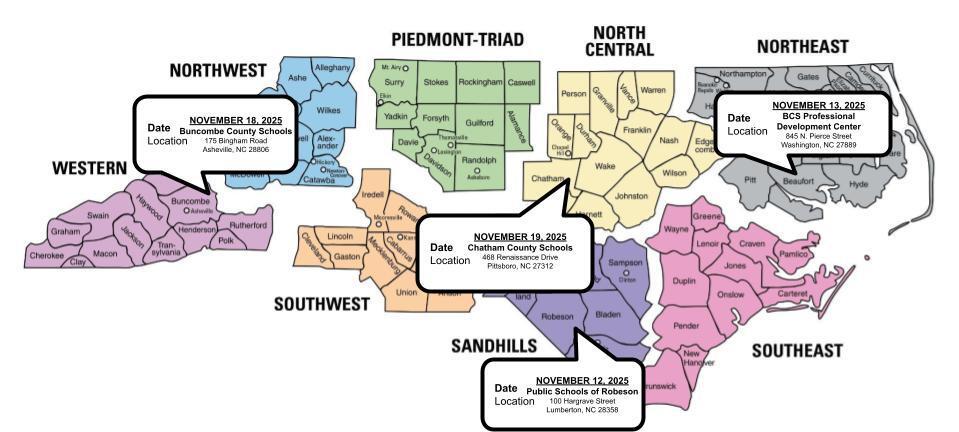
Join us for a full day of collaboration and learning focused on 𝗖𝘂𝗿𝗿𝗶𝗰𝘂𝗹𝘂𝗺, 𝗜𝗻𝘀𝘁𝗿𝘂𝗰𝘁𝗶𝗼𝗻 & 𝗔𝘀𝘀𝗲𝘀𝘀𝗺𝗲𝗻𝘁 — designed to empower digital leaders across North Carolina.
- When: 9:00 AM – 4:00 PM
- Catered lunch included
- Multiple locations across NC – find one near you!
Choose your focus track:
- SIS Coordinators
- District & School Leaders – HR, Technology, Media Coordinators, Directors & more
Registration is free!
Sign up today: go.ncdpi.gov/November2025DLE
Learn more on the DTL Hub: go.ncdpi.gov/DTLHub
|

Teacher Tips
New Bulletin Category: Teacher Toolbox
Campus Learning Updates: Check this space for ongoing updates about Campus Learning feature updates and improvements. Check it out here: Campus Learning Updates
Spotlight This Week: Resources for Posting Grades
|

Charter School Corner
Upcoming Charter School SIS Trainings
Bi-Monthly Charter School SIS Support Office Hours
Charter Connect In-Person Meeting
-
If you were not able to join us in person this month, please click on this link for the notes from all of our meetings in 2025
Charter schools now have a dedicated SIS professional contact!
Jennifer Fogleman is your dedicated NCSIS Professional Learning Consultant for Charter Schools. Jennifer brings a wealth of experience in the Student Information System (SIS) and is committed to providing you with the same high level of service you've come to expect from our team.
To reach Jennifer: jennifer.fogleman@dpi.nc.gov
The NCSIS Professional Learning Consultant team is here to support you. Please don't hesitate to contact Jennifer if you have any questions or concerns.
|

CTE Updates
Important:
At this time, schools should not complete any steps related to concentrator calculation or run CTE reports.
Please do not:
- Assign CTE Academic Programs (last year’s programs remain and have not been updated for 25–26)
- Update Student Status
- Run or use the NC CTE Extract Report
Further guidance will be shared once the updates are in place. Until then, no action should be taken on concentrator status in Infinite Campus.
|

NCSIS Resources
PSUs have access to the Campus Community, where they can acquire product knowledge, glean tips and tricks, and engage in networking opportunities with other districts. The Campus Community offers convenient single sign-on access from the Campus system to a wealth of resources, including the knowledge base, forum discussions, learning tools, support site, upcoming events, and more.
Campus Community- contains the information you need to learn how to use Infinite Campus through product documentation, videos & simulations, study guides, forums, and much more. Whether you are a teacher, data manager, or Infinite Campus user, you will find the learning resources in a clearly defined pathway for a seamless transition from PowerSchool.
Campus Passport- is on-demand, self-paced courses that can be assigned to new and existing staff. Accessed through the Campus Community, you will find Instructor-Led Training, specific E-Learning courses, or select a learning plan based on your district role.
KnowledgeOwl: KnowledgeOwl will include articles (QRDs) that are created and updated by the SIS Professional Learning team.
NCSIS Knowledge Base | NC Department of Public Instruction
GitHub Vendor Integrations Repository: 3rd party extract formats can be found below.
GitHub Vendor Integrations Repository
Ad Hoc Filter Sharing Community: Shared google folder for Ad Hoc filters PSUs have created.Ad Hoc Community
-
Naming Convention: Ad Hoc Name - PSU Name
- You’re welcome to include your email address within the document (optional).
-
Permissions: You have editing access—please proceed with caution!
-
PII: Do not upload any PII to the shared folder
NCSIS Crosswalk Document- will contain Infinite Campus and PowerSchool terms with their meanings to assist users with learning the new NCSIS terminology. This is a working document and will be updated regularly. NCSIS Crosswalk Document
IC Role Specific Resources- can be viewed by clicking on http://ncsis.gov, go to the Phase I PSU’s tab and scroll to the IC Role Specific Resources section. It Includes information for specific staff roles, as well as a guide for parents & students.
Webinar Recording Links and FAQs- can be found at http://ncsis.gov under the Professional Learning tab. Please check for recently added webinars.
|
Requesting Technical Support Points of Contact
Please review the information below on how to submit support tickets:
Contact Infinite Campus for assistance with:
NCSIS Application/Support Issues
Submit a case: https://support.infinitecampus.com
Contact DPI for assistance with:
- NCDPI Business Questions
- Duplicate Students
- Amplify/Missing Students
- PMR Deletes in Infinite Campus
Submit a request: https://go.ncdpi.gov/help
For additional technical support contacts, please refer to the document below: Requesting Help
|
|
 |
|