WHAT'S NEW!
- Transcript Printing & Legal Name Requirement*
- DPI Position Vacancy*
- 2024-2025 Dropout Reporting Procedures*
- Digital Leaders Exchange - September Recap*
- Reminder - NCSIS Conference*
REMINDERS:
- NC College Connect
- Duplicate/Overlapping Enrollments - Reminder
- CCRG Pathway Repealed
- Teacher Tips
- Upcoming Training Information
- NCED CONNECT 2026 Symposium - Call for Proposals
- Charter School Corner
- Knowledge Owl
- Phase II Implementation Dashboard
- Clarification: Membership for Students with IEPs
- CTE Updates
- Reminder: Submitting Requests for State Report Deletions
- SIS EOY Timeline SY 24-25
- NCSIS Resources
- Requesting Technical Support Points of Contact
- Want to Stay in the Loop?
|
*indicates new or updated information
|
|
WHAT'S NEW!
 |
|
Transcript Printing & Legal Name Requirement*
PSUs are reminded that if staff members have access to print transcripts, they must also have access to the Identity Tool within Infinite Campus. This ensures that the student’s legal name is displayed on transcripts.
We recognize the importance of this requirement and have already raised the matter with Infinite Campus.
If you encounter challenges granting appropriate staff members access to Census data—which is necessary for the legal name to display on transcripts—please submit a case directly to Infinite Campus for support.
Legal and Preferred Name: https://ncdepartmentofpublicinstruction.knowledgeowl.com/home/about-legal-and-preferred-name?
|
DPI Position Vacancy*
If you love the SIS, working with SASA policy, and analyzing data, use your skills with the DPI Office of School Business. We're looking for an additional team member to answer student accounting policy questions, train school staff to accurately enter data in the SIS, and monitor PMR data for compliance. Apply for the PSU Operations Support Analyst position (#65035195) by October 3.
For questions, please contact Catherine Mau.
|
|
 |
2024-2025 Dropout Reporting Procedures*
Schools and PSU should use the Dropout Program tool in the NCSIS to report all 2024-2025 dropouts to NCDPI by COB November 4th, 2025. NCDPI will pull the active dropout program records after 7:00 pm on November 4th that will be used for Federal and State Reporting.
Dropout Reporting Resources and Documentation
Dropout Data Manual
The North Carolina Data Reporting and Procedure Manual: Dropout Data can be found here under the Documents section of the webpage.
State Student Locator
The State Student Locators is a collection of tools that can be used to determine a student's most recent enrollment in any PSU in the state or to find if a student has overlapping or duplicate enrollments in one or more PSUs. Information on how to access and use the State Student Locator can be found here.
NCSIS Dropout Reporting and Verification Report
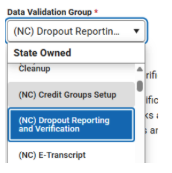
The Dropout Reporting and Verification report produces a set of sub-reports that can be used to track dropouts during the school year and can be used to research and report verified dropouts for state and reporting in the current (next school year). The report is available in the NCSIS Reporting Module → Data Validation Report → (NC) Dropout Reporting and Verification Group.
This report looks at student enrollment and dropout records based on the school year selected in the context menu and will look forward to the next school year when checking for potential dropouts and later enrollments. The report should be run under the reporting year calendar. Therefore, after June 30th of the reporting year, the calendar in the NCSIS context menu will need to be changed to the reporting year.
PSU Dropout Data Coordinator Contact Information
Dropout Data Coordinator Contact Information is now being collected in EDDIE!
Each PSU can designate up to two Dropout Data Contacts. Please work with your PSU’s EDDIE coordinator to have the contact information entered. Email EDDIE@dpi.nc.gov for questions if you are unsure of the EDDIE coordinator for your PSU.
Digital Leaders Exchange - September Recap*
Digital Leaders Exchange: If we missed you at DLE, please refer to the slide presentations below.
Opening Session Slidedeck
|
 Reminder - NCSIS Conference*
NCSIS Conference October 20th - 22nd - RALEIGH
We are excited to invite you back to the NCSIS 2025 Conference, taking place October 20-22, 2025 at the Raleigh Downtown Marriott. This year’s event will bring together leaders, educators, and technology professionals from across North Carolina to collaborate, learn, and shape the future of student information systems in our state.
Registration Options:
- General Registration – $200 Available September 18 – September 30, 2025
- Late Registration – $250 Available October 1, 2025, until capacity is reached
Space is limited! We anticipate strong participation, so we encourage you to register early to secure your spot.
- Location: Raleigh Downtown Marriott **New Location this Year!
- Dates: October 20 - 22, 2025
- Intended Audience: SIS Coordinators & Lead Data Managers
This conference will feature Infinite Campus trainers on site, SIS Experts from the field, breakout sessions & workshops, and networking opportunities designed to support you in making the most of NCSIS during this critical phase of statewide implementation.
Register Now by visiting the DTL Hub - www.dpi.nc.gov/dtl. Full hotel information is available in the hub.
We look forward to seeing you in Raleigh this October for an engaging and impactful conference.
Hotel Information:
- ➡️ Raleigh Marriott City Center — $229.00 USD per night
-
Last Day to Book: Sunday, September 28, 2025
- Book your group rate here
REMINDERS:

NC College Connect
NC College Connect: Scheduling Guidance
PSUs must verify transcript and scheduling accuracy by Friday, September 26, 2025 (COB) to ensure student eligibility. Key requirements include:
- 12th- & 13th-grade students with a weighted GPA ≥ 2.80
- A fourth-level math course passed or scheduled
- All graduation requirements scheduled (no placeholders)
- Correct course codes & grading setup for all course types
Please click on the link below for more information:
NC College Connect Scheduling Guidance
|
 |
|
Duplicate/Overlapping Enrollments - Reminder
PSUs should regularly use the Duplicate/Overlapping Enrollments Tool in the NCDPI Student Locator to identify overlapping or duplicate student enrollments in the current year across the state.
Addressing these duplicate/overlapping enrollments helps ensure accurate records, smooth transitions for students, and prevents issues that may affect other connected systems.
Navigation: https://locator.ncsis.gov
|

CCRG Pathway Repealed
Due to the repeal of the CCRG Legislation, LEAs are no longer offering CCRG. As a result, the NROC/EdReady project platform is no longer available for student use. If you have any questions or need assistance, feel free to reach out.
For PSUs, this means that in NCSIS the CCRG Math Course Code, 20132X0, will be disabled and the flags for CCRG Math and Reading will be inactivated this Friday, September 19, 2025.
If you have students scheduled for CCRG- student schedules will need to be updated accordingly. Please ensure the following changes are made:
- Remove students from CCRG Math and schedule them for Math 4 or another appropriate math course.
- Keep students in English 4 but CCRG content will no longer be embedded in the course.
Guidance information can be found here.
Questions: NCDPI Contact: Dr. Erica Shoulders-Royster, Career and College Ready Specialist
|
Upcoming Training Information
Upcoming Training Sessions & Webinars:
- NCSIS Honor Roll Statewide Webinar Tue, Sep 30, 2025, 3:00 PM
- Early Warning in Infinite Campus, Friday, October 3rd, 1 pm
- Building Dashboards for Assessment Data, Friday, October 3rd, 3 pm
- Early Warning In Infinite Campus, Monday, October 13th, 9 am
- Introduction to Insight Dashboards in Infinite Campus, Monday, October 13th, 12 pm
- Building Dashboards in Infinite Campus Using Insights (Intermediate), Monday, October 13th, 3 pm
- Documenting Interventions in Infinite Campus, Wednesday, October 15th, 10 am
- Building Dashboards for Assessment Data, Wednesday, October 15th,1 pm
- Creating Custom Screens, Wednesday, October 15th, 3 pm
Additional Training Opportunities
Be sure to review the DTL Signature Events Calendar and Eventbrite for upcoming in-person and virtual regional meetings, webinars, and training sessions. These opportunities are designed to keep staff connected, informed, and supported throughout the school year.
DTL Signature Events Calendar
Eventbrite-NCSIS
*In the DTL Signature Events Calendar, use the arrows at the bottom of the screen to scroll to monthly event calendars, including upcoming NCSIS webinars!
Charter School Virtual Office Hours are offered twice a month to provide ongoing support and answer your questions.
📅 When: 2nd & 4th Thursday of each month (Date change started in August)
⏰ Time: 9:00 AM – 10:00 AM
🔗 Join us for Bi-Monthly Charter School Support Virtual Office Hours!
NCSIS Teacher Training Information:
Please use the link below to access teacher training resources for NCSIS. Additional details can also be found at ncsis.gov.
Infinite Campus Training Resources
If you have any questions, please contact Erin Wolfhope at erin.wolfhope@dpi.nc.gov with questions!
|
NCED CONNECT 2026 Symposium
Call for Proposals!
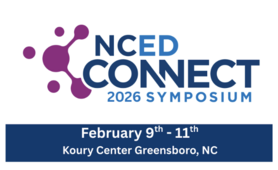
We are excited to announce that the Call for Proposals is now open for the NCED Connect Symposium, taking place February 9–11, 2026, at the Koury Convention Center in Greensboro, NC.
This year, we are planning an even larger symposium this year and expanding our offerings around:
- AI in Education
- NCSIS (Phase I and II) for all (Data Managers, SIS Coordinators, Teachers, Coaches, Admin, Central Office Staff, Support Staff)
- EdTech Innovation
- Instructional Strategies
- NCED Connect Services (NCEES, Instructional Improvement System (Schoolnet), Canvas, & OER)
- Leadership tracks for CTOs, principals, coaches, and central office staff
We invite you to share your expertise by submitting a session proposal. Please complete the Call for Proposals by September 30, 2025, using the link below:
Submit Your Proposal Here - You are needed!
|

Charter School Corner
Upcoming Charter School SIS Trainings
Bi-Monthly Charter School SIS Support Office Hours
Charter Connect In-Person Meeting
-
If you were not able to join us in person this month, please click on this link for the notes from all of our meetings in 2025
Charter schools now have a dedicated SIS professional contact!
Jennifer Fogleman is your dedicated NCSIS Professional Learning Consultant for Charter Schools. Jennifer brings a wealth of experience in the Student Information System (SIS) and is committed to providing you with the same high level of service you've come to expect from our team.
To reach Jennifer: jennifer.fogleman@dpi.nc.gov
The NCSIS Professional Learning Consultant team is here to support you, please don't hesitate to contact Jennifer if you have any questions or concerns.
|
Phase II Implementation Dashboard
Reminder for Phase II SIS Coordinators Only:
- Please update your progress on tasks weekly in the Go-Live Checklist.
- If you select “Need Support” for any task, also notify your assigned SIS PL consultant.
- Once support has been provided, remember to update the task status.
- Regularly reviewing and updating your PSU’s checklist is strongly encouraged to stay on track for Go-Live.
You can also view a summary of dashboard features and access steps here: NCSIS Implementation Dashboard Overview Slides
|
 |
|
Clarification: Membership for Students with IEPs
To be counted in membership, students must be enrolled for at least 50% of the instructional day. There is no special FTE for students with IEPs who attend fewer than half of the school’s instructional day.
- Students attending 50% or more of the instructional day are included in membership.
- Students attending less than 50% of the instructional day are reported as visiting students.
This guidance aligns with existing SASA policy and ensures consistent reporting across PSUs.
For questions, please refer to the SASA Manual link below or contact the Office of School Business Services.
SASA Manual
|

CTE Updates
Important:
At this time, schools should not complete any steps related to concentrator calculation or run CTE reports.
Please do not:
- Assign CTE Academic Programs (last year’s programs remain and have not been updated for 25–26)
- Update Student Status
- Run or use the NC CTE Extract Report
Further guidance will be shared once the updates are in place. Until then, no action should be taken on concentrator status in Infinite Campus.
|

Reminder: Submitting Requests for State Report Deletions
Reminder: Submitting Requests for State Report Deletions
If you're working with Infinite Campus Support on a ticket and they advise that DPI must delete a state report so it can be re-run, please remember that you must submit a ServiceNow ticket to DPI to request the deletion. DPI cannot process the request based on the IC ticket alone, as Finance approval is required for all deletions.
To ensure proper routing, please use the following steps when submitting your request:
When submitting a case to NCDPI for a State Report deletion:
- In ServiceNow, select "Report a Service Incident"
- Choose "NCSIS – Powered by Infinite Campus"
Be sure to include the following information:
- Name of the State Report
- The specific month or period to be deleted (if applicable)
- School name(s) and six-digit school number(s) (even if it's all schools)
- A brief reason for the deletion request
- The Infinite Campus Support case number
PMR Guidance:
If you are running PMR for the first time in Infinite Campus, please refer to the following resource for step-by-step instructions on resolving validation errors, generating, and submitting the report:
🔗 Principal’s Monthly Report (PMR) | NC DPI
Support Ticket Guidance: Contact Infinite Campus for: • NCSIS application/support issues • NCSIS state reporting issues Submit a case: https://support.infinitecampus.com
Contact DPI for: • NCDPI business questions • Duplicate students • Amplify/missing students • PMR or LCS deletes in Infinite Campus Submit a case: https://go.ncdpi.gov/help
|

SIS EOY Timeline SY 24-25
The Phase II timeline includes the status of key tasks and identifies items that will be added by NCDPI after End-of-Year (EOY) processing is complete. While these tasks apply to Phase II PSUs, Phase I PSUs may also view this information for awareness.
|

NCSIS Resources
PSUs have access to the Campus Community, where they can acquire product knowledge, glean tips and tricks, and engage in networking opportunities with other districts. The Campus Community offers convenient single sign-on access from the Campus system to a wealth of resources, including the knowledge base, forum discussions, learning tools, support site, upcoming events, and more.
Campus Community- contains the information you need to learn how to use Infinite Campus through product documentation, videos & simulations, study guides, forums, and much more. Whether you are a teacher, data manager, or Infinite Campus user, you will find the learning resources in a clearly defined pathway for a seamless transition from PowerSchool.
Campus Passport- is on-demand, self-paced courses that can be assigned to new and existing staff. Accessed through the Campus Community, you will find Instructor-Led Training, specific E-Learning courses, or select a learning plan based on your district role.
KnowledgeOwl: KnowledgeOwl will include articles (QRDs) that are created and updated by the SIS Professional Learning team.
NCSIS Knowledge Base | NC Department of Public Instruction
GitHub Vendor Integrations Repository: 3rd party extract formats can be found below.
GitHub Vendor Integrations Repository
Ad Hoc Filter Sharing Community: Shared google folder for Ad Hoc filters PSUs have created.Ad Hoc Community
-
Naming Convention: Ad Hoc Name - PSU Name
- You’re welcome to include your email address within the document (optional).
-
Permissions: You have editing access—please proceed with caution!
-
PII: Do not upload any PII to the shared folder
NCSIS Crosswalk Document- will contain Infinite Campus and PowerSchool terms with their meanings to assist users with learning the new NCSIS terminology. This is a working document and will be updated regularly. NCSIS Crosswalk Document
IC Role Specific Resources- can be viewed by clicking on http://ncsis.gov, go to the Phase I PSU’s tab and scroll to the IC Role Specific Resources section. It Includes information for specific staff roles, as well as a guide for parents & students.
Webinar Recording Links and FAQs- can be found at http://ncsis.gov under the Professional Learning tab. Please check for recently added webinars.
|
Requesting Technical Support Points of Contact
Please review the information below on how to submit support tickets:
Contact Infinite Campus for assistance with:
NCSIS Application/Support Issues
Submit a case: https://support.infinitecampus.com
Contact DPI for assistance with:
- NCDPI Business Questions
- Duplicate Students
- Amplify/Missing Students
- PMR Deletes in Infinite Campus
Submit a request: https://go.ncdpi.gov/help
For additional technical support contacts, please refer to the document below:Requesting Help
|
|
 |
|