WHAT'S NEW!
- Digital Leaders Exchange - September*
- E-Transcript Data Validation - Action Required*
- LCS Report Update*
- SASA Manual Update*
- NCSIS Conference*
- Upcoming Training Information*
- Knowledge Owl*
- Teacher Tips*
- Statewide PMR Issue*
REMINDERS:
- NCED CONNECT 2026 Symposium - Call for Proposals
- EDDIE Grade Level Function Updates
- Charter School Corner
- Infinite Campus Zoom Training Video Retention Reminder
- Infinite Campus Training Sites
- Phase II Implementation Dashboard
- 25-26 Master Course Code List Update
- CCRG Pathway Repealed
- PMR FATAL-26 Students Suspended on the First Day of School
- Clarification: Membership for Students with IEPs
- CTE Updates
- Reminder: Submitting Requests for State Report Deletions
- SIS EOY Timeline SY 24-25
- NCSIS Resources
- Requesting Technical Support Points of Contact
- Want to Stay in the Loop?
|
*indicates new or updated information
|
|
WHAT'S NEW!
 Digital Leaders Exchange - September*
Don't miss out, there's still time to register!
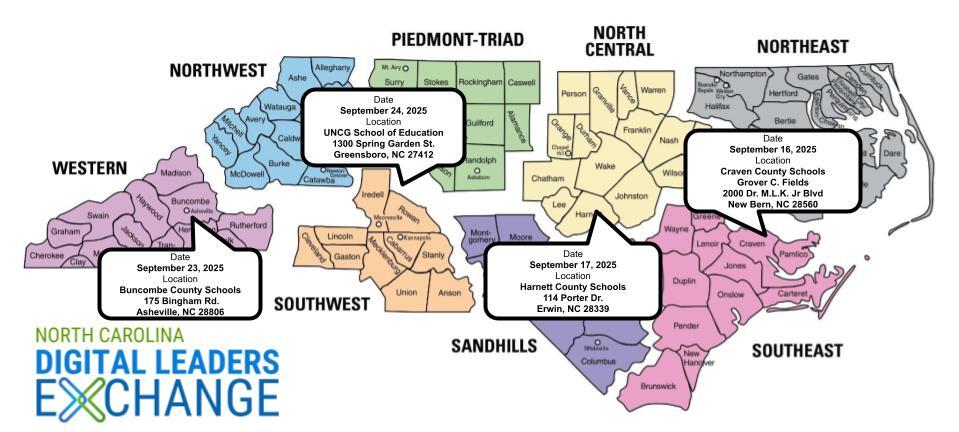
For September, our Digital Learning Exchanges will focus on aligning data privacy and cybersecurity policies and procedures with current best practices and federal and state laws, implementing a process for continuous improvement in data protection and risk management, and providing professional learning opportunities to communicate the importance of cybersecurity and data privacy to all stakeholders.
- New Bern, September 16, 2025 at Grover C. Fields Middle School
- Erwin, September 17, 2025 at Harnett County Gentry Educator Development Center
- Asheville, September 23, 2025 at Buncombe County Schools Central Office
- Greensboro, September 24, 2025 at UNCG School of Education
E-Transcript Data Validation - Action Required*
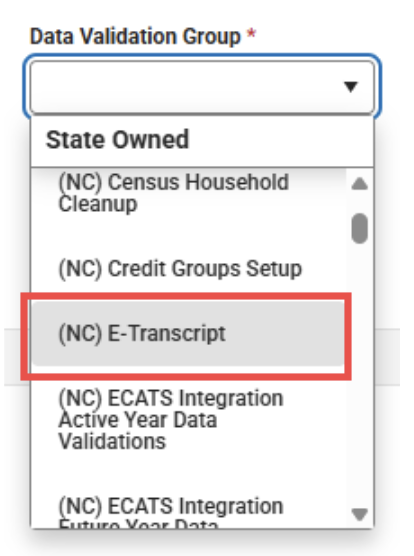
PSUs are reminded to run the E-Transcript Data Validation Report regularly and correct any errors identified. Students listed on this report may experience transcript requests through CFI that do not process correctly. Running this report consistently helps ensure records stay accurate and transcripts are delivered smoothly.
Pathway: Reporting > Data Validation > Data Validation Report > (NC) E-Transcript
 |
|
LCS Report Update*
DPI is aware that the Legislative Class Size (LCS) report is not currently displaying under NC State Reporting in Infinite Campus. This is due to a bug that will be fixed in the 2539 release.
|
SASA Manual Update*
The School Attendance and Student Accounting Manual has been updated. Please refer to the link and information below.
SASA Manual
|
|
 |
 NCSIS Conference*
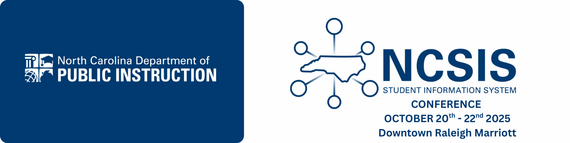
NCSIS Conference October 20th - 22nd - RALEIGH
We are excited to invite you back to the NCSIS 2025 Conference, taking place October 20-22, 2025 at the Raleigh Downtown Marriott. This year’s event will bring together leaders, educators, and technology professionals from across North Carolina to collaborate, learn, and shape the future of student information systems in our state.
Registration Options:
- Early Bird Registration – $150 On Sale Now through September 17, 2025 at 11:59 PM
- General Registration – $200 Available September 18 – September 30, 2025
- Late Registration – $250 Available October 1, 2025 until capacity is reached
Space is limited! We anticipate strong participation, so we encourage you to register early to secure your spot.
Location: Raleigh Downtown Marriott **New Location this Year!
Dates: October 20 - 22, 2025
Intended Audience: SIS Coordinators & Lead Data Managers
This conference will feature Infinite Campus trainers on site, SIS Experts from the field, breakout sessions & workshops, and networking opportunities designed to support you in making the most of NCSIS during this critical phase of statewide implementation.
Register Now by visiting the DTL Hub - www.dpi.nc.gov/dtl Full hotel information is available in the hub as well.
We look forward to seeing you in Raleigh this October for an engaging and impactful conference.
Hotel Information:
- ➡️ Raleigh Marriott City Center — $229.00 USD per night
-
Last Day to Book: Sunday, September 28, 2025
- Book your group rate here

Upcoming Training Information*
Upcoming Training Sessions & Webinars:
Back-to-School Regional Check-Ins:
Back-to-School Check-Ins will be held regionally next week. Please check Eventbrite for your region’s registration link and secure your spot.
NCSIS Honor Roll Statewide Webinar Tue, Sep 30, 2025, 3:00 PM
Additional Training Opportunities
Be sure to review the DTL Signature Events Calendar and Eventbrite for upcoming in-person and virtual regional meetings, webinars, and training sessions. These opportunities are designed to keep staff connected, informed, and supported throughout the school year.
DTL Signature Events Calendar
Eventbrite-NCSIS
*In the DTL Signature Events Calendar, use the arrows at the bottom of the screen to scroll to monthly event calendars, including upcoming NCSIS webinars!
Charter School Virtual Office Hours are offered twice a month to provide ongoing support and answer your questions.
📅 When: 2nd & 4th Thursday of each month (Date change starting in August)
⏰ Time: 9:00 AM – 10:00 AM
🔗 Join us for Bi-Monthly Charter School Support Virtual Office Hours!
NCSIS Teacher Training Information:
Please use the link below to access teacher training resources for NCSIS. Additional details can also be found at ncsis.gov.
Infinite Campus Training Resources
If you have any questions, please contact Erin Wolfhope at erin.wolfhope@dpi.nc.gov with questions!
|
 |
|
Statewide PMR Issue*
PMR Report Update
The previously reported bug impacting the PMR has been resolved. The PMR Report generation in Infinite Campus is now working properly, and PSUs should be able to generate the report for review and approval.
Navigation: Reporting > NC State Reporting > NC PMR Extract
If you experience any issues, please submit a support ticket with Infinite Campus and notify your assigned SIS PL consultant for assistance.
|
REMINDERS:
NCED CONNECT 2026 Symposium
Call for Proposals!
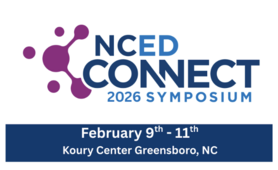
We are excited to announce that the Call for Proposals is now open for the NCED Connect Symposium, taking place February 9–11, 2026 at the Koury Convention Center in Greensboro, NC.
This year, we are planning an even larger symposium this year and expanding our offerings around:
- AI in Education
- NCSIS (Phase I and II) for all (Data Managers, SIS Coordinators, Teachers, Coaches, Admin, Central Office Staff, Support Staff)
- EdTech Innovation
- Instructional Strategies
- NCED Connect Services (NCEES, Instructional Improvement System (Schoolnet), Canvas, & OER)
- Leadership tracks for CTOs, principals, coaches, and central office staff
We invite you to share your expertise by submitting a session proposal. Please complete the Call for Proposals by September 30, 2025 using the link below:
Submit Your Proposal Here - You are needed!
|
EDDIE Grade Level Function Updates
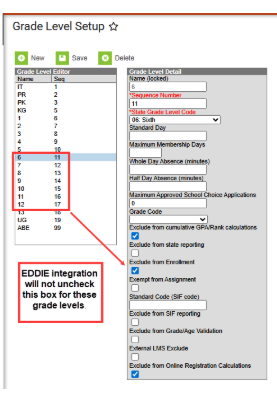
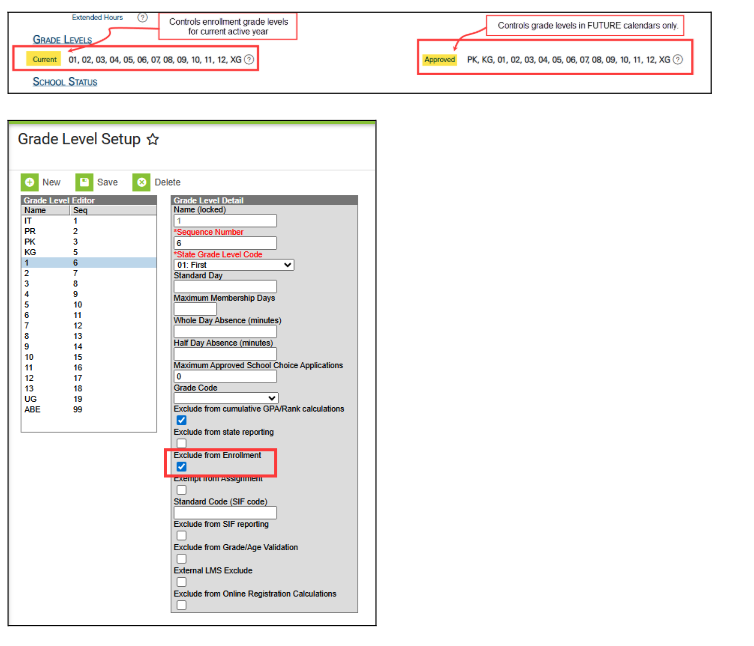
Previously the EDDIE integration was checking and unchecking the ‘Exclude from Enrollment’ box for any grade level not listed in a schools Current grade level list in EDDIE. This presented a problem for schools that had multiple calendars in the same school for different grade levels.The EDDIE integration has been updated to now only check the Exclude from Enrollment box if a grade level does not exist in the Current grade level field, it will not uncheck the exclude box on a grade level if a school has checked the box to exclude a grade level in a calendar.
For instance, a school in EDDIE has grades K-12 in the Current grade level list for a school, however the school has setup three different calendars. One calendar for K-5, one calendar for 6-8, and one calendar for 9-12. In the K-5 calendar the school has checked exclude from Enrollment for grades 6-12. These will no longer be unchecked by the EDDIE integration.
Navigation: Scheduling & Courses > Calendar Setup > Grade Level Setup
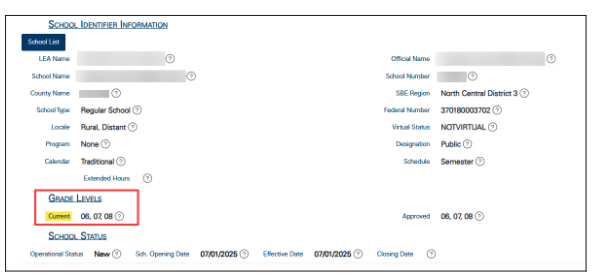 The Current grade level list in EDDIE controls the available grade levels in the current active year at the State Edition in Infinite Campus. The Approved grade level controls the available grade levels for the future year, typically for scheduling purposes. However, PSUs need to ensure the newly added grade levels in Approved are also updated in the Current grade levels in EDDIE when NCDPI flips to the next active year in the state edition (usually after July 1).
The Approved Grade Level field in EDDIE will also be used by the EDDIE integration for future grade levels and scheduling. If a grade level exists in the Approve Grade Level list, a school can have any of those grade levels set up for enrollment in future years. However, once the state rolls over to the next year, PSUs will need to ensure the new grade levels are also reflected in EDDIE in the Current Grade Level field as of 7/1 of the new year.


Charter School Corner
Upcoming Charter School SIS Trainings
Bi-Monthly Charter School SIS Support Office Hours
Charter Connect In-Person Meeting
-
If you were not able to join us in person this month, please click on this link for the notes from all of our meetings in 2025
Charter schools now have a dedicated SIS professional contact!
Jennifer Fogleman is your dedicated NCSIS Professional Learning Consultant for Charter Schools. Jennifer brings a wealth of experience in the Student Information System (SIS) and is committed to providing you with the same high level of service you've come to expect from our team.
To reach Jennifer: jennifer.fogleman@dpi.nc.gov
The NCSIS Professional Learning Consultant team is here to support you, please don't hesitate to contact Jennifer if you have any questions or concerns.
|
Infinite Campus Zoom Training Video Retention Reminder
Infinite Campus Zoom Training Video Retention Reminder- Phase II
Please ensure you download any Infinite Campus training Zoom video links within 180 days of the meeting if you need them for future reference, as the recordings will be automatically deleted after this time.
|
|
 |
 |
|
Infinite Campus Training Sites
Training Sites to Be Disabled – September 30th
Please be advised that the Infinite Campus training sites assigned to PSUs during implementation will be disabled on September 30th.
PSUs will continue to have access to their sandbox environments, which should be used for training and practice purposes moving forward.
If you have any questions, please contact your Infinite Campus Implementation team or your assigned SIS PL consultant.
|

Phase II Implementation Dashboard
Reminder for Phase II SIS Coordinators Only:
- Please update your progress on tasks weekly in the Go-Live Checklist.
- If you select “Need Support” for any task, also notify your assigned SIS PL consultant.
- Once support has been provided, remember to update the task status.
- Regularly reviewing and updating your PSU’s checklist is strongly encouraged to stay on track for Go-Live.
You can also view a summary of dashboard features and access steps here: NCSIS Implementation Dashboard Overview Slides
|

25-26 Master Course Code List Update
The following Course Updates are included in 25-26 Master Course Code List V9.
Course 20132X0 CCRG Math is now disabled (End Year 2025) on the Master Course Code List due to the CCRG pathway has been repealed and should not be used for scheduling.
- Guidance information here.
- CCRG Reading and Math flags will be inactivated in NCSIS.
Truncated Course Names in NCSIS-IC Corrected
- NCDPI corrected truncated course names (e.g., Honors, I/II) to meet IC’s 30-character limit.
- 80+ State Course Code Names are updated and published to PSUs.
- See 25-26 Master Course Code List V9 (Full Course Codes tab, updates in orange).Note: Local course Name fields were not updated in PSU instances. Districts should review course masters/sections for local name changes that might be needed.
- Example course IE725X0 - SREB AC App Auto Mtrl Join’g H, shows in production with a “?” instead of the apostrophe.
Arts Education State Course Code Name Updates
- Standardized abbreviations:
- Special → Specializ (Specialization)
- Grade → Gr
- Kindergarten → Kinder
- Changes affect State Course Code Name only (not local fields).
Other Updates
Master Course Code List Notes tab includes links to Arts Ed Course Code Crosswalk (Grad Requirement and Endorsement information) and Arts Ed Scheduling Quick Guide.
|

CCRG Pathway Repealed
Due to the repeal of the CCRG Legislation, LEAs are no longer offering CCRG. As a result, the NROC/EdReady project platform is no longer available for student use. If you have any questions or need assistance, feel free to reach out.
For PSUs, this means that in NCSIS the CCRG Math Course Code, 20132X0, will be disabled and the flags for CCRG Math and Reading will be inactivated.
If you have students scheduled for CCRG- student schedules will need to be updated accordingly. Please ensure the following changes are made:
- Remove students from CCRG Math and schedule them for Math 4 or another appropriate math course.
- Keep students in English 4 but CCRG content will no longer be embedded in the course.
Guidance information can be found here.
Questions: NCDPI Contact: Dr. Erica Shoulders-Royster, Career and College Ready Specialist
|
 |
|
PMR FATAL-26 Students Suspended on the First Day of School
Students Suspended on the First Day of School
Beginning with PMR 1, students who were suspended on their initial enrollment day should remain enrolled in the SIS. For both rolled-over suspensions and new suspensions that include the first day of school, the student should be marked absent using the 3 code.
This adjustment will no longer trigger a fatal PMR error. It ensures that student discipline information remains active while aligning procedures with compulsory attendance law.
If you have already submitted PMR 1 and removed suspended students, please contact Student Accounting for assistance.
|
Clarification: Membership for Students with IEPs
To be counted in membership, students must be enrolled for at least 50% of the instructional day. There is no special FTE for students with IEPs who attend fewer than half of the school’s instructional day.
- Students attending 50% or more of the instructional day are included in membership.
- Students attending less than 50% of the instructional day are reported as visiting students.
This guidance aligns with existing SASA policy and ensures consistent reporting across PSUs.
For questions, please refer to the SASA Manual link below or contact the Office of School Business Services.
SASA Manual
|
|
 |

CTE Updates
Important:
At this time, schools should not complete any steps related to concentrator calculation or run CTE reports.
Please do not:
- Assign CTE Academic Programs (last year’s programs remain and have not been updated for 25–26)
- Update Student Status
- Run or use the NC CTE Extract Report
Further guidance will be shared once the updates are in place. Until then, no action should be taken on concentrator status in Infinite Campus.
|

Reminder: Submitting Requests for State Report Deletions
Reminder: Submitting Requests for State Report Deletions
If you're working with Infinite Campus Support on a ticket and they advise that DPI must delete a state report so it can be re-run, please remember that you must submit a ServiceNow ticket to DPI to request the deletion. DPI cannot process the request based on the IC ticket alone, as Finance approval is required for all deletions.
To ensure proper routing, please use the following steps when submitting your request:
When submitting a case to NCDPI for a State Report deletion:
- In ServiceNow, select "Report a Service Incident"
- Choose "NCSIS – Powered by Infinite Campus"
Be sure to include the following information:
- Name of the State Report
- The specific month or period to be deleted (if applicable)
- School name(s) and six-digit school number(s) (even if it's all schools)
- A brief reason for the deletion request
- The Infinite Campus Support case number
PMR Guidance:
If you are running PMR for the first time in Infinite Campus, please refer to the following resource for step-by-step instructions on resolving validation errors, generating, and submitting the report:
🔗 Principal’s Monthly Report (PMR) | NC DPI
Support Ticket Guidance: Contact Infinite Campus for: • NCSIS application/support issues • NCSIS state reporting issues Submit a case: https://support.infinitecampus.com
Contact DPI for: • NCDPI business questions • Duplicate students • Amplify/missing students • PMR or LCS deletes in Infinite Campus Submit a case: https://go.ncdpi.gov/help
|

SIS EOY Timeline SY 24-25
The Phase II timeline includes the status of key tasks and identifies items that will be added by NCDPI after End-of-Year (EOY) processing is complete. While these tasks apply to Phase II PSUs, Phase I PSUs may also view this information for awareness.
|

NCSIS Resources
PSUs have access to the Campus Community, where they can acquire product knowledge, glean tips and tricks, and engage in networking opportunities with other districts. The Campus Community offers convenient single sign-on access from the Campus system to a wealth of resources, including the knowledge base, forum discussions, learning tools, support site, upcoming events, and more.
Campus Community- contains the information you need to learn how to use Infinite Campus through product documentation, videos & simulations, study guides, forums, and much more. Whether you are a teacher, data manager, or Infinite Campus user, you will find the learning resources in a clearly defined pathway for a seamless transition from PowerSchool.
Campus Passport- is on-demand, self-paced courses that can be assigned to new and existing staff. Accessed through the Campus Community, you will find Instructor-Led Training, specific E-Learning courses, or select a learning plan based on your district role.
KnowledgeOwl: KnowledgeOwl will include articles (QRDs) that are created and updated by the SIS Professional Learning team.
NCSIS Knowledge Base | NC Department of Public Instruction
GitHub Vendor Integrations Repository: 3rd party extract formats can be found below.
GitHub Vendor Integrations Repository
Ad Hoc Filter Sharing Community: Shared google folder for Ad Hoc filters PSUs have created.Ad Hoc Community
-
Naming Convention: Ad Hoc Name - PSU Name
- You’re welcome to include your email address within the document (optional).
-
Permissions: You have editing access—please proceed with caution!
-
PII: Do not upload any PII to the shared folder
NCSIS Crosswalk Document- will contain Infinite Campus and PowerSchool terms with their meanings to assist users with learning the new NCSIS terminology. This is a working document and will be updated regularly. NCSIS Crosswalk Document
IC Role Specific Resources- can be viewed by clicking on http://ncsis.gov, go to the Phase I PSU’s tab and scroll to the IC Role Specific Resources section. It Includes information for specific staff roles, as well as a guide for parents & students.
Webinar Recording Links and FAQs- can be found at http://ncsis.gov under the Professional Learning tab. Please check for recently added webinars.
|
 |
|
Requesting Technical Support Points of Contact
Please review the information below on how to submit support tickets:
Contact Infinite Campus for assistance with:
NCSIS Application/Support Issues
Submit a case: https://support.infinitecampus.com
Contact DPI for assistance with:
- NCDPI Business Questions
- Duplicate Students
- Amplify/Missing Students
- PMR Deletes in Infinite Campus
Submit a request: https://go.ncdpi.gov/help
For additional technical support contacts, please refer to the document below:Requesting Help
|
|