What's New!
- Disabled Local Administrator Accounts*
- Amplify Information*
- Infinite Campus Help Link*
- Ad Hoc Reporting*
- Releasing Records*
- Phase II Implementation Dashboard*
- Upcoming Training Information*
- FERPA Reminder
- NCBOLD Recap
- NCSIS 3rd Party Office Hours
- Course and Section Attributes
- OCS & ECS Science Course Options
- Course Number Requirements by Term Length
- Reminder: Submitting Requests for State Report Deletions
- Disabled Courses
- Master Course Code List & Course Code Manual Updated
- Graduation Requirements Program Automatically Added
- ECATS 2025-26 Transition Update
- Charter School Corner
- Printing Transcripts for Graduated or Inactive Students
- Accessing North Carolina Historical Student Data (NCHSD)
- Graduation Data Verification Report Information
- Knowledge Owl
- SIS EOY Timeline SY 24-25
- NCSIS Resources
- Requesting Technical Support Points of Contact
- Want to Stay in the Loop?
|
*indicates new or updated information
|
|
WHAT'S NEW!
Disabled Local Administrator Accounts*
If your local administrator account (local authentication) was disabled, and you had items connected to that account (ad hoc filters, letters, etc), you can put a ticket into Infinite Campus to have them copied to another account.
|
|
 |

Amplify Information*
SIS Coordinators: Please share the information below with your school leaders regarding upcoming Amplify training and support opportunities.
Leaders, register now!
Preparing for BOY:
To support district and school leaders, Amplify will offer the following webinar(s) to help you prepare for a successful BOY administration using the mCLASS tools. The webinars will focus on new mCLASS updates, enrollment, required assessments, and other frequently asked questions. The webinars will be one hour in length; we will record the session and post it here.
Register now!
Monday, August 18th, 3:00
Preparing for BOY Office Hours:
After attending or reviewing the recording of the webinar, Amplify will host weekly office hours to support districts and charters with additional questions. Please be sure to review the webinar information and the enrollment section on the Amplify site prior to joining these sessions.
Office Hours, join here:
- Thursday, August 21st, 12:00 pm – 12:30 pm
- Friday, August 29th, 12:00 pm – 12:30 pm
Recordings of Previous Sessions:
Preparing for BOY
Recording
Slide deck
|
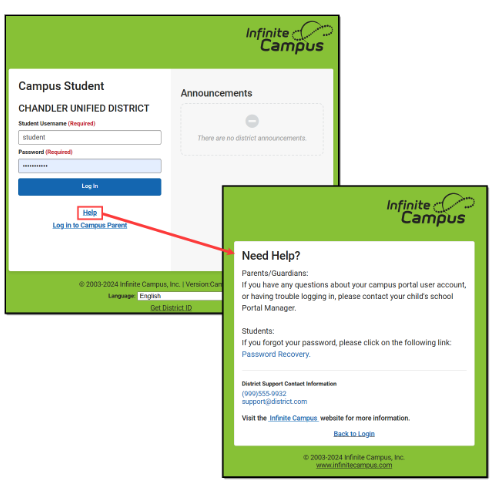
Infinite Campus Help Link*
Infinite Campus has observed that users—including parents, staff, and other stakeholders—are going directly to the Infinite Campus public website to seek support. Many of these users are completing the “Contact Us” form, which is intended for the sales and marketing team to capture interest in the Infinite Campus product, not to provide technical assistance. This route can delay the support process, as requests are routed through multiple parties before reaching the correct PSU contacts.
To reduce delays and ensure parents and staff receive support directly from the PSU, Infinite Campus recommends customizing the Help link in Infinite Campus. PSUs can replace the default Infinite Campus link and message with their own contact information or support resources. Options include:
-
System Support Email Address or
-
Custom Message with a link to an external form and a System Support Email Address, or
-
Custom Message with a System Support Phone Number
You can also remove the Infinite Campus link entirely if desired. This change allows PSUs to direct users to their preferred support channels, reducing the number of misrouted requests.
Example:
The default Help link message can be personalized to include the PSU’s phone number, support email, or a link to an online help request form.
More Information: Full instructions for customizing the Help link can be found here: https://kb.infinitecampus.com/help/login-page-preferences#help-all-login-pages
Ad Hoc Reporting*
Updated Resource: Ad Hoc Reporting in Infinite Campus
Please review the recently updated Infinite Campus Knowledge Base article on Ad Hoc reporting options. This resource provides guidance on the available report types, their capabilities, and considerations for choosing the right option for your needs.
https://kb.infinitecampus.com/help/scope-of-support#ad-hoc-reporting

Releasing Records*
During the Records Transfer process, a request is sent to the previous school to release records. If you receive the request, please make sure to do the following steps BEFORE you choose to Release Records.
- Ensure that the Records Transfer from the school prior to yours has been completed, if appropriate, so that your historical record for this student is complete
- Verify that all information has been entered for the student
- Print any needed reports
- End the student’s enrollment (either as a typical withdrawal or as a No Show)
For full instructions, refer to the End Enrollment Checklist.
Please process all records transfer requests within 48 hours, whenever possible, to avoid delays.
|
Phase II Implementation Dashboard*
Reminder for Phase II SIS Coordinators Only:
Please make sure you are updating your progress on tasks weekly in the Go-Live Checklist.
Next Steps for SIS Coordinators Once access is granted:
- Navigate to the PSU Page tab in the Go-Live Checklist.
- Begin entering the progress of tasks once your production site is live.
- Use the dropdown menus to update the status of each implementation task.
- Select “Needs Support” for any tasks requiring follow-up.
- Notify your assigned SIS PL Consultant for timely assistance and guidance.
Additional Information
- The dashboard serves as a collaborative pulse check for tracking implementation milestones.
- Communications may come from both Infinite Campus and NCDPI.
- Some tasks may involve other departments and are not solely the responsibility of SIS Coordinators.
- Each PSU has a unique production timeline, so progress stages may vary.
- Regularly reviewing and updating your PSU’s checklist is strongly encouraged.
You can also view a summary of dashboard features and access steps here: NCSIS Implementation Dashboard Overview Slides
If your PSU has not yet submitted the Dashboard Access Request Survey or has not received access, please complete the survey as soon as possible to ensure access is granted:Phase II Dashboard Access Request Survey
SIS Coordinators may also share access to the PSU Go-Live Checklist spreadsheet directly with additional team members, as needed.
Thank you for your continued partnership and dedication to a successful NCSIS rollout. Please reach out to your assigned SIS PL Consultant if you have any questions or need additional support.
|

Upcoming Training Information*
Be sure to check the DTL Signature Events Calendar* or Eventbrite for upcoming in-person and virtual regional meetings and training sessions. Don’t miss out on valuable opportunities to connect, learn, and stay informed!
DTL Signature Events Calendar
Eventbrite-NCSIS
*In the DTL Signature Events Calendar, use the arrows at the bottom of the screen to scroll to monthly event calendars, including upcoming NCSIS webinars!
Upcoming Webinars:
Parent Portal Letters Webinar: Monday, August 18, 2025 at 2:00 PM
NCSIS Statewide PSU Check-In: Monday, August 18, 2025 at 3:00 PM EDT
Parent Portal Letters Webinar: Tuesday, August 19, 2025 at 10:00 AM EDT
Charter School Virtual Office Hours are offered twice a month to provide ongoing support and answer your questions.
📅 When: 2nd & 4th Thursday of each month (Date change starting in August)
⏰ Time: 9:00 AM – 10:00 AM
🔗 Join us for Bi-Monthly Charter School Support Virtual Office Hours!
NCSIS Teacher Training Information:
Please use the link below to access teacher training resources for NCSIS. Additional details can also be found at ncsis.gov.
Infinite Campus Training Resources
If you have any questions, please contact Erin Wolfhope at erin.wolfhope@dpi.nc.gov with questions!
|
REMINDERS:
 |
|
FERPA Reminder
Please be mindful of FERPA when sending communications that include student information. Avoid sharing personally identifiable information (PII) through unsecured channels and ensure you're following all data privacy guidelines.
Thank you for helping protect student privacy!
|
NCBOLD Recap
Did You Miss NCBOLD? No worries — we’ve got you covered! 🎉
You can still access the opening slide deck and explore all the great resources shared during NCBOLD by visiting the links below:
Catch up on what you missed and keep the learning going!
|
 |
|
NCSIS 3rd Party Office Hours
Do you have questions about Third-Party Apps? Join us for NCSIS Open Office Hours!
SIS Coordinators and CTO’s are invited to attend open office hours to ask questions, troubleshoot issues, and receive support related to third-party applications and system integrations.
-
Weekly Sessions: July 10th – August 28th
-
Wednesdays: 8:30 – 9:30 AM
-
Thursdays: 3:00 –4:00 PM
Registration available via Eventbrite!
3rd Party Office Hours Registration
Infinite Campus Data Extract and Integration Support Form
|
Course & Section Attributes
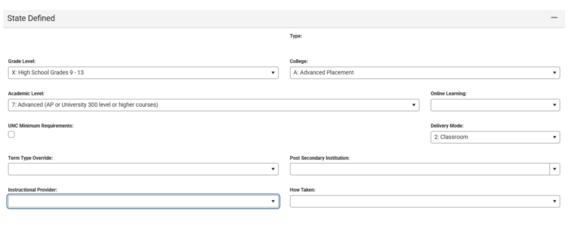
State-defined fields for courses (previously known as Course Attributes) are partially fixed.
The State Defined fields can be found on Course Masters, on Courses attached to schools, and on sections. Defaults can be set on Course Masters and pushed to Courses attached to schools. If a section varies from the default set on the Course, it can be changed.
Previously, instructions were given to not modify Delivery Mode, Post Secondary Institution, Instructional Provider and How Taken due to the data dictionaries being incorrect for the fields.
Do not edit “Instructional Provider” due to incorrect values still existing in the data dictionary. All other fields—How Taken, Post Secondary Institution, Delivery Mode, and others—may now be updated as appropriate.
|
|
 |

OCS & ECS Science Course Options
OCS
During the July State Board of Education meeting, new Science course options for the Occupational Course of Study (OCS) were approved within the GRAD 004 policy. Students entering the 9th grade for the first time 2025-2026 have the option to take Physical Science or Earth/Environmental Science.
These are the course codes to be used:
- 34102X0 Physical Science
- 35012X0 Earth/Environ Science
Note: These courses have also been added in NCSIS-IC to the 2021 NC OCS Graduation Requirements. Please direct any questions regarding OCS to Beverly.Colwell@dpi.nc.gov, IDEA Consultant: Postsecondary Transition.
ECS
During the same meeting, the Extended Content Standards (ECS) were updated to include Environmental Science. This update is documented in the GRAD 010 policy.
The course code to be used:
- 9330AX0 Earth/Environmental Science (New - see 25-26 Master Course Code List v8)
- To use: navigate in NCSIS to Grading & Standards > Course Masters > Add Course Master
- Select a School Calendar (context) and navigate to Scheduling & Courses > Courses> Add Course
Please direct any questions regarding ECS to: Matthew.Martinez@dpi.nc.gov, IDEA Consultant: Intellectual Disabilities.
Questions regarding scheduling courses should be directed to your NCDPI Regional Professional Learning Team Consultant.
Courtesy FYI: This information will be shared via various NCDPI listservs in an effort to reach all personnel supporting these activities statewide.
|

Course Number Requirements by Term Length
Please ensure that separate course numbers are assigned for courses offered in different term lengths—such as a course that might be offered as a yearlong, semester, or quarter length course. This is required to prevent grading issues and to support accurate scheduling and state reporting.
Different Course Numbers must be used for each Term Length offered. Course Code characters 8, 9, and 10 can be used to differentiate between term lengths.
- Examples (determine coding and naming conventions locally)
- 51002Z0S, 51002Z0SEM
- 51002Z0Q, 51002Z0QTR
- 51002Z0Y, 51002Z0YL
Term Types should be set on each course in the Course Information tool, and overridden on the Section Information tool if needed. See the Term Type Setup article for details.
|

Reminder: Submitting Requests for State Report Deletions
If you're working with Infinite Campus Support on a ticket and they advise that DPI must delete a state report so it can be re-run, please remember that you must submit a ServiceNow ticket to DPI to request the deletion. DPI cannot process the request based on the IC ticket alone, as Finance approval is required for all deletions.
To ensure proper routing, please use the following steps when submitting your request:
When submitting a case to NCDPI for a State Report deletion:
- In ServiceNow, select "Report a Service Incident"
- Choose "NCSIS – Powered by Infinite Campus"
Be sure to include the following information:
- Name of the State Report
- The specific month or period to be deleted (if applicable)
- School name(s) and six-digit school number(s) (even if it's all schools)
- A brief reason for the deletion request
- The Infinite Campus Support case number
PMR Guidance:
If you are running PMR for the first time in Infinite Campus, please refer to the following resource for step-by-step instructions on resolving validation errors, generating, and submitting the report:
🔗 Principal’s Monthly Report (PMR) | NC DPI
Support Ticket Guidance: Contact Infinite Campus for: • NCSIS application/support issues • NCSIS state reporting issues Submit a case: https://support.infinitecampus.com
Contact DPI for: • NCDPI business questions • Duplicate students • Amplify/missing students • PMR or LCS deletes in Infinite Campus Submit a case: https://go.ncdpi.gov/help
|
Disabled Courses
Reminder: Review Disabled Course Codes in Infinite Campus
As part of your scheduling cleanup process, be sure to review disabled course codes using the Ad Hoc Filters in Infinite Campus. These filters help identify courses that are no longer valid for scheduling and could impact your master schedule if not addressed.
You can find information on the Disabled Courses Ad Hoc Filters within the Scheduling Workflow for Building Knowledge Base article. Scheduling Workflow for Building | NC Department of Public Instruction
For additional guidance, refer to the Disabled Course Codes article. Disabled Course Codes | NC Department of Public Instruction
Please update or remove any disabled courses as needed to ensure accurate scheduling and reporting.
|
|
 |

Master Course Code List & Course Code Manual Updated
Master Course Code List Updated*
The 2025–26 Master Course Code List has been updated to Version 8. This update includes the correct Credit Type for each course code in the Full Course Codes sheet.
Course Code Manual Updated
The CCP Course Code guidance link in the Course Code Manual was previously reported as broken. This has now been corrected, and the updated manual is available at the link below.
|
Graduation Requirements Program Automatically Added
On Tuesday, July 29, a FRC Graduation Requirements Program was added to all current and former students who had a value in the Date First Entered the 9th Grade field on the Graduation tab but were missing a Graduation Program.
Moving forward, any students enrolled in 9th grade or higher will still need a Graduation Requirements Program added manually—either one at a time or in bulk using the Batch Program Assignment Wizard. This will be automated in the future.
Please Note:
- Students following the OCS (Occupational Course of Study) graduation requirements will need to have their Graduation Requirements Program updated to the correct OCS version.
- Students on the Extended Content Standards path should have their Graduation Requirements Program removed entirely. Each PSU can choose to create a local Academic Program for ECS students or they can remain without one.
Be sure to review your students’ Graduation data and make any necessary updates.
ECATS 2025-26 Transition Update
The ECATS application has successfully transitioned to the 2025–26 academic year, and the file transfer issues requiring manual data movement between the SIS and ECATS (in both directions) have been resolved.
During the Back-to-School period, the Automated Student Records Transfer process in ECATS often slows due to the high volume of student transfers. Please allow 3–5 days for these transfers to complete.
If you have a data issue not addressed in the ECATS: PowerSchool to IC Crosswalk | NC DPI, please have your ECATS Designated User submit a ZenDesk ticket.
Reminders
- DPI is seeing occurrences of missing calendar data within the SIS. Calendar issues can cause students not to be imported into ECATS. Please pay particular attention to the school and program calendars such as the OEC calendar. Additionally, verify that all calendars are set up with correct terms and ‘in’ and ‘out’ of school days as well as the correct minutes in the Teacher Day field. Please reference the transition crosswalk available on ECATS: PowerSchool to IC Crosswalk | NC DPI.
If you or your EC or SIS team were unable to attend the June 17 "ECATS Phase II SIS Implementation: Tips and Tricks" office hours, the recording and presentation are available on the ECATS page of the OEC website. These resources are helpful for all PSUs managing data-related concerns.
|

Charter School Corner
Upcoming Charter School SIS Trainings
Bi-Monthly Charter School SIS Support Office Hours - DATE CHANGE starts in August!
Charter Connect In-Person Meeting
-
If you were not able to join us in person this month, please click on this link for the notes from all of our meetings in 2025
Charter schools now have a dedicated SIS professional contact!
Jennifer Fogleman is your dedicated NCSIS Professional Learning Consultant for Charter Schools.
Jennifer brings a wealth of experience in the Student Information System (SIS) and is committed to providing you with the same high level of service you've come to expect from our team.
To reach Jennifer: jennifer.fogleman@dpi.nc.gov
The NCSIS Professional Learning Consultant team is here to support you, please don't hesitate to contact Jennifer if you have any questions or concerns.
|

Printing Transcripts for Graduated or Inactive Students
If your PSU needs to print a transcript for a student who has graduated or is no longer active, you can access the student’s record by navigating to the year and calendar in which the student graduated or was last enrolled.
Once in the correct year, school, and calendar, follow the steps below to generate the transcript:
- From the Landing Page, search for the student by name or Student UID.
- Navigate to the Transcript tool.
- Select Reports > NC Official Transcript to print the individual student transcript.
https://ncdepartmentofpublicinstruction.knowledgeowl.com/home/transcripts-2bc8d4f-transcripts
Please ensure you are in the appropriate year and calendar context when searching for the student. If you have any questions, reach out to your assigned SIS PL Consultant for support.
|
Accessing North Carolina Historical Student Data (NCHSD)
North Carolina Historical Student Data (NCHSD):
The North Carolina Historical Student Data (NCHSD) application allows authorized users to access transcripts and cumulative folder reports for students who graduated prior to 2014 and whose records are not in NCSIS. Please see the link below for instructions on how to access and use the NCHSD.
IAM QRD: Accessing NC Historical Student Data
Graduation Data Verification Report Information
Validation Steps:
- Run the Graduation Data Verification report in the 2024-25 context.
- Turn off “Show Active Year Only.”
- Ensure the correct 2024-25 calendars are selected.
Important Deadlines:
- All summer graduates that should be included in the 2024-25 cohort must be entered into the system and validated by August 11th.
- There is no Submit button for this report. Data from Infinite Campus will be extracted after August 11th.
Please remember the following guidelines for coding summer graduates in relation to the GDV for the 2024–25 school year:
- Students who complete graduation before August 7 should have a “Regular” diploma period and an enrollment end date and diploma date of August 6 or earlier in order to report in the 2024-2025 school year cohort.
- For Phase II districts, any graduate that was contained on your PGDV in PowerSchool will have the Diploma Period populated through a data upload this week.
For detailed instructions on how to complete all required steps for summer graduates, please refer to the following resource: Summer Graduate | NC Department of Public Instruction
|

SIS EOY Timeline SY 24-25
The Phase II timeline includes the status of key tasks and identifies items that will be added by NCDPI after End-of-Year (EOY) processing is complete. While these tasks apply to Phase II PSUs, Phase I PSUs may also view this information for awareness.
|

NCSIS Resources
PSUs have access to the Campus Community, where they can acquire product knowledge, glean tips and tricks, and engage in networking opportunities with other districts. The Campus Community offers convenient single sign-on access from the Campus system to a wealth of resources, including the knowledge base, forum discussions, learning tools, support site, upcoming events, and more.
Campus Community- contains the information you need to learn how to use Infinite Campus through product documentation, videos & simulations, study guides, forums, and much more. Whether you are a teacher, data manager, or Infinite Campus user, you will find the learning resources in a clearly defined pathway for a seamless transition from PowerSchool.
Campus Passport- is on-demand, self-paced courses that can be assigned to new and existing staff. Accessed through the Campus Community, you will find Instructor-Led Training, specific E-Learning courses, or select a learning plan based on your district role.
KnowledgeOwl: KnowledgeOwl will include articles (QRDs) that are created and updated by the SIS Professional Learning team.
NCSIS Knowledge Base | NC Department of Public Instruction
GitHub Vendor Integrations Repository: 3rd party extract formats can be found below.
GitHub Vendor Integrations Repository
Ad Hoc Filter Sharing Community: Shared google folder for Ad Hoc filters PSUs have created.Ad Hoc Community
-
Naming Convention: Ad Hoc Name - PSU Name
- You’re welcome to include your email address within the document (optional).
-
Permissions: You have editing access—please proceed with caution!
-
PII: Do not upload any PII to the shared folder
NCSIS Crosswalk Document- will contain Infinite Campus and PowerSchool terms with their meanings to assist users with learning the new NCSIS terminology. This is a working document and will be updated regularly. NCSIS Crosswalk Document
IC Role Specific Resources- can be viewed by clicking on http://ncsis.gov, go to the Phase I PSU’s tab and scroll to the IC Role Specific Resources section. It Includes information for specific staff roles, as well as a guide for parents & students.
Webinar Recording Links and FAQs- can be found at http://ncsis.gov under the Professional Learning tab. Please check for recently added webinars.
|
 |
|
Requesting Technical Support Points of Contact
Please review the information below on how to submit support tickets:
Contact Infinite Campus for assistance with:
NCSIS Application/Support Issues
Submit a case: https://support.infinitecampus.com
Contact DPI for assistance with:
- NCDPI Business Questions
- Duplicate Students
- Amplify/Missing Students
- PMR Deletes in Infinite Campus
Submit a request: https://go.ncdpi.gov/help
For additional technical support contacts, please refer to the document below:Requesting Help
|
|