What's New!
- Graduation Requirements Program Automatically Added*
- ECATS 2025-26 Transition Update*
- NCSIS 3rd Party Office Hours*
- Charter School Corner*
- Upcoming Training Information*
Reminders:
- Teacher Toolkit
- Campus Community Login
- Printing Transcripts for Graduated or Inactive Students
- Accessing North Carolina Historical Student Data (NCHSD)
- EDDIE Integration Update
- Course and Section Attributes
- Graduation Data Verification Report Information
- Teacher Workday Setup
- Phase II Implementation Dashboard
- SIS EOY Timeline SY 24-25
- Knowledge Owl
- Guidance for ECS Students Returning for an Additional Year in Grade 12
- NCSIS Resources
- Requesting Technical Support Points of Contact
- Want to Stay in the Loop?
|
*indicates new or updated information
|
|
WHAT'S NEW!
Graduation Requirements Program Automatically Added*
On Tuesday, July 29, a FRC Graduation Requirements Program was added to all current and former students who had a value in the Date First Entered the 9th Grade field on the Graduation tab but were missing a Graduation Program.
Moving forward, any students enrolled in 9th grade or higher will still need a Graduation Requirements Program added manually—either one at a time or in bulk using the Batch Program Assignment Wizard. This will be automated in the future.
Please Note:
- Students following the OCS (Occupational Course of Study) graduation requirements will need to have their Graduation Requirements Program updated to the correct OCS version.
- Students on the Extended Content Standards path should have their Graduation Requirements Program removed entirely. Each PSU can choose to create a local Academic Program for ECS students or they can remain without one.
Be sure to review your students’ Graduation data and make any necessary updates.
ECATS 2025-26 Transition Update*
The ECATS application has successfully transitioned to the 2025–26 academic year, and the file transfer issues requiring manual data movement between the SIS and ECATS (in both directions) have been resolved.
During the Back-to-School period, the Automated Student Records Transfer process in ECATS often slows due to the high volume of student transfers. Please allow 3–5 days for these transfers to complete.
If you have a data issue not addressed in the ECATS: PowerSchool to IC Crosswalk | NC DPI, please have your ECATS Designated User submit a ZenDesk ticket.
Reminders
- DPI is seeing occurrences of missing calendar data within the SIS. Calendar issues can cause students not to be imported into ECATS. Please pay particular attention to the school and program calendars such as the OEC calendar. Additionally, verify that all calendars are set up with correct terms and ‘in’ and ‘out’ of school days as well as the correct minutes in the Teacher Day field. Please reference the transition crosswalk available on ECATS: PowerSchool to IC Crosswalk | NC DPI.
If you or your EC or SIS team were unable to attend the June 17 "ECATS Phase II SIS Implementation: Tips and Tricks" office hours, the recording and presentation are available on the ECATS page of the OEC website. These resources are helpful for all PSUs managing data-related concerns.
|
 |
|
NCSIS 3rd Party Office Hours*
Join Us for NCSIS Open Office Hours!
SIS Coordinators and CTO’s are invited to attend open office hours to ask questions, troubleshoot issues, and receive support related to third-party applications and system integrations.
-
Weekly Sessions: July 10th – August 28th
-
Wednesdays: 8:30 – 9:30 AM
-
Thursdays: 3:00 –4:00 PM
Registration available via Eventbrite!
3rd Party Office Hours Registration
Infinite Campus Data Extract and Integration Support Form
|

Charter School Corner*
Upcoming Charter School SIS Trainings
Bi-Monthly Charter School SIS Support Office Hours - DATE CHANGE starts in August!
Charter Connect In Person Meeting
-
If you were not able to join us in person this month, please click on this link for the notes from all of our meetings in 2025
Charter schools now have a dedicated SIS professional contact!
Jennifer Fogleman is your dedicated NCSIS Professional Learning Consultant for Charter Schools.
Jennifer brings a wealth of experience in the Student Information System (SIS) and is committed to providing you with the same high level of service you've come to expect from our team.
To reach Jennifer: jennifer.fogleman@dpi.nc.gov
The NCSIS Professional Learning Consultant team is here to support you, please don't hesitate to contact Jennifer if you have any questions or concerns.
|
Upcoming Training Information*
Be sure to check the DTL Signature Events Calendar* or Eventbrite for upcoming in-person and virtual regional meetings and training sessions. Don’t miss out on valuable opportunities to connect, learn, and stay informed!
DTL Signature Events Calendar
Eventbrite-NCSIS
*In the DTL Signature Events Calendar, use the arrows at the bottom of the screen to scroll to monthly event calendars, including upcoming NCSIS webinars!
Charter School Virtual Office Hours are offered twice a month to provide ongoing support and answer your questions.
📅 When: 2nd & 4th Thursday of each month (Date change starting in August)
⏰ Time: 9:00 AM – 10:00 AM
🔗 Join us for Bi-Monthly Charter School Support Virtual Office Hours!
Athletics in NCSIS Webinar:
Athletic Directors and SIS Coordinators,
Join us for an upcoming webinar to learn how to use NCSIS (North Carolina's Student Information System powered by Infinite Campus) tools and reports to support athletic eligibility review and manage team information. This session covers key tools, reporting options, and team setup methods within the system.
Whether you're reviewing eligibility or organizing rosters, this session is designed to give both Phase I Athletic Directors and SIS Coordinators practical guidance to streamline workflows and ensure data accuracy.
Date: Tuesday. August 5th, 2025
Time: 10:00 AM
Eventbrite Registration Link: Athletics in NCSIS Webinar Tickets, Tuesday, August 5th 2025 at 10:00 AM | Eventbrite
Date: Wednesday. August 6th, 2025
Time: 10:00 AM
Eventbrite Registration Link: Athletics in NCSIS Webinar Tickets, Wednesday, August 6th 2025 at 1:00 PM | Eventbrite
NCIS Phase I & Phase II Early Start Schools Check In Webinar: Join the SIS PL team for a review of essential start-of-school processes and the Principal’s Monthly Report (PMR) for early-start schools.
Date: Wednesday. August 6th, 2025
Time: 3:00 PM
Eventbrite Registration Link: NCSIS Phase I & II Early Start School Check-In, Wednesday, August 6th @ 3 PM
We look forward to your participation!
|
REMINDERS:
 |
|
Teacher Toolkit
NCSIS Teacher Training Information:
Please use the link below to access teacher training resources for NCSIS. Additional details can also be found at ncsis.gov.
⭐ These sessions will be offered at NCBOLD 2025.
Infinite Campus Training Resources
If you have any questions, please contact Erin Wolfhope at erin.wolfhope@dpi.nc.gov with questions!
|
Campus Community Login
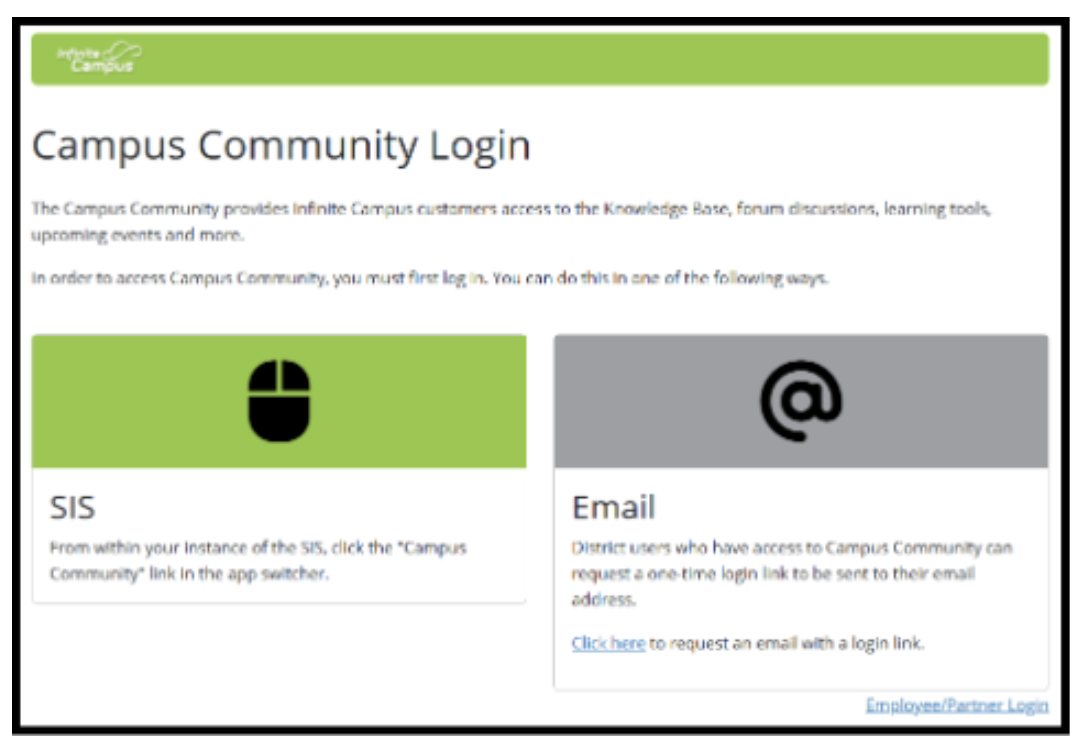
NEW Campus Community Login Process
- The way customers (and employees) login to Campus Community has changed as of 7/19
-
Customers will now have 2 options to login to Campus Community/Campus Passport
- 1. Through their Production Site
- Login to production site > select app switcher > select Community
- They'll be taken directly to the Campus Community Homepage
- 2. By requesting an email link to Login
- When a customer navigates to the Campus Community homepage (community.infinitecampus.com), they’ll the option to have a login link emailed to them
- The login link will be emailed to their primary email entered in Census > Demographics. If they don’t yet have an account in their SIS Site, but do have a Campus Community account via previous CSV upload, the email will be sent to the email that was on the CSV when their account was created
-
Customer Resource for this new Campus Community Process:

Printing Transcripts for Graduated or Inactive Students
If your PSU needs to print a transcript for a student who has graduated or is no longer active, you can access the student’s record by navigating to the year and calendar in which the student graduated or was last enrolled.
Once in the correct year, school, and calendar, follow the steps below to generate the transcript:
- From the Landing Page, search for the student by name or Student UID.
- Navigate to the Transcript tool.
- Select Reports > NC Official Transcript to print the individual student transcript.
https://ncdepartmentofpublicinstruction.knowledgeowl.com/home/transcripts-2bc8d4f-transcripts
Please ensure you are in the appropriate year and calendar context when searching for the student. If you have any questions, reach out to your assigned SIS PL Consultant for support.
|
Accessing North Carolina Historical Student Data (NCHSD)
North Carolina Historical Student Data (NCHSD):
The North Carolina Historical Student Data (NCHSD) application allows authorized users to access transcripts and cumulative folder reports for students who graduated prior to 2014 and whose records are not in NCSIS. Please see the link below for instructions on how to access and use the NCHSD.
IAM QRD: Accessing NC Historical Student Data
EDDIE Integration Update
The EDDIE Integration was enabled on July 11th. The following fields are being populated by the integration:
- Address
- Agency
- CEEB Number
- City
- District Contact First Name, District Contact Last Name
- Fax, Phone
- NCES District Override
- NCES School ID
- Name
- Physical Address, Physical City, Physical State, Physical Zip
- Principal Email, Principal Name, Principal Title
- Region Number
- School Accreditation Status
- State
- State School Number
- Type
- URL
- Zip
Accurate data in EDDIE is essential to ensure correct information flows into Infinite Campus. In Infinite Campus version .2531, these fields will no longer be editable in NCSIS. If any changes need to be made to these fields, please make them in EDDIE.
Course & Section Attributes
Course and section attributes are currently not showing correctly in Infinite Campus.
Please do not modify these values, as the problem will be fixed programmatically by Infinite Campus.
Expected Fix: Version .2527
|
|
 |
Graduation Data Verification Report Information
Validation Steps:
- Run the Graduation Data Verification report in the 2024-25 context.
- Turn off “Show Active Year Only.”
- Ensure the correct 2024-25 calendars are selected.
Important Deadlines:
- All summer graduates that should be included in the 2024-25 cohort must be entered into the system and validated by August 11th.
- There is no Submit button for this report. Data from Infinite Campus will be extracted after August 11th.
Please remember the following guidelines for coding summer graduates in relation to the GDV for the 2024–25 school year:
- Students who complete graduation before August 7 should have a “Regular” diploma period and an enrollment end date and diploma date of August 6 or earlier in order to report in the 2024-2025 school year cohort.
For detailed instructions on how to complete all required steps for summer graduates, please refer to the following resource: Summer Graduate | NC Department of Public Instruction
|
Teacher Workday Setup
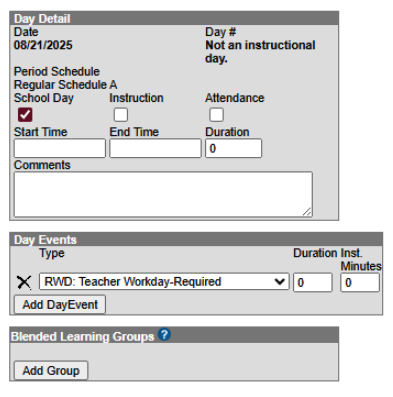
Teacher Workdays should remain marked as a School Day; however, Instruction and Attendance should NOT be selected. This setup ensures the day counts as part of the school calendar but is correctly displayed as a non-instructional day when the calendar is printed.
 |
Phase II Implementation Dashboard
Reminder for Phase II SIS Coordinators Only:
Once your production site is live, please begin documenting your progress in the Go-Live Checklist.
Next Steps for SIS Coordinators
Once access is granted:
- Navigate to the PSU Page tab in the Go-Live Checklist.
- Begin entering the progress of tasks once your production site is live.
- Use the dropdown menus to update the status of each implementation task.
- Select “Needs Support” for any tasks requiring follow-up.
- Notify your assigned SIS PL Consultant for timely assistance and guidance.
Additional Information
- The dashboard serves as a collaborative pulse check for tracking implementation milestones.
- Communications may come from both Infinite Campus and NCDPI.
- Some tasks may involve other departments and are not solely the responsibility of SIS Coordinators.
- Each PSU has a unique production timeline, so progress stages may vary.
- Regularly reviewing and updating your PSU’s checklist is strongly encouraged.
You can also view a summary of dashboard features and access steps here: NCSIS Implementation Dashboard Overview Slides
|
SIS EOY Timeline SY 24-25
The Phase II timeline includes the status of key tasks and identifies items that will be added by NCDPI after End-of-Year (EOY) processing is complete. While these tasks apply to Phase II PSUs, Phase I PSUs may also view this information for awareness.
|
Guidance for ECS Students Returning for an Additional Year in Grade 12
ECS students who will return for another year in Grade 12 should be assigned an End Date corresponding to the last instructional day of the school calendar, along with a Local End Status of PR: Promoted. Additionally, the student should have a future enrollment record in Grade 12 for the upcoming school year.
To ensure proper documentation, please follow the steps outlined in the Adding an XG Flag article to apply the XG flag appropriately.
|
|
 |

NCSIS Resources
Phase I participants have access to the Campus Community, where they can acquire product knowledge, glean tips and tricks, and engage in networking opportunities with other districts. The Campus Community offers convenient single sign-on access from the Campus system to a wealth of resources including the knowledge base, forum discussions, learning tools, support site, upcoming events, and more.
Campus Community- contains the information you need to learn how to use Infinite Campus through product documentation, videos & simulations, study guides, forums, and much more. Whether you are a teacher, data manager, or Infinite Campus user, you will find the learning resources in a clearly defined pathway for a seamless transition from PowerSchool.
Campus Passport- is on-demand, self-paced courses that can be assigned to new and existing staff. Accessed through the Campus Community, you will find Instructor-Led Training, specific E-Learning courses, or select a learning plan based on your district role.
KnowledgeOwl: KnowledgeOwl will include articles (QRDs) that are created and updated by the SIS Professional Learning team.
NCSIS Knowledge Base | NC Department of Public Instruction
GitHub Vendor Integrations Repository: 3rd party extract formats can be found below.
GitHub Vendor Integrations Repository
Ad Hoc Filter Sharing Community: Shared google folder for Ad Hoc filters PSUs have created.Ad Hoc Community
-
Naming Convention: Ad Hoc Name - PSU Name
- You’re welcome to include your email address within the document (optional).
-
Permissions: You have editing access—please proceed with caution!
-
PII: Do not upload any PII to the shared folder
NCSIS Crosswalk Document- will contain Infinite Campus and PowerSchool terms with their meanings to assist users with learning the new NCSIS terminology. This is a working document and will be updated regularly. NCSIS Crosswalk Document
IC Role Specific Resources- can be viewed by clicking on http://ncsis.gov, go to the Phase I PSU’s tab and scroll to the IC Role Specific Resources section. It Includes information for specific staff roles, as well as a guide for parents & students.
Webinar Recording Links and FAQs- can be found at http://ncsis.gov under the Professional Learning tab. Please check for recently added webinars.
|
Requesting Technical Support Points of Contact
Please review the information below on how to submit support tickets:
Contact Infinite Campus for assistance with:
NCSIS Application/Support Issues
Submit a case: https://support.infinitecampus.com
Contact DPI for assistance with:
- NCDPI Business Questions
- Duplicate Students
- Amplify/Missing Students
- PMR Deletes in Infinite Campus
Submit a request: https://go.ncdpi.gov/help
For additional technical support contacts, please refer to the document below:Requesting Help
|
|
 |
|