What's New!
- Celebrating Our Progress - Thank You, Phase I & Phase II PSUs!* (Phase I & II)
- Statewide Sync & Enrollment Update* (Phase I & II)
- URGENT: Complete End Enrollments 24-25 School Year* (Phase I)
- Action Required: Add Grad Calc Options & Grading Tasks to New Course Masters* (Phase I & II)
- Course Number Requirements by Term Length* (Phase I & II)
- Browser Reminder* (Phase I & II)
- Attention Campus Payments Users* (Phase I & II)
- Reminder: Summer Graduates and Diploma Periods* (Phase I & II)
- E-Transcript Information* (Phase I & II)
- Missing Test Score Details in Assessments* (Phase I & II)
- Student Locator Tool* (Phase I & II)
- EOY Support Hours Added!*
- SIS EOY Timeline SY 24-25* (Phase I & II)
- Upcoming Training Information* (Phase I & II)
Reminders:
- Key PLTW Updates – 2025–2026 Master Course Code List (Phase I & II)
- Production Site Information (Phase II)
- Historical Transcripts (Phase I & II)
- TIMS Functionality Update (Phase I & II)
- Course and Section Attributes (Phase I & II)
- Infinite Campus & MTSS Overview Sessions (Phase I & II)
- Charter School Corner (Phase I & II)
- Knowledge Owl (Phase I & II)
- Events & Actions in Infinite Campus - Statewide Planning & PSU Input Needed (Phase I & II)
- Guidance for ECS Students Returning for an Additional Year in Grade 12 (Phase I & II)
- Parent Portal Self Service Tool (Phase II)
- Phase II Implementation Dashboard (Phase II)
- NCBOLD 2025 (Phase I & II)
- Data Restoration Notice (Phase I & II)
- NCSIS Resources (Phase I & II)
- Requesting Technical Support Points of Contact (Phase I & II)
- Want to Stay in the Loop? (Phase I & II)
|
*indicates new or updated informatio
|
|
WHAT'S NEW!
 |
|
Celebrating Our Progress - Thank You, Phase I & Phase II PSUs!*
Phase I & II
Thank You, Phase I & Phase II PSUs – We’re All on NCSIS!
As we wrap up the End-of-Year process, we want to take a moment to sincerely thank all Phase I and Phase II PSUs for your incredible hard work and dedication. Your efforts have made this transition a success, and we’re excited to now be working together as one on the NCSIS platform!
We look forward to the new school year ahead and to continuing this journey of learning, growth, and collaboration with each of you.
Wishing you and your teams a safe, relaxing, and Happy 4th of July!
— The SIS Professional Learning Team
|
Statewide Sync & Enrollment Update*
Phase I & II
The statewide sync remains on track for completion by July 7th. DPI will assess the sync progress that morning and plans to provide additional enrollment guidance by midday on July 7th.
Please wait for this communication before proceeding with enrollments to ensure all processes run smoothly.
Thank you for your continued patience and collaboration during this process.
|
|
 |

URGENT: Complete End Enrollments 24-25 School Year*
Phase I
In closing out the 2024–25 school year and preparing for 2025–26, all users must immediately complete end-of-year (EOY) processing to ensure accurate student data and avoid disruptions.
DPI has identified that some PSUs have missing or incomplete end date and end status fields in their enrollment records for the 2024–25 school year. NCDPI has provided a Validation Report to assist users on identifying student enrollment records that will need to be updated.
The (NC) EOY Enrollment Verification Report consists of two reports, one that provides students with missing end dates and one that provides students with missing end statuses. A PSU running the validation must be in the 24-25 School Year/Calendar when generating the reports.
Priority 1
Fix End Dates - (NC) Enrollments w/ No End Date - Should be completed by EOD July 11, 2025
Priority 2
Fix End Status - (NC) Enrollments w/ No End Status - Should be completed by EOD July 11, 2025
Additional Information
-
Complete the above Priority 1 and 2 before withdrawing students for the upcoming school year.
-
Before releasing a student to a new PSU or School:
- 24-25 enrollment record must be updated with the proper end date and end status
- 25-26 enrollment record must be updated to a 7/1 entry and end dates with a W1 end status and the No Show checkbox checked
- For cross-enrolled students (X1) students on the validation report, the cross-enrollment record should have an end date of the last day of the course with a W1 end status.
- No Show records with a missing end date and/or end status will be corrected by NCDPI. No Show records do not display in the validations.
- When ending enrollments, be sure to be in the 24-25 School Year/Calendar and to use the appropriate local end status:
- PR – Promoted
- RT – Retained
- Please Do NOT use W1 or W2 as an end status for a student that completed the year. The only exception is the students in the Homeless Program calendar should have an end status of W1.
Thank you for your attention to this important task and for your continued partnership.
If you have questions, please join us during EOY Office Hours. See Eventbrite for links to daily support hours.
|
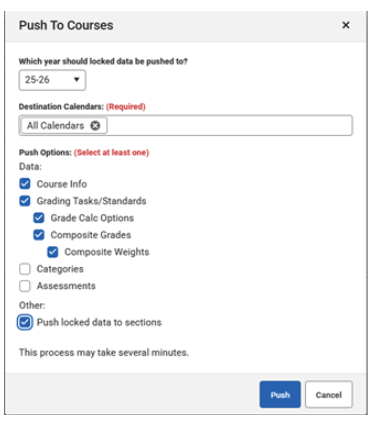
Action Required: Add Grad Calc Options & Grading Tasks to New Course Masters*
Phase I & II
PSUs will need to add Graduation Calculation Options and Grading Tasks to any newly added Course Masters. Please follow the steps below:
o Search for and select the Course Master
o Add Grading Tasks to the Course Master : Grading and Standards > Course Masters > Grading Tasks
- Be sure to choose the correct Score Group (NC 5 pt Scale for PLTW classes)
o Establish Grade Calc Options for the Course Master: Grading & Standards > Course Masters > Grad Calc options
If the course has already been added to the school and sections have been created:
o Push the Course Master to the Courses: Grading and Standards > Course Masters > Course Master Info > Push to Courses
If the course has not been added to the school:
o Scheduling & Courses > Courses > Add Course
Please ensure these steps are completed to support accurate grading and reporting.
Course Number Requirements by Term Length*
Phase I & II
Please ensure that separate course numbers are assigned for courses offered in different term lengths—such as yearlong, semester, or quarter. This is required to prevent grading issues and to support accurate scheduling and state reporting.
|
|
 |
 |
|
Browser Reminder*
Phase I & II
Best Practice Reminder – Using Infinite Campus in Your Browser
To ensure optimal system performance and avoid data issues, PSUs should only have one Infinite Campus tab open per browser session.
If you need to work in multiple areas of Infinite Campus at the same time, please use a different browser (e.g., Google Chrome, Mozilla Firefox, Microsoft Edge, etc.) to open a second session.
Following this best practice helps prevent session conflicts and ensures data saves correctly across tools.
Thank you for your attention to this important reminder!
|
Attention Campus Payments Users*
Phase I & II
New Payment Processing Vendor: Stripe
- We are excited to announce Infinite Campus will be replacing the payment vendor with Stripe, the industry’s leading platform for uptime and security. Stripe is trusted by millions of businesses including Amazon and Google. Watch the linked webinar recording for everything you need to know about the Payrix to Stripe migration. If you are using Campus Payments, please complete the following two steps:
- Complete this survey to select your Payrix to Stripe migration month and to indicate the number of devices needing replacement.
- Review the migration resources page. Here you’ll find FAQs, webinar recording, migration timeline, and more!
Infinite Campus will begin transitioning districts this summer and complete all migrations by July 31, 2026. You'll have the option to transition your district at a time convenient to you.
|
 |
|
Reminder: Summer Graduates and Diploma Periods*
Phase I & II
Please remember the following guidelines for coding summer graduates in relation to the GDV for the 2024–25 school year:
- Students who complete graduation before August 7 should have a “Regular” diploma period to ensure accurate reporting on the GDV.
- Students who graduate on or after August 7 should have a “Summer” diploma period.
For detailed instructions on how to complete all required steps for summer graduates, please refer to the following resource:
Summer Graduate | NC Department of Public Instruction
|
E-Transcript Information*
Phase I & II
E-transcript Information- The eTranscript service will resume operations on July 11th to allow time for the statewide sync and ensure all PSUs are fully online.
|
|
 |
Missing Test Score Details in Assessments*
Phase I & II
Missing Test Score Details in Assessments
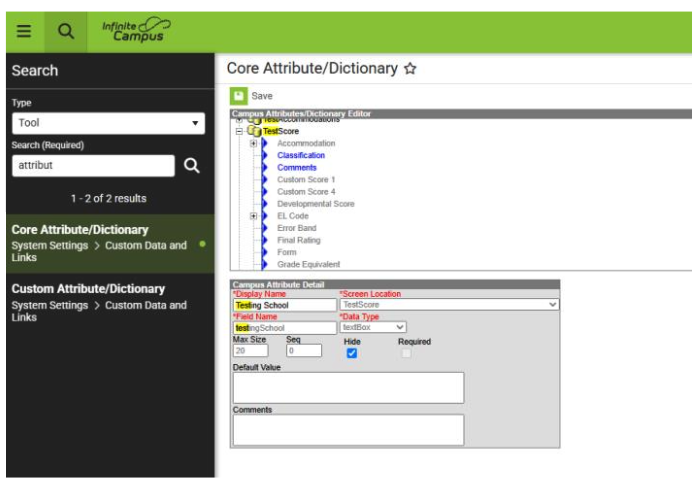
Issue: Some users have reported missing test score details in the Assessments tab. This is due to specific attributes being hidden on the District Edition side.
Resolution Steps: To resolve the issue, follow the steps below to unhide the necessary attributes in the Core Attribute Dictionary:
- Navigate to: System Settings > Custom Data and Links > Core Attribute/Dictionary
- Under the ‘TestScore’ section, locate the following fields:
- Testing District
- Testing Grade
- Testing School
For each of these fields:
- Uncheck the ‘Hide’ box
- Click ‘Save’ after updating each one
Once these attributes are visible, test score details should appear as expected.
 Need Help? If you have any questions or need assistance, please reach out to your assigned SIS PL consultant.
 |
|
Student Locator Tool*
Phase I & II
Student Locator Tool:
Please note: The Student Locator will be unreliable and may display inaccurate information until July 14, when statewide syncing is complete.
|
EOY Support Hours Added!*
Please see Eventbrite for links to daily support hours next week.
The SIS PL team will host a Statewide Check-In webinar to check in with PSUs, answer questions, and provide important updates. This session will focus on providing guidance and outlining key next steps to help PSUs prepare for the 2025–26 school year. All PSUs are encouraged to attend. Please see the link below to register.
Statewide Check-In- July 9th, 3-4 pm
|
|
 |

SIS EOY Timeline SY 24-25*
Phase I & II
Please review the detailed timeline of key activities by selecting the appropriate link below:
The Phase II timeline includes the status of key tasks and identifies items that will be added by NCDPI after End-of-Year (EOY) processing is complete. While these tasks apply to Phase II PSUs, Phase I PSUs may also view this information for awareness.
Students currently enrolled in an NC Public School cannot be pre-registered or enrolled until July 7, 2025.
Enrollments in Infinite Campus FOR ALL PSUs will need to stop by COB on 6/26/2025 and cannot be performed while the sync from PSU sites to the State Edition site is completed. The sync is expected to be completed by 7/7/2025.
For both Phase I and Phase II PSUs, DO NOT ENROLL students or transfer records until state syncing is complete (ETA July 7) to ensure the student records transfer functions appropriately and duplicates are not created.
Completion of the sync will be communicated from NC DPI. At that time you will be able to resume enrolling students.
Your support and collaboration are greatly appreciated as we prepare for this unique EOY. If you have any questions or need assistance during the process, please don’t hesitate to contact your Professional Learning Team Consultant.
|

Upcoming Training Information*
Phase I & II
Be sure to check the SIS PL Plan or Eventbrite for upcoming in-person and virtual regional meetings and trainings. Don’t miss out on valuable opportunities to connect, learn, and stay informed!
SIS PLP 2024-25 FINAL
Eventbrite-NCSIS
End-of-Year Support – Virtual Drop-In Office Hour Sessions
We will be offering virtual End-of-Year (EOY) support through drop-in office hour sessions. Both Phase I and Phase II PSUs are welcome to attend the sessions.
- Phase I & II EOY Office Hours- Mon, July 7th - Thur, July 10th, 1-3 pm
- Statewide PSU Check-in- Wed, July 9th, 3-4 pm
Charter School Virtual Office Hours are offered twice a month to provide ongoing support and answer your questions.
📅 When: 2nd & 4th Friday of each month
⏰ Time: 9:00 AM – 10:00 AM
🔗 Join us for Bi-Monthly Charter School Support Virtual Office Hours!
|
REMINDERS:
Key PLTW Updates – 2025–2026 Master Course Code List
Phase I & II
NCDPI has published the SY 25.26 Master Course Code List 06.26.25 V6 PUBLISH with important changes to Project Lead The Way (PLTW) courses:
-
Seven existing PLTW Honors courses have been disabled after 2024–25 and had their added value updated from 0.5 to 1.0. See next bullet for courses to use beginning in 2025-2026.
- HP705X0 PLTW Principles of Biomedical Sci Hon
- HP715X0 PLTW Human Body Systems Honors
- HP725X0 PLTW Medical Intervention Honors
- CI355X0 PLTW Cybersecurity Honors
- CE115X0 PLTW Principles of Engr Hon
- CE135X0 PLTW Digital Electronics Hon
- CE145X0 PLTW Civil Engr and Arch Hon
-
New course codes for PLTW for 2025–2026
Note: These courses have been approved by appropriate Boards for college-level weighting.
- HP707X0 PLTW Princ of Biomed Sci
- HP717X0 PLTW Human Body Systems
- HP727X0 PLTW Medical Intervention
- CI357X0 PLTW Cybersecurity
- CE117X0 PLTW Principles of Engr
- CE137X0 PLTW Digital Electronics
- CE147X0 PLTW Civil Engr and Arch
-
Infinite Campus has disabled the above PLTW 5X0 courses and deployed updated PLTW 7X0 course masters to all Phase 1 PSUs and the following Phase 2 PSUs: Cabarrus, Charlotte, Durham, Gaston, Union, Wake, and Winston-Salem Forsyth. Remaining Phase 2 PSUs will receive updates by July 11-12, 2025.
Please also note that several courses on the 25.26 Master Course Code list will have Name Changes Post-EOY 24-25 (see spreadsheet tab). Those name changes are expected to be completed by NCDPI July 11-12, 2025 and pushed to all PSUs to update 25-26 Course Masters and Section Courses’ State Code and State Code Name fields.
|
Production Site Information
Phase II
Updates/Reminders for New Phase II Production sites:
-
Program Flags: Flags for programs will be applied to students after the state sync in mid-July. Please do not modify any NCDPI created flags.
-
Student Schedules in Infinite Campus: Please carefully check student schedules in Infinite Campus for correct conversion. Report any issues to your IC Implementation team and PL Consultant.
-
Post-Production Data: Discipline, Testing Data, additional program information and Historical Attendance will be added after conversion, with completion expected in August.
|
|
 |
 |
|
Historical Transcripts
Phase I & II
A new website will be available that will give PSUs access to historical transcripts that were available in PowerSchool. This will be an icon in NCEdCloud and access will be granted through the NCEdCloud Request feature (like help desk roles). More details coming soon!
|
 TIMS Functionality Update
Phase I & II
On June 18, the ability to import AM/PM Bus Requests was added to Infinite Campus.
Please see more information under the June 2025 Update on the TIMS website: Transportation Information Management System
Course & Section Attributes
Phase I & II
Course and section attributes are currently not showing correctly in Infinite Campus.
Please do not modify these values, as the problem will be fixed programmatically by Infinite Campus.
Expected Fix: Version .2527
|
|
 |
 |
|
Infinite Campus & MTSS Overview Sessions
Phase I & II
Join us for an overview of how Infinite Campus will support MTSS implementation as ECATS MTSS sunsets. This session will guide stakeholders through key steps for preparing for the transition, introduce available Infinite Campus MTSS support resources, and highlight system features that align with MTSS practices
July MTSS Dates:
https://drive.google.com/file/d/1665-FH-uEN2AaJlzf02Q8Zd2m_JNyl6M/view?usp=sharing
|

Charter School Corner
Phase I & II
Upcoming Charter School SIS Trainings
EOY Virtual Office Hours
- Feel free to join the East or the West EOY Virtual Office Hours for assistance with EOY processing and checklist, register in the Eventbrite links listed in this bulletin
- If you need additional support with EOY please reach out to jennifer.fogleman@dpi.nc.gov
Bi-Monthly Charter School SIS Support Office Hours
Charter schools now have a dedicated SIS professional contact!
We are pleased to introduce Jennifer Fogleman as your new dedicated NCSIS Professional Learning Consultant for Charter Schools, effective immediately.
Jennifer brings a wealth of experience in the Student Information System (SIS) and is committed to providing you with the same high level of service you've come to expect from our team.
To reach Jennifer: jennifer.fogleman@dpi.nc.gov
The NCSIS Professional Learning Consultant team is here to support you, please don't hesitate to contact Jennifer if you have any questions or concerns.
|

Events & Actions in Infinite Campus - Statewide Planning & PSU Input Needed
Phase I & II
Events & Actions in Infinite Campus serve as automated prompts to notify staff when key changes occur—such as new student enrollments, schedule changes, or student withdrawals—that require timely attention. These triggers are configured to help improve communication and coordination among staff.
In addition to notifications, Events & Actions can also be used to automate data entry, such as populating specific fields based on a user's response or a change in another field. This functionality supports efficiency, consistency, and accuracy across student records by reducing the need for manual updates and ensuring timely data alignment.
NCDPI is currently developing a guidance document outlining the Events & Actions that have been created—and those that are planned—for statewide implementation. As part of this effort, we are seeking input from PSUs to better understand what additional Events & Actions would be helpful.
Please complete the survey below to share which event types and actions your PSU would find beneficial. Your feedback will help guide future statewide configurations:
Events & Actions Survey
Thank you for your participation and continued partnership!
|
Guidance for ECS Students Returning for an Additional Year in Grade 12
Phase I & II
ECS students who will return for another year in Grade 12 should be assigned an End Date corresponding to the last instructional day of the school calendar, along with a Local End Status of PR: Promoted. Additionally, the student should have a future enrollment record in Grade 12 for the upcoming school year.
To ensure proper documentation, please follow the steps outlined in the Adding an XG Flag article to apply the XG flag appropriately.
|
|
 |
 |
|
Parent Portal Self-Service Tool
Phase II
Enabling the Parent Portal Self-Service Tool
If you would like to enable the Parent Portal Self-Service tool after your production site is live, follow the steps below:
- Log in to Infinite Campus.
- Navigate to School and District Settings > District Information.
- Check the box for Allow Portal GUID Self Service.
Once enabled, the associated schools will appear within 24 hours. This tool allows parents to create their own portal accounts, streamlining access to student information.
|
Phase II Implementation Dashboard
Phase II
Reminder for SIS Coordinators:
Once your production site is live, please begin documenting your progress in the Go-Live Checklist.
Next Steps for SIS Coordinators
Once access is granted:
- Navigate to the PSU Page tab in the Go-Live Checklist.
- Begin entering the progress of tasks once your production site is live.
- Use the dropdown menus to update the status of each implementation task.
- Select “Needs Support” for any tasks requiring follow-up.
- Notify your assigned SIS PL Consultant for timely assistance and guidance.
Additional Information
- The dashboard serves as a collaborative pulse check for tracking implementation milestones.
- Communications may come from both Infinite Campus and NCDPI.
- Some tasks may involve other departments and are not solely the responsibility of SIS Coordinators.
- Each PSU has a unique production timeline, so progress stages may vary.
- Regularly reviewing and updating your PSU’s checklist is strongly encouraged.
You can also view a summary of dashboard features and access steps here: NCSIS Implementation Dashboard Overview Slides
|
NCBOLD 2025
There's still time to register!
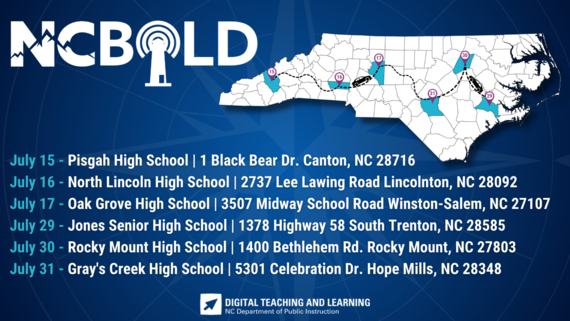
The Division of Digital Teaching and Learning (DTL) is excited to announce that again this summer, we will be offering an all-day digital teaching and learning conference in six of the educational regions throughout our state - NCBOLD. The focus will be NCSIS, AI in Education, NCED Connect Products (NCEES, Schoolnet, Canvas, EBSCO/Britannica), EdTech Tools, and more!
Target Audience: SIS Personnel, Principals, CO Staff, Instructional Coaches, Teachers
Attendees can earn up to 0.7 CEUs for each day’s attendance. A complimentary lunch will be provided each day. We do ask that you please cancel your registration if your plans change to ensure everyone can attend. For additional information check out go.ncdpi.gov/NCBOLD.
Please note there are different “ticket” types. To ensure your special curated sessions are available for your role, please select the correct ticket. If your ticket is sold out, you can be added to the waitlist when people cancel their registration. To ensure that we have a clear indication of participants registered and attending, you can manage your tickets in your EventBrite account (cancel or change).
Session information coming soon!
|
2025 Dates & Locations
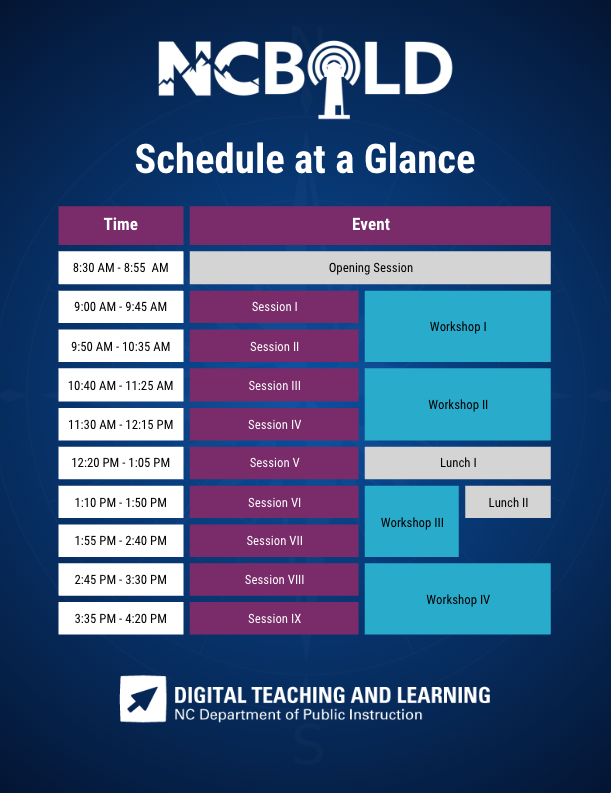
 Schedule At A Glance
Data Restoration Notice
Phase I & II
Please be advised that if a PSU updates or modifies SIS data in error and a restoration is required, there may be a cost incurred from Infinite Campus to complete the data recovery process. This is due to the time and effort that is incurred for data restore. We strongly encourage all users to exercise caution when making data changes. Please consult with your SIS PL Consultant if you are unsure about a process prior to moving forward.
|
|
 |

NCSIS Resources
Phase I & II
Phase I participants have access to the Campus Community, where they can acquire product knowledge, glean tips and tricks, and engage in networking opportunities with other districts. The Campus Community offers convenient single sign-on access from the Campus system to a wealth of resources including the knowledge base, forum discussions, learning tools, support site, upcoming events, and more.
Campus Community- contains the information you need to learn how to use Infinite Campus through product documentation, videos & simulations, study guides, forums, and much more. Whether you are a teacher, data manager, or Infinite Campus user, you will find the learning resources in a clearly defined pathway for a seamless transition from PowerSchool.
Campus Passport- is on-demand, self-paced courses that can be assigned to new and existing staff. Accessed through the Campus Community, you will find Instructor-Led Training, specific E-Learning courses, or select a learning plan based on your district role.
KnowledgeOwl: KnowledgeOwl will include articles (QRDs) that are created and updated by the SIS Professional Learning team.
NCSIS Knowledge Base | NC Department of Public Instruction
GitHub Vendor Integrations Repository: 3rd party extract formats can be found below.
GitHub Vendor Integrations Repository
Ad Hoc Filter Sharing Community: Shared google folder for Ad Hoc filters PSUs have created.Ad Hoc Community
-
Naming Convention: Ad Hoc Name - PSU Name
- You’re welcome to include your email address within the document (optional).
-
Permissions: You have editing access—please proceed with caution!
-
PII: Do not upload any PII to the shared folder
NCSIS Crosswalk Document- will contain Infinite Campus and PowerSchool terms with their meanings to assist users with learning the new NCSIS terminology. This is a working document and will be updated regularly. NCSIS Crosswalk Document
IC Role Specific Resources- can be viewed by clicking on http://ncsis.gov, go to the Phase I PSU’s tab and scroll to the IC Role Specific Resources section. It Includes information for specific staff roles, as well as a guide for parents & students.
Webinar Recording Links and FAQs- can be found at http://ncsis.gov under the Professional Learning tab. Please check for recently added webinars.
|
Requesting Technical Support Points of Contact
Phase I & II
Please review the information below on how to submit support tickets:
Contact Infinite Campus for assistance with:
NCSIS Application/Support Issues
Submit a case: https://support.infinitecampus.com
Contact DPI for assistance with:
- NCDPI Business Questions
- Duplicate Students
- Amplify/Missing Students
- PMR Deletes in Infinite Campus
Submit a request: https://go.ncdpi.gov/help
For additional technical support contacts, please refer to the document below:Requesting Help
|
|
 |
|