What's New!
- ECATS Phase II SIS Implementation Office Hours: Tips & Tricks* (Phase II)
- Temporary Procedure for Graduation Requirement Overrides* (Phase I)
- Events & Actions in Infinite Campus - Statewide Planning & PSU Input Needed* (Phase I & II)
- Guidance for ECS Students Returning for an Additional Year in Grade 12* (Phase I & II)
- 3rd Party Office Hours* (Phase I & II)
- New Grading Policy for Credit Recovery Courses* (Phase I & II)
- Athletic Eligibility Data Reminder* (Phase II)
- SIS EOY Timeline SY 24-25* (Phase I & II)
- Knowledge Owl* (Phase I & II)
- Conversion: Student to Staff Merges - Due this Friday* (Phase I & II)
- (NC) Grade Point Average (GPA) Configuration Verification* (Phase I)
- State Report Updates* (Phase I)
- Upcoming Training Information* (Phase I & II)
Reminders:
- Access Issue: NC Graduation Data Verification Report (Phase I)
- Parent Portal Self Service Tool (Phase II)
- NC Graduation Data Verification (GDV) (Phase I)
- Phase II Implementation Dashboard (Phase II)
- Charter School Corner (Phase I & II)
- Final Grading Reminder (Phase I & II)
- Phase II Data Conversion Information (Phase II)
- Final Transcript Procedures in Infinite Campus (Phase I)
- Temporary Workaround for Recording CCAHS Completion in Infinite Campus (Phase I)
- ECS & Infinite Campus (Phase I)
- Credit Groups (Phase I & II)
- NCBOLD 2025
- TIMS Extract Update (Phase I)
- Data Restoration Notice (Phase I & II)
- EDDIE Year-End Memo (Phase I)
- Program Additions (Phase I)
- Infinite Campus & MTSS Overview Sessions (Phase I & II)
- Program End Date Guidance (Phase I)
- NCSIS Resources (Phase I & II)
- Requesting Technical Support Points of Contact (Phase I & II)
- 2024-2025 Home Base Maintenance Periods (Phase I & II)
- Want to Stay in the Loop? (Phase I & II)
|
*indicates new or updated information
|
|
WHAT'S NEW!

ECATS Phase II SIS Implementation Office Hours: Tips & Tricks*
Phase II
Change is good but it also comes with its own nuances. That is why the ETS Team will be providing office hours on Tuesday, June 17, 2025, from 11 a.m. - 12 p.m. for Phase II PSUs transitioning to the new SIS, Infinite Campus (IC). Tips to prevent interruptions in ECATS business processes by ensuring a seamless integration of data between ECATS and IC will be shared. We will also point you to tools such as validation reports for calendar setups, student locator to help solve multiple enrollments, and many other resources that are available to help you troubleshoot and answer questions.
Please use the information below to join the webinar. If you have any questions concerning this webinar, please contact Yolanda Wilson, yolanda.wilson@dpi.nc.gov.
We look forward to seeing you!
Webinar topic:
ECATS Phase II SIS Implementation Office Hours: Tips and Tricks
Date and time:
Tuesday, June 17, 2025 11:00 AM | (UTC-04:00) Eastern Time (US & Canada)
Join link:
https://ncgov.webex.com/ncgov/j.php?MTID=mc8668943d6acbb32b1cc49d5f1b3c6cc
Webinar number:
2437 228 7238
Webinar password:
Jxmqw9mKr27 (59679965 when dialing from a phone or video system)
Join by phone:
+1-415-655-0003 US Toll
+1-904-900-2303 United States Toll (Jacksonville)
Access code: 243 722 87238
|

Temporary Procedure for Graduation Requirement Overrides*
Phase I
Infinite Campus is currently developing official functionality to support graduation requirement overrides. Until that process is fully implemented, PSUs should follow the interim guidance outlined below to ensure all override actions are consistently and accurately documented in student records.
Interim Override Instructions (Applicable to Any Course)
For any course requiring a graduation requirement override:
- Go to the Transcript tool and locate the applicable course in the student’s grade record.
- Enter a comment that includes the following:
- The word "override"
- The course number being overridden (e.g., “override – Course #XXXX”)
- It is strongly recommended to include a brief explanation or justification. Example: “Override for Health/PE. Verified HEA 110 curriculum meets NC graduation requirements.”
Important Note About Comment Formatting
It is very important that staff enter the comment exactly as described above—including the word “override” followed by the course number—so that we can accurately identify these records later.
If your PSU has already entered override comments in a different format, please review and update those records to align with the required structure outlined above. This will ensure consistency and allow those entries to be correctly identified during the automated update process next year.
Beginning next year, when the new override process is officially implemented in Infinite Campus, NCDPI will run a script to automatically update this year’s override entries. Using the correct format now is critical to ensure that the process runs smoothly and reliably.
Why This Matters
- Ensures PSUs can meet graduation requirements without delay while maintaining proper documentation.
- Enables NCDPI to automatically locate and update override entries when the official functionality is deployed.
- Supports data integrity and consistency across the state.
Action Required
Please share this guidance with all staff responsible for transcript management and ensure it is applied consistently for any graduation requirement override.
Also, take time to review and update any previously entered overrides to match the formatting guidance above.
If you have any questions, please reach out to your assigned SIS PL Consultant.
|

Events & Actions in Infinite Campus - Statewide Planning & PSU Input Needed*
Phase I & II
Events & Actions in Infinite Campus serve as automated prompts to notify staff when key changes occur—such as new student enrollments, schedule changes, or student withdrawals—that require timely attention. These triggers are configured to help improve communication and coordination among staff.
In addition to notifications, Events & Actions can also be used to automate data entry, such as populating specific fields based on a user's response or a change in another field. This functionality supports efficiency, consistency, and accuracy across student records by reducing the need for manual updates and ensuring timely data alignment.
NCDPI is currently developing a guidance document outlining the Events & Actions that have been created—and those that are planned—for statewide implementation. As part of this effort, we are seeking input from PSUs to better understand what additional Events & Actions would be helpful.
Please complete the survey below to share which event types and actions your PSU would find beneficial. Your feedback will help guide future statewide configurations:
Events & Actions Survey
Thank you for your participation and continued partnership!
|
 |
|
Guidance for ECS Students Returning for an Additional Year in Grade 12*
Phase I & II
ECS students who will return for another year in Grade 12 should be assigned an End Date corresponding to the last instructional day of the school calendar, along with a Local End Status of PR: Promoted. Additionally, the student should have a future enrollment record in Grade 12 for the upcoming school year.
To ensure proper documentation, please follow the steps outlined in the Adding an XG Flag article to apply the XG flag appropriately.
|
New Grading Policy for Credit Recovery Courses*
Phase I & II
New Policy: Numeric Grading for Credit Recovery Courses (Non-Electives) – Effective 2025–26
Beginning with the 2025–26 school year, public school units (PSUs) must assign a numeric grade for all credit recovery courses tied to non-elective graduation requirements.
The numeric grade assigned during credit recovery must be factored into the student’s existing Incomplete (I) or Fail (F) course grade on their transcript. This combined grade should reflect the percentage of the course completed through credit recovery, resulting in a final passing numeric grade.
This SBE policy (CCRE-001 - see 6.3) does not apply to elective courses and is intended to promote consistency and accuracy in GPA calculation and graduation reporting.
Courses Requiring Numeric Grades for Credit Recovery (Non-Elective Graduation Requirements)
Note: Instructions for grading setup for these courses are being developed and will be shared soon.
Please see the link below for a list of courses that must be graded using the NC 10-Point Scale for credit recovery purposes.
New Policy: Numeric Grading for Credit Recovery Courses (Non-Electives) – Effective 2025–26

Athletic Eligibility Data Reminder*
Phase II
What information do you need to save from PowerSchool for Athletics?
- Attendance
- Grades (A2 pulled separately)
- GPA Information
- Promotion/Retention Information
- Addresses (student demographic information)
- Athletic Teams Information
|

SIS EOY Timeline SY 24-25*
Phase I
There will be no downtime for Phase I PSUs transitioning from the current year to the future year in Infinite Campus (IC). However, NCDPI will transition all Phase I PSUs from the 24-25 school year to the 25-26 year in Infinite Campus on 6/30/2025. This should not be done before June 30th.
Check out the recordings and presentations from our End of Year Webinars!
End of Year | NC Department of Public Instruction
Phase II
Phase II PSUs must still do all pre-EOY processes in PowerSchool and have EOY validations cleared on or before June 26th, 2025. PowerSchool will be taken offline for EOY processing on June 26, 2025. PSUs will no longer have access to their PowerSchool instances after June 26, 2025.
Please select the link below for a detailed timeline from February 1 to July 15th:
Students currently enrolled in an NC Public School cannot be pre-registered or enrolled until July 7, 2025.
Enrollments in Infinite Campus FOR ALL PSUs will need to stop by COB on 6/26/2025 and cannot be performed while the sync from PSU sites to the State Edition site is completed. The sync is expected to be completed by 7/7/2025.
For both Phase I and Phase II PSUs, DO NOT ENROLL students or transfer records until state syncing is complete (ETA July 7) to ensure the student records transfer functions appropriately and duplicates are not created.
Completion of the sync will be communicated from NC DPI. At that time you will be able to resume enrolling students.
Your support and collaboration are greatly appreciated as we prepare for this unique EOY. If you have any questions or need assistance during the process, please don’t hesitate to contact your Professional Learning Team Consultant.
|

Conversion: Student to Staff Merges - Due this Friday*
Phase I & II
Reminder to complete the student to staff merges. If you have not already done so, please complete this information by Friday, June 13th.
UID Reconciliation: Student to Staff Report
The UID Reconciliation: Student to Staff report helps identify former students who are now staff members within the same PSU. This report is important for both Phase I and Phase II schools:
- Phase I schools: Allows you to report all duplicates at once to NCDPI. Records will be combined over the summer.
- Phase II schools: Ensures each person has only one record after the conversion process. Records will be combined shortly after your production site is live.
For detailed instructions, please refer to the NCSIS article linked below:
https://ncdepartmentofpublicinstruction.knowledgeowl.com/home/conversion-student-to-staff-merges
|

(NC) Grade Point Average (GPA) Configuration Verification*
Phase I
The report formerly titled (NC) Grade Point Average (GPA) Weight Verification has been renamed to (NC) GPA Configuration Verification to more accurately reflect its purpose. This updated title better aligns with the report’s function—supporting PSUs in reviewing GPA-related course configurations to ensure accuracy and consistency across courses and transcripts.
The NC GPA Configuration Verification report group includes a suite of validation tools designed to help PSUs identify and correct misalignments in course setup, transcript data, and grading configurations to ensure accurate GPA calculations.
New Validation Report Available: (NC) Misconfigured Courses – GPA Verification
This new report enhances the ability of PSUs to pinpoint and resolve GPA-related course configuration issues.
For guidance on how to review and interpret the data validation reports, please refer to the article linked below:
GPA Configuration Verification Report Guide
If you have any questions, please reach out to your assigned SIS PL consultant.
|
 |
|
State Report Updates*
PMR Report- As we near the end of the school year, please ensure that all Month 9 PMRs are reviewed and approved within 10 days of your district’s last instructional day. Timely approval is essential for accurate end-of-year data reporting and compliance.
Discipline Report- Under Development
GDV Report- is now in production, and validations are available to run.
|

Upcoming Training Information*
Phase I & II
Be sure to check the SIS PL Plan or Eventbrite for upcoming in-person and virtual regional meetings and trainings. Don’t miss out on valuable opportunities to connect, learn, and stay informed!
SIS PLP 2024-25 FINAL
Eventbrite-NCSIS
End-of-Year Support – Virtual Drop-In Office Hour Sessions
We will be offering virtual End-of-Year (EOY) support through drop-in office hour sessions. Both Phase I and Phase II PSUs are welcome to attend the sessions scheduled for their region.
To find and register for a session, please visit Eventbrite and locate the session for your region. We encourage early registration so we can better prepare to support your needs during the session.
- Please visit Eventbrite-NCSIS to find and register for EOY support webinars scheduled for your region.
- East Phase I & II EOY Office Hours - Tue, Jun 17, 2025, 3:00 PM
- West Phase I & II EOY Office Hours - Wed, Jun 18, 2025, 12:00 PM
Charter School Virtual Office Hours are offered twice a month to provide ongoing support and answer your questions.
📅 When: 2nd & 4th Friday of each month
⏰ Time: 9:00 AM – 10:00 AM
🔗 Join us for Bi-Monthly Charter School Support Virtual Office Hours!
|
REMINDERS:
Access Issue: NC Graduation Data Verification Report
Phase I
Access Issue: NC Graduation Data Verification Report
Some PSU users have reported issues running the NC Graduation Data Verification report, even when appropriate tool rights are assigned.
At this time, only users with the Student Information System Product Security Role will be able to run the report.
This issue is expected to be resolved in the upcoming Campus.2523 update. Once North Carolina upgrades to this version, report access should function as expected.
|
|
 |
 |
|
Parent Portal Self-Service Tool
Phase II
Enabling the Parent Portal Self-Service Tool
If you would like to enable the Parent Portal Self-Service tool after your production site is live, follow the steps below:
- Log in to Infinite Campus.
- Navigate to School and District Settings > District Information.
- Check the box for Allow Portal GUID Self Service.
Once enabled, the associated schools will appear within 24 hours. This tool allows parents to create their own portal accounts, streamlining access to student information.
|

NC Graduation Data Verification (GDV)
Phase I
Summer Graduates – Removing the No Show Checkbox
PSUs were previously advised to check the No Show checkbox for students who graduated during the summer. This guidance has since been revised to ensure accurate reporting in the Graduate Data Verification (GDV) report.
For students who completed graduation from August 7 through the day before the first instructional day of the 2024–25 school year, the No Show checkbox should not be selected.
To identify and update these students:
- Run the No Show Report
- Pathway: Student Information > Reports > No Show Report
- Locate students with a W6 end status who graduated during the summer timeframe.
- Remove the No Show Checkbox
- Pathway: Student Information > General > Enrollments
- For the identified students, uncheck the No Show checkbox to ensure proper reporting as summer graduates in the GDV file.
Please review and update these records as needed. If you have any questions, feel free to reach out to your assigned SIS PL consultant for support.
|

Phase II Implementation Dashboard
Phase II
Reminder for SIS Coordinators:
Once your production site is live, please begin documenting your progress in the Go-Live Checklist.
Next Steps for SIS Coordinators
Once access is granted:
- Navigate to the PSU Page tab in the Go-Live Checklist.
- Begin entering the progress of tasks once your production site is live.
- Use the dropdown menus to update the status of each implementation task.
- Select “Needs Support” for any tasks requiring follow-up.
- Notify your assigned SIS PL Consultant for timely assistance and guidance.
Additional Information
- The dashboard serves as a collaborative pulse check for tracking implementation milestones.
- Communications may come from both Infinite Campus and NCDPI.
- Some tasks may involve other departments and are not solely the responsibility of SIS Coordinators.
- Each PSU has a unique production timeline, so progress stages may vary.
- Regularly reviewing and updating your PSU’s checklist is strongly encouraged.
You can also view a summary of dashboard features and access steps here: NCSIS Implementation Dashboard Overview Slides
|

Charter School Corner
Phase I & II
Upcoming Charter School SIS Trainings
Charter School Data Manager Academy for Phase I or Phase II
(1-day training, so please only sign up for 1 day below)
Bi-Monthly Charter School SIS Support Office Hours
Charter School OLR Processing In Person Training
Charter schools now have a dedicated SIS professional contact!
We are pleased to introduce Jennifer Fogleman as your new dedicated NCSIS Professional Learning Consultant for Charter Schools, effective immediately.
Jennifer brings a wealth of experience in the Student Information System (SIS) and is committed to providing you with the same high level of service you've come to expect from our team.
To reach Jennifer: jennifer.fogleman@dpi.nc.gov
The NCSIS Professional Learning Consultant team is here to support you, please don't hesitate to contact Jennifer if you have any questions or concerns.
|
Final Grading Reminder
Phase I & II
Be sure to verify all final grades are entered and validated for graduating students (Scores posted to transcript for Infinite Campus and F1 grades stored for PowerSchool) prior to entering diploma dates.
|
|
 |

Phase II Data Conversion Information
Phase II
Hot tip: On your production data due date, download all AET files from eMFTS. This will give you a copy of the information that Infinite Campus uses to create your production instance.
Scheduling Setup should be completed for all students. The “Next Grade” and “Next School” fields determine the enrollment for the 25-26 year in your production site. Check weekly to verify that any new enrollments have these fields completed.
Infinite Campus will convert data for Phase II PSUs directly from PowerSchool. The data files on eMFTS are provided for your information and to allow for easier auditing of data, but any changes to these files will not change the data that is converted into Infinite Campus. The data that is converted comes straight from PowerSchool.
Use the Conversion Guide to help you audit and validate the data you have in PowerSchool using the data files. Make any changes necessary in PowerSchool.
Once your trial site is available, your implementation team will provide you with a Data Validation Workbook. It will have instructions about how to validate the data that has been converted. Any data issues found should be fixed in PowerSchool so that the production site contains the correct data.
Use the PowerSchool->Infinite Campus Data Validation Workbook to find ideas on how to easier find the data in PowerSchool to validate and where to change the data in PowerSchool to fix issues (if applicable).
Previous Phase II Data Conversion Webinar Information:
|
Final Transcript Procedures in Infinite Campus
Phase I
Final Transcript Procedures in Infinite Campus for High School Principals, SIS Coordinators, Data Managers, and School Counselors
NCDPI and CFNC Electronic High School Transcript System Protocols and Processing Start Date for Infinite Campus EOY 2025
To allow ample time for schools to store final marks and ensure that the “Diploma Date” fields are populated correctly, NCDPI has requested that CFNC begin the electronic high school transcript system on Thursday, June 19, 2025. This will be the start date to release queued final transcripts. The CFNC system automatically creates these queued requests for seniors who sent a non-final transcript earlier in the year. The CFNC transcript system will remain available for regular functions such as new transcript requests.
This schedule means it is critical that all final marks are posted to transcripts before June 19, 2025, and all graduates have their “Diploma Date” field populated on the student Graduation screen within Infinite Campus.
Based on the standard system protocol, CFNC will automatically release queued final transcripts after June 19. As a reminder, the standard system protocol is for the automatic release of queued final transcripts ten days after your school's end date in the Infinite Campus calendar when two conditions are met:
- The Diploma Type is populated.
- The Infinite Campus “Diploma Date” field is populated (not blank).
If either of the two conditions mentioned above are not met when the CFNC system attempts to release the final transcript, the e-transcript requests will enter a nine-day processing loop. During this period, the system will make three additional attempts every three days until the conditions are met. If the conditions are met by the end of the nine-day processing loop, the final e-transcript will still be processed and released to colleges through CFNC. However, if the conditions are not met by the end of the nine-day processing loop, the final e-transcript request(s) will fail, and the student will be automatically notified by email. This underscores the importance of meeting the protocol requirements on time.
Incomplete final e-transcripts occur when final marks are not posted to transcripts within ten days, and students have their “Diploma Date” populated within Infinite Campus. Schools must post grades to transcripts within the specified period to prevent this to ensure proper processing. This reiteration emphasizes the necessity and responsibility of adhering to the protocol.
Again, e-transcript services will continue as normal through CFNC. Still, to allow schools time to store final marks and ensure that the “Diploma Date” fields are populated correctly, the CFNC electronic high school transcript system will wait until Thursday, June 19, 2025, to start releasing queued final transcripts.

Temporary Workaround for Recording CCAHS Completion in Infinite Campus
Phase I
Phase I NCSIS Coordinators:
As part of the transition from PowerSchool to Infinite Campus (IC), we want to provide guidance on how to handle students who initially dropped out of high school to attend Community College Adult High School (CCAHS). These students are coded with a W2T Local End Status on their Enrollment screen.
Background:
In response to PSU requests, NCDPI is developing a new process in Infinite Campus to accurately record when a student completes a CCAHS program and include them in the original high school’s graduation cohort. Until that process is approved and deployed, we ask all PSUs with a CCAHS Agreement of Affiliation to implement the following temporary workaround in IC.
Graduation Data Validation (GDV) Report Note:
The (NC) Graduation Data Verification Validation report’s GDV-5 rule may flag the student for not having a W4/W6 exit code in the previous enrollment; this is expected and acceptable under the current workaround. Students with a diploma date between 8/7/24 – 8/6/25 (school year window) will be included in the current GDV report, in alignment with existing report logic:
We appreciate your attention to this matter and your continued support in ensuring student records are complete and accurate. If you have any questions, please reach out to your SIS PL Consultant.
|
ECS & Infinite Campus
Phase I
The completion of high school course requirements for students instructed on the Extended Content Standards (ECS) should be documented in Infinite Campus using Academic Programs instead of Graduation Programs. This is because these students are served through individualized education programs.
The recommendation is due to the following reasons:
- Students served by Extended Content Standards (ECS) can participate in graduation activities but will exit high school with a certificate instead of a diploma.
- The number of years a student with a disability can stay in high school before exiting with a certificate depends on the age they enter high school and their 22nd birthday.
The OEC user guide contains additional resources on ECS Course Requirements and Participation in the NC Alternate Assessment (NCEXTEND1).
Infinite Campus Articles:
 Credit Groups
Phase I & II
Required Use of State Credit Groups for Accurate Graduation Progress and Transcript Reporting
Audience: NCSIS-IC Coordinators
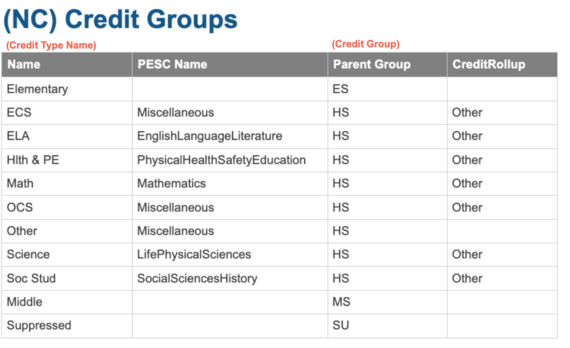
Subject: This message serves as a reminder and directive regarding the use of Credit Groups within the North Carolina Student Information System. Navigation to view: Grading & Standards > Grading Setup > Credit Group Setup.
To ensure accurate calculation of student graduation progress and to maintain consistency in transcript reporting, all districts must use the state-defined credit groups without modifications. These credit groups are set up according to Policy GRAD-004 and should not be modified. Creating new credit groups or altering existing ones disrupts historical data integrity and directly affects the system’s ability to:
- Accurately calculate and display graduation progress,
- Populate the North Carolina Official Transcript correctly, and
- Submit accurate data for the electronic transcript (e-Transcript) as required by state regulations.
The use of unauthorized or customized credit groups will result in incomplete or inaccurate transcripts, which may negatively impact student outcomes, including college admissions and scholarship opportunities.
Action Required:Please review your district’s current credit group configuration for all grade levels (ES, MS, HS) and ensure full alignment with the state-defined credit groups. A validation report, “(NC) Credit Groups Setup”, has been provided. Do not create new credit groups or modify existing state required ones.
If you have questions about the correct usage or need support aligning your local configuration, please open an Infinite Campus Support Case.
As a reminder, legislation prohibits additional local graduation requirements beyond the SBE 22 credits for all NC PSUs (SBE Policy Grad-001).
Thank you for your attention to this matter and for your continued partnership in supporting student success and data integrity across the state.
NCBOLD 2025
Registration is OPEN!! 📣
The Division of Digital Teaching and Learning (DTL) is excited to announce that again this summer, we will be offering an all-day digital teaching and learning conference in six of the educational regions throughout our state - NCBOLD. The focus will be NCSIS, AI in Education, NCED Connect Products (NCEES, Schoolnet, Canvas, EBSCO/Britannica), EdTech Tools, and more!
Target Audience: SIS Personnel, Principals, CO Staff, Instructional Coaches, Teachers
Attendees can earn up to 0.7 CEUs for each day’s attendance. A complimentary lunch will be provided each day. We do ask that you please cancel your registration if your plans change to ensure everyone can attend. For additional information check out go.ncdpi.gov/NCBOLD.
Please note there are different “ticket” types. To ensure your special curated sessions are available for your role, please select the correct ticket. If your ticket is sold out, you can be added to the waitlist when people cancel their registration. To ensure that we have a clear indication of participants registered and attending, you can manage your tickets in your EventBrite account (cancel or change).
|
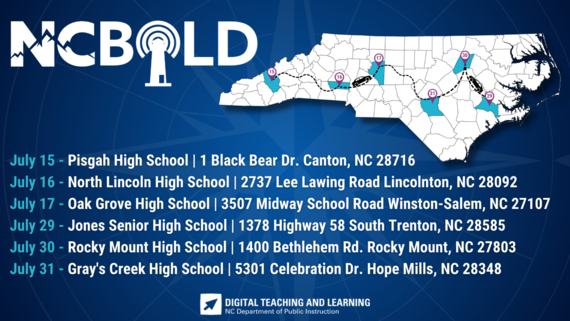
2025 Dates & Locations
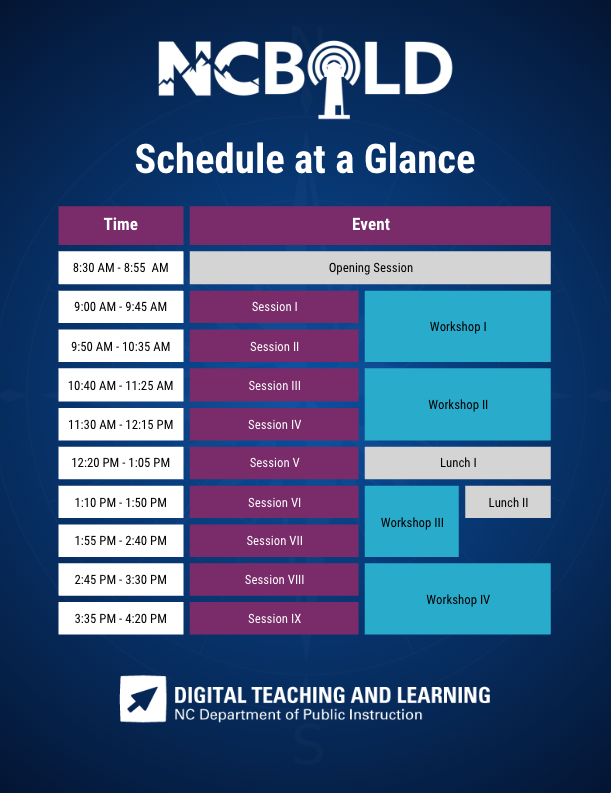
 Schedule At A Glance
TIMS Extract Update
Phase I
SIS Coordinators: Please see the information that was shared with Transportation Directors and TIMS Coordinators on May 14th.
TIMS & Infinite Campus: Updated Information within TIMS Extract (May 2025)
Infinite Campus programmers have completed requested modifications to the TIMS Extract, effective May 12th, 2025.
Next School & Grade Information
- If Next School and Next Grade have been established for students in Infinite Campus, the updated version of the TIMS Extract will now include this information in the typical columns.
- As normal, Transportation Departments can then use these fields for Student Promotion in Fall Planning Databases.
Pre-Registered Students
-
If the new calendar has been established in Infinite Campus and data managers have started to Enter or Import Pre-Registered Students for next year; the TIMS Extract will now also contain any Pre-Registered Students (mostly PK and KI) that are not current students and only present in next year’s calendar.
- These students will show their next year school and grade in the appropriate columns as current students in the TIMS Extract.
|
Data Restoration Notice
Phase I & II
Please be advised that if a PSU updates or modifies SIS data in error and a restoration is required, there may be a cost incurred from Infinite Campus to complete the data recovery process. This is due to the time and effort that is incurred for data restore. We strongly encourage all users to exercise caution when making data changes. Please consult with your SIS PL Consultant if you are unsure about a process prior to moving forward.
|
|
 |
EDDIE Year-End Memo
Phase I
The EDDIE Year-End Memo is now available. Please review the memo for important guidance and deadlines related to year-end updates in EDDIE.
EDDIE Year End Memo
Program End Date Guidance
Phase I
As we prepare for End-of-Year (EOY) processes in Infinite Campus, please review the guidance below regarding Program End Dates. It is important to ensure each program is reviewed and updated according to its specific end-date rules. This helps maintain data accuracy, meet compliance requirements, and support accurate reporting for state and federal purposes.
The chart below outlines how program end dates should be managed:
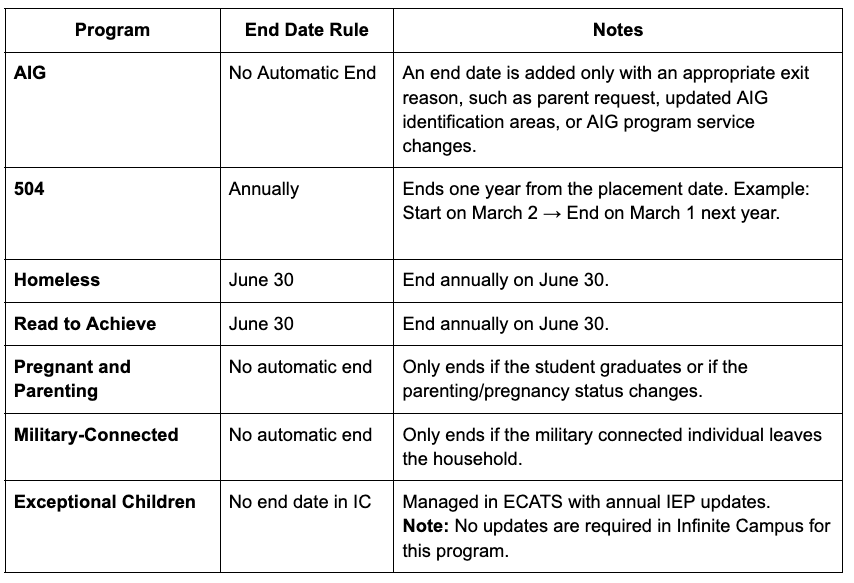 Previously we had indicated that graduation programs needed to be ended. We have since determined that graduation programs do NOT need to be ended upon withdrawal.
Further guidance on this process will be available soon. If you have any questions, please don’t hesitate to contact your assigned SIS PL Consultant.

NCSIS Resources
Phase I & II
Phase I participants have access to the Campus Community, where they can acquire product knowledge, glean tips and tricks, and engage in networking opportunities with other districts. The Campus Community offers convenient single sign-on access from the Campus system to a wealth of resources including the knowledge base, forum discussions, learning tools, support site, upcoming events, and more.
Campus Community- contains the information you need to learn how to use Infinite Campus through product documentation, videos & simulations, study guides, forums, and much more. Whether you are a teacher, data manager, or Infinite Campus user, you will find the learning resources in a clearly defined pathway for a seamless transition from PowerSchool.
Campus Passport- is on-demand, self-paced courses that can be assigned to new and existing staff. Accessed through the Campus Community, you will find Instructor-Led Training, specific E-Learning courses, or select a learning plan based on your district role.
KnowledgeOwl: KnowledgeOwl will include articles (QRDs) that are created and updated by the SIS Professional Learning team.
NCSIS Knowledge Base | NC Department of Public Instruction
GitHub Vendor Integrations Repository: 3rd party extract formats can be found below.
GitHub Vendor Integrations Repository
Ad Hoc Filter Sharing Community: Shared google folder for Ad Hoc filters PSUs have created.Ad Hoc Community
-
Naming Convention: Ad Hoc Name - PSU Name
- You’re welcome to include your email address within the document (optional).
-
Permissions: You have editing access—please proceed with caution!
-
PII: Do not upload any PII to the shared folder
NCSIS Crosswalk Document- will contain Infinite Campus and PowerSchool terms with their meanings to assist users with learning the new NCSIS terminology. This is a working document and will be updated regularly. NCSIS Crosswalk Document
IC Role Specific Resources- can be viewed by clicking on http://ncsis.gov, go to the Phase I PSU’s tab and scroll to the IC Role Specific Resources section. It Includes information for specific staff roles, as well as a guide for parents & students.
Webinar Recording Links and FAQs- can be found at http://ncsis.gov under the Professional Learning tab. Please check for recently added webinars.
|
 |
|
Requesting Technical Support Points of Contact
Phase I & II
Please review the information below on how to submit support tickets:
Contact Infinite Campus for assistance with:
NCSIS Application/Support Issues
Submit a case: https://support.infinitecampus.com
Contact DPI for assistance with:
- NCDPI Business Questions
- Duplicate Students
- Amplify/Missing Students
- PMR Deletes in Infinite Campus
Submit a request: https://go.ncdpi.gov/help
For additional technical support contacts, please refer to the document below:Requesting Help
|
2024-2025 Home Base Maintenance Periods
Phase I & II
Each year, a list of scheduled maintenance windows is published by NCDPI. This is published in advance to help teachers and administrators better prepare for temporary outages and loss of access. Please review the 2024-2025 maintenance schedule and put these dates on your calendar. In most cases, the entire window is not necessary and we can return systems to service earlier than listed. If emergency maintenance is required in addition to these scheduled dates, all users will be notified in advance.
|
|
|
 |
|