What's New!
- Phase II Timeline* (Phase II)
- Blackout Dates for Enrollment at EOY* (Phase I & II)
- Flag Automation* (Phase I)
- Credit Groups* (Phase I & II)
- Infinite Campus & MTSS Overview Sessions* (Phase I & II)
- Program End Date Guidance* (Phase I)
- Legislative Class Size Report Update* (Phase I)
- Charter School Corner* (Phase I & II)
- State Report Updates* (Phase I)
- Mastering Campus Recordings (Phase I & II)
- Upcoming Training Information* (Phase I & II)
- Clarifying Points* (Phase I)
- NCBOLD 2025*
Reminders:
- PMR Report Reminder (Phase I & II)
- Phase II Implementation Dashboard (Phase II)
- Course Information Screen Update (Phase I)
- NC State-Specific Resources & Updates (Phase I & II)
- KnowledgeOwl (Phase I & II)
- 2025-2026 SY Master Course Code List V5 Update
- Data Extract Utility (DEU) Pull Deprecation (Phase I)
- ECS & Infinite Campus (Phase I)
- SIS EOY Timeline SY 24-25 (Phase I & II)
- Phase II Data Conversion Information (Phase II)
- Partnering Progress (Phase I & II)
- NCSIS Resources (Phase I & II)
- Requesting Technical Support Points of Contact (Phase I & II)
- 2024-2025 Home Base Maintenance Periods (Phase I & II)
- Want to Stay in the Loop? (Phase I & II)
|
*indicates new or updated information
|
|
WHAT'S NEW!

Phase II Timeline*
Phase II
Thank you for all your hard work to ensure data quality. The trial site conversions have been going very well. As we approach July 1st, NCDPI wants to clarify the timeline of tasks that can be completed between your production site delivery in June and post-EOY.
The link below contains a chart that explains the dates of events that can be done from 6/1 to 7/12.
24-25 EOY Phase II Timeline
Enrollments in Infinite Campus will need to be suspended starting 6/27/2025, and cannot occur while the sync from PSU sites to the State Edition site is completed. This is expected to be completed by 7/7/2025.
For both Phase I and Phase II PSUs, DO NOT ENROLL students or transfer records until state syncing is complete (ETA July 7) to ensure the student records transfer functions appropriately and duplicates are not created.
PSUs can still withdraw and graduate students in NCSIS during this window.
Completion will be communicated from NC DPI.
|
 |
|
Blackout Dates for Enrollment at EOY*
Phase I & II
Enrollments in Infinite Campus FOR ALL PSUs will need to stop by COB on 6/26/2025 and cannot be performed while the sync from PSU sites to the State Edition site is completed. The sync is expected to be completed by 7/7/2025.
For both Phase I and Phase II PSUs, DO NOT ENROLL students or transfer records until state syncing is complete (ETA July 7) to ensure the student records transfer functions appropriately and duplicates are not created.
Completion of the sync will be communicated from NC DPI. At that time you will be able to resume enrolling students.
|
Flag Automation*
Phase I
The following flags are now automated:
- 504
- AIG
- EL
- Migrant
- Military Connected
When a program is created for any of the above with a valid start date, a flag will become active for a student.
When a program is ended, the flag will also end.
If the end date for the program is in the future, the flag remains active until the end date is passed.
For Military Connected, if multiple family members have a military connection, individual flag records are created for each, but only one icon appears in the student header. If some military connections are ended, their respective end dates are recorded in the flag setup. However, the icon remains visible in the student header unless all connections are ended.
|
|
 |
 Credit Groups*
Phase I & II
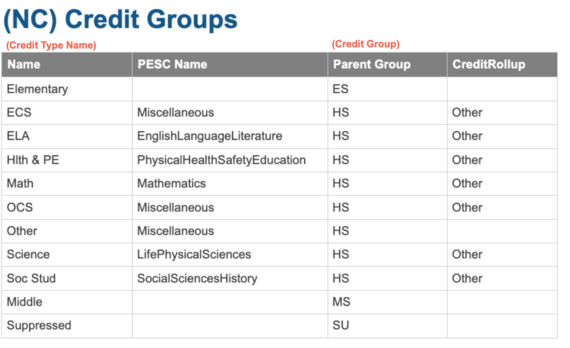
Required Use of State Credit Groups for Accurate Graduation Progress and Transcript Reporting
Audience: NCSIS-IC Coordinators
Subject: This message serves as a reminder and directive regarding the use of Credit Groups within the North Carolina Student Information System. Navigation to view: Grading & Standards > Grading Setup > Credit Group Setup.
To ensure accurate calculation of student graduation progress and to maintain consistency in transcript reporting, all districts must use the state-defined credit groups without modifications. These credit groups are set up according to Policy GRAD-004 and should not be modified. Creating new credit groups or altering existing ones disrupts historical data integrity and directly affects the system’s ability to:
- Accurately calculate and display graduation progress,
- Populate the North Carolina Official Transcript correctly, and
- Submit accurate data for the electronic transcript (e-Transcript) as required by state regulations.
The use of unauthorized or customized credit groups will result in incomplete or inaccurate transcripts, which may negatively impact student outcomes, including college admissions and scholarship opportunities.
Action Required:Please review your district’s current credit group configuration for all grade levels (ES, MS, HS) and ensure full alignment with the state-defined credit groups. A validation report, “(NC) Credit Groups Setup”, has been provided. Do not create new credit groups or modify existing state required ones.
If you have questions about the correct usage or need support aligning your local configuration, please open an Infinite Campus Support Case.
As a reminder, legislation prohibits additional local graduation requirements beyond the SBE 22 credits for all NC PSUs (SBE Policy Grad-001).
Thank you for your attention to this matter and for your continued partnership in supporting student success and data integrity across the state.
Program End Date Guidance*
Phase I
As we prepare for End-of-Year (EOY) processes in Infinite Campus, please review the guidance below regarding Program End Dates. It is important to ensure each program is reviewed and updated according to its specific end-date rules. This helps maintain data accuracy, meet compliance requirements, and support accurate reporting for state and federal purposes.
The chart below outlines how program end dates should be managed:
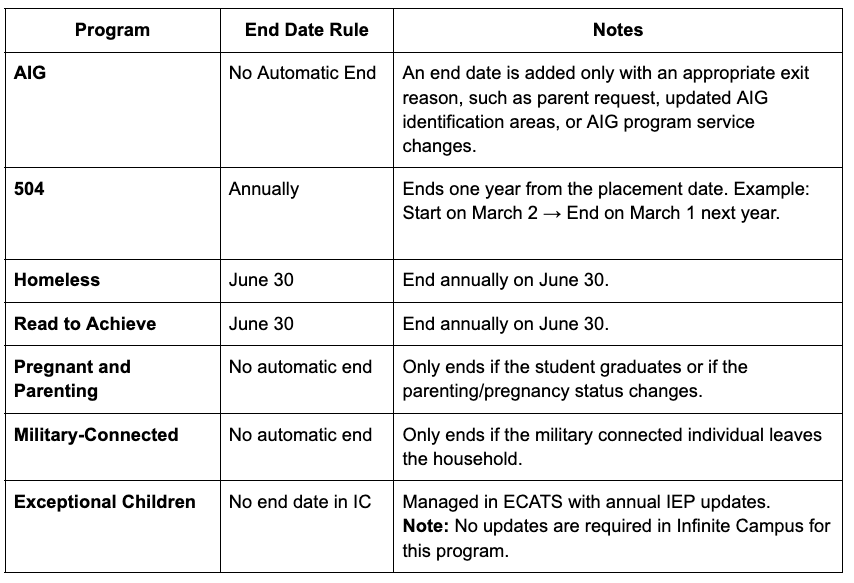 Previously we had indicated that graduation programs needed to be ended. We have since determined that graduation programs do NOT need to be ended upon withdrawal.
Further guidance on this process will be available soon. If you have any questions, please don’t hesitate to contact your assigned SIS PL Consultant.

Legislative Class Size Report Update*
Phase I
The Legislative Class Size (LCS) report in Infinite Campus itself is reporting correctly. PSUs may use this report to verify their class size data to ensure accuracy while the issues with the Class Size Average report are being addressed.
DPI is investigating the following issues with the Legislative Class Size Average Report:
- While the student count per class is accurate, the average class size is being calculated based on an incorrect section count, which may result in misleading averages.
- Additionally, there is a known issue regarding the calculation of sections with combo classes in the summary report. The lead teacher is counting in both grade levels in the teacher count.
- The Individual and PSU Class Size Average overage violation reports seem to have a calculation error.
- Over the Individual Class Size Maximum
- Over the PSU-wide Maximum Average
Our team is actively working with the vendor to address these issues and will provide updates once a resolution is in place.
Please be reminded that the Legislative Class Size (LCS) report itself is reporting correctly and can be used to verify the class size data to ensure accuracy.
If you have any concerns about the required attestation or reporting, please include those concerns—along with the specific actions you've taken to meet class size requirements and any other relevant details—when you submit the attestation. Be sure to clearly identify the school, class, or other specifics in your submission. Send all of this to studentaccounting@dpi.nc.gov.
Thank you for your understanding and continued partnership.
|

Charter School Corner*
Phase I & II
Upcoming Charter School SIS Trainings
Charter Connect In-Person meeting
Bi-Monthly Charter School SIS Support Office Hours
Charter School OLR Setup In-Person Training
Charter School OLR Processing In-Person Training
Charter schools now have a dedicated SIS professional contact!
We are pleased to introduce Jennifer Fogleman as your new dedicated NCSIS Professional Learning Consultant for Charter Schools, effective immediately.
Jennifer brings a wealth of experience in the Student Information System (SIS) and is committed to providing you with the same high level of service you've come to expect from our team.
To reach Jennifer: jennifer.fogleman@dpi.nc.gov
The NCSIS Professional Learning Consultant team is here to support you, please don't hesitate to contact Jennifer if you have any questions or concerns.
|
 |
|
State Report Updates*
Phase I
GRS Report- The statewide Grade, Race, Sex (GRS) report will be run as part of PMR7. The report will be added to the Statistical Profile at that time.
Discipline Report- Under Development
GDV Report- is now in production, and validations are available to run. Additional information will be shared soon.
|

Mastering Campus Recordings*
Phase I & II
Mastering Campus: Full Recording Series Now Available!
Missed a session or want to review key content? The Mastering Campus training series is now available on-demand! Each day focuses on a core area of NCSIS to help strengthen your understanding and support your PSU.
📅 Session Recordings:
- Day 4: Course Catalogs & Hand Scheduling Watch Recording Passcode: wn9tD.@b
📌 Note: If you have any questions or need additional support, reach out to your SIS PL Consultant. Happy learning!
|

Upcoming Training Information*
Phase I & II
Be sure to check the SIS PL Plan or Eventbrite for upcoming in-person and virtual regional meetings and trainings. Don’t miss out on valuable opportunities to connect, learn, and stay informed!
SIS PLP 2024-25 FINAL
Eventbrite-NCSIS
PSU End-of-Year (EOY) Support Webinars
To assist with EOY processes in the NCSIS, webinars have been scheduled for both Phase I and Phase II PSUs:
Phase I PSUs:
Phase II PSUs:
Please visit Eventbrite-NCSIS to find and register for EOY support webinars scheduled for your region.
Charter School Virtual Office Hours are offered twice a month to provide ongoing support and answer your questions.
📅 When: 2nd & 4th Friday of each month
⏰ Time: 9:00 AM – 10:00 AM
🔗 Join us for Bi-Monthly Charter School Support Virtual Office Hours!
|
Clarifying Points*
Phase I
1T Attendance Code: this attendance code should only be used in the event of a natural disaster
1R Attendance Code: As a reminder, please see the guidance below for using the 1R attendance code.
(a) Remote instruction means instruction delivered to students in a remote location outside of the school facility, whether synchronously or asynchronously. Instructional days or hours provided through any of the following shall not be considered remote instruction:
- North Carolina Virtual Public School courses.
- E‑learning courses that meet the requirements of G.S. 115C‑238.85.
- Institution of higher education courses, as provided in Article 16 of this Chapter or G.S. 115D‑20(4).
- Homebound instruction required for a student by an individualized education program, as defined in G.S. 115C‑106.3(8), or a section 504 (29 U.S.C. § 794) plan.
- Instruction provided to a student during a short‑ or long‑term suspension.
TAS Flags: These will be added to applicable students in Infinite Campus, making it easier to pull this information for reporting.
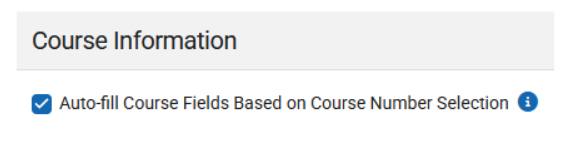
Manually Adding Transcript Grades: When entering a grade in IC, keep the Auto-fill checkbox on to ensure the Credit Type populates correctly.
NCBOLD 2025*
Registration is NOW OPEN!! 📣
The Division of Digital Teaching and Learning (DTL) is excited to announce that again this summer, we will be offering an all-day digital teaching and learning conference in six of the educational regions throughout our state - NCBOLD. The focus will be NCSIS, AI in Education, NCED Connect Products (NCEES, Schoolnet, Canvas, EBSCO/Britannica), EdTech Tools, and more! A complete session list will be available in the coming weeks.
Target Audience: SIS Personnel, Principals, CO Staff, Instructional Coaches, Teachers
Attendees can earn up to 0.7 CEUs for each day’s attendance. A complimentary lunch will be provided each day. We do ask that you please cancel your registration if your plans change to ensure everyone can attend. For additional information, check out go.ncdpi.gov/NCBOLD.
|
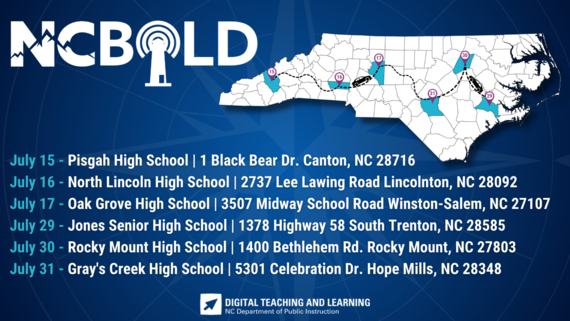
2025 Dates & Locations
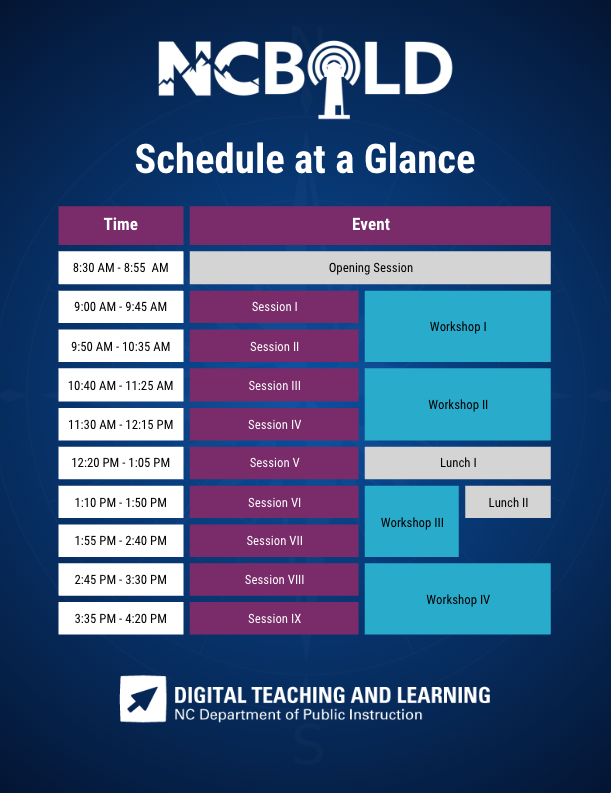
 Schedule At A Glance
REMINDERS:
PMR Report Reminder
Phase I & II
As we near the end of the school year, please ensure that all Month 9 PMRs are reviewed and approved within 10 days of your district’s last instructional day. Timely approval is essential for accurate end-of-year data reporting and compliance.
If you have any questions or need assistance, please contact your assigned SIS PL Consultant.
Thank you for your continued partnership!
|
|
 |
Phase II Implementation Dashboard
Phase II
Dear Phase II PSUs,
As part of our continued efforts to support a successful transition to the North Carolina Student Information System (NCSIS), we are excited to introduce the NCSIS Implementation Dashboard—a new tool designed to help monitor progress and identify support needs during the implementation process. This dashboard will be used collaboratively by NCDPI and Infinite Campus to help ensure a smooth rollout across all Phase II PSUs.
We shared this tool during the recent Superintendents Quarterly and at the Digital Leaders Exchange to gather feedback from the field and align the dashboard with district needs.
About the Dashboard
The dashboard provides a real-time visual overview of implementation progress, including:
- A statewide progress map
- County-level filtering for regional insights
- PSU-specific views for district-level updates
The dashboard is built from the Go-Live Checklist, which includes task-specific checklists aligned with key implementation phases:
- Production Site Setup
- Pre-First Day of School
- First Day of School
- 3 Months Post Go-Live
Access Details
- Superintendents with a Google-based school email address have already been granted access to the NCSIS Implementation Dashboard.
- SIS Coordinators who completed the Phase II Dashboard Access Request Survey have been granted access to the dashboard and their PSU’s Go-Live Checklist spreadsheet.
- Additional team members listed in the survey have also been granted dashboard access.
Important: All users—including SIS Coordinators and implementation team members—must have a school-issued Google email address to access the dashboard and checklist. Access cannot be granted to personal or non-Google accounts.
If your PSU has not yet submitted the Dashboard Access Request Survey or has not received access, please complete the survey as soon as possible to ensure access is granted: Phase II Dashboard Access Request Survey
SIS Coordinators may also share access to the PSU Go-Live Checklist spreadsheet directly with additional team members, as needed.
Next Steps for SIS Coordinators
Once access is granted:
- Navigate to the PSU Page tab in the Go-Live Checklist.
- Begin entering the progress of tasks once your production site is live.
- Use the dropdown menus to update the status of each implementation task.
- Select “Needs Support” for any tasks requiring follow-up.
- Notify your assigned SIS PL Consultant for timely assistance and guidance.
Additional Information
- The dashboard serves as a collaborative pulse check for tracking implementation milestones.
- Communications may come from both Infinite Campus and NCDPI.
- Some tasks may involve other departments and are not solely the responsibility of SIS Coordinators.
- Each PSU has a unique production timeline, so progress stages may vary.
- Regularly reviewing and updating your PSU’s checklist is strongly encouraged.
You can also view a summary of dashboard features and access steps here: NCSIS Implementation Dashboard Overview Slides
Thank you for your continued partnership and dedication to a successful NCSIS rollout. Please reach out to your assigned SIS PL Consultant if you have any questions or need additional support.
|
Course Information Screen Update
Phase I
Did You Notice? A New Look for the Course Information Screen! The Course Information screen in Infinite Campus has a refreshed design. Be sure to review the updates and familiarize yourself with the new layout.
Click here to view the updated Course Information screen
|
|
 |
NC State-Specific Resources & Updates
Phase I & II
Stay informed by regularly reviewing the Infinite Campus Knowledge Base – North Carolina State-Specific Information page. This page includes important updates, documentation, and guidance tailored to North Carolina PSUs. We recommend checking it frequently to ensure you have the most up-to-date information related to reporting, configuration, and compliance.
🔗 Access the NC State-Specific Info Page
2025-2026 SY Master Course Code List V5 Update
The SY 25.26 Master Course Code List V5 has been updated, please review the Notes tab for a listing of updated areas.
This update includes approved Course Number and Added Value changes to PLTW courses listed below. The value changes for 2025-2026 will not be reflected in PowerSchool or Infinite Campus instances at this time to preserve 2024-2025 historical data. These values will be updated after End of Year (EOY) processing in Infinite Campus for Phase 1 & Phase 2 to be available July 1, 2025.
List of PLTW courses updated in version 5 Master Course Code list (all updated from 5X to 7X and removed Honors from course name, and Added Value = 1):
- CE117X0 - PLTW Principles of Engr
- CE137X0 - PLTW Digital Electronics
- CE147X0 - PLTW Civil Engr and Arch
- CI357X0 - PLTW Cybersecurity
- HP707X0 - PLTW Princ of Biomed Sci
- HP717X0 - PLTW Human Body Systems
- HP727X0 - PLTW Medical Intervention
Please contact your local CTE Director or Karen McPherson if you have any questions.
Data Extract Utility (DEU) Pull Deprecation
Phase I
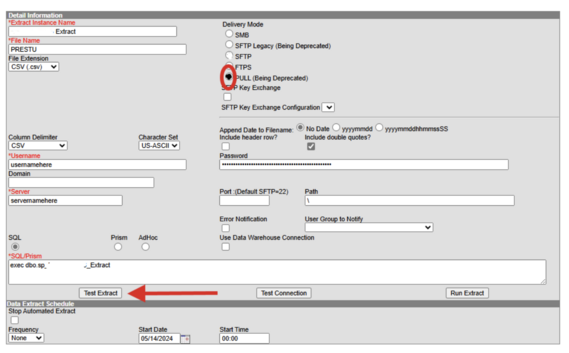
Infinite Campus will discontinue the Data Extract Utility “Pull” method on June 30th, 2025. PSUs must switch to an alternative delivery mode before the deadline to avoid disruptions. After deprecation, any active “Pull” methods will convert to SMB (Server Message Block) protocol with non-functioning credentials, causing connection errors. PSUs using other delivery methods (such as SFTP) will remain unaffected.
PSUs can use the “Test Extract” function to still receive a downloadable file of the data. Navigate to System Settings > Data Utilities > Data Extract Utility. Select the Extract Instance. Scroll to the bottom of the page and select “Test Extract” to download the file.
ECS & Infinite Campus
Phase I
The completion of high school course requirements for students instructed on the Extended Content Standards (ECS) should be documented in Infinite Campus using Academic Programs instead of Graduation Programs. This is because these students are served through individualized education programs.
The recommendation is due to the following reasons:
- Students served by Extended Content Standards (ECS) can participate in graduation activities but will exit high school with a certificate instead of a diploma.
- The number of years a student with a disability can stay in high school before exiting with a certificate depends on the age they enter high school and their 22nd birthday.
The OEC user guide contains additional resources on ECS Course Requirements and Participation in the NC Alternate Assessment (NCEXTEND1).
Infinite Campus Articles:

SIS EOY Timeline SY 24-25
Phase I
There will be no downtime for Phase I PSUs transitioning from the current year to the future year in Infinite Campus (IC). However, NCDPI will transition all Phase I PSUs from the 24-25 school year to the 25-26 year in Infinite Campus on 6/30/2025. This should not be done before June 30th.
Phase II
Phase II PSUs must still do all pre-EOY processes in PowerSchool and have EOY validations cleared on or before June 26th, 2025. PowerSchool will be taken offline for EOY processing on June 26, 2025. PSUs will no longer have access to their PowerSchool instances after June 26, 2025.
Please select the link below for a detailed timeline from February 1 to July 15th:
Your support and collaboration are greatly appreciated as we prepare for this unique EOY. If you have any questions or need assistance during the process, please don’t hesitate to contact your Professional Learning Team Consultant.
|

Phase II Data Conversion Information
Phase II
Hot tip: Scheduling Setup should be completed for all students. The “Next Grade” and “Next School” fields determine the enrollment for the 25-26 year in your production site. Check weekly to verify that any new enrollments have these fields completed.
Infinite Campus will convert data for Phase II PSUs directly from PowerSchool. The data files on eMFTS are provided for your information and to allow for easier auditing of data, but any changes to these files will not change the data that is converted into Infinite Campus. The data that is converted comes straight from PowerSchool.
Use the Conversion Guide to help you audit and validate the data you have in PowerSchool using the data files. Make any changes necessary in PowerSchool.
Once your trial site is available, your implementation team will provide you with a Data Validation Workbook. It will have instructions about how to validate the data that has been converted. Any data issues found should be fixed in PowerSchool so that the production site contains the correct data.
Use the PowerSchool->Infinite Campus Data Validation Workbook to find ideas on how to easier find the data in PowerSchool to validate and where to change the data in PowerSchool to fix issues (if applicable).
Previous Phase II Data Conversion Webinar Information:
|
Partnering Progress
Phase I & II
To support the successful implementation of the NCSIS, we have developed a detailed professional development plan for both Phase I and Phase II participants. This plan will provide you with the knowledge, skills, and resources needed to implement NCSIS effectively. Registration links are available for most events now, while others will be added in the coming months.
The linked document outlines the full professional development plan for Phase I and II, including:
-
Training Workshops: Covering NCSIS fundamentals and implementation
-
Ongoing Support: Regular check-ins with NCSIS consultants, access to online resources, and participation in PLCs.
-
Continuous Improvement: Regular assessment and feedback cycles to refine and enhance implementation practices.

NCSIS Resources
Phase I & II
Phase I participants have access to the Campus Community, where they can acquire product knowledge, glean tips and tricks, and engage in networking opportunities with other districts. The Campus Community offers convenient single sign-on access from the Campus system to a wealth of resources including the knowledge base, forum discussions, learning tools, support site, upcoming events, and more.
Campus Community- contains the information you need to learn how to use Infinite Campus through product documentation, videos & simulations, study guides, forums, and much more. Whether you are a teacher, data manager, or Infinite Campus user, you will find the learning resources in a clearly defined pathway for a seamless transition from PowerSchool.
Campus Passport- is on-demand, self-paced courses that can be assigned to new and existing staff. Accessed through the Campus Community, you will find Instructor-Led Training, specific E-Learning courses, or select a learning plan based on your district role.
KnowledgeOwl: KnowledgeOwl will include articles (QRDs) that are created and updated by the SIS Professional Learning team.
NCSIS Knowledge Base | NC Department of Public Instruction
GitHub Vendor Integrations Repository: 3rd party extract formats can be found below.
GitHub Vendor Integrations Repository
Ad Hoc Filter Sharing Community: Shared google folder for Ad Hoc filters PSUs have created.Ad Hoc Community
-
Naming Convention: Ad Hoc Name - PSU Name
- You’re welcome to include your email address within the document (optional).
-
Permissions: You have editing access—please proceed with caution!
-
PII: Do not upload any PII to the shared folder
NCSIS Crosswalk Document- will contain Infinite Campus and PowerSchool terms with their meanings to assist users with learning the new NCSIS terminology. This is a working document and will be updated regularly. NCSIS Crosswalk Document
IC Role Specific Resources- can be viewed by clicking on http://ncsis.gov, go to the Phase I PSU’s tab and scroll to the IC Role Specific Resources section. It Includes information for specific staff roles, as well as a guide for parents & students.
Webinar Recording Links and FAQs- can be found at http://ncsis.gov under the Professional Learning tab. Please check for recently added webinars.
|
 |
|
Requesting Technical Support Points of Contact
Phase I & II
Please review the information below on how to submit support tickets:
Contact Infinite Campus for assistance with:
NCSIS Application/Support Issues
Submit a case: https://support.infinitecampus.com
Contact DPI for assistance with:
- NCDPI Business Questions
- Duplicate Students
- Amplify/Missing Students
- PMR Deletes in Infinite Campus
Submit a request: https://go.ncdpi.gov/help
For additional technical support contacts, please refer to the document below:Requesting Help
|
2024-2025 Home Base Maintenance Periods
Phase I & II
Each year, a list of scheduled maintenance windows is published by NCDPI. This is published in advance to help teachers and administrators better prepare for temporary outages and loss of access. Please review the 2024-2025 maintenance schedule and put these dates on your calendar. In most cases, the entire window is not necessary and we can return systems to service earlier than listed. If emergency maintenance is required in addition to these scheduled dates, all users will be notified in advance.
|
|
|
 |
|