What's New!
- Start and End Dates Report (Required)* (Phase I & II)
- GRS Report* (Phase I)
- System Updates* (Phase I & II)
- Digital Leaders Exchange* (Phase I & II)
- Legislative Class Size (LCS) Report Update* (Phase I)
- Course Planning Update* (Phase I)
- OCR/CRDC SY2324 Deadline Extension, System Latency Reminder, and Updated Status Report* (Phase I & II)
- SIS EOY Timeline SY 24-25* (Phase I & II)
- KnowledgeOwl* (Phase I & II)
- Upcoming Training Information* (Phase I & II)
- NCSIS Resources* (Phase I & II)
Reminders:
- Resident District Selection Clarification (Phase I)
- Newly Added - CPR Completion Reports (Phase I)
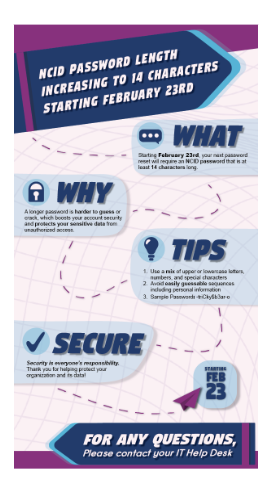
- Important NCID Update: New Password Requirements (Phase I & II)
- Tool Rights (Phase I & II)
- Phase II Data Conversion Information (Phase II)
- Targeted Assistance Schools (Phase I)
- NCBOLD - Save the Date! (Phase I & II)
- Partnering Progress (Phase I & II)
- Requesting Technical Support Points of Contact (Phase I & II)
- 2024-2025 Home Base Maintenance Periods (Phase I & II)
- Want to Stay in the Loop? (Phase I & II)
|
*indicates new or updated information
WHAT'S NEW!
 |
|
Start and End Dates Report (Required)*
Phase I & II
2025-2026 Instructional Start and End Dates (Required)
Please enter your school's instructional start and end dates for the 2025-26 school year into the SIS by April 1. All NC public schools, regardless of type, must provide a minimum of 185 days or 1,025 hours of instruction covering at least nine calendar months. This information is pulled from the SIS on April 2 to verify compliance with the law.
Most PSUs are required to comply with calendar start/end date requirements. Unless the PSU is in an exempt category (SASA, p.51) or has received an approved calendar waiver for the 2025-26 school year, the start date should be no earlier than August 25, 2025 and the end date should be no later than June 12, 2026. This information is pulled from the SIS on April 2 to verify compliance with the law.
For further questions, please contact studentaccounting@dpi.nc.gov.
School Attendance and Student Accounting Manual (SASA)
Calendar Law: LEAs | Charter Schools | Cooperative Innovative High Schools | Lab Schools | Regional School
|
GRS Report*
Phase I
The statewide Grade, Race, Sex (GRS) report will be run as part of PMR7. The report will be added to the Statistical Profile at that time.
|
|
 |

System Updates*
Phase I & II
Important Update: System Updates for Historical Disabled Course Codes and Graduation Programs
Dear Phase I & II PSUs,
NCDPI in conjunction with Infinite Campus is pleased to announce the following updates to Phase 1 production sites. These updates will also be included in Phase II implementation processes. Please click on the links for additional information.
|
Digital Leaders Exchange*
Phase I & II
April 7-10, 2025
The Office of Digital Teaching and Learning is excited to announce our next round of Digital Leaders Exchange. In April, We will have two paths with content highlighting Leadership & Vision from the Digital Learning Plan, and "exchanging" End of Year Processes.
-
Goal 1 – A shared vision for digital teaching and learning is established and communicated with all stakeholders.
-
Goal 2 – Effectively plan and implement action steps to carry out the shared vision.
One for SIS Coordinators for both Phase I and II; One for other participants such as human resource directors, tech directors, media directors, and more. We will meet from 9 AM - 4PM and lunch will be catered. Register for a date & location that best fits your schedule.
Event Schedule and Locations
The event will take place across four days, moving to accommodate regional travel:
April 7 | Martin Community College, 1161 Kehukee Park Rd., Williamston, NC 27892
April 8 | Johnston County Schools (AG Glenn Building), 211 East Rose St., Smithfield, NC 27577
April 9 | Iredell-Statesville Schools (Unity Center), 1145 Salisbury Rd., Statesville, NC 28677
April 10 | Buncombe County Schools, 175 Bingham Rd., Asheville, NC, 28806
Register Here: https://www.eventbrite.com/cc/digital-leaders-exchange-3571799?utm-campaign=social&utm-content=creatorshare&utm-medium=discovery&utm-term=odclsxcollection&utm-source=cp&aff=escb
Review our tentative agenda HERE.
|
Legislative Class Size (LCS) Report Update*
Phase I
We have an important update regarding the Legislative Class Size (LCS) Report that requires your attention.
Legislative Class Size (LCS) Report – Required Section Number Updates
The Legislative Class Size (LCS) Report will be moved into production soon. To ensure that pull-out sections are excluded from the report, LEAs must update the existing section numbers for pull-out sections following the guidelines outlined below. Updating the section number will only modify the section number itself and should not create any issues within the system.
Please follow the guidance below to complete this update.
NCSIS Knowledge Base article: Scheduling Resource Students
https://ncdepartmentofpublicinstruction.knowledgeowl.com/home/scheduling-resource-students
A pullout section is defined as a section for any student within the same course, at the same time, with the same teacher, who is pulled out of the regular classroom setting.
LEAs must update these sections within the next two weeks to avoid class size reporting issues. Infinite Campus has confirmed that updating pull-out section numbers will not delete grade or attendance data.
Applicable to ONLY those schools that schedule Pull-Out Sections.
Please note: Charter Schools are not required to submit the LCS report.
If you have any questions regarding this update, please don’t hesitate to reach out to your assigned SIS PL consultant.
|
Course Planning Update*
Phase I
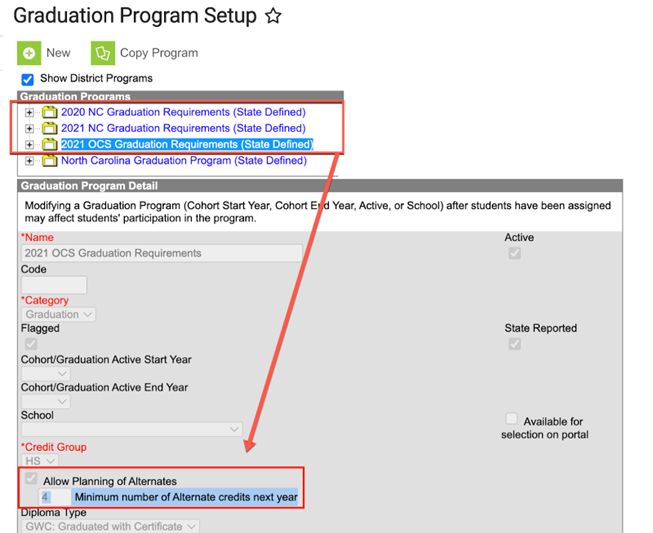
An issue was noted by PSUs and verified by NCDPI that when using the Course Planning feature, alternate courses could not be added to a student’s course plan. This issue has been corrected as of Monday, Mar. 3, 2025 in the state programs under “Graduation Program Setup”.
The "Allow Planning of Alternates" checkbox is now checked and the "Minimum number of Alternate credits next year" was set to 4 for all PSUs.
To view, navigate to Student Information > Program Administration > Graduation Program Setup > click on a Graduation Requirements plan and scroll down to the Details section.
Resources:
NCDPI Knowledgebase Article: Graduation Program Assignment
OCR/CRDC SY2324 Deadline Extension, System Latency Reminder, and Updated Status Report*
Phase I & II
Dear Coordinators,
Please inform other staff as appropriate.
Note: PSUs that were not open in the school year 2023-24 are not required to participate in this collection.
CRDC Deadline Extended to April 7, 2025
The Office for Civil Rights (OCR) has sent a nationwide notification to superintendents announcing an extension of the CRDC submission deadline to April 7, 2025. PSUs now have additional time to review, update, and certify their data.
System Latency Reminder
The Federal Submission Tool remains accessible nationwide, with peak usage between 11:00 AM – 4:00 PM EST. Users may experience system latency during these hours, particularly as the new deadline approaches.
- Expect uploads to process overnight.
- If the Pre-Certification or Certification buttons appear unavailable when your PSU is ready to certify, please check the system again later.
- For any system functionality issues, please contact PSC at CRDC@aemcorp.com.
February 28, 2025 State Progress Report (Attached)
The latest state progress report includes:
- Percentage of completion for each PSU
- Certification status (certified or pending)
- Current contact information listed in the Federal Submission Tool
Thank you for your continued efforts throughout this process. If you have any questions or need assistance, please reach out.
|

SIS EOY Timeline SY 24-25*
Phase I
There will be no downtime for Phase I PSUs transitioning from the current year to the future year in Infinite Campus (IC). However, NCDPI will transition all Phase I PSUs from the 24-25 school year to the 25-26 year in Infinite Campus on 6/30/2025. This should not be done before June 30th.
Phase II
Phase II PSUs must still do all pre-EOY processes in PowerSchool and have EOY validations cleared on or before June 26th, 2025. PowerSchool will be taken offline for EOY processing on June 26, 2025. PSUs will no longer have access to their PowerSchool instances after June 26, 2025.
Please select the link below for a detailed timeline from February 1 to July 15th:
Your support and collaboration are greatly appreciated as we prepare for this unique EOY. If you have any questions or need assistance during the process, please don’t hesitate to contact your Professional Learning Team Consultant.
|

Upcoming Training Information*
Phase I & II
Be sure to check the SIS PL Plan or Eventbrite for upcoming in-person and virtual regional meetings and trainings. Don’t miss out on valuable opportunities to connect, learn, and stay informed!
SIS PLP 2024-25 FINAL
Eventbrite-NCSIS
|

NCSIS Resources*
Phase I & II
Phase I participants have access to the Campus Community, where they can acquire product knowledge, glean tips and tricks, and engage in networking opportunities with other districts. The Campus Community offers convenient single sign-on access from the Campus system to a wealth of resources including the knowledge base, forum discussions, learning tools, support site, upcoming events, and more.
Campus Community- contains the information you need to learn how to use Infinite Campus through product documentation, videos & simulations, study guides, forums, and much more. Whether you are a teacher, data manager, or Infinite Campus user, you will find the learning resources in a clearly defined pathway for a seamless transition from PowerSchool.
Campus Passport- is on-demand, self-paced courses that can be assigned to new and existing staff. Accessed through the Campus Community, you will find Instructor-Led Training, specific E-Learning courses, or select a learning plan based on your district role.
KnowledgeOwl: KnowledgeOwl will include articles (QRDs) that are created and updated by the SIS Professional Learning team.
NCSIS Knowledge Base | NC Department of Public Instruction
GitHub Vendor Integrations Repository: 3rd party extract formats can be found below.
GitHub Vendor Integrations Repository
Ad Hoc Filter Sharing Community: Shared google folder for Ad Hoc filters PSUs have created.Ad Hoc Community
-
Naming Convention: Ad Hoc Name - PSU Name
- You’re welcome to include your email address within the document (optional).
-
Permissions: You have editing access—please proceed with caution!
-
PII: Do not upload any PII to the shared folder
NCSIS Crosswalk Document- will contain Infinite Campus and PowerSchool terms with their meanings to assist users with learning the new NCSIS terminology. This is a working document and will be updated regularly. NCSIS Crosswalk Document
IC Role Specific Resources- can be viewed by clicking on http://ncsis.gov, go to the Phase I PSU’s tab and scroll to the IC Role Specific Resources section. It Includes information for specific staff roles, as well as a guide for parents & students.
Webinar Recording Links and FAQs- can be found at http://ncsis.gov under the Professional Learning tab. Please check for recently added webinars.
|
REMINDERS:
 |
|
Resident District Selection Clarification
Phase I
PSUs should not select a charter school when completing the Resident District field. Only LEAs should be selected.
This information is located on the Enrollment screen under the State Reporting Fields section.
|

Newly Added - CPR Completion Reports
Phase I
We now have two CPR Completion Reports available: CPR Completion Report – Passed and CPR Completion Report – Not Passed. These reports include only active students within the school and display the following details:
-
Student Name (sorted by Grade Level, then alphabetically by last name)
- Student Number
- Grade Level
-
School Name (Enrolled School if run at the PSU level)
-
Testing School (pulled from the CPR assessment screen)
- Date Taken
The Not Passed report includes students who:
- Have not yet taken the CPR assessment
- Have a recorded CPR assessment score of "Fail" without a second recorded score of "Passed"
To run these reports, navigate to:Reporting > Data Validation > Data Validation Group > State Owned > Select the Report
|
Important NCID Update: New Password Requirements
Phase I & II
Please see the notice below regarding NCID (NCID Portal).
Starting February 23, any user changing their NCID password will be required to create a password at least 14 characters long. Existing passwords will continue to work until changed.
Be sure to update accordingly to meet the new requirements!
 |
|
Tool Rights
Phase I & II
Hot off the press! A new article is now available to help with assigning user calendars and tool rights in Infinite Campus! This resource provides helpful guidance to ensure users have the appropriate access while maintaining data security.
Check out the Tool Rights Catalog here – this resource is only accessible with this link!
|

Phase II Data Conversion Information
Phase II
Hot tip: Scheduling Setup should be completed for all students. The “Next Grade” and “Next School” fields determine the enrollment for the 25-26 year in your production site. Check weekly to verify that any new enrollments have these fields completed.
Infinite Campus will convert data for Phase II PSUs directly from PowerSchool. The data files on eMFTS are provided for your information and to allow for easier auditing of data, but any changes to these files will not change the data that is converted into Infinite Campus. The data that is converted comes straight from PowerSchool.
Use the Conversion Guide to help you audit and validate the data you have in PowerSchool using the data files. Make any changes necessary in PowerSchool.
Once your trial site is available, your implementation team will provide you with a Data Validation Workbook. It will have instructions about how to validate the data that has been converted. Any data issues found should be fixed in PowerSchool so that the production site contains the correct data.
Use the PowerSchool->Infinite Campus Data Validation Workbook to find ideas on how to easier find the data in PowerSchool to validate and where to change the data in PowerSchool to fix issues (if applicable).
Previous Phase II Data Conversion Webinar Information:
|

Targeted Assistance Schools
Phase I
Targeted Assistance Schools (TAS)
Title I funds are used to support programs for eligible students who are failing or at risk of failing to meet state academic standards.
The following are key dates and resources related to the TAS submission process for both IC (Infinite Campus) and PS (PowerSchool):
Dates to Know:
- March 3, 2025: IC and PS will go live for PSUs (Public School Units) to submit TAS data.
- June 23, 2025: TAS data submissions due from PSUs with TAS data.
- June 30, 2025: FY25 TAS data will be finalized.
Requirement:
Schools that are either SW-TAS or TAS-TAS are required to submit TAS data in PowerSchool or flag in Infinite Campus
- SW-TAS – The first “SW” indicates that the school is eligible to operate a schoolwide program (SW), the second “TAS” confirms that the school implemented a “TAS” program.
- TAS-TAS – The first “TAS” indicates that the school is eligible to operate a TAS program, the second “TAS” confirms the school implemented TAS program.
Link: List of SW-TAS and TAS-TAS schools (pulled from 2024-2025 ESSR Report)
PowerSchool:
Link: TAS – Student Served Data Collection Process for PowerSchool
Infinite Campus:
Video Link: TAS - Student Served Data Collection (Infinite Campus)-20250225 2037-2
Password: QgUcknT2
Infinite Campus core documentation on Flags Link: https://kb.infinitecampus.com/help/flags-student
Important Access Note: The tool rights assigned to staff are essential for managing access within the upper right corner of the Infinite Campus platform. If you are responsible for assigning the TAS flag in Infinite Campus and you experience difficulties accessing or managing the tool, or if you are unable to view all schools, please reach out to the designated individual within your PSU who oversees access rights (ex: SIS Coordinator or School Data Manager).
If you have any questions, please contact your Consolidated Program Administrator.
|
NCBOLD - Save the Date!
Phase I & II
NCBOLD 2025
Save the Date! July 15th - 17th & July 29th - 31st
Are you passionate about sharing your NCSIS knowledge? We’re looking for PSU SIS staff to serve as NCBOLD Ambassadors to help train data managers, teachers, and administrators. If you're interested, click the link below to apply!
NCBOLD Application
|
Partnering Progress
Phase I & II
To support the successful implementation of the NCSIS, we have developed a detailed professional development plan for both Phase I and Phase II participants. This plan will provide you with the knowledge, skills, and resources needed to implement NCSIS effectively. Registration links are available for most events now, while others will be added in the coming months.
The linked document outlines the full professional development plan for Phase I and II, including:
-
Training Workshops: Covering NCSIS fundamentals and implementation
-
Ongoing Support: Regular check-ins with NCSIS consultants, access to online resources, and participation in PLCs.
Continuous Improvement: Regular assessment and feedback cycles to refine and enhance implementation practices.
|
Requesting Technical Support Points of Contact
Phase I & II
Please review the information below on how to submit support tickets:
Contact Infinite Campus for assistance with:
NCSIS Application/Support Issues
Submit a case: https://support.infinitecampus.com
Contact DPI for assistance with:
- NCDPI Business Questions
- Duplicate Students
- Amplify/Missing Students
- PMR Deletes in Infinite Campus
Submit a request: https://go.ncdpi.gov/help
For additional technical support contacts, please refer to the document below:Requesting Help
|
|
 |
 |
|
2024-2025 Home Base Maintenance Periods
Phase I & II
Each year, a list of scheduled maintenance windows is published by NCDPI. This is published in advance to help teachers and administrators better prepare for temporary outages and loss of access. Please review the 2024-2025 maintenance schedule and put these dates on your calendar. In most cases, the entire window is not necessary and we can return systems to service earlier than listed. If emergency maintenance is required in addition to these scheduled dates, all users will be notified in advance.
|
|
|