Topics in this issue:
- Home Base Maintenance Window - February 2025*
- SIS EOY Timeline SY 24-25
- NCED Connect Slide Presentations
- Reminder: Use of OCS/ECS Course Code Titles & Numbers
- New PowerSchool Contacts sqlReports
- OCR/CRDC – SY2324: Update – HIBS-2 Set to Zero, Missing Schools Requested, Certification Now Open*
- 2025-2026 Course Codes in PowerSchool
- PowerSchool State Reporting
- PowerSchool Student Transfers
- Requesting Technical Help Points of Contact
- 2024-2025 Home Base Maintenance Periods
*indicates new article this week
 |
|
Home Base Maintenance Window - February 2025*
PowerSchool - will be unavailable starting on Friday, February 21st, at 6 p.m., with an anticipated return to service no later than Saturday, February 22nd, at 10 a.m. The application will be accessible to all users once the maintenance is complete.
NCEdCloud - Maintenance will occur Friday, February 21st, from 6-8 p.m.
|

SIS EOY Timeline SY 24-25
NCDPI wants to ensure that Phase I and Phase II PSUs understand the timeline for completing the End of Year (EOY) process.
Phase I
There will be no downtime for Phase I PSUs transitioning from the current year to the future year in Infinite Campus (IC). However, NCDPI will transition all Phase I PSUs from the 24-25 school year to the 25-26 year in Infinite Campus on 6/30/2025. This should not be done before June 30th.
Phase II
Phase II PSUs transitioning from PowerSchool (PS) to Infinite Campus will go from IC trial sites to production sites and discontinue using PowerSchool on June 26th.
Phase II PSUs must still do all pre-EOY processes and have EOY validations cleared on or before June 26th, 2025. PowerSchool will be taken offline for EOY processing on June 26, 2025. PSUs will no longer have access to their PowerSchool instances after June 26, 2025.
Please select the link below for a detailed timeline from February 1 to July 15th:
Your support and collaboration are greatly appreciated as we prepare for this unique EOY. If you have any questions or need assistance during the process, please don’t hesitate to contact your Professional Learning Team Consultant.
|
NCED Connect Slide Presentations
If you missed the NCED Connect Symposium or just want a handy reference, you can access all the slide presentations HERE. Stay connected and keep learning!
|
|
 |
Reminder: Use of OCS/ECS Course Code Titles & Numbers
As a reminder, please do not include these abbreviations and/or words within course titles or course numbers:
- EC (Exceptional Children)
- ECS (Extended Content Standards)
- OCS (Occupational Course of Study)
The use of identifiers that may disclose a student's disability may unintentionally contribute to disability discrimination or a breach of confidentiality. Therefore, the use of these abbreviations is prohibited to comply with Section 504 of the Rehabilitation Act of 1973, Title II of the Americans with Disabilities Act of 1990, the Individuals with Disabilities Education Act (IDEA), and the Family Educational Rights and Privacy Act (FERPA).
Master Course Code lists can be found here:
If you have questions:
- Concerning creating course titles and course numbers in the SIS, please contact
- (NCSIS-IC) NCSIS PL Regional Consultant
- (PS SIS) - Open a PS Case - Instructions here: Requesting Help
- EC - Extended Content Standards: Email Matthew Martinez
- EC - Occupational Course of Study: Email Beverly Colwell
|
New PowerSchool Contacts sqlReports
Three sqlReports are being added to the Data Audits folder in your PowerSchool instance to assist with the cleaning up of contact addresses which will be used to create Households in Infinite Campus. Each report focuses on a different set of students.
Path: Start Page > Reports > sqlReports > Data Audits
The name of the reports are:
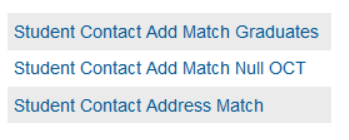 Student Contact Add Match Graduates
This report provides the user with the GRADUATED student and the contacts associated with them. A comparison is made between the student and contact Physical Address and then lists it as a MISMATCH if it is not identical and MATCH if it is.
- Student has a "W4" or "W6" exitcode
- Contact has an originalcontacttype of "mother" or "father" or the originalcontacttype is Null
- Physical address of the student is an exact match to the physical address of the associated contact or a mismatch
Student Contact Add Match Null OCT
This report provides the user with the student and the contacts associated with them. A comparison is made between the student and contact Physical Address and then lists it as a MISMATCH if it is not identical and MATCH if it is. This report only pulls contacts who have no Original Contact Type for their contacts.
- Contact originalcontacttype is Null
- The enroll_status = 0
- Physical address of the student is an exact match to the physical address of the associated contact or a mismatch
Student Contact Address Match
This report provides the user with the student and the contacts associated to them. A comparison is made between the student and contact Physical Address and then lists it as a MISMATCH if it is not identical and MATCH if it is. It only provides Contacts that have an original contact type of mother or father (Parent/Guardian Field 1 or Parent/Guardian Field 2).
- Contact has an originalcontacttype of "mother" or "father"
- The enroll_status = 0
- Physical address of the student is an exact match to the physical address of the associated contact or a mismatch
OCR/CRDC – SY2324: Update – HIBS-2 Set to Zero, Missing Schools Requested, Certification Now Open*
Dear Coordinators,
Please inform other staff as appropriate.
Note: PSUs that were not open in the school year 2023-24 are not required to participate in this collection.
The following updates have been made to the North Carolina CRDC collection:
-
HIBS-2 (Allegations of Harassment or Bullying by Religion Type) has been set to zero at the state level for all entities. No further action is needed on this item.
-
NCDPI has submitted a request to CRDC PSC for the addition of missing schools to the CRDC Universe. The affected CRDC coordinators were copied on the PSC request.
Certification Now Open
PSUs may now begin certifying their CRDC collection. Please review your data, ensure all required local updates have been made, and proceed with certification.
The collection closes on March 7, 2025. Please ensure certification is completed before this deadline.
Attached is the most recent state progress report, which includes:
-
Percentage complete for each PSU
-
Certification status (whether or not the PSU has certified)
-
Current contact information listed in the Federal Submission Tool
Remaining CRDC Error Review Webinar – DPI will be hosting one more real-time error review session where PSUs can receive assistance and share insights. Use the link to join:
Join the meeting now
Meeting ID: 275 486 542 860
Passcode: TFomt7
Thank you for your hard work throughout this process!
If you have any questions or need assistance, please reach out.

PowerSchool State Reporting
Navigate to Reports > State Reports (run and approve at school level and final approval at PSU level)
- Principal Monthly Report - Due each month
|
Requesting Technical Support Points of Contact
Please refer to the document below for who to contact for technical support.
Requesting Help
|
|
 |
 |
|
2024-2025 Home Base Maintenance Periods
Each year, a list of scheduled maintenance windows is published by NCDPI. This is published in advance to help teachers and administrators better prepare for temporary outages and loss of access. Please review the 2024-2025 maintenance schedule and put these dates on your calendar. In most cases, the entire window is not necessary and we can return systems to service earlier than listed. If emergency maintenance is required in addition to these scheduled dates, all users will be notified in advance.
|
 |
Home Base Admin Course
Feedback from PSUs identified a need for resource hubs for the Home Base products. The product managers have created Admin Resource Courses for each area. These resource courses are located in the NCDPI Canvas instance.
Please visit these courses. Below are the steps to enroll:
How to access these resources:
- Sign in to the Blue Canvas icon within NCEdCloud
- Using the Global Navigation (on the left), click the Home Base Resources button
- On the menu that opens, select the course(s) you would like to enroll into
- After enrolling, the course will appear on your Canvas Dashboard
|
|
 |
 |
|
Access for PSU PowerSchool SIS Admins
Any PSU PowerSchool SIS admin who does not have access to the NCDPI “Blue” Canvas located in the NCEdCloud portal and would like to have access follow these steps:
- Log into my.ncedcloud.org
- Find the Blue Canvas icon and click to launch it.
- Agree to the Canvas use policy question and Blue Canvas will open.
If you have any questions, please contact Rebecca Stokes.
Other Information:
- Feel free to provide feedback on these courses. They all contain a feedback button on their homepage.
- We will continue to update these courses as more product information becomes available
|
NCDPI Technology Support Center
NCDPI's Technology Support Center continues to meet your support needs for:
- Schoolnet
- NCEES/Unified Talent
- Staff & Student UID (eScholar)
Support availability:
Web (NEW URL): https://ncgov.servicenowservices.com/sp_dpi - 24/7
Phone: 919-716-1840, Monday - Friday, 7 a.m. to 4 p.m. (excluding state holidays)
Submitting a ServiceNow Ticket How to Document
Technical support for SIS needs is handled directly by PowerSchool Support using chat, phone, or by opening a case ticket.
 |
|
Follow Us on Social Media!
Follow us on Facebook, Twitter and Instagram, and begin receiving "Did You Know" tips featuring each Home Base product.
These messages will include upcoming changes, tips, and even hidden treasures within each product to make your job easier. If you are not following us on Facebook, Instagram and Twitter, click on the links below and begin today! Make sure you share this information with other staff within your school.
Instagram: @ncdpidtl Facebook: @ndpidtl X: @ncdpidtl
|
|