What's New!
- Season's Greetings from the SIS PL Team*
- Happy Holidays*
- CPR Test Update* (Phase I)
- Access Test* (Phase I)
- Ad Hoc Google Shared Folder (Phase I)
- Phase II Data Conversion Information* (Phase II)
- Student Locator Tool* (Phase I & II)
- KnowledgeOwl* (Phase I & II)
- Upcoming Training Information* (Phase II)
- NCED Connect 2025 Symposium* (Phase I & II)
Reminders:
- Adding Transcript Grades Update (Phase I)
- State Report Update (Phase I & II)
- Infinite Campus Resources (Phase I & II)
- NCSIS Resources (Phase I & II)
- Partnering Progress (Phase I & II)
- Requesting Technical Support Points of Contact (Phase I & II)
- 2024-2025 Home Base Maintenance Periods (Phase I & II)
- Want to Stay in the Loop? (Phase I & II)
|
*indicates new or updated information
WHAT'S NEW!
 Season's Greeting's from the SIS PL Team*
Phase I & II
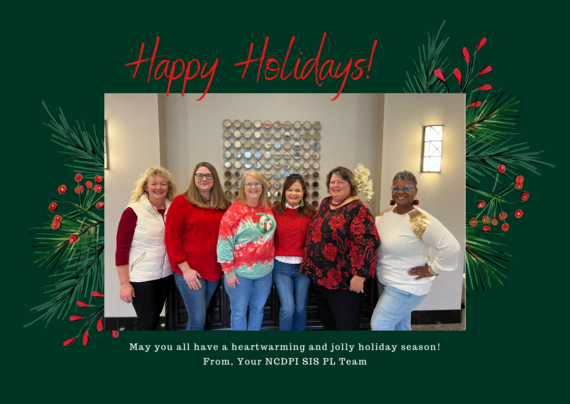
Wishing you a holiday season filled with joy, laughter, and time well spent with loved ones. As we reflect on the year, we are grateful for your hard work and partnership, which have made a meaningful difference.
Take this time to relax, recharge, and enjoy the moments that matter most. We look forward to a bright and successful year ahead with you!
Happy Holidays and best wishes for the New Year!
Warmly,Your SIS PL Team
 Phase I & II
The NCSIS bulletin will be suspended for the next two weeks. The next issue will be delivered on January 9th. We extend our best wishes for a happy and restful holiday season.
CPR Test Update*
Phase I
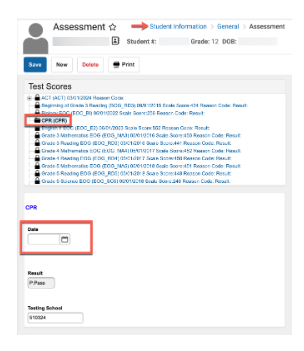
The Date Field has been added to the CPR Assessment. You can find it by following this pathway:Student Information > General > Assessment
For detailed guidance, please refer to the CPR instructions linked below:
https://ncdepartmentofpublicinstruction.knowledgeowl.com/home/cpr
Access Test*
Phase I
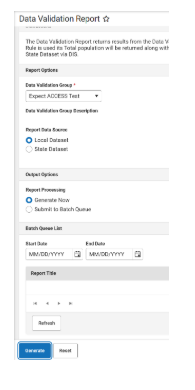
The ACCESS Testing window for the state opens mid-January. As part of this required State Test, there is now a data validation report to mirror the Expect ACCESS report in PowerSchool, called “Expect ACCESS Test”. This report helps PSUs track students who should be ACCESS-tested.
District accountability staff and School Test Coordinators are asked to use this report, which means they will need tool rights to Reporting - Data Validation in Infinite Campus if they do not already have access.
Ad Hoc Google Shared Folder*
Phase I
Sharing is caring! We’ve received requests from PSUs to share ad hoc filters created by other PSUs for reporting purposes.
Please use the link below to share the ad hoc filters you’re using. When uploading, ensure that no personally identifiable information (PII) is included.
Ad Hoc Community
Guidelines:
-
Naming Convention: Ad Hoc Name - PSU Name
- You’re welcome to include your email address within the document (optional).
-
Permissions: You have editing access—please proceed with caution!
Thank you for your collaboration and for contributing to this community resource!
|
|
 |

Phase II Data Conversion Information*
Phase II
Infinite Campus will convert data for Phase II PSUs directly from PowerSchool. The data files on eMFTS are provided for your information and to allow for easier auditing of data, but any changes to these files will not change the data that is converted into Infinite Campus. The data that is converted comes straight from PowerSchool.
Use the Conversion Guide to help you audit and validate the data you have in PowerSchool using the data files. Make any changes necessary in PowerSchool.
Currently, 30 out of 37 files are ready to be audited and validated. Any updates will be listed on the Additions/Corrections page in the Conversion Guide.
Once your trial site is available, your implementation team will provide you with a Data Validation Workbook. It will have instructions about how to validate the data that has been converted. Any data issues found should be fixed in PowerSchool so that the production site contains the correct data.
Check below in the Upcoming Training section for available office hours after the holidays.
Phase II Data Conversion Webinar Information:
|

Student Locator Tool
Phase I & II
SIS Coordinators,
We are excited to announce the release of the new DPI Student Locator tool!
This tool allows you to view each PSU a student has been enrolled in, including their current school of attendance. It is particularly useful for:
- Validating data, such as addressing discrepancies in the dropout report and reviewing a student’s enrollment history.
- Infinite Campus PSUs: Verifying that enrollment information in State Edition is accurate (note: only the most recent enrollment for each PSU is displayed).
- Identifying students who are enrolled in multiple PSUs simultaneously.
In addition, we will soon introduce reports and tools to assist with UID cleanup.
Access Instructions
Detailed instructions for registering and using the system are available in the NCSIS Knowledge Base: https://ncdepartmentofpublicinstruction.knowledgeowl.com/home/state-student-locator.
Important Reminder Please be mindful that any user granted access to this tool will be able to view information for any student statewide. Plan accordingly when distributing access permissions. NCDPI will review access requests by referencing the EDDIE system or the Home Base contact list to identify staff members designated as SIS leads. For individuals not listed, we will reach out to coordinators to verify their requests.
Understanding the Student Locator Tool
The Student Locator Tool is a powerful resource designed to provide PSUs with additional insights into student data, complementing the Student UID System, the Staff UID System, and the CEDARS Data Warehouse. However, it’s important to note that the Student Locator Tool does not replace these systems.
Here’s what makes the Student Locator Tool unique:
-
Cross-Instance Enrollment Visibility: The Locator Tool can identify if a student is enrolled in more than one PowerSchool instance, more than one Infinite Campus instance, or across both.
-
Accurate School Identification for Infinite Campus: For students enrolled in Infinite Campus, the Student UID System may reflect a generic "AAA" school code rather than the correct school code within the PSU. The Locator Tool can often provide the correct school information.
Limitations to Keep in Mind:
- The Locator Tool only displays student records enrolled in either PowerSchool or Infinite Campus.
- It will not show students with assigned UIDs who are not yet enrolled in a SIS.
- It also does not identify students with more than one UID in the UID system.
While the Student Locator Tool is a valuable complement to the Student UID System, it does not serve as a complete replacement.
For more information or assistance, feel free to reach out to your SIS PL consultant.
|
KnowledgeOwl*
Phase I & II
We are pleased to introduce our knowledge management system, which will house NCDPI documentation. KnowledgeOwl will include articles (QRDs) that are created and updated by the SIS Professional Learning team. Please use the link below to access the recently added or updated articles. We encourage you to check back regularly for additional resources.
NCSIS Knowledge Base | NC Department of Public Instruction
Revised articles-
Adding Transcript Grades- Updated
Create New School Enrollment (R1/W1 Procedure)- Updated
Newly published articles-
Graduation Checklist
CPR
Student Locator Tool
eMFTS Access

Upcoming Training Information*
Phase II
Phase II Data Conversion Office Hours:
Please click on the link to join at the appropriate time. No registration necessary! Breakout rooms can be used if you have questions that involve PII.
Mastering Campus Virtual Sessions:
|
NCED Connect 2025 Symposium*
January 21st-23rd – Greensboro, NC
Phase I & II
This event is designed for District Leadership, CTOs, Teachers, Coaches, Accountability Teams, SIS Coordinators, Data Managers, Ed Tech/Media Specialists, and E-Rate On-Site Support staff.
To learn more about the NCED Connect Symposium click HERE for a catalog of sessions and participant tracks being offered.
Click here to register for NCED Connect Symposium 2025!
📢 Don’t miss out! There's still time to register! 🌟
- Late/On-Site Registration - $350/pp | Dec. 19 - Jan. 23
📅 Exciting updates ahead—the conference schedule will be released soon! Stay tuned for details on sessions, speakers, and more.
****Please Note****
You will be invoiced separately through NCDPI online payment system once you register. Invoices will be sent on Mondays, Wednesdays, & Fridays.
Looking forward to a great event together!
|
REMINDERS:
Adding Transcript Grades Update
Phase I
Until the Transfer Record Box currently in development is released, please follow the steps below to ensure accurate and complete record-keeping for transfer students. The new Transfer Student Record Box will simplify the process for managing transfer records, but in the meantime, the following steps are required:
Historical Transfer Records:
- Historical Transfer Records (TR) from PowerSchool have been automatically loaded into Infinite Campus. No further action is required for these records.
Manually Enter Out-of-State Transfer Records:
- For students transferring from out of state, you must manually enter previous transcript records into Infinite Campus and mark them as transfer records. This includes all out-of-state transfers that have been enrolled in Infinite Campus so far this school year. Detailed steps for this process are provided in the Transcripts | Infinite Campus article, along with the NCSIS Knowledge Base article linked below.
Additional Information
As of December 2024, check this box for each transfer grade entered.
|
|
 |
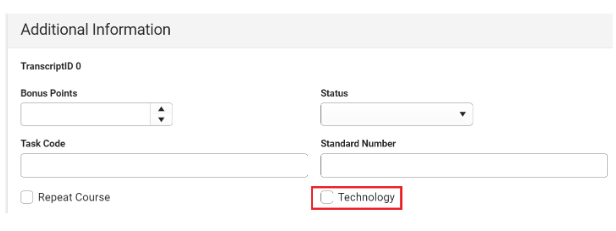 Please refer to the updated NCSIS Knowledge Base article below:
Adding Transcript Grades- Updated
https://ncdepartmentofpublicinstruction.knowledgeowl.com/home/adding-transcript-grades
State Report Update
Phase I & II
The Fall Legislative Class Size (LCS) report has been delayed. All deadlines for affidavits and waiver requests are postponed until further notice. We will update you when the reports are up and running.
Please update your superintendents and SIS data managers accordingly.
Please contact Student Accounting studentaccounting@dpi.nc.gov with any questions regarding this delay or submission of the report or waivers.
|
|
 |
Infinite Campus Resources
Phase I & II
Please see the links below for resources on how to effectively “qualify an Infinite Campus support case” to improve response and resolution times. This approach also helps minimize back-and-forth communication, keeping inboxes clearer (which everyone appreciates!).
|
|
 |

NCSIS Resources
Phase I & II
Phase I participants have access to the Campus Community, where they can acquire product knowledge, glean tips and tricks, and engage in networking opportunities with other districts. The Campus Community offers convenient single sign-on access from the Campus system to a wealth of resources including the knowledge base, forum discussions, learning tools, support site, upcoming events, and more.
Campus Community- contains the information you need to learn how to use Infinite Campus through product documentation, videos & simulations, study guides, forums, and much more. Whether you are a teacher, data manager, or Infinite Campus user, you will find the learning resources in a clearly defined pathway for a seamless transition from PowerSchool.
Campus Passport- is on-demand, self-paced courses that can be assigned to new and existing staff. Accessed through the Campus Community, you will find Instructor-Led Training, specific E-Learning courses, or select a learning plan based on your district role.
KnowledgeOwl: KnowledgeOwl will include articles (QRDs) that are created and updated by the SIS Professional Learning team.
NCSIS Knowledge Base | NC Department of Public Instruction
GitHub Vendor Integrations Repository: 3rd party extract formats can be found below.
GitHub Vendor Integrations Repository
NCSIS Crosswalk Document- will contain Infinite Campus and PowerSchool terms with their meanings to assist users with learning the new NCSIS terminology. This is a working document and will be updated regularly. NCSIS Crosswalk Document
IC Role Specific Resources- can be viewed by clicking on http://ncsis.gov, go to the Phase I PSU’s tab and scroll to the IC Role Specific Resources section. It Includes information for specific staff roles, as well as a guide for parents & students.
Webinar Recording Links and FAQs- can be found at http://ncsis.gov under the Professional Learning tab. Please check for recently added webinars.
|
Partnering Progress
Phase I & II
To support the successful implementation of the NCSIS, we have developed a detailed professional development plan for both Phase I and Phase II participants. This plan will provide you with the knowledge, skills, and resources needed to implement NCSIS effectively. Registration links are available for most events now, while others will be added in the coming months.
The linked document outlines the full professional development plan for Phase I and II, including:
-
Training Workshops: Covering NCSIS fundamentals and implementation
-
Ongoing Support: Regular check-ins with NCSIS consultants, access to online resources, and participation in PLCs.
-
Continuous Improvement: Regular assessment and feedback cycles to refine and enhance implementation practices.
 |
|
Requesting Technical Support Points of Contact
Phase I & II
Please refer to the document below for who to contact for technical support.
|
2024-2025 Home Base Maintenance Periods
Phase I & II
Each year, a list of scheduled maintenance windows is published by NCDPI. This is published in advance to help teachers and administrators better prepare for temporary outages and loss of access. Please review the 2024-2025 maintenance schedule and put these dates on your calendar. In most cases, the entire window is not necessary and we can return systems to service earlier than listed. If emergency maintenance is required in addition to these scheduled dates, all users will be notified in advance.
|
|
|
 |
|