Topics in this issue:
- Happy Holidays!*
- Home Base Maintenance Window - December 2024*
- New PowerSchool Contacts sqlReports*
- OCR/CRDC - SY2324 - NCDPI Upload Extended*
- Legislative Class Size Report Update (PowerSchool & Infinite Campus)
- 2025-2026 Course Codes in PowerSchool
- Class Rank Update
- PowerSchool State Reporting
- Final GDV Report Update
- PowerSchool Student Transfers
- Data Conversion and Address Validation
- NCED Connect 2025 Symposium*
- Requesting Technical Help Points of Contact
- 2024-2025 Home Base Maintenance Periods
*indicates new article this week
 The SIS Weekly bulletin will be suspended for the next two weeks. The next issue will be delivered on January 8th. We extend our best wishes for a happy and restful holiday season.
Home Base Maintenance Window - December 2024*
PowerSchool - PowerSchool will be unavailable from 6 PM Friday, December 20th to 6 AM Saturday, December 21st to perform OS Patching.
|
|
 |
New PowerSchool Contacts sqlReports*
Three sqlReports are being added to the Data Audits folder in your PowerSchool instance to assist with the cleaning up of contact addresses which will be used to create Households in Infinite Campus. Each report focuses on a different set of students.
Path: Start Page > Reports > sqlReports > Data Audits
The name of the reports are:
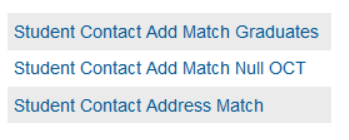 Student Contact Add Match Graduates
This report provides the user with the GRADUATED student and the contacts associated with them. A comparison is made between the student and contact Physical Address and then lists it as a MISMATCH if it is not identical and MATCH if it is.
- Student has a "W4" or "W6" exitcode
- Contact has an originalcontacttype of "mother" or "father" or the originalcontacttype is Null
- Physical address of the student is an exact match to the physical address of the associated contact or a mismatch
Student Contact Add Match Null OCT
This report provides the user with the student and the contacts associated with them. A comparison is made between the student and contact Physical Address and then lists it as a MISMATCH if it is not identical and MATCH if it is. This report only pulls contacts who have no Original Contact Type for their contacts.
- Contact originalcontacttype is Null
- The enroll_status = 0
- Physical address of the student is an exact match to the physical address of the associated contact or a mismatch
Student Contact Address Match
This report provides the user with the student and the contacts associated to them. A comparison is made between the student and contact Physical Address and then lists it as a MISMATCH if it is not identical and MATCH if it is. It only provides Contacts that have an original contact type of mother or father (Parent/Guardian Field 1 or Parent/Guardian Field 2).
- Contact has an originalcontacttype of "mother" or "father"
- The enroll_status = 0
- Physical address of the student is an exact match to the physical address of the associated contact or a mismatch
OCR/CRDC - SY2324 - NCDPI Upload Extended*
Dear Coordinators,
Please inform other staff as appropriate.
Note: PSUs that were not open in the school year 2023-24 are not required to participate in this collection.
SY2023-24 CRDC Federal Submission Window
The Federal Submission Tool is opened December 9, 2024. Due to system issues, the NCDPI upload period has been extended. The process should be complete by December 20, 2024. Please refrain from making any updates to the data until NCDPI confirms that the pre-population process is complete.
Access to the Federal Submission System
If no staff member from your PSU receives an account email from PSC, please reach out to PSC. PSC will work with your PSU to ensure a staff member has access to the tool and can provision accounts to others as needed.
CRDC Webinar – Submission System
NCDPI supports North Carolina’s Public School Units (PSUs) by performing pre-collection activities and pre-populating the CRDC Federal Submission Tool with state-level data. Join the SEA CRDC Coordinator for a 1.5-hour discussion and demonstration of the Federal Submission Tool. Attendees will learn how to navigate the system, receive recommendations for reviewing errors, and explore the top three reports that can help ensure timely completion of the CRDC.
This 1.5-hour session has been scheduled twice and a recording will be provided in the NC CRDC SY 23-24 Canvas Course. Use the links below to register for the webinar.
NC CRDC SY 23-24 Canvas Course – Updates
The Civil Rights Resource Center, the federal hub for technical documentation for the CRDC, has been updated. The Canvas course has been revised to align with the new look and feel of the Resource Center.
As a reminder, NC-specific documentation—such as the CRDC Collection By Entity Excel document—is available in the course. This document is critical for understanding the data NCDPI will pre-populate when the submission window opens. The course also includes presentations, webinar recordings, and guidance on resolving errors within the Federal Submission Tool.
Any public school employee involved in or interested in the CRDC is welcome to enroll. Click here to enroll.
CRDC Support
Please email nc.ocr.crdc@dpi.nc.gov with any questions you may have.
 |
|
Legislative Class Size Report Update (PowerSchool & Infinite Campus)
The Fall Legislative Class Size (LCS) report has been delayed. All deadlines for affidavits and waiver requests are postponed until further notice. We will update you when the reports are up and running.
Please update your superintendents and SIS data managers accordingly.
Please contact Student Accounting studentaccounting@dpi.nc.gov with any questions regarding this delay or submission of the report or waivers.
|
 |
|
Class Rank Update
The class rank feature in PowerSchool will be updated to run automatically each time Final (F1) grades are entered. This improvement ensures that all Public School Units (PSUs) have accurate class ranks reflected on transcripts and in state reports generated throughout the year. This update is scheduled for implementation on the evening of Thursday, November 21, 2024.
|

PowerSchool State Reporting
Navigate to Reports > State Reports (run and approve at school level and final approval at PSU level)
- School Allotment Child Count Transfer - Not being run in PS this year
- Principal Monthly Report - Due each month
- Retention/Promotion - Due 10/27/2024 Extended to 12/6/2024
- Drop Out Data Collection - Due 11/04/2024 Extended to 12/6/2024
- Advanced Mathematics Course Enrollment (AMC) - Due 11/1/2024
- Fall AIG Headcount - Due 11/30/2024
- Fall Legislative Class Size - Due 11/30/2024 - Finance file pending
- LEAs only, Charter Schools are exempt
|
 |
|
Final GDV Report Update
The Final GDV report Submission End date on the 24-25 state reporting dashboard has been updated to June 26, 2025. This will allow PSUs to continue correcting 23-24 graduate data throughout the 24-25 school year without having to request an unlock. This is to align the system functionality of the two student information systems and ensure reporting is consistent across the state. Please continue to submit updates to the Graduation Cohort Rate to the Office of Accountability via the normal means.
|
PowerSchool Student Transfers
Student Transfers in PowerSchool from Phase I Schools to Phase II Schools
Since PowerSchool returned to service post-EOY, NCDPI has been working with PowerSchool to run scripts in all Phase I PowerSchool instances to close them out. These scripts included transferring all students' records out as no-show records with an exit comment of “Infinite Campus.” This will allow Phase II PSUs still using PowerSchool SIS to transfer in the students' records.
We are pleased to announce that as of July 12, 2024, all students have been successfully transferred out of Phase I PSU PowerSchool Instances, and their records are now ready for transfer into Phase II PSUs.
It is important to note that student records in the inactive Phase I PowerSchool instances will remain available for transfer to active Phase II PowerSchool instances throughout the year. If a student transfers to your PowerSchool PSU from a Phase I Infinite Campus PSU, it is your responsibility to not only pull in the student's historical records from PowerSchool, but also update the most recent Re-Enrollment (the no-show record transferred in) from the prior PSU to reflect the correct entry and exit dates (This will server as the E1 record). You may need to contact the student's prior Phase I PSU to ask for this information.
For students who move between Phase I and Phase II schools multiple times during the year, only the enrollment record created at EOY (no-show record w/Infinite campus exit comment) will be maintained. Students transitioning from a Phase I PSU must be treated as out-of-state transfers for future enrollment, which means that their data must be entered manually, except for the missing enrollment record. Enrollment and exit codes should follow the standard processes outlined in the SASA manual. Each student should have only one E1 record from a PSU within the school year, regardless of the system in which they received the E1 code. We know there will be enrollment record gaps throughout the year as PSUs cannot recreate enrollment records for a Phase I PSU when transferring records. This is okay; we are working on resolving this when Phase II PSUs move to Infinite Campus.
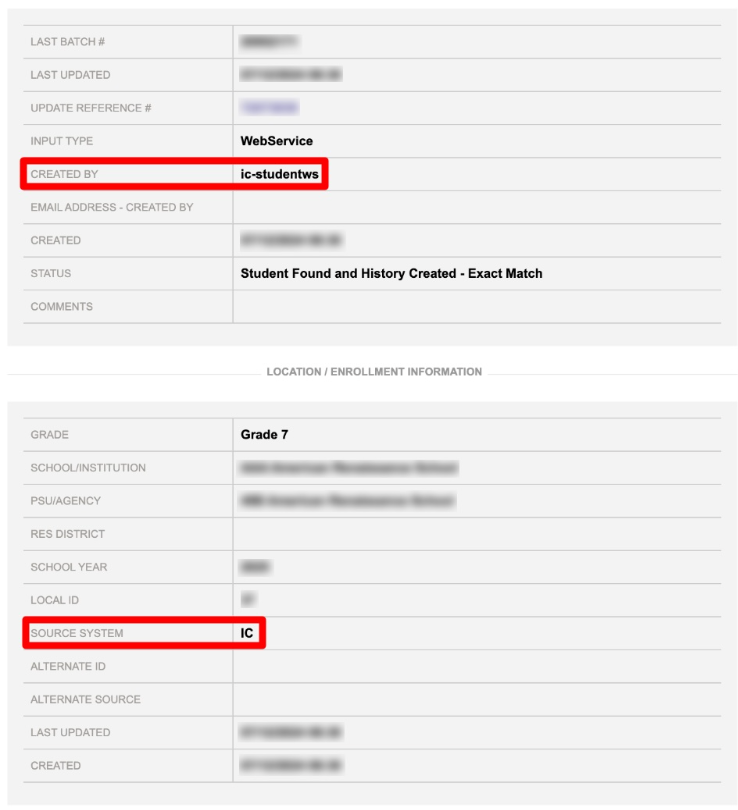
The Student UID System can be checked to determine whether a student record has been moved between Phase I and II PSUs. When a student is enrolled in Infinite Campus for the first time, the UID System will be updated to reflect a “Source System” of “IC,” and the user creating the update is “ic-studentws” as shown in the screenshot below.
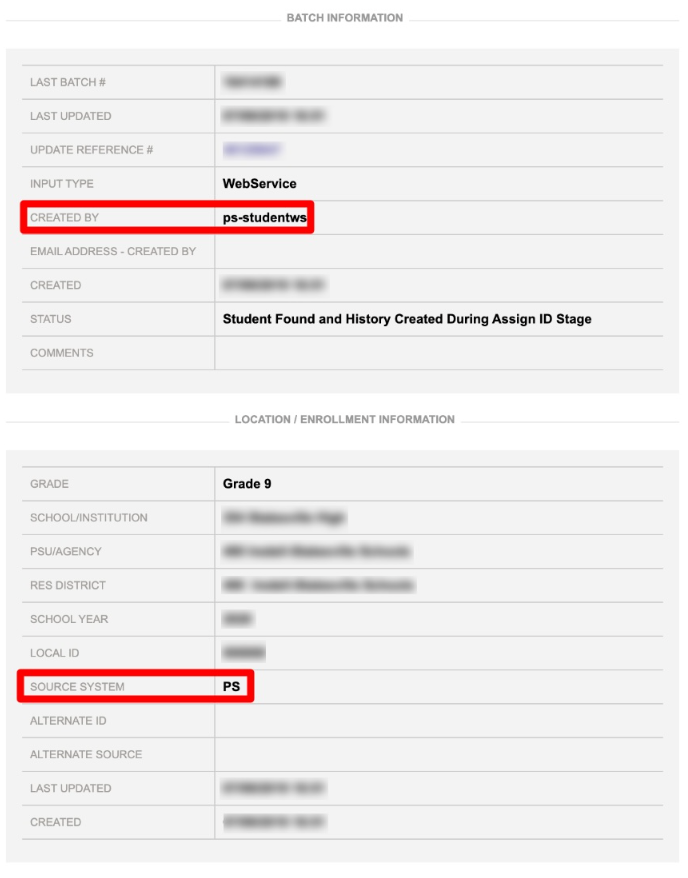
 When a student is enrolled in PowerSchool, the UID System will be updated to reflect a “Source System” of “PS,” and the user creating the update is “ps-studentws” as shown in the screenshot below.
 We would like to extend our heartfelt thanks to all of our PSUs for your unwavering commitment and hard work. Your dedication is instrumental in the success of these processes, and we are truly grateful for your efforts.
Please submit a case to PowerSchool support if you have any issues with transfer student records in PowerSchool.
Data Conversion and Address Validation
Address verification and validation are critical for the data conversion in Infinite Campus. As PSUs work to clean up addresses, they should collaborate with the transportation department to ensure the address changes won’t disrupt the current bus route information.
When updated student information is loaded into the school bus routing system, any change in street address will remove a student from their bus route pending reassignment. Please coordinate closely with the transportation department to minimize disruption and use valid County GIS map addresses. Google Maps, OpenStreetMap, and other consumer mapping applications are more likely to provide invalid addresses in most PSUs.
NCED Connect 2025 Symposium*
January 21st - 23rd – Greensboro, NC
📢 Don’t miss out! There's still time to register! 🌟
This event is designed for District Leadership, CTOs, Teachers, Coaches, Accountability Teams, SIS Coordinators, Data Managers, Ed Tech/Media Specialists, and E-Rate On-Site Support staff.
NEW! To learn more about the NCED Connect Symposium click HERE for a catalog of sessions and participant tracks being offered.
📅 Exciting updates ahead—the conference schedule will be released soon! Stay tuned for details on sessions, speakers, and more.
Click here to register for NCED Connect Symposium 2025!
- Regular Registration - $300/pp | Nov. 23 - Dec. 18
- Late/On-Site Registration - $350/pp | Dec. 19 - Jan. 23
****Please Note****
You will be invoiced separately through NCDPI online payment system once you register. Invoices will be sent on Mondays, Wednesdays, & Fridays.
Looking forward to a great event together!
|
Requesting Technical Support Points of Contact
Please refer to the document below for who to contact for technical support.
Requesting Help
|
|
 |
 |
|
2024-2025 Home Base Maintenance Periods
Each year, a list of scheduled maintenance windows is published by NCDPI. This is published in advance to help teachers and administrators better prepare for temporary outages and loss of access. Please review the 2024-2025 maintenance schedule and put these dates on your calendar. In most cases, the entire window is not necessary and we can return systems to service earlier than listed. If emergency maintenance is required in addition to these scheduled dates, all users will be notified in advance.
|
 |
Home Base Admin Course
Feedback from PSUs identified a need for resource hubs for the Home Base products. The product managers have created Admin Resource Courses for each area. These resource courses are located in the NCDPI Canvas instance.
Please visit these courses. Below are the steps to enroll:
How to access these resources:
- Sign in to the Blue Canvas icon within NCEdCloud
- Using the Global Navigation (on the left), click the Home Base Resources button
- On the menu that opens, select the course(s) you would like to enroll into
- After enrolling, the course will appear on your Canvas Dashboard
|
|
 |
 |
|
Access for PSU PowerSchool SIS Admins
Any PSU PowerSchool SIS admin who does not have access to the NCDPI “Blue” Canvas located in the NCEdCloud portal and would like to have access follow these steps:
- Log into my.ncedcloud.org
- Find the Blue Canvas icon and click to launch it.
- Agree to the Canvas use policy question and Blue Canvas will open.
If you have any questions, please contact Rebecca Stokes.
Other Information:
- Feel free to provide feedback on these courses. They all contain a feedback button on their homepage.
- We will continue to update these courses as more product information becomes available
|
NCDPI Technology Support Center
NCDPI's Technology Support Center continues to meet your support needs for:
- Schoolnet
- NCEES/Unified Talent
- Staff & Student UID (eScholar)
Support availability:
Web (NEW URL): https://ncgov.servicenowservices.com/sp_dpi - 24/7
Phone: 919-716-1840, Monday - Friday, 7 a.m. to 4 p.m. (excluding state holidays)
Submitting a ServiceNow Ticket How to Document
Technical support for SIS needs is handled directly by PowerSchool Support using chat, phone, or by opening a case ticket.
 |
|
Follow Us on Social Media!
Follow us on Facebook, Twitter and Instagram, and begin receiving "Did You Know" tips featuring each Home Base product.
These messages will include upcoming changes, tips, and even hidden treasures within each product to make your job easier. If you are not following us on Facebook, Instagram and Twitter, click on the links below and begin today! Make sure you share this information with other staff within your school.
Instagram: @ncdpidtl Facebook: @ndpidtl X: @ncdpidtl
|
|