What's New!
- Student Locator Tool*
- PMR Update*
- KnowledgeOwl*
- State Report Update*
- Upcoming Training Information*
- NCED Connect 2025 Symposium*
- Digital Leaders Exchange November - Recap*
Reminders:
- Infinite Campus NC Training Experience Preview Sessions
- ALPS Historical Data
- Census Report
- Disaster Relief Enrollment
- Clarifying Points
- Infinite Campus Ad Hoc Filter Option
- State Report Resources & Assistance
- ALOT Report Update
- NCSIS Resources
- Infinite Campus Resources
- Data Validation Reports
- Partnering Progress
- Requesting Technical Support Points of Contact
- 2024-2025 Home Base Maintenance Periods
- Want to Stay in the Loop?
|
*indicates new or updated information
WHAT'S NEW!
Student Locator Tool*
SIS Coordinators,
We are excited to announce the release of the new DPI Student Locator tool!
This tool allows you to view each PSU a student has been enrolled in, including their current school of attendance. It is particularly useful for:
- Validating data, such as addressing discrepancies in the dropout report and reviewing a student’s enrollment history.
- Infinite Campus PSUs: Verifying that enrollment information in State Edition is accurate (note: only the most recent enrollment for each PSU is displayed).
- Identifying students who are enrolled in multiple PSUs simultaneously.
In addition, we will soon introduce reports and tools to assist with UID cleanup.
Access Instructions
Detailed instructions for registering and using the system are available in the NCSIS Knowledge Base: https://ncdepartmentofpublicinstruction.knowledgeowl.com/home/state-student-locator.
Important Reminder Please be mindful that any user granted access to this tool will be able to view information for any student statewide. Plan accordingly when distributing access permissions.
|
|
 |

PMR Update*
If you have a closed school that has not had students enrolled in the 24-25 school year, please delete their 24-25 calendar.
Additionally, if you haven’t already, please run and approve PMR 2 ASAP.
As a reminder, when running the PMR you must complete all four steps as documented here: PMR Submission Verification Process | NC Department of Public Instruction
PMR Validations FATAL Report Update:The PMR Validations FATAL report can now be generated at both the school level for a single school, or at the PSU level for all schools through the Batch Queue process. This update has significantly improved the processing time, enabling faster report generation. Please note that the PMR must still be generated and submitted at the school level.
New Report Available: A new PMR Submission Status report is now available for PSUs. The report can be run from the PSU level to see status for all schools, or from an individual school level to see only that school’s status. This new validation group contains three different individual reports, Schools that Have Submitted, Schools that have not Submitted, and a third report that contains all within one report, which also includes a status field, that will show if the PMR has been successfully submitted, generated but not submitted, or not generated at all. To run the report, navigate to Reporting > Data Validation Report > PMR Submission Status – M1, and Generate Now. This report runs very quickly, so it does not have to be submitted to the batch queue. PMR Submission Status – M2- M4 are available as well, and months 5-9 will be added soon.
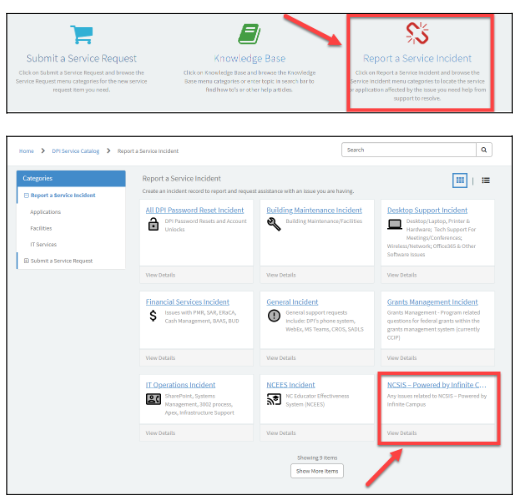
Submitting a Ticket: When submitting your ticket to NCDPI for a PMR deletion, please select "Report a Service Incident" and choose "NCSIS - Powered by Infinite Campus" to ensure proper routing. Only one ticket per PSU is needed for PMR deletion. All schools can be submitted on one ticket.
|
 |
If you have questions about PMR Extract functionality, please contact your Regional SIS Professional Learning Consultant.
If you have questions about student accounting policy, please email StudentAccounting@dpi.nc.gov.
KnowledgeOwl*
We are pleased to introduce our knowledge management system, which will house NCDPI documentation. KnowledgeOwl will include articles (QRDs) that are created and updated by the SIS Professional Learning team. Please use the link below to access the recently added or updated articles. We encourage you to check back regularly for additional resources.
NCSIS Knowledge Base | NC Department of Public Instruction
Revised article-
Create New School Enrollment (R1/W1 Procedure)- Updated
https://ncdepartmentofpublicinstruction.knowledgeowl.com/home/r1-w1-enrollment
Newly published articles-
Student Locator Tool
https://ncdepartmentofpublicinstruction.knowledgeowl.com/home/state-student-locator.
eMFTS Access
https://ncdepartmentofpublicinstruction.knowledgeowl.com/home/emfts-access
Deceased Person Information
https://ncdepartmentofpublicinstruction.knowledgeowl.com/home/deceased-person-information
Adding Transcript Grades
https://ncdepartmentofpublicinstruction.knowledgeowl.com/home/adding-transcript-grades
School Nutrition
https://ncdepartmentofpublicinstruction.knowledgeowl.com/home/school-nutrition
Honor Roll
https://ncdepartmentofpublicinstruction.knowledgeowl.com/home/honor-roll
Principal’s Monthly Report (PMR)
https://ncdepartmentofpublicinstruction.knowledgeowl.com/home/principals-monthly-report-pmr
Section 504 Program
https://ncdepartmentofpublicinstruction.knowledgeowl.com/home/section-504-program
Check-In/Check-Out- Meeting Attendance
https://ncdepartmentofpublicinstruction.knowledgeowl.com/home/check-incheck-out-meeting-attendance
Dropout Reporting
https://ncdepartmentofpublicinstruction.knowledgeowl.com/home/dropout-reporting
Adding Transcript Grades
https://ncdepartmentofpublicinstruction.knowledgeowl.com/home/adding-transcript-grades
State Report Update*
The Fall Legislative Class Size (LCS) report has been delayed. All deadlines for affidavits and waiver requests are postponed until further notice. We will update you when the reports are up and running.
Please update your superintendents and SIS data managers accordingly.
Please contact Student Accounting studentaccounting@dpi.nc.gov with any questions regarding this delay or submission of the report or waivers.
|
|
 |

Upcoming Training Information*
NCSIS Phase II Participants Data Conversion Webinars
This session is an opportunity for the SIS Professional Learning team to meet with Phase II PSUs on the implementation Data Conversion process so far, answer questions and to gain feedback to help in supporting a smooth transition.
- Monday, December 9th at 11:00 am
- Wednesday, December 18th at 1:00 pm
Quarterly Phase II Participant Virtual Check-In Webinar III
Quarterly Phase II Participant Virtual Check-In Webinar III: December 12th - 1pm
|
NCED Connect 2025 Symposium*
January 21st-23rd – Greensboro, NC
This event is designed for District Leadership, CTOs, Teachers, Coaches, Accountability Teams, SIS Coordinators, Data Managers, Ed Tech/Media Specialists, and E-Rate On-Site Support staff.
To learn more about the NCED Connect Symposium click HERE for a catalog of sessions and participant tracks being offered.
Click here to register for NCED Connect Symposium 2025!
- Regular Registration - $300/pp | Nov. 23 - Dec. 18
- Late/On-Site Registration - $350/pp | Dec. 19 - Jan. 23
Presenters:
Presenters can choose a "presenters" registration once their proposal has been accepted. 1 FREE registration per proposal. Call for proposals are still open at: https://cfp.sched.com/speaker/o7wK75kJLT (Now extended to: December 8th)
****Please Note****
You will be invoiced separately through NCDPI online payment system once you register. Invoices will be sent on Mondays, Wednesdays, & Fridays.
Looking forward to a great event together!
|

Digital Leaders Exchange November - Recap*
FOCUS: Curriculum, Assessment & Instruction
The Digital Leaders Exchange Opening slidedeck can be found HERE.
All session links are provided below:
Please bookmark these resources:
|
REMINDERS:
Infinite Campus NC Training Experience Preview Sessions
Coming soon! Infinite Campus will host NC Training Experience Preview Sessions for Phase 2 PSUs. More information below.
Session Name: Session Name: Infinite Campus Training Experience Preview for Phase 2 PSUs
Session Description: Set Training expectations for the Infinite Campus Implementation Training Methodology, and preview resources and processes established for successful Implementations for Phase 2 PSUs.
Audience: Staff who will or may be responsible at the PSU for coordinating and communicating training efforts for the upcoming Infinite Campus implementation.
Length: 1 hour
Zoom Registration Links:
Tuesday December 10, 2024 @ 10:00am ET – https://infinitecampus.zoom.us/webinar/register/WN_4Aea5DRsSq-18wF-6mHpuA
Wednesday December 11, 2024 @ 2:00pm ET – https://infinitecampus.zoom.us/webinar/register/WN_lp6zpRGzT7SQSr5W6H3zPg
Tuesday December 17, 2024 @ 1:00pm ET – https://infinitecampus.zoom.us/webinar/register/WN_BXe0S0e8RSW6oM34c5brDA
Thursday December 19, 2024 @ 11:00am ET – https://infinitecampus.zoom.us/webinar/register/WN_V-EitLIPSsGfyqSoSu0SRg
 |
|
ALPS Historical Data
Historical data for Alternative Learning Programs and School has been loaded into Infinite Campus.
Data can be reviewed by navigating to Student Information>General>ALPS.
Ad hoc fields for this program can be found in the Filter Designer for Student Data under Student>Learner>ALPSS.
More information can be found here: Alternative Learning Programs and Schools (ALPS) (North Carolina) | Infinite Campus
|
Census Report
Check out the Census Report below. Selecting the option to run the report by address will display the cities where students reside.
Path: Census > Reports > Census by Address
|
|
 |
Clarifying Points
End Enrollment:
Only check the "no-show" box when withdrawing a student if they have never attended the school during the current calendar year. If the student has attended, please process the withdrawal using the appropriate attendance dates and refer to the Student End Enrollment Checklist article.
https://ncdepartmentofpublicinstruction.knowledgeowl.com/home/student-end-enrollment-checklist
Assessment/Testing Data:
CPR scores have been loaded into Infinite Campus. Instructions for running reports to view students with and without scores will be coming soon.
1L, 2L, 1P Attendance Codes:
1L, 2L have been updated to tardies in Infinite Campus. 1P is set as a present code.
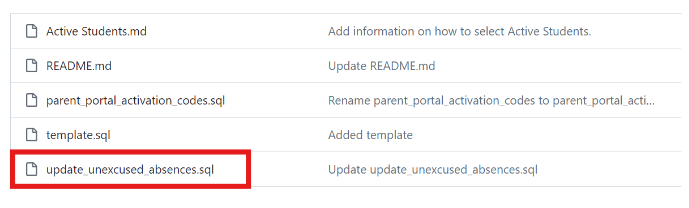
Teacher tardies should be used to indicate when students are late to class, but not when they arrive late to school. Teacher tardies should not be converted into 1L or 2L attendance codes. Please refer to the SQL script information to verify your Task Scheduler is setup correctly.
The SQL script for setting up this process can be copied from the GitHub repository found HERE. On the webpage, click on the SQL report highlighted below and follow the steps listed in the Readme section on How to Use this Repository.
|
 |
|
State Report Resources & Assistance
2023-24 Dropout Report Extension and 2023-24 RP Report Extension
The submission dates for the 2023-24 Dropout Report and the submission date for the 2023-24 RP (Retention/Promotion) Report have been extended to Friday, December 6th for all PSUs.
Please refer to the linked documentation below for Dropout Data, Retention-Promotion (RP), & the Common Follow-Up Systems (CFS) Reporting:
If you have any questions about State reports, Amy Powell-Moman holds office hours from Tuesday to Friday, 3:30 - 6:00 p.m. You can book time with her using the link below.
Book time with Amy Powell Moman
|
ALOT Report Update
The ALOT report in the SIS will not be used for reporting the data this year. For this school year, NCDPI will utilize ECATS as the authoritative source for this purpose. No action is required from PSUs at this time other than the normal activities associated with enrolling students, requesting records, and implementing current IEPs.
|
|
 |

NCSIS Resources
Phase I participants have access to the Campus Community, where they can acquire product knowledge, glean tips and tricks, and engage in networking opportunities with other districts. The Campus Community offers convenient single sign-on access from the Campus system to a wealth of resources including the knowledge base, forum discussions, learning tools, support site, upcoming events, and more.
Campus Community- contains the information you need to learn how to use Infinite Campus through product documentation, videos & simulations, study guides, forums, and much more. Whether you are a teacher, data manager, or Infinite Campus user, you will find the learning resources in a clearly defined pathway for a seamless transition from PowerSchool.
Campus Passport- is on-demand, self-paced courses that can be assigned to new and existing staff. Accessed through the Campus Community, you will find Instructor-Led Training, specific E-Learning courses, or select a learning plan based on your district role.
KnowledgeOwl: KnowledgeOwl will include articles (QRDs) that are created and updated by the SIS Professional Learning team.
NCSIS Knowledge Base | NC Department of Public Instruction
GitHub Vendor Integrations Repository: 3rd party extract formats can be found below.
GitHub Vendor Integrations Repository
NCSIS Crosswalk Document- will contain Infinite Campus and PowerSchool terms with their meanings to assist users with learning the new NCSIS terminology. This is a working document and will be updated regularly. NCSIS Crosswalk Document
IC Role Specific Resources- can be viewed by clicking on http://ncsis.gov, go to the Phase I PSU’s tab and scroll to the IC Role Specific Resources section. It Includes information for specific staff roles, as well as a guide for parents & students.
Webinar Recording Links and FAQs- can be found at http://ncsis.gov under the Professional Learning tab. Please check for recently added webinars.
|
Infinite Campus Resources
Please see the links below for resources on how to effectively “qualify an Infinite Campus support case” to improve response and resolution times. This approach also helps minimize back-and-forth communication, keeping inboxes clearer (which everyone appreciates!).
|
|
 |
Data Validation Reports
Important Data Validation Reports to keep your data clean!
Please run the Census Rules data validation report and update the address information for any students who are showing on the “Active students who do not have a mailing address” section.
Please run the Invalid Transcript Grade Levels data validation report and update grade level information as necessary.
Please run the Credit Recovery Transcript data validation report to identify any credit recovery grade that has a GPA weight greater than ‘0’ associated. The GPA weight will have to be changed to 0 or left blank.
Please run the IC Internal Audit for schools, calendars, and enrollment data validation. Within this report, there is a specific section called 'Grade Levels Associated with Calendars,' which includes a column listing all grade levels excluded from class rank/GPA. Please review this section and ensure the information is accurate.
Stay ahead of data issues—use the Data Validation Report to quickly spot and fix data errors, keeping your PSU’s records clean and accurate! Check out the article below to see how it’s done.
Reporting>Data Validation>Data Validation Report - Data Validation Report | Infinite Campus
Report examples: Census Household Cleanup, Withdrawn Student Audit Report, Unicode Character Cleanup, Parent Portal, Census Rules, & IC Internal Audit for schools, calendars, and enrollment data validation.
Partnering Progress
To support the successful implementation of the NCSIS, we have developed a detailed professional development plan for both Phase I and Phase II participants. This plan will provide you with the knowledge, skills, and resources needed to implement NCSIS effectively. Registration links are available for most events now, while others will be added in the coming months.
The linked document outlines the full professional development plan for Phase I and II, including:
-
Training Workshops: Covering NCSIS fundamentals and implementation
-
Ongoing Support: Regular check-ins with NCSIS consultants, access to online resources, and participation in PLCs.
-
Continuous Improvement: Regular assessment and feedback cycles to refine and enhance implementation practices.
 |
|
Requesting Technical Support Points of Contact
Please refer to the document below for who to contact for technical support.
|
2024-2025 Home Base Maintenance Periods
Each year, a list of scheduled maintenance windows is published by NCDPI. This is published in advance to help teachers and administrators better prepare for temporary outages and loss of access. Please review the 2024-2025 maintenance schedule and put these dates on your calendar. In most cases, the entire window is not necessary and we can return systems to service earlier than listed. If emergency maintenance is required in addition to these scheduled dates, all users will be notified in advance.
|
|
|
 |
|