THE INFORMATION BELOW PERTAINS TO K-5 ONLY
October Kindergarten Newsletter

Designed specifically for teachers in kindergarten classrooms, this newsletter shares timely information related to transitions throughout the year, formative assessment, and early literacy practices. Resources for teachers are also included.
|
“Retained Twice” Definition within Policy KNEC-003
 |
|
Effective July 11, 2024, Policy KNEC-003 was updated to include Kindergarten in the definition of “retained twice.” Item #6 within the policy now states:
For purposes of "supplemental tutoring" pursuant to G.S. 115C-83.8(e), a student is identified as "retained twice" if: the student is retained once in kindergarten, first grade, second grade or third grade, and the student is retained again in the third grade either by placement in a third-grade class again or given the reading retained label and placed in a transitional 3/4 class combination or accelerated reading.
|
Updated! Important RtA Data Reminders
Reading Retained Label - Grade 5
Any student who had a reading retained label in 23-24, did not demonstrate proficiency during the 23-24 school year, and was promoted directly to 5th grade in 24-25 should not have a reading retained label as a 5th grader. These reading retained labels should be removed from PowerSchool and Infinite Campus. DPI will not be able to remove these labels this year.
|
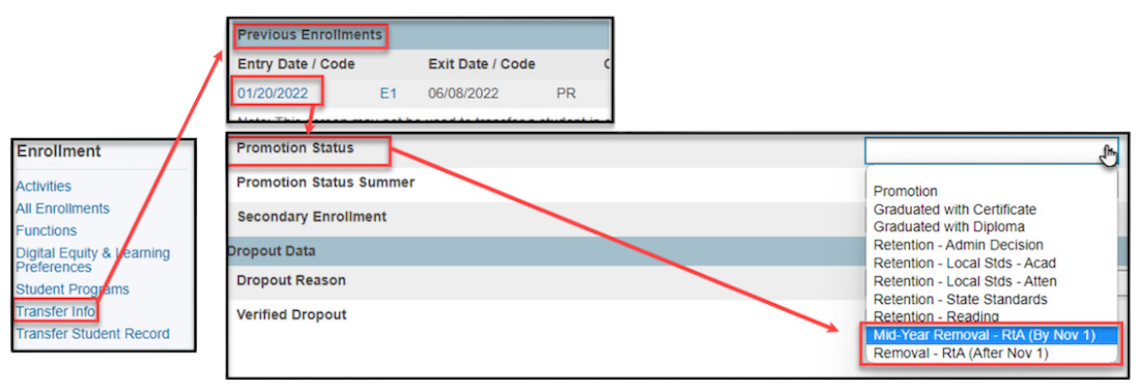
Mid-Year Promotion:
Any student with the retained reading label who demonstrates proficiency on the 3rd grade reading standards by November 1, 2024 should have their reading retained label changed in PowerSchool and Infinite Campus between November 1 and November 15, 2024.
For PowerSchool:
For Infinite Campus:
Select a Student: If a student is not selected, click Open Student Search tool to search by the student's name.
Search for a student using advanced searches or Ad Hoc Filters as needed. Select the student's name to open the Read to Achieve Program tool. If a student was already selected, the Read to Achieve Program tool will open automatically.
- Click View on the Read to Achieve program to open the program information.
- Enter the End Date in MM/DD/YYYY format or click the calendar icon to select the date.
- Select "MYP: Mid-Year Promotion - RtA (by Nov 1)" under the Program Exit Status.
- Select one (1) Good Cause Exemption (GCE) category under Exit Status Reason.
- Enter comments (optional).
- Click Save to end the program.
Additional note: Please do not change, add, or manipulate the data in the RtA archive table in PowerSchool as this can negatively impact the accuracy of the data for reporting.
Individual Reading Plans and Infinite Campus
Phase 1 Users of Infinite Campus:
The Infinite Campus Platform offers the opportunity to enter Individual Reading Plans (IRPs) into the system. For this year, since we are in Phase 1, entering IRPs into the Infinite Campus platform is optional.
For the 24-25 school year, districts will enter the IRP data the traditional way, which is through the JELOC report survey that will go out in July 2024.
The Office of Early Learning encourages districts to enter the data for IRPs this year as a best practice and use this as an opportunity to familiarize themselves with the entering of IRPs using the Infinite Campus platform.
Updated! Amplify Infinite Campus Support
For PSUs using Infinite Campus in the 2024-2025 school year:
For issues with rostering, please ask your data manager to submit a help ticket to the NCDPI SIS team via the ServiceNow portal.
- Login to the ServiceNow Portal.
- Click on “Report a Service Incident”.
- Click on “NCSIS – Powered by Infinite Campus”.
- Enter the information and click “Submit”
QRD ServiceNow
NEW guidance documents:
-
RtA Staff Roles - NCSIS Infinite Campus - Setting staff roles in Infinite Campus is required for rostering into mCLASS.
- mCLASS Troubleshooting Guide - NCSIS Infinite Campus
If you have any questions, please contact Thomas.Merritt@dpi.nc.gov or Dan.Tetreault@dpi.nc.gov.
Read To Achieve Program Screen for Infinite Campus
For PSUs that are using Infinite Campus in the 2024-2025 school year, Infinite Campus contains a new RtA Program screen to record the following student RtA data required for state reporting:
-
Individual Reading Plans - This category is to record when a student receives an IRP or becomes proficient and is removed from IRP status. This is not intended to create or store intervention plans. Please see the NC MTSS Framework & Infinite Campus Crosswalk for more information about intervention plans.
-
Reading Retained (Grade 3 Only) - Third graders who were non-proficient in reading only and promoted to the 4th grade through the enrollment roll forward process automatically have an enrollment record that records the promotion. After this process, the school is responsible for updating the RtA Program status to "RRET: Reading Retained (end of 3rd grade)".
-
Good Cause Exemption - This category is for recording when a student has been promoted based on a Good Cause Exemption.
If you have any questions, please contact Thomas.Merritt@dpi.nc.gov or Dan.Tetreault@dpi.nc.gov.
|