What's New!
- Report Availability Update*
- Grading Standards*
- Disaster Relief Enrollment*
- E-Transcripts*
- Duplicate Student Search Report*
- Parent Portal Self Service*
- Military Data*
- PMR Update*
- ML (Multilingual Learners) Data in Infinite Campus*
- Verified Home Language Field*
- KnowledgeOwl*
- Data Validation Reports*
- Upcoming Training Information*
- Clarifying Points*
- OCR/CRDC - SY2023-2024 Coordinator Contacts Due November 15, 2024*
- SIS Conference*
- NCED Connect 2025 Symposium*
Reminders:
- Requesting Technical Support Points of Contact
- Partnering Progress
- NCSIS Resources
- 2024-2025 Home Base Maintenance Periods
- Want to Stay in the Loop?
- Questions
|
*indicates new or updated information
WHAT'S NEW!
 |
|
Report Availability Update*
State Report Availability Update:
- Dropout Data: Now available for Phase I and Phase II PSUs
- Retention-Promotion (RP): Will be available on eMFTS by tomorrow morning for Phase I PSUs
- Common Follow-Up Systems (CFS) Reporting: Expected to be available by Friday for Phase I PSUs.
Please refer to the linked documentation below for further details:
|
Grading Standards*
Missing Grading Standards?
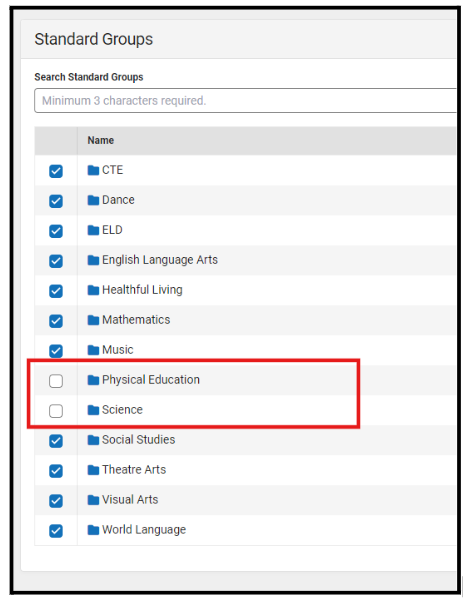
If you are unable to see grading standards for content areas, please ensure to check the box next to the academic area in the Standard Groups area.
Navigation: Grading & Standards > Standards Setup > School Standard Setup
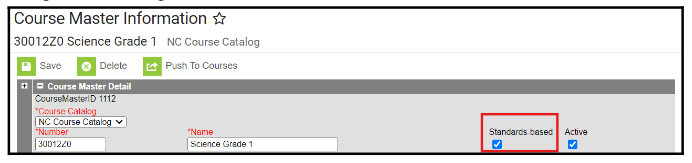
Additionally, ensure the Standards-based box is checked at the course master level and pushed to courses and sections.
Navigation: Grading & Standards > Course Masters > Course Master Information
E-Transcripts*
The E-Transcript integration is now active. Student transcripts can be sent through CFNC.
 |
|
Duplicate Student Search Report*
You can run the Duplicate Students Search (Student Information>Reports>Duplicate Students Search) report to identify any duplicates within your PSU.
Duplication is determined using the following demographic fields:
- Name fields - Last Name, First Name, Middle Name, Middle Initial
- Gender
- Birthday
- Social Security Number
- Race/Ethnicity
When a user selects multiple criteria, only duplicate information that matches ALL of the marked options is returned. You can uncheck any criteria that you do not want to compare. For names, you can choose an Exact Match or a Soundex Match (where Jon and John would be considered the same).
*******Any duplicate students should be reported through the NCDPI Service Portal at https://go.ncdpi.gov/help.********///waiting for confirmation
|
Parent Portal Self Service*
Now available! Please follow these steps to allow your parents to participate:
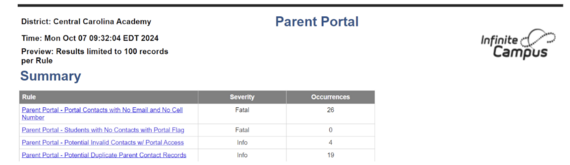
1. Run your Parent Portal Data Validation report and verify that your contact information is clean enough for this service to be helpful for your PSU
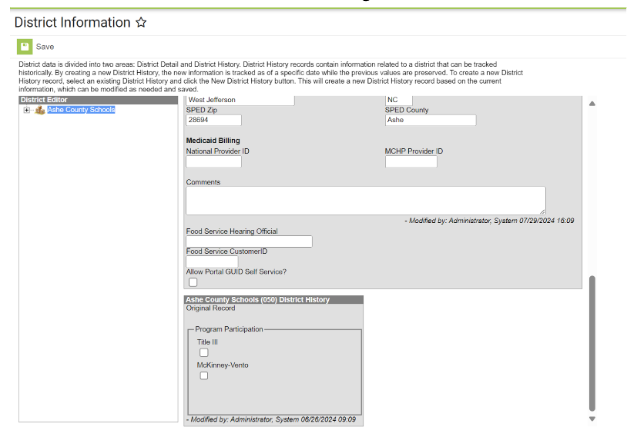
 2. Once you are ready, opt-in by checking the Allow Portal GUID Self Service? on the School & District Settings>District Information tool
 3. Publish the URL to your parents for the Parent Portal Self Service tool
https://portalaccess.ncsis.gov
Military Data*
Military Data from PowerSchool has been loaded into Infinite Campus. Records for parents and step-parents of military connected students were loaded, as long as only one person with that relationship existed for each student. It should not have overwritten any data that already existed for a contact. More information about validation and other reports is coming!
|
|
 |

PMR Update*
Month 1 PMR Submission is due Friday, October 18.
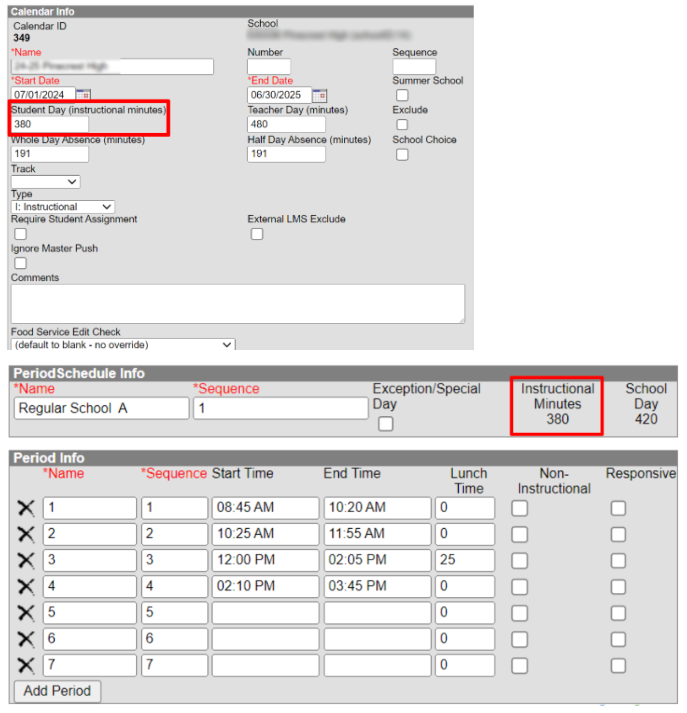
The instructional minutes in the Calendar Information and Period Schedule Info (Period Setup) have a direct impact on FATAL-23, FATAL-26, and FATAL-29. To avoid these errors, the instructional minutes in the Period Schedule Info (Period Setup) and the Calendar Information tool must align.
If the minutes entered do not align, it may negatively impact membership and attendance calculations, leading to these errors.
The example images below show where the instructional minutes must match.
|
If you have questions about PMR Extract functionality, please contact your Regional SIS Professional Learning Consultant.
If you have questions about student accounting policy, please email StudentAccounting@dpi.nc.gov.
ML (Multilingual Learners) Data in Infinite Campus*
Please find below the presentation that has been shared with PSU EL Coordinators. It includes recommendations for tool rights assignments for EL staff and teachers, as well as the steps for creating an EL record.
Working Document for ML Data in Infinite Campus
New updates on slides 3 and 4.
Verified Home Language Field*
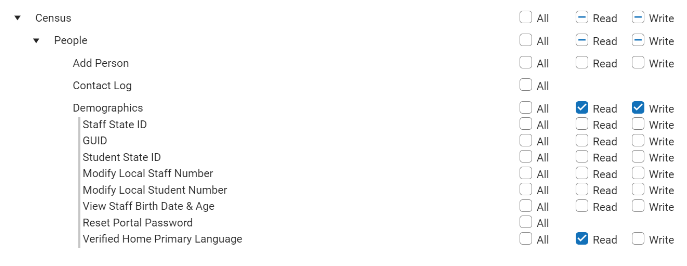
Please ensure the Verified Home Primary Language field is set to Read only for any of your staff who have Census rights such as your EL Coordinators. (Please see image below)
KnowledgeOwl*
We are pleased to introduce our knowledge management system, which will house NCDPI documentation. KnowledgeOwl will include articles (QRDs) that are created and updated by the SIS Professional Learning team. Please use the link below to access the recently added articles. We encourage you to check back regularly for additional resources.
NCSIS Knowledge Base | NC Department of Public Instruction
Newly published articles-
Principal’s Monthly Report (PMR)
https://ncdepartmentofpublicinstruction.knowledgeowl.com/home/principals-monthly-report-pmr
Section 504 Program
https://ncdepartmentofpublicinstruction.knowledgeowl.com/home/section-504-program
Check-In/Check-Out- Meeting Attendance
https://ncdepartmentofpublicinstruction.knowledgeowl.com/home/check-incheck-out-meeting-attendance
Cross-Site Enrollment
https://ncdepartmentofpublicinstruction.knowledgeowl.com/home/cross-site-enrollment
Adding an XG Flag
https://ncdepartmentofpublicinstruction.knowledgeowl.com/home/adding-xg-flag
Student Email Import
https://ncdepartmentofpublicinstruction.knowledgeowl.com/home/email-import
Term Type Setup
https://ncdepartmentofpublicinstruction.knowledgeowl.com/home/term-type-setup
Dropout Reporting
https://ncdepartmentofpublicinstruction.knowledgeowl.com/home/dropout-reporting
Data Validation Reports*
Important Data Validation Reports to keep your data clean!
Please run the Census Rules data validation report and update the address information for any students who are showing on the “Active students who do not have a mailing address” section.
Please run the Invalid Transcript Grade Levels data validation report and update grade level information as necessary.
Please run the Credit Recovery Transcript data validation report to identify any credit recovery grade that has a GPA weight greater than ‘0’ associated. The GPA weight will have to be changed to 0 or left blank.
Please run the IC Internal Audit for schools, calendars, and enrollment data validation. Within this report, there is a specific section called 'Grade Levels Associated with Calendars,' which includes a column listing all grade levels excluded from class rank/GPA. Please review this section and ensure the information is accurate.
Stay ahead of data issues—use the Data Validation Report to quickly spot and fix data errors, keeping your PSU’s records clean and accurate! Check out the article below to see how it’s done.
Reporting>Data Validation>Data Validation Report - Data Validation Report | Infinite Campus
Report examples: Census Household Cleanup, Withdrawn Student Audit Report, Unicode Character Cleanup, Parent Portal, Census Rules, & IC Internal Audit for schools, calendars, and enrollment data validation.

Upcoming Training Information*
SIS Admin Training “Mastering Campus” (Limited to 1 SIS Admin per PSU)
Phase I Check-in III Call
October 29th - 3pm
Infinite Campus Webinar Sessions- Learning Management System
Register for either date/time
November 5th - 10 am or November 7th - 2pm
The NC Digital Leaders Exchange is coming to a location near you soon! Each event will run from the West to the East while also aligning each “exchange” with a part of the Digital Learning Plan. In November, we will be highlighting Curriculum, Instruction & Assessment along with the typical offerings of Home Base product update sessions.
We will meet from 9:00 AM - 4:00 PM and lunch will be catered. Register for a date & location that best fits your schedule.
Register HERE.
Our agenda can be found HERE.
|
Clarifying Points*
Data Update:
- EC flags in Infinite Campus are now functioning correctly. Flags should automatically populate based on the student's service start and end dates.
- Discipline data has been imported.
- Birth Country will be updated in Infinite Campus soon.
Assessment/Testing Data:
- The WIDA ACCESS and Screener historical scores have been put into Infinite Campus.
- The EOG/EOC scores have been imported into Infinite Campus.
- CPR scores will be coming soon.
Military Information: has been imported into Infinite Campus.
1L, 2L, 1P Attendance Codes:
- 1L, 2L have been updated to tardies in Infinite Campus. 1P is set as a present code.
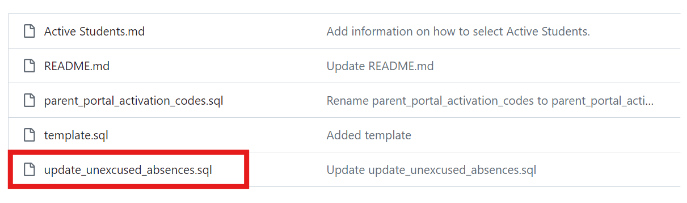
- Teacher tardies should be used to indicate when students are late to class, but not when they arrive late to school. Teacher tardies should not be converted into 1L or 2L attendance codes. Please refer to the SQL script information below to verify that your setup is correct.
- The SQL script for setting up this process can be copied from the GitHub repository found HERE. On the webpage, click on the SQL report highlighted below and follow the steps listed in the Readme section on How to Use this Repository.
|
OCR/CRDC - SY2023-2024 Coordinator Contacts Due November 15, 2024*
Dear Coordinators,
Please inform other staff as appropriate.
Note: PSUs that were not open in the school year 2023-24 are not required to participate in this collection.
CRDC Coordinator Contact Updates Due in EDDIE - November 15, 2024
This week, the Partner Support Center (PSC) and OCR will notify the nation that registration and contact information for the upcoming CRDC is due by October 31. Please note that this messaging does not apply to North Carolina.
For PSUs in North Carolina, it is essential to update EDDIE with two CRDC Coordinator contacts by November 15, 2024. Additionally, PSUs are strongly encouraged to verify or update the Student Information Coordinator contact.
Instructions for creating staff entries (roles) in EDDIE can be found in the Help Using EDDIE section of the NCDPI website.
After November 15, 2024, NCDPI will provide Partner Support with a North Carolina Universe file and a CRDC Contact file. Identified CRDC Coordinators will receive login credentials from PSC before the submission window opens.
CRDC Webinar – Getting Started
Join the SEA CRDC Coordinator for preliminary information on the upcoming collection process. Staff who attend will understand how NCDPI communicates with PSU CRDC Coordinator contacts, what to expect from NCDPI regarding support for the collection, and what resources are available at the local, state, and federal levels.
This 1.5-hour session has been scheduled twice and a recording will be provided in the NC CRDC SY 23-24 Canvas Course. Use the links below to register for the webinar.
NC CRDC SY 23-24 Canvas Course – Now Open
The NC CRDC SY 2023-24 Canvas Course is now open.
The course is divided into modules that build concepts step by step, outlining PSU responsibilities and explaining how NCDPI assists with pre-populating data. NC-specific documentation, such as the CRDC Collection By Entity Excel document, will be housed in the course and is critical for understanding what data NCDPI will pre-populate when the submission window opens. The course also includes presentations, webinar recordings, and guidance on the error resolution process within the Federal Submission Tool.
Any public school employee involved or interested in CRDC is invited to enroll. The course enrollment link is available on the NCDPI CRDC website: Civil Rights Data Collection | NC DPI.
SY2023-24 CRDC Federal Submission Window
The OCR has announced that the Federal Submission Tool will be open from December 9, 2024, through March 7, 2025. The 2023-24 LEA and School forms have been published. For more information, visit the Communities360° - Home > Overview > Home (ed.gov).
CRDC Support
Please email nc.ocr.crdc@dpi.nc.gov with any questions you may have.
|
SIS Conference Recap*
Thank you for attending the SIS 2024 Conference! We truly enjoyed seeing everyone and sharing valuable information to support your work.
For a full list of all the presentations, please visit the link below:
go.ncdpi.gov/SISConference2024
|
|
 |
NCED Connect 2025 Symposium*
January 21st-23rd – Greensboro, NC
This event is designed for District Leadership, CTOs, Teachers, Coaches, Accountability Teams, SIS Coordinators, Data Managers, Ed Tech/Media Specialists, and E-Rate On-Site Support staff.
Registration is coming your way in the next two weeks.
- Early Bird Registration: $250/pp
- Regular Registration - $300/pp
- Late/On-Site Registration - $350/pp
Discounted registration for LEAD presenters! So.... the call for proposals is NOW OPEN! We need YOU!
https://cfp.sched.com/speaker/o7wK75kJLT
|
REMINDERS:
Requesting Technical Support Points of Contact
Please refer to the document below for who to contact for technical support.
|
|
 |
Partnering Progress
To support the successful implementation of the NCSIS, we have developed a detailed professional development plan for both Phase I and Phase II participants. This plan will provide you with the knowledge, skills, and resources needed to implement NCSIS effectively. Registration links are available for most events now, while others will be added in the coming months.
The linked document outlines the full professional development plan for Phase I and II, including:
-
Training Workshops: Covering NCSIS fundamentals and implementation
-
Ongoing Support: Regular check-ins with NCSIS consultants, access to online resources, and participation in PLCs.
-
Continuous Improvement: Regular assessment and feedback cycles to refine and enhance implementation practices.

NCSIS Resources
Phase I participants will gain access to the Campus Community, where they can acquire product knowledge, glean tips and tricks, and engage in networking opportunities with other districts. The Campus Community offers convenient single sign-on access from the Campus system to a wealth of resources including the knowledge base, forum discussions, learning tools, support site, upcoming events, and more.
Campus Community- contains the information you need to learn how to use Infinite Campus through product documentation, videos & simulations, study guides, forums, and much more. Whether you are a teacher, data manager, or Infinite Campus user, you will find the learning resources in a clearly defined pathway for a seamless transition from PowerSchool.
Campus Passport- is on-demand, self-paced courses that can be assigned to new and existing staff. Accessed through the Campus Community, you will find Instructor-Led Training, specific E-Learning courses, or select a learning plan based on your district role.
KnowledgeOwl: KnowledgeOwl will include articles (QRDs) that are created and updated by the SIS Professional Learning team.
NCSIS Knowledge Base | NC Department of Public Instruction (knowledgeowl.com
NCSIS Crosswalk Document- will contain Infinite Campus and PowerSchool terms with their meanings to assist users with learning the new NCSIS terminology. This is a working document and will be updated regularly. NCSIS Crosswalk Document
IC Role Specific Resources- can be viewed by clicking on http://ncsis.gov , go to the Phase I PSU’s tab and scroll to the IC Role Specific Resources section. It Includes information for specific staff roles, as well as a guide for parents & students.
Webinar Recording Links and FAQs- can be found at http://ncsis.gov under the Professional Learning tab. Please check for recently added webinars.
|
 |
|
2024-2025 Home Base Maintenance Periods
Each year, a list of scheduled maintenance windows is published by NCDPI. This is published in advance to help teachers and administrators better prepare for temporary outages and loss of access. Please review the 2024-2025 maintenance schedule and put these dates on your calendar. In most cases, the entire window is not necessary and we can return systems to service earlier than listed. If emergency maintenance is required in addition to these scheduled dates, all users will be notified in advance.
|
|

Questions?
Please feel free to reach out for questions or concerns by emailing ncsis@dpi.nc.gov
|
|