What's New!
- Term Type Setup*
- Address Script*
- IC PD Yearly Event Series*
- Printing Transcript Clarification*
- Central Office Calendar*
- Dropout Report*
- Transcript Issue Checks*
- Calendar Information & Period Setup Steps*
- Clarifying Points*
- KnowledgeOwl*
- Upcoming Training Information*
- Data Validation Reports*
Reminders:
- PMR Report Status
- Military Information & Military Connections
- Adding Standards
- NCSIS Transcript
- Report Card Setup
- Campus Parent & Campus Student Webinar for Families
- Partnering Progress
- NCSIS Resources
- 2024-2025 Home Base Maintenance Periods
- Want to Stay in the Loop?
- Questions
|
*indicates new or updated information
WHAT'S NEW!
Term Type Setup*
Please see the Knowledge Base article on setting up Term Types for courses below. Infinite Campus is adding a new field in Course Information and Section Information to assist with extracts identifying when a section is happening. The field is Term Type Override and must be completed on each course, with any exceptions to the default set at the section level.
https://ncdepartmentofpublicinstruction.knowledgeowl.com/home/term-type-setup
Schools are encouraged to enter this information as soon as possible, especially if testing in the near future. Please contact your regional accountability office with any questions.
Address Script*
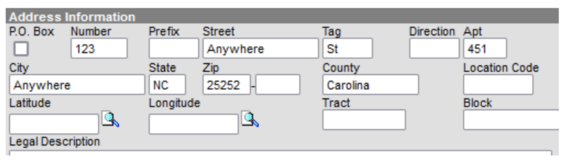
A script will be run to parse addresses with apparent apartment numbers denoted by a comma (“,”) in the “Street” field to match Campus formatting by placing the values into the Street, Tag and Apartment fields. This will not work for every address but will clean up many that may not be currently parsed. It will only impact addresses that currently have a comma in the “Street” field.
Instances that currently look like:
|
|
 |
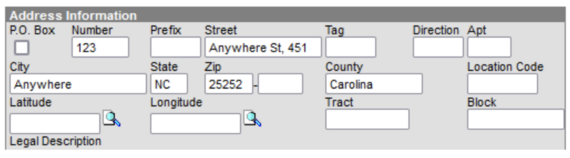 Will be parsed to look like:
 |
|
IC PD Yearly Event Series*
Check out “YES” Infinite Campus Professional Development Series!
YES includes timely instruction on a wide array of Infinite Campus topics during the school year! YES has district-wide access to NINE live events and access to all session recordings for one year.
|
Printing Transcript Clarification*
Phase I PSUs should be printing transcripts from Infinite Campus now. Access to print transcripts from PowerSchool will be removed for Phase I PSUs at the end of this month, September 30, 2024. If you are having issues printing transcripts in Infinite Campus, please contact your IC implementation team or submit a service ticket if you have been transitioned to Infinite Campus support.
|
|
 |
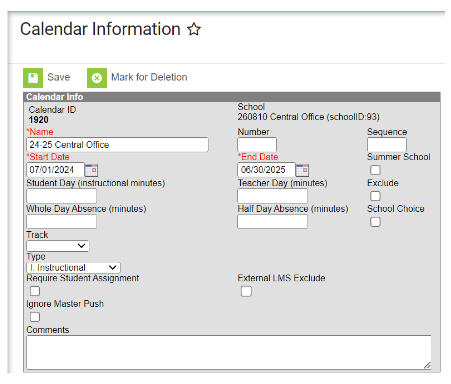
Central Office Calendar*
Missing a Central Office calendar? Ensure you've created a calendar for your Central Office. This will enable it to appear in the context dropdown.
 |
|
Dropout Report*
Check out the recently added NCSIS Knowledge Base article on Dropout Reporting at the link below:
https://ncdepartmentofpublicinstruction.knowledgeowl.com/home/dropout-reporting
Additionally, DPI will be hosting a Dropout Reporting webinar on Thursday, September 19th at 11:00 a.m. This session will guide participants through the "Dropout - North Carolina" tracking process in Infinite Campus.
To register, use the link provided below, and please share this information with any staff members involved in dropout reporting.
|
Transcript Issue Checks*
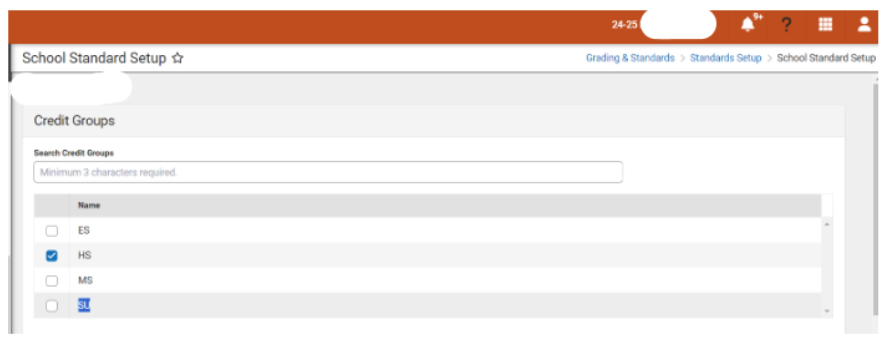
If a suppressed grade is appearing on the transcript and shouldn't be, please review the image below. Check the school standards and ensure that the credit type "SU" is not selected on the list.
The pathway for this is: Grading & Standards> Standards Setup> School Standard Setup
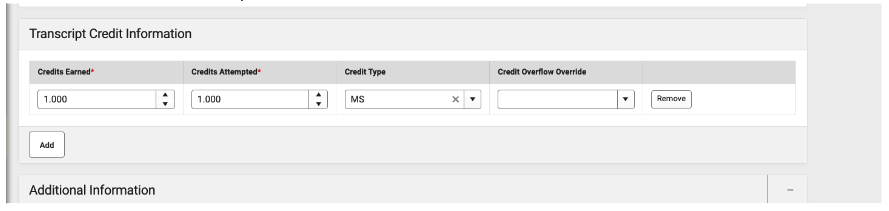
 If a middle school student took a high school course for credit and it isn’t appearing on the transcript, check whether the credit type is set to "Middle" or “MS” as shown below. If it is, you'll need to select the correct credit type under the “HS” header.
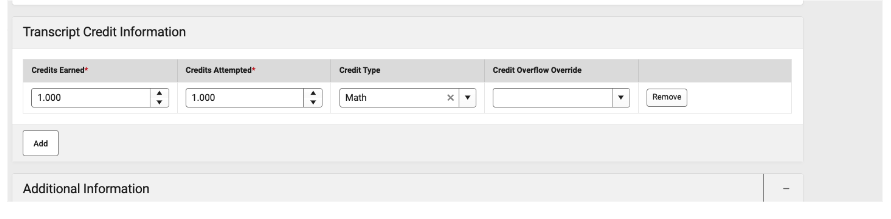
 Please refer to the image below for guidance on how the credit type should be designated. In this example, the credit type under "Transcript Credit Information" is listed as "Math" under high school credit types.
Calendar Information & Period Setup Steps*
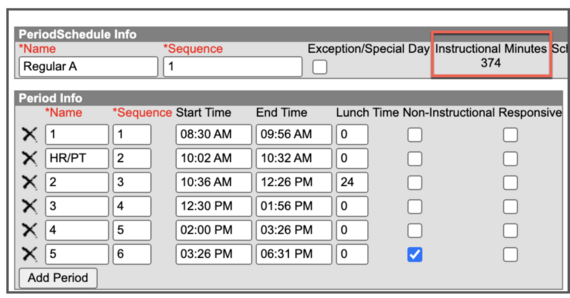
PSUs will need to enter & verify the Student Day (instructional minutes), Teacher Day (minutes) as well as the Whole Day Absences & Half Day Absences (minutes) fields on the Calendar Information tool.
Instructional Minutes- total instructional minutes for the school day, excluding lunch and passing time.
Teacher Day- the total minutes in a teachers workday.
Whole Day Absence- half the instructional minutes plus one minute
Half Day Absence- Enter the Whole Day Absence total (this is new!)
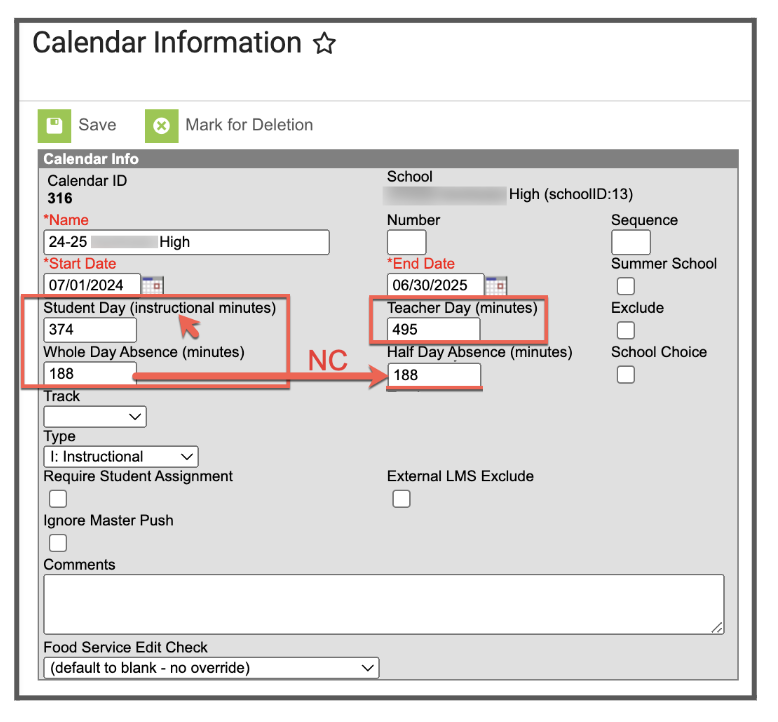 The Instructional Minutes on the PeriodSchedule Info (Period Setup) must match the Instructional Minutes on the Calendar Information tool. Please see the image below.
Clarifying Points*
Standards: Science & PE standards are now available in Infinite Campus.
Course Codes: PLTW course codes have been updated for PSUs.
Data Update: EC flags in Infinite Campus are now functioning correctly. Flags should automatically populate based on the student's service start and end dates. Discipline data has been imported. Assessment/Testing data should be available within Infinite Campus soon.
Withdrawals: When withdrawing a student in Infinite Campus, the end date will be the last day a student attended school.
Flags: Please do NOT change any flag that has “State owned flag” in the Description and is checked as State Reported.
Service Type: Please see information below for designating a service type on the Enrollment tool.
-
Primary (P)- to be used for the primary enrollment for the student
-
Partial (S)- to be used for cross-enrollments
-
Special Ed Services (N)- Do not use
GPA Calculation:
GPA weight is synonymous with course credits. Bonus points are not being used based on NC GPA calculations. The GPA added value that was done in PowerSchool is done through score groups in Infinite Campus. There are 3 score groups for High School credit courses that are used – 4pt, 4.5pt and 5pt.
In Infinite Campus, the GPA calculation involves taking the GPA value from the score group:associated with a specific score and multiplying it by the course credit (GPA weight). This result is then summed and divided by the total course credits (GPA weights). Below is an example illustrating this process:
10215X0 English 1 Honors 87 3.5 GPA pts 1 credit
20902X0 Foundations of NC Math 1 95 4 GPA pts 1 credit
WC032X2 CCP ARCH I 2 Credits 99 4 GPA pts 2 credits
3.5 * 1 = 3.5
4 * 1 = 4
4 * 2 = 8
3.5 + 4 + 8 = 15.5
15.5 / 4 = 3.875
Combine Person Tool & ServiceNow Tickets:
-
Current Status: PSUs are currently unable to use the Combine Person tool.
-
Help Ticket Update: If you find that one individual (student or staff) has multiple Person records with different student or staff UIDs associated, please submit a ServiceNow ticket. NCDPI will correct both Infinite Campus and the appropriate UID System. Please do not submit tickets for duplicate Person records where one of the records does not have an associated UID — for example, an employee who has one Person record as an employee and a second Person record as a parent. This process may change, and we will provide further updates as needed.
|
KnowledgeOwl*
We are pleased to introduce our knowledge management system, which will house NCDPI documentation. KnowledgeOwl will include articles (QRDs) that are created and updated by the SIS Professional Learning team. Please use the link below to access the recently added articles. We encourage you to check back regularly for additional resources.
NCSIS Knowledge Base | NC Department of Public Instruction (knowledgeowl.com)
Please see the recent revisions to the No-Show process.
Updated Article-
NC No Show Process
Newly published articles-
Term Type Setup
Dropout Reporting
Helpful Reports & Processes
Transcripts

Upcoming Training Information*
Phase I Check in & Technical Assistance Webinar: Please register for your preferred dates and submit any questions you may have before the webinar by clicking the link below:
Submit Questions
Infinite Campus Messenger w/Voice: Infinite Campus will host a webinar to provide information on the Messenger w/Voice product in Infinite Campus.
Date & Time: September 16th - 3pm
Please use the link below to register:
Online Registration Webinar: Infinite Campus will host a webinar to provide information on the Online Registration product in Infinite Campus.
Date & Time: September 18th - 3pm
Please use the link below to register:
SIS Admin Training “Mastering Campus” (Limited to 1 SIS Admin per PSU)
Register for free 5 day SIS Admin Training. Choose your dates/locations
Choose 1 Location Per PSU:
|
Data Validation Reports*
Take a look at the newly added Parent Portal & Census Rules data validation reports!
Stay ahead of data issues—use the Data Validation Report to quickly spot and fix data errors, keeping your PSU’s records clean and accurate! Check out the article below to see how it’s done.
Reporting>Data Validation>Data Validation Report - Data Validation Report | Infinite Campus
Report examples: Census Household Cleanup, Withdrawn Student Audit Report, Unicode Character Cleanup, Parent Portal, & Census Rules.
REMINDERS:
PMR Report Status
PMR Report:The PMR (Principal’s Monthly Report) is currently in the testing phase. We’ll update you once it’s ready for use.
 |
|
Military Information & Military Connections
Military information will be imported into Infinite Campus at no cost to PSUs—there is no need to pay Infinite Campus for this data.
The Military Connections tool tracks data for those in a student's household who are military personnel. This tool works with the Impact Aid tool, which tracks parents/guardians employed at federal sites (armed forces locations, reservation lands, etc.).
https://kb.infinitecampus.com/help/military-connections
|
 |
|
NCSIS Transcript
Transcripts are now available for PSUs to generate. Before running and printing transcripts, please consult your SIS Coordinator to ensure that your student information is up to date and that the appropriate graduation program has been assigned.
Missed our NCSIS Transcript Webinar on Wednesday, September 4th? No problem! You can view the webinar recording under the Professional Learning tab on our website: http://ncsis.gov.
For assistance with running and printing transcripts, please refer to the articles below.
Graduation | NC Department of Public Instruction (knowledgeowl.com)
|
Report Card Setup
Please verify that your schools have progress & report cards setup. Please see the information below to assist in creating a report card template if necessary. (System Settings > System Preferences > Report Setup)
North Carolina Report Card Setup
If you need assistance with this process, please reach out to your Infinite Campus Implementation team.
|
|
 |
Campus Parent & Campus Student Webinar for Families
We will host another "How to Use the Mobile Apps in NCSIS for Parents & Students'' webinar on Tuesday, September 17th at 7 pm. Please see the registration link below to share with PSU families.
September 17th - 7pm
Link to recording of July 30th session:
July 30th Recording - Mobile Apps in NCSIS for Parents & Students
Partnering Progress
To support the successful implementation of the NCSIS, we have developed a detailed professional development plan for both Phase I and Phase II participants. This plan will provide you with the knowledge, skills, and resources needed to implement NCSIS effectively. Registration links are available for most events now, while others will be added in the coming months.
The linked document outlines the full professional development plan for Phase I and II, including:
-
Training Workshops: Covering NCSIS fundamentals and implementation
-
Ongoing Support: Regular check-ins with NCSIS consultants, access to online resources, and participation in PLCs.
-
Continuous Improvement: Regular assessment and feedback cycles to refine and enhance implementation practices.

NCSIS Resources
Phase I participants will gain access to the Campus Community, where they can acquire product knowledge, glean tips and tricks, and engage in networking opportunities with other districts. The Campus Community offers convenient single sign-on access from the Campus system to a wealth of resources including the knowledge base, forum discussions, learning tools, support site, upcoming events, and more.
Campus Community- contains the information you need to learn how to use Infinite Campus through product documentation, videos & simulations, study guides, forums, and much more. Whether you are a teacher, data manager, or Infinite Campus user, you will find the learning resources in a clearly defined pathway for a seamless transition from PowerSchool.
Campus Passport- is on-demand, self-paced courses that can be assigned to new and existing staff. Accessed through the Campus Community, you will find Instructor-Led Training, specific E-Learning courses, or select a learning plan based on your district role.
KnowledgeOwl: KnowledgeOwl will include articles (QRDs) that are created and updated by the SIS Professional Learning team.
NCSIS Knowledge Base | NC Department of Public Instruction (knowledgeowl.com
NCSIS Crosswalk Document- will contain Infinite Campus and PowerSchool terms with their meanings to assist users with learning the new NCSIS terminology. This is a working document and will be updated regularly. NCSIS Crosswalk Document
IC Role Specific Resources- can be viewed by clicking on http://ncsis.gov , go to the Phase I PSU’s tab and scroll to the IC Role Specific Resources section. It Includes information for specific staff roles, as well as a guide for parents & students.
Webinar Recording Links and FAQs- can be found at http://ncsis.gov under the Professional Learning tab. Please check for recently added webinars.
|
 |
|
2024-2025 Home Base Maintenance Periods
Each year, a list of scheduled maintenance windows is published by NCDPI. This is published in advance to help teachers and administrators better prepare for temporary outages and loss of access. Please review the 2024-2025 maintenance schedule and put these dates on your calendar. In most cases, the entire window is not necessary and we can return systems to service earlier than listed. If emergency maintenance is required in addition to these scheduled dates, all users will be notified in advance.
|
|

Questions?
Please feel free to reach out for questions or concerns by emailing ncsis@dpi.nc.gov
|
|