What's New!
- Digital Leaders Exchange - September
- New IC Community Passport Courses
- Support for IC Third-Party Integration
- PSU Issue Support
- SASA Revisions
- Start & End Dates on Student Rosters
- How to Publish a Letter Builder Template to a User Group
- ECATS Integration with NCSIS
- Clarifying Points
- Campus Parent & Campus Student Webinar for Families
- Updated Canvas Information
- Upcoming Training Information
Reminders:
- Welcome Back!
- NCBOLD24 Thank you
- KnowledgeOwl
- Data Access Suite Tools
- Campus Community ID Instructions
- Grade Level Chart Comparison
- Local ID Workaround
- Transcripts
- DPI Flags in Infinite Campus
- CEDARS, Student UID, and Staff UID: Understanding the Distinctions and Access Processes
- Important Information: Accountability and GDV File
- Release Pack Campus.2411
- EWS & MTSS Information
- Partnering Progress
- NCSIS Resources
- SIS Scoop
- 2024-2025 Home Base Maintenance Periods
- Want to Stay in the Loop?
- Questions
|
WHAT'S NEW!
 |
|
Digital Leaders Exchange - September
The NC Digital Leaders Exchange is coming to a location near you soon! Each event will run from the East to the West while also aligning each “exchange” with a part of the Digital Learning Plan. In September, we will be highlighting Cybersecurity and Data Privacy along with the typical offerings of Home Base product update sessions.
Special Guests: John Mairs (NCEdCloud), Tim Wease & Sammie Carter (Cybersecurity), Diane Dulaney (Data Privacy), Home Base Team, E-Rate team, DTL Team
We will meet from 9:00 AM - 4:00 PM and lunch will be catered. Register for a date & location that best fits your schedule.
Register at: https://www.eventbrite.com/cc/digital-leaders-exchange-3571799
|
New IC Community Passport Courses
The Infinite Campus training team is happy to announce that we have two new courses available in Campus Passport.
Calendar Administration: This course is designed to help you setup and apply early release days, half days, or other exceptions that deviate from standard period schedules within your schools.
Resync State Data: This course is designed to help you identify when a state resync is needed and how to complete the process of the resync. Note - This course only applies to school districts that are in (BIE, DE, HI, KY, MT, NC, NV, SD)
Support for IC Third-Party Integration
To support Phase I districts experiencing issues integrating third-party applications into Infinite Campus, DPI is hosting a series of office hours and webinars to assist with these integrations.
If you are experiencing issues with third party integrations, please complete this form to request assistance with development. Anything we develop will be shared on our Github.
For help setting up these integrations, join our Office Hours from Tuesday to Thursday, August 20-22, from 9:00 AM to 5:00 PM using the information below:
3rd Party Integration Office Hours Meeting
Meeting ID: 260 040 156 937
Passcode: svtyfD
PSU Issue Support
If your PSU is experiencing issues with the TIMS export, Amplify, or Schoolnet rosters, please report them to your Infinite Campus Implementation Team first. If the issue persists, contact your assigned Regional SIS PL Consultant immediately.
SASA Revisions
School Attendance and Student Accounting (SASA) Manual
The SASA Manual was amended to implement pertinent legislation, funding in arrears, and the new Student Information System (SIS). Revisions include the admission of out-of-state and foreign exchange students to charter schools, withdrawing students from school, coding attendance on individual student make-up days, the class size waiver request process, guidance about eligibility for use of a modified school calendar, retention of digitized student records, and assignment of Student User Identification numbers. Information about the addition of Pre-K ADM to the K–13 ADM for purposes of school principal salary calculation was added as well; changes to the Principal Salary Schedule are effective January 2025 and will be brought before the Board in the fall for final approval.
Link to SASA: https://www.dpi.nc.gov/bsopsasa-2024pdf/download?attachment
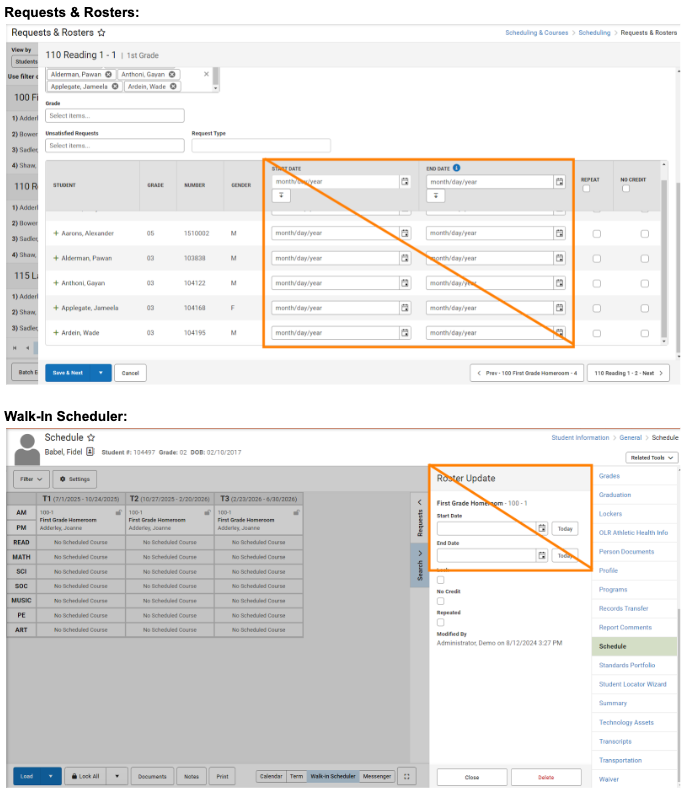
Start & End Dates on Student Rosters
A reminder that schedulers do NOT need to put a start or end date on a roster when scheduling students. Start and End Dates should only be used if the date falls outside of the regular term dates (For example, if a student has dropped a course, or making a change mid-term).
Start and End Date Fields appear in both the Requests & Roster and the Walk-In Schedule tool. Please leave those fields BLANK prior to the first day of school if the student should be scheduled into the regular scheduled course.
How to Publish a Letter Builder Template to a User Group
PSU Coordinator, did you create a Letter Builder Template and want to publish it to a user group (for example - Data Managers)?
- Whoever built the template should be added to the User Group (ex. Data Managers)
- Ensure the Data Manager has tool rights to Reporting > Ad Hoc Reporting > Letter Builder
- Save the letter to the User Group
- Share the template with their data managers
- You can share the Ad-Hoc in the same way
ECATS Integration with NCSIS
On Monday night the Exceptional Children Every Child Accountability & Tracking System, (ECATS), began importing files from Infinite Campus. To ensure clean data transmission throughout the year, the Department of Public Instruction (DPI) has identified key data each PSUs should review to ensure clean data is ingested into ECATS.
The following items should be reviewed frequently to identify and correct data integrity which may have occurred during data conversion.
- Student Enrollment Status
Students will incorrectly show up in ECATS in multiple PSUs at one time, if students are not properly withdrawn.
- Verify that students no longer enrolled have been properly withdrawn, with the correct withdrawal reason if appropriate, and with an end date.
- Legal Names (Students)
Legal names need to be accurate in the NCSIS. If legal name is not correct, duplicate student records will be created, the transfer process in ECATS will not occur, and Exceptional Children documentation will be finalized with invalid names. Here are items to review in the NCSIS:
- Check for swapped first and last names in legal name fields.
- Ensure consistency in first, middle, and last name fields.
- Verify accuracy of student date of birth across systems.
A data validation titled “Legal Last Name and First Name Discrepancies” has been created to help PSUs identify names to review. The validation can be accessed by going to Reporting > Data Validation Report in the NCSIS.
- Special Characters
Special Characters that are found in student names may cause duplicate records to be created in ECATS and cause the records transfer process between PSUs to not work. To assist with identifying if you have any special characters Here are items to review in the NCSIS.
- Review student names for special characters.
- Review parent names for special characters.
- Check addresses for special characters.
A data validation titled “Unicode Character Cleanup” has been created to help PSUs identify names to review. The validation can be accessed by going to Reporting > Data Validation Report in the NCSIS.
- Addresses
If a student or parent/contact address is blank in NCSIS and the address existed in ECATS prior to EOY, the old address will continue to appear in ECATS until it is fixed in the NCSIS.
- Identify and fill in any missing student addresses.
- Identify and fill in any missing parent/contact addresses.
- Verify that the correct parent/contacts are designated as ‘Guardian’. Only parent/contact address data marked as “Guardian” will be brought into ECATS.
- Student UIDs
A student who has a duplicate UID will be missing from ECATS.
- Identify and resolve any duplicate Student UIDs.
- Find and populate null Student UID fields.
A data validation titled “(NC) UID Errors” has been created to help PSUs identify UID items to review. The validation can be accessed by going to Reporting > Data Validation Report in the NCSIS.
- Student Race/Ethnicity
ECATS may reject the student record and it will not be imported, or the student may be absent from federal and/or state reporting.
- Verify that student Race and Ethnicity have been entered in NCSIS.
Additional Data Observations (No Action Required):
Home Language
A student’s home language in ECATs will display the language from PowerSchool and the language from Infinite Campus instead of from Infinite Campus only. For example: A student with a home language as Hmong may appear as “Hmong; Mong_” in ECATS. This does not impact Document Translation and will be addressed with the ECATS vendor at a later date.
Additional issues/observations are included in a transition crosswalk available on the NCDPI website at ECATS: PowerSchool to IC Crosswalk. During the new NC SIS implementation, this page will be updated as any changes necessitate. Please bookmark it as a reference for you and your colleagues.
Thank you for your attention to this information to help with a smooth transition. We appreciate your ongoing partnership.
Clarifying Points
Check In Attendance Code: The 1L excused tardy attendance code is considered an excused absence and the 2L unexcused tardy attendance code is considered an unexcused absence. The absence applies to the duration when the student is not in class.
Service Type: Please see information below for designating a service type on the Enrollment tool.
Primary (P)- to be used for the primary enrollment for the student
Partial (S)- to be used for cross-enrollments
Special Ed Services (N)- Do not use
GPA Calculation:
GPA weight is synonymous with course credits. Bonus points are not being used based on NC GPA calculations. The GPA added value that was done in PowerSchool is done through score groups in Infinite Campus. There are 3 score groups for High School credit courses that are used – 4pt, 4.5pt and 5pt.
In Infinite Campus, the GPA calculation involves taking the GPA value from the score group :associated with a specific score and multiplying it by the course credit (GPA weight). This result is then summed and divided by the total course credits (GPA weights). Below is an example illustrating this process:
10215X0 English 1 Honors 87 3.5 GPA pts 1 credit
20902X0 Foundations of NC Math 1 95 4 GPA pts 1 credit
WC032X2 CCP ARCH I 2 Credits 99 4 GPA pts 2 credits
3.5 * 1 = 3.5
4 * 1 = 4
4 * 2 = 8
3.5 + 4 + 8 = 15.5
15.5 / 4 = 3.875
Combine Person Tool & ServiceNow Tickets:
-
Current Status: PSUs are currently unable to use the Combine Person tool.
-
Help Ticket Update: If you find that one individual (student or staff) has multiple Person records with different student or staff UIDs associated, please submit a ServiceNow ticket. NCDPI will correct both Infinite Campus and the appropriate UID System. Please do not submit tickets for duplicate Person records where one of the records does not have an associated UID — for example, an employee who has one Person record as an employee and a second Person record as a parent. This process may change, and we will provide further updates as needed.
User Group Roles:
Please ensure you create a user group for your Transportation staff who need access to Infinite Campus to view or update student transportation information.
|
Campus Parent & Campus Student Webinar for Families
We will host another "How to Use the Mobile Apps in NCSIS for Parents & Students'' webinar on Tuesday, September 17th at 7 pm. Please see the registration link below to share with PSU families.
September 17th - 7pm
Link to recording of July 30th session:
July 30th Recording - Mobile Apps in NCSIS for Parents & Students
Updated Canvas Information
Canvas Integration - What to Expect
The integration to Canvas is done through the OneRoster API. In order for this to happen, Canvas must be given credentials by the PSU. This setup is done by the PSU in the Digital Learning Applications Configuration tool. Here is a knowledge base article on how to set it up: https://kb.infinitecampus.com/help/configuring-oneroster-connections
Canvas Cartridge Upload
The link below provides documentation on how to prepare Canvas cartridges to upload to Infinite Campus’ Learning Management System. The document will be updated often with an “updated on” line at the beginning of the article for users to know what version they are viewing. Please do NOT share a pdf version of this link as users will not get the updates when they are made.
Infinite Campus’ plan is to release improvements to the import tool as soon as they are available over the summer and potentially into the fall. For example, the new quiz question types Infinite Campus is releasing soon won’t immediately be supported with the import tool. A teacher with quiz question types that won’t import immediately (as outlined in the document) could hold onto the cartridge to import after the additional question types are added or could re-import the cartridge after the improvements are made.
Infinite Campus Upload document
Canvas Guide on Exporting Courses

Upcoming Training Information
Phase II Welcoming Webinar: Get an inside look at what is next for Phase II NCSIS powered by Infinite Campus, ask questions and get answers as we look to the future with NCSIS.
August 15th - 2pm
Grade Book Support for Teachers & Admin: NCDPI Professional Learning Team and NCBOLD Teacher Ambassadors will provide updates, resources and answer questions on the Infinite Campus Grade Book. Please use the links below to register:
- Thursday, August 15, 2024 4pm
- Thursday, August 15, 2024 7pm
- Tuesday, August 20, 2024 4pm
- Tuesday, August 20, 2024 7pm
- Thursday, August 22, 2024 4pm
- Thursday, August 22, 2024 7pm
Phase I Back to School Check-in 2: This session is an opportunity for the SIS Professional Learning team to check-in with Phase 1 PSUs for any immediate needs that can not be addressed with the below methods -
- Infinite Campus Implementation Team: Your first point of contact should be your Infinite Campus Implementation Team. They are prepared and eager to assist you. We have received excellent customer service from them with the year-round schools and are confident they will continue to provide outstanding support.
- NC Specific Questions: If SIS coordinators have any questions specific to North Carolina, please submit them at www.ncsis.gov by clicking on the FAQ section.
- Urgent Concerns: For any immediate issues, please reach out to your regional NCSIS Professional Learning Consultant.
Please use the link below to register:
August 19th - 3pm
SIS Admin Training “Mastering Campus” (Limited to 1 SIS Admin per PSU)
Register for free 5 day SIS Admin Training. Choose your dates/locations
Choose 1 Location Per PSU:
|
REMINDERS:

Welcome Back!
Dear North Carolina K-12 Leaders,
As the Director of Digital Teaching and Learning, it is my pleasure to welcome you to the start of another exciting school year! I hope you found some time to rest this summer and are recharged for the journey ahead.
We are entering a year filled with opportunities for growth, innovation, and meaningful engagement throughout our schools. The integration of NCSIS and other resources in our educational practices continues to be a cornerstone in enhancing student learning experiences. Our goal is to support you in harnessing the power of technology to create dynamic and interactive learning environments that cater to the diverse needs of our students.
This year, we are thrilled to introduce several new initiatives designed to support and empower you:
-
Professional Development Workshops: We will be offering a series of workshops and webinars focused on the latest trends in digital education, effective use of learning management systems, and strategies for integrating technology into your curriculum.
-
Resource Hub: Our new and improved Digital Teaching and Learning Resource Hub will provide you with access to a wealth of instructional materials, lesson plans, and best practices from educators across the state. (www.dpi.nc.gov/dtl)
-
NCSIS Support and Training: Our dedicated team of professional learning consultant staff are here to assist you through the implementation process whether you are in Phase I or II, we’ve got you covered. Full professional development plan with dates are located by clicking HERE.
-
Digital Leaders Exchanges: Join us as we continue to grow together through our professional learning communities to connect with fellow edtech leaders, SIS leaders, share experiences, and collaborate on innovative projects. Full calendar can be viewed by clicking HERE.
Your commitment to providing high-quality education is the driving force behind our efforts. Together, we can leverage our partnerships to inspire and engage our students, preparing them for a future where digital literacy is paramount.
Thank you for your dedication and passion. Here’s to a successful and transformative school year ahead!
Warm regards,
Matthew Mayo
Director of Digital Teaching and Learning
North Carolina Department of Public Instruction
|
NCBOLD24 Thank you
Thank you to all who attended NCBOLD NCSIS Data Manager and Teacher sessions! We had an amazing time, and we hope you learned some cool things to bring back to your PSUS! If you have not already done so, please complete the feedback survey for the date and Momentum Day sessions you attended at go.ncdpi.gov/ncbold24feedbackm. Our Ambassadors and we greatly value your feedback and use it to make necessary changes to make these sessions as useful as possible.
NCSIS-IC Presentation Links
Data Managers/Administrators (*Includes a downloadable Google Slide link on first slide and are provided by NCDPI under the Creative Commons Attribution-NonCommercial-ShareAlike 4.0 International License.):
Teachers/Educators:
|
KnowledgeOwl
We are pleased to introduce our knowledge management system, which will house NCDPI documentation. KnowledgeOwl will include articles (QRDs) that are created and updated by the SIS Professional Learning team. Please use the link below to access the recently added articles. We encourage you to check back regularly for additional resources.
NCSIS Knowledge Base | NC Department of Public Instruction (knowledgeowl.com
Newly published articles-
https://ncdepartmentofpublicinstruction.knowledgeowl.com/home/summer-graduates
https://ncdepartmentofpublicinstruction.knowledgeowl.com/home/adding-transcript-grades
Data Access Suite Tools
Campus Data Access Suite is a group of tools including Data Access Tracker, Data Change Tracker and Data Validations.
System Settings>Data Utilities>Data Access Tracker Report - Data Access Tracker Report | Infinite Campus
System Settings>Data Utilities>Data Change Tracker Report (this has to be enabled and tool rights given for it) - Data Change Tracker Setup | Infinite Campus
Reporting>Data Validation>Data Validation Report - Data Validation Report | Infinite Campus
Report example: Withdrawn Student Audit Report, Census Household Cleanup
Campus Community ID Instructions
Please follow the steps below to link your Infinite Campus SIS login to your existing CampusID and get access to the Campus Community and Knowledge Base from Infinite Campus. This process is for people who already have a CampusID and need to link that ID to their Infinite Campus SIS login. This is where you will be accessing materials for your Infinite Campus Trainings.
Campus Community ID Instructions - Production Site 2024 Doc.pdf
Grade Level Chart Comparison
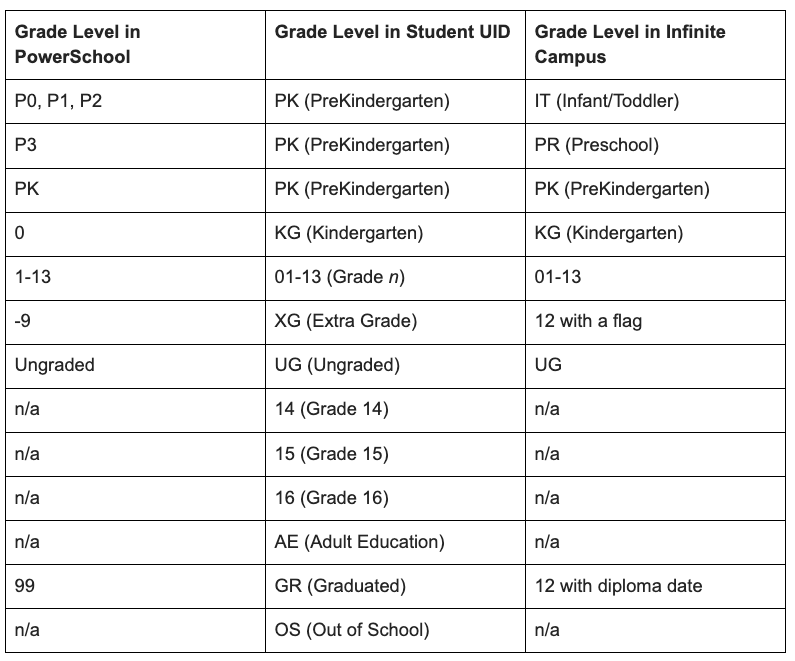
Please refer to the table for a comparison of grade levels across PowerSchool, UID, and Infinite Campus.
Local ID Workaround
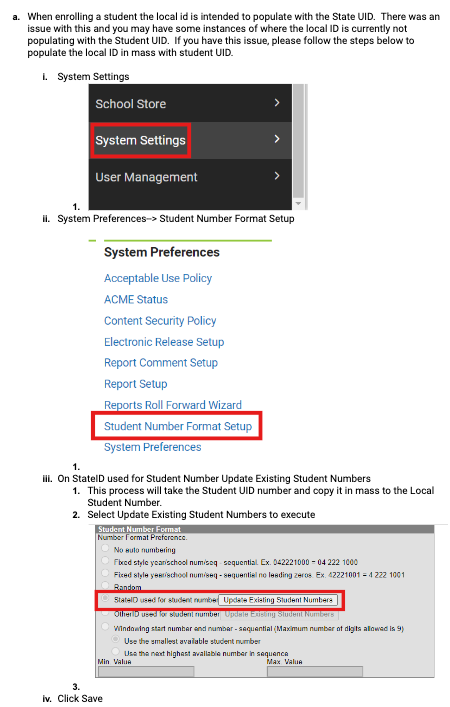
Please see the workaround for the scenario where students have state IDs but not local IDs populated.
Transcripts
The transcripts in Infinite Campus are still being finalized. If you need to print a transcript for a student in the meantime, please use the transcript saved from PowerSchool. DPI will notify PSUs once the transcripts are ready for use within Infinite Campus.
DPI Flags in Infinite Campus
Please do NOT change any flag that has DPI in the title and is checked as State Edition.
CEDARS, Student UID, and Staff UID: Understanding the Distinctions and Access Processes
CEDARS Data Warehouse is a separate system from Student UID and from Staff UID. The three are vaguely related but are technically separate and have separate access approval processes. Staff Leads may have been listed as a CEDARS Security Officer, but that's separate from the Student UID Security Officer.
Important Information: Accountability and GDV File
Public school units (PSUs) participating in Infinite Campus Phase I currently do not have a way to make changes to the 2023–24 graduate file as the GDV report is nearing completion. To support including graduates who earned a diploma or certificate by August 6, 2024, not included in the GDV file from PowerSchool collected on June 30, 2024, the GRADSUPP process has been created. This process also allows for changes to graduates processed in GDV1 in PowerSchool.
PSUs must collect data from schools to supplement the current graduates. Schools should provide any data changes from the original GDV submission from PowerSchool. The testing coordinator will upload the file to the secure shell for inclusion in the cohort graduation rate date.
The GRADSUPP file allows PSUs to submit changes to the graduation data for the 2023–24 school year for students who graduate by August 6, 2024. The file is due August 12, 2024. Students recorded in this collection will be entered by the PSU into Infinite Campus at a later date.
Release Pack Campus.2411
Campus.2411 Enhancements
NEW Requests & Rosters
A new Scheduling tool called Requests & Rosters is now available. This tool combines the functionality of the following tools into just one tool.
- Manual Roster Builder
- Section Roster Batch Edit
- Request Wizard
- Roster Copy
- Section Roster Setup
Use Requests & Rosters throughout the Scheduling process to copy section rosters, add and remove students from a section, modify course requests, update roster start and end dates, and much more.Refer to the article linked above for detailed information, and refer to the What's New in Scheduling article for additional Scheduling updates.
Product Information: Requests & Rosters
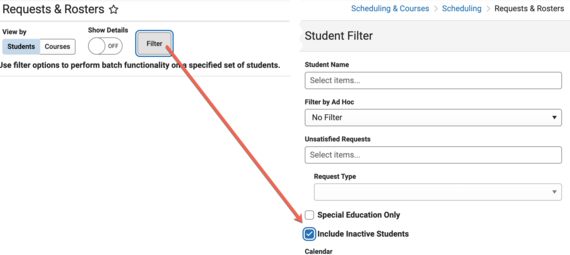
Is the student filter not working for you anymore? Try this! The steps below will include inactive students:
To view inactive students prior to enrollment start date: Scheduling & Courses > Scheduling > Requests & Rosters > View By: Students > select Filter button > in pop out check the box for Include Inactive Students. (see screenshot)
EWS & MTSS Information
With the statewide adoption of Infinite Campus (IC) as the new student information system, the
NCDPI has new opportunities to streamline other applications used by public school units. One
application that has recently been considered is the early warning system (EWS) component and
the multi-tiered system of support (MTSS) module.
Infinite Campus provides both EWS and an MTSS module as part of the North Carolina
package. Given the amount of data currently being exported to ECATS for the EWS and the
small percentage of PSUs actively using the ECATS MTSS module, the NCDPI has made the
decision to transition to Infinite Campus as the platform for the EWS and MTSS module.
The transition to Infinite Campus for MTSS will occur commensurate with the implementation
phases currently in place.
PHASE I
Phase I PSUs will receive technical assistance with the end-of-the-year activities underway in the
current system to archive intervention plans/progress monitoring collected to date and to
complete other transition activities necessary to become an IC EWS/MTSS user. Priority will be
given to the Phase I PSUs currently identified as routine users in ECATS EWS/MTSS. Details
regarding technical assistance will be shared through the Integrated and Behavior Systems
(IABS) communication loops.
Non-PHASE I PSUs
PSUs that are currently using the EWS and the MTSS module in ECATS and who are not
participating in the Phase I implementation of IC, will continue to have ECATS EWS/MTSS
available for the 2024-2025 school year. Technical assistance and transition activities will be
provided throughout the year in preparation for the full statewide implementation of IC with the
EWS and the MTSS module during the 2025-2026 school year.
Special Education and Service Documentation
The statewide platform currently used for the special education and service documentation
modules will remain the same (ECATS). The data housed in a student information system and
necessary to support these modules will continue to flow during the implementation phases.
There are no current plans to move these modules to IC.
Partnering Progress
To support the successful implementation of the NCSIS, we have developed a detailed professional development plan for both Phase I and Phase II participants. This plan will provide you with the knowledge, skills, and resources needed to implement NCSIS effectively. Registration links are available for most events now, while others will be added in the coming months.
The linked document outlines the full professional development plan for Phase I and II, including:
-
Training Workshops: Covering NCSIS fundamentals and implementation
-
Ongoing Support: Regular check-ins with NCSIS consultants, access to online resources, and participation in PLCs.
-
Continuous Improvement: Regular assessment and feedback cycles to refine and enhance implementation practices.

NCSIS Resources
Phase I participants will gain access to the Campus Community, where they can acquire product knowledge, glean tips and tricks, and engage in networking opportunities with other districts. The Campus Community offers convenient single sign-on access from the Campus system to a wealth of resources including the knowledge base, forum discussions, learning tools, support site, upcoming events, and more.
Campus Community- contains the information you need to learn how to use Infinite Campus through product documentation, videos & simulations, study guides, forums, and much more. Whether you are a teacher, data manager, or Infinite Campus user, you will find the learning resources in a clearly defined pathway for a seamless transition from PowerSchool.
Campus Passport- is on-demand, self-paced courses that can be assigned to new and existing staff. Accessed through the Campus Community, you will find Instructor-Led Training, specific E-Learning courses, or select a learning plan based on your district role.
KnowledgeOwl: KnowledgeOwl will include articles (QRDs) that are created and updated by the SIS Professional Learning team.
NCSIS Knowledge Base | NC Department of Public Instruction (knowledgeowl.com
NCSIS Crosswalk Document- will contain Infinite Campus and PowerSchool terms with their meanings to assist users with learning the new NCSIS terminology. This is a working document and will be updated regularly. NCSIS Crosswalk Document
IC Role Specific Resources- can be viewed by clicking on http://ncsis.gov , go to the Phase I PSU’s tab and scroll to the IC Role Specific Resources section. It Includes information for specific staff roles, as well as a guide for parents & students.
Webinar Recording Links and FAQs- can be found at http://ncsis.gov under the Professional Learning tab. Please check for recently added webinars.
|
SIS Scoop
Get the Inside Track on Big News! We are excited to announce the Connect Conference coming January 2025. Join us for a focused training event designed to equip you with the skills needed to master our new Student Information System. Get ready for hands-on workshops, networking opportunities, and expert-led sessions. The conference will be held at the Koury Convention Center in Greensboro, NC. More information is coming soon!
|
|
 |
 |
|
2024-2025 Home Base Maintenance Periods
Each year, a list of scheduled maintenance windows is published by NCDPI. This is published in advance to help teachers and administrators better prepare for temporary outages and loss of access. Please review the 2024-2025 maintenance schedule and put these dates on your calendar. In most cases, the entire window is not necessary and we can return systems to service earlier than listed. If emergency maintenance is required in addition to these scheduled dates, all users will be notified in advance.
|
|
Want to Stay in the Loop?
Click HERE to learn how to sign up to receive the weekly NCSIS Phase I bulletin.
Stay informed with the latest NCSIS news and information by visiting: http://ncsis.gov
|
|
 |

Questions?
Please feel free to reach out for questions or concerns by emailing ncsis@dpi.nc.gov
|
|