End of Year Information:
- EOY Open Office Hours
- EOY Essentials: Weekly Q&A with NCDPI
- Phase I EOY Message with Timeline
Reminders:
- NCSIS Phase I Conversion: Post-Production and Beyond
- 2024-2025 Home Base Maintenance Periods
- SIS Briefing: Key Information
- 3rd Party Integrations
- Updated Canvas Information
- NCSIS Resources
- Upcoming Training Information
- Conversion Tips & Data Clean-Up
- SIS Speak
- Non-NCEdCloud Users
- EWS & MTSS Information
- Partnering Progress
- SIS Scoop
- Want to Stay in the Loop?
- Questions
|
End of Year Information:
EOY Open Office Hours
The SIS PL Team will have open office hours to assist Phase I PSUs with questions/concerns about the EOY/Post EOY process. Please use the links below to join anytime during the times listed below.
EOY Essentials: Weekly Q&A with NCDPI
Join the SIS PL team for a weekly check-in with Phase I PSUs to discuss the implementation process and End-of-Year (EOY) procedures. This is an opportunity to ask questions, provide feedback, and ensure a smooth transition.
NCSIS-IC Phase I Implementation Team Check-In
Registration links are listed below:
You've got EOY questions, we've got answers! If you weren't able to join our virtual EOY check-in sessions but want to stay up-to-date on the latest EOY information, check out the NCSIS Question & Answers document below. Choose the Phase I Implementation Check tabs.
NCSIS Questions & Answers Document
|
|
 |
 |
|
Phase I EOY Message with Timeline
Please click on the link below to access important updated information regarding the End of Year timeline for Phase I PSUs. This document includes detailed timelines, guidelines, and essential steps that PSUs need to complete.
EOY Message with Timeline (updated 7/3/2024)
|
Reminders:
NCSIS Phase I Data Conversion: Post-Production and Beyond
Due to EOY constraints, data extracts were paused until July 3rd. You will see updated files in your eMFTS folder on the morning of July 3rd.
To support the swiftness needed for the post-production conversion, the program data (gifted, 504, lep, migrant, and testAccom) will not be submitted in the July 8-11 timeframe. During this post-production conversion period, you will submit the following files:
- Student.csv
- RosterLive.csv
- Transcript.csv
- EnrollmentCurrentPostEOY.csv (posted to the enrollment area in the conversion dashboard)
- EnrollmentHIstorical.csv (posted to the miscellaneous area in the conversion dashboard)
The program data conversion will occur after the post-production conversion. The program data includes the following files:
- Gifted.csv
- 504.csv
- Lep.csv
- Migrant.csv
- testAccom.csv
|
Date
|
Activity
|
Responsible Party
|
|
July 3, 2024
|
Files available on eMFTS with post-EOY data
|
NCDPI
|
|
July 7, 2024
|
Access to PowerSchool will be view only access. Anyone in Group 149 in PS will be moved to view only.
|
NCDPI
|
|
July 8, 2024
|
Scripts will be run in PowerSchool to transfer all students out with an exit comment of “Infinite Campus.” Plugins, AutoComms and exports will also be disabled.
|
NCDPI
|
|
July 8-10, 2024
|
Post-production files uploaded to conversion dashboards and dashboards locked
|
PSUs
|
|
July 11-12, 2024
|
Post-production conversion
|
Infinite Campus
|
|
July 15, 2024
|
Conversion dashboard open for program data
|
PSUs
|
|
July 15, 2024
|
ECATS data available in NCSIS
|
Infinite Campus
|
|
July 19, 2024
|
All conversion dashboards locked
|
PSUs
|
|
July 26, 2024
|
Program data available in NCSIS
|
Infinite Campus
|
|
August 23, 2024
|
Historical discipline data available in NCSIS
|
Infinite Campus
|
2024-2025 Home Base Maintenance Periods
Each year, a list of scheduled maintenance windows is published by NCDPI. This is published in advance to help teachers and administrators better prepare for temporary outages and loss of access. Please review the 2024-2025 maintenance schedule and put these dates on your calendar. In most cases, the entire window is not necessary and we can return systems to service earlier than listed. If emergency maintenance is required in addition to these scheduled dates, all users will be notified in advance.
|
|
 |

SIS Briefing: Key Information
Please review the following important Phase 1 NCSIS-IC information:
1. Phase I PSUs: DPI Staff Deletion
-
Action Required: All Phase I Public School Units (PSUs) must delete any Department of Public Instruction (DPI) staff from their production instance.
2. NCVPS Information:
-
Cross Enrollment: PSUs will not be able to cross-enroll students for the 1st semester of the 24-25 school year.
-
Conversion Files and/or Production Instance: Because of this change, PSUs should schedule NCVPS sections and enter NCVPS staff into Infinite Campus using their typical process.
3. Infinite Campus Online Registration:
-
FERPA and Digital Device Survey: If your PSU is using Infinite Campus Online Registration, you need to create the "pleats" for the Family Educational Rights and Privacy Act (FERPA) and the Digital Learning Dashboard.
4. Combine Person Tool & ServiceNow Tickets:
-
Current Status: PSUs are currently unable to use the Combine Person tool.
-
Help Ticket Update: If you find duplicate student or staff records, please submit a ServiceNow ticket. This process may change, and we will provide further updates as needed.
|
3rd Party Integrations
If on State Contract:
NCDPI will do the integration. Please see the list below:
- TIMS
- PowerSchool Unified Talent/NCEES
- ScholarPath
- Pearson Schoolnet
- Learning.com
- EBSCO
- Britannica
- ECATS
- Amplify mClass and alternative assessment when awarded
- NROC/edReady (CCRG)
- SAS EVAAS
- NC Early Learning Inventory
- LETRS
- Prodigy - Minecraft EDU
- NC Cardinal
- Credentia
- NCCER
- Microsoft
- Pearson Certiport
- Learning Ally
- School Nutrition Technology System
- NAVVY
If NOT on State Contract:
PSUs will need to work with Infinite Campus. *Please note there may be a cost.
Click below for information on how to setup a One Roster API or a data extract using the Data Extract Utility tool. Infinite Campus 3rd Party Integration Information
Updated Canvas Information
Newly Added: Canvas Integration - What to Expect
The integration to Canvas is done through the OneRoster API. In order for this to happen, Canvas must be given credentials by the PSU. This setup is done by the PSU in the Digital Learning Applications Configuration tool. Here is a knowledge base article on how to set it up: https://kb.infinitecampus.com/help/configuring-oneroster-connections
Canvas Cartridge Upload
The link below provides documentation on how to prepare Canvas cartridges to upload to Infinite Campus’ Learning Management System. The document will be updated often with an “updated on” line at the beginning of the article for users to know what version they are viewing. Please do NOT share a pdf version of this link as users will not get the updates when they are made.
Infinite Campus’ plan is to release improvements to the import tool as soon as they are available over the summer and potentially into the fall. For example, the new quiz question types Infinite Campus is releasing soon won’t immediately be supported with the import tool. A teacher with quiz question types that won’t import immediately (as outlined in the document) could hold onto the cartridge to import after the additional question types are added or could re-import the cartridge after the improvements are made.
Infinite Campus Upload document
Canvas Guide on Exporting Courses

NCSIS Resources
Phase I participants will gain access to the Campus Community, where they can acquire product knowledge, glean tips and tricks, and engage in networking opportunities with other districts. The Campus Community offers convenient single sign-on access from the Campus system to a wealth of resources including the knowledge base, forum discussions, learning tools, support site, upcoming events, and more.
Campus Community- contains the information you need to learn how to use Infinite Campus through product documentation, videos & simulations, study guides, forums, and much more. Whether you are a teacher, data manager, or Infinite Campus user, you will find the learning resources in a clearly defined pathway for a seamless transition from PowerSchool.
Campus Passport- is on-demand, self-paced courses that can be assigned to new and existing staff. Accessed through the Campus Community, you will find Instructor-Led Training, specific E-Learning courses, or select a learning plan based on your district role.
NCSIS Crosswalk Document- will contain Infinite Campus and PowerSchool terms with their meanings to assist users with learning the new NCSIS terminology. This is a working document and will be updated regularly. NCSIS Crosswalk Document
Infinite Campus Role-specific Staff Videos can be viewed by clicking on http://ncsis.gov and then click on Learn more about NCSIS (Technology Staff, Counselor, Front Office Staff, Teacher, etc).
IC Role Specific Resources- can be viewed by clicking on http://ncsis.gov, go to the Phase I PSU’s tab and scroll to the IC Role Specific Resources section. It Includes information for specific staff roles, as well as a guide for parents & students.
Data Manager Roadshow Presentation Link - HERE
Webinar Recording Links and FAQs- can be found at http://ncsis.gov under the Professional Learning tab. Please see the recently added Phase I Participant Check-In May 2024 webinar link.
|
Upcoming Training Information
Virtual Data Extract Utility Set-Up Webinar: Many applications utilized by PSUs are exports from the student information system. This webinar will demonstrate how to use the Data Extract Utility and create Ad Hoc filters using the drag and drop feature or SQL to create extracts. Processes that write to the SIS will not be addressed in the webinar. Register using the link below.
Friday, July 12th, 1- 2:30 pm
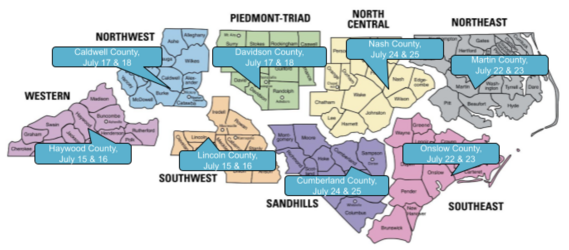
NCBOLD Registration is Open! Office of Digital Teaching and Learning (DTL) is excited to announce its new iteration of NCBOLD for this summer. New for this year: NCBOLD will be a TWO-Day Conference! Back again this year is Data Manager training for both Infinite Campus and PowerSchool and the Beginning Teacher Track. Sessions for Data Managers will be led by NCDPI SIS Consultants, as well as practicing educators. PSUs may send multiple school-based data managers for this track. This has been one of our most widely requested needs and we are excited that we can provide this opportunity at a regional level. Also new for this year at NCBOLD, we will have Digital Literacy sessions and E-Rate Boot Camp for PSU E-Rate contacts.
NCBOLD 2024 Locations and Dates
Explanation of Target Audience for Each Day of NCBOLD
Video Explanation of NCBOLD 2024 Schedule
Registration is open!
|
|
 |

Conversion Tips & Data Clean-up
SIS Phase I - Data Extracts Process Update
**Important Updates**
- The 504.csv file has been corrected to extract only 504 programs from PowerSchool. Please download your file and check for accuracy before next week.
- The migrant.csv file is expected very soon. Please download it as soon as you see it and check for accuracy. Please email ncsis@dpi.nc.gov with any problems that you see.
- The lepAccom file is now named the testAccom file and contains all accommodations for EL, 504 and Transitory Impairment accommodations from PowerSchool.
- Changes now included in the enrollment file:
- The admission status has been added to all enrollment files
- The startComment and endComment fields should now correctly extract data
- The No Show records that were originally from the graduated student school but were populated in the extract with the graduated_schoolID for each student are now be completely excluded from the enrollmentCurrent files. This will mean that many of your graduates will not be in your enrollmentCurrentPostEOY file at all, but their entire history will be included in the enrollmentHistorical file. This addresses an issue we are seeing in Infinite Campus production sites where students do not appear in a search in the year that they graduated.
Next up! Post-Production and Post-EOY data uploads.
Post-EOY, you will be submitting these 5 files to Infinite Campus. These need to be downloaded no sooner than July 3, but by the end of the day on July 8, 2024. Please verify that the enrollment file contains the correct data (check a known retention for the 23-24 school year) to know if the files have updated with post-EOY data. They should be submitted to Infinite Campus by the due date established by your implementation team. Remember that any changes you made to your production files (fixing course numbers, deleting blank grades, etc) will need to be made to these files also.
- student.csv
- transcript.csv
- rosterLive.csv
- enrollmentCurrentPostEOY.csv
- enrollmentHistorical.csv
How post-production/post-EOY files will be loaded into Infinite Campus:
- Student.csv - only new records that were not previously loaded during the production conversion will be inserted into Infinite Campus. There will be no updates for previously converted data.
- EnrollmentCurrentPostEOY.csv and EnrollmentHistorical.csv - (CHANGE) All enrollment records will be deleted from the production site and replaced with the records in both enrollment files.
- Transcript.csv and RosterLive.csv - all data will be deleted from the production site and a full load will be done using these files.
This information should help you decide how to process these files for your post-production, post-EOY upload.
Continue to email questions and concerns to ncsis@dpi.nc.gov. Your feedback has helped make this process better for everyone!
**Please continue to monitor the Additions/Corrections page in the Data Conversion Guide. All updates will be posted there!
|
SIS Speak
This week the focus is on Day Types:
Scheduling & Courses > Calendar Setup > Day Setup
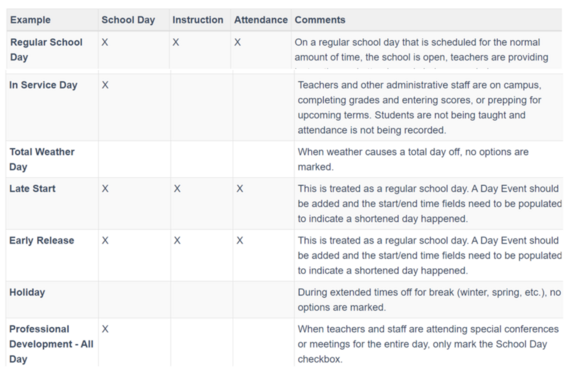
Each day of the school year needs to be marked for School, Instruction and Attendance, or some combination of each. After using the Day Reset option, all of these options are marked for each day, which means users need to modify the ones that should not be marked this way.
Here are the definitions for these fields.
-
School Day - this option is marked when teachers, students, administrators, etc. are on school grounds.
-
Instruction - this option is marked when students are on school grounds and attending classes.
-
Attendance - this option is marked when attendance entries are recorded.
Below are some examples of when these fields should be marked.
|
|
 |
Non-NCEdCloud Users
Infinite Campus allows the use of multiple sources for Single-Sign-On, including NCEdCloud, ClassLink, Clever, Office 365, Google, OneLogin, Okta, and any other system capable of integration via SAML. NCEdCloud will be configured by default for any PSU who plans on using it. Other integrations will be the responsibility of the PSU, instructions are available at https://kb.infinitecampus.com/help/saml---sso-service-provider-configuration.
Different authentication sources may also be used for students, staff, and parents (though each user may only use one authentication source). An SSO provider is required for students and staff. Parents may use an SSO provider if the district has a provider that supports parent accounts, otherwise they may use Infinite Campus’s internal authentication.
Please complete the survey below to indicate your PSUs Single-Sign-On provider.
Survey Link
If you have questions about this request, please contact Mark Samberg (mark.samberg@dpi.nc.gov) or John Mairs (john.mairs@dpi.nc.gov).
EWS & MTSS Information
With the statewide adoption of Infinite Campus (IC) as the new student information system, the
NCDPI has new opportunities to streamline other applications used by public school units. One
application that has recently been considered is the early warning system (EWS) component and
the multi-tiered system of support (MTSS) module.
Infinite Campus provides both EWS and an MTSS module as part of the North Carolina
package. Given the amount of data currently being exported to ECATS for the EWS and the
small percentage of PSUs actively using the ECATS MTSS module, the NCDPI has made the
decision to transition to Infinite Campus as the platform for the EWS and MTSS module.
The transition to Infinite Campus for MTSS will occur commensurate with the implementation
phases currently in place.
PHASE 1
Phase I PSUs will receive technical assistance with the end-of-the-year activities underway in the
current system to archive intervention plans/progress monitoring collected to date and to
complete other transition activities necessary to become an IC EWS/MTSS user. Priority will be
given to the Phase I PSUs currently identified as routine users in ECATS EWS/MTSS. Details
regarding technical assistance will be shared through the Integrated and Behavior Systems
(IABS) communication loops.
Non-PHASE 1 PSUs
PSUs that are currently using the EWS and the MTSS module in ECATS and who are not
participating in the Phase 1 implementation of IC, will continue to have ECATS EWS/MTSS
available for the 2024-2025 school year. Technical assistance and transition activities will be
provided throughout the year in preparation for the full statewide implementation of IC with the
EWS and the MTSS module during the 2025-2026 school year.
Special Education and Service Documentation
The statewide platform currently used for the special education and service documentation
modules will remain the same (ECATS). The data housed in a student information system and
necessary to support these modules will continue to flow during the implementation phases.
There are no current plans to move these modules to IC.
Partnering Progress
DPI’s Commitment to PSU Success with New SIS Implementation
NCSIS Professional Development Plan 2024
Check back: Phase II Professional Development Plan coming soon!

SIS Scoop
Get the Inside Track on Big News! We are excited to announce the “XX” Symposium coming January 2025. Join us for a focused training event designed to equip you with the skills needed to master our new Student Information System. Get ready for hands-on workshops, networking opportunities, and expert-led sessions. The conference will be held at the Koury Convention Center in Greensboro, NC. More information is coming soon!
|
 |
|
Want to Stay in the Loop?
Click HERE to learn how to sign up to receive the weekly NCSIS Phase I bulletin.
Stay informed with the latest NCSIS news and information by visiting: http://ncsis.gov
|

Questions?
Please feel free to reach out for questions or concerns by emailing ncsis@dpi.nc.gov
|
|