Unified Talent/NCEES Updates 02/18/2022

Having trouble viewing this email? View it as a Web page.


NCDPI - Academic Services Banner

February 18, 2022

Unified Talent/NCEES UPDATES


ACADEMIC AND DIGITAL LEARNING

HB NCEES Header

list

In This Issue:

  1. Tonight's Home Base Maintenance Window
  2. Admin View of Notes Library fixed
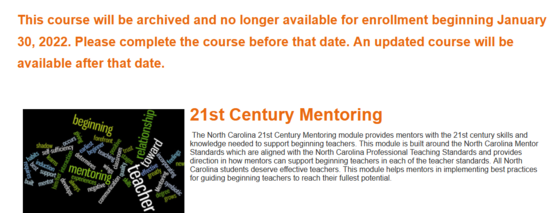
  3. NCVPS Updates Moodle Courses to Canvas
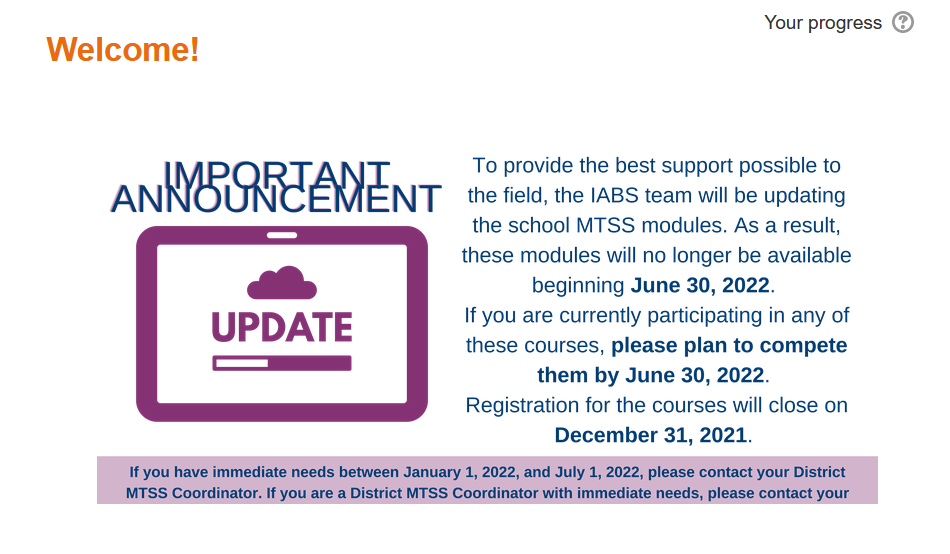
  4. MTSS Updating Courses Notice
  5. Premium Library/EdStar Analytics Webinar Recording
  6. NCEES Tuesday Webinars
  7. NC Virtual Free Online Professional Development
  8. NCEES Office 1/2 Hours
  9. NCDPI ServiceNow Support 
Perform & Professional Learning

home base maintenance

Tonight's Home Base Maintenance Window

Tonight’s Home Base maintenance window is set to begin at 7 p.m.  The PowerSchool, NCEES, Schoolnet and NCEdCloud applications are all scheduled for a brief maintenance.


The PowerSchool application will be brought down for one night only, Friday, February 18 at 7 p.m. and returned to service by 12:00 p.m., Saturday, February 19.  The application will be made accessible to all users once maintenance is complete. 


This maintenance window will include a small SRC update. Here is a copy of the SRC release notes. In addition, due to the influx of PowerSchool SIS outages we have experienced since our last Oracle upgrade, PowerSchool will perform an Oracle restart during this maintenance window. This restart is expected to improve system performance and decrease the number of outages. We estimate that maintenance will be completed by noon on Saturday, February 19. If this changes, PSUs will be contacted.


Security patching will be performed on the Schoolnet application starting at 8 p.m. on Friday, Feb. 18. Schoolnet may experience a brief 30 minute outage.


NCEdCloud will undergo miscellaneous security updates beginning at 8 p.m. on Friday, Feb. 18; however, no downtime is expected.  


Please share this message with other staff as appropriate.


Note:  Each year, a list of scheduled maintenance windows are published by NCDPI.  This is published in advance to help teachers and administrators better prepare for temporary outages and loss of access.  Please review the 2022-2023 maintenance schedule and put these dates on your calendar. In most cases, the entire window is not necessary and we can return systems to service earlier than listed. If an emergency maintenance is required in addition to these scheduled dates, all users will be notified in advance.


NCEES MAINTENANCE

Sunday, February 20 at 10:00 p.m. to Monday, February 21 at 6:00 a.m. EST, the NCEES vendor (PowerSchool) will be deploying version 22.2.0.0 into the NCEES system.

Release Notes can be found in the PowerSchool Community for Professional Learning and Perform Enterprise have also been posted in Help.


During this time, NCEES’s availability will be limited. The only NC update item is:

  • Professional Learning,
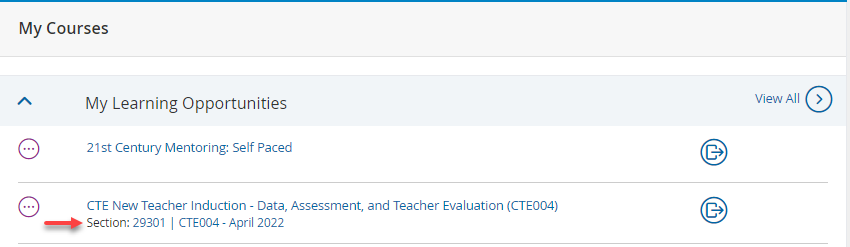
    • Improvement - Section Title Displayed in My Courses,
      • Both Section Title and Section Number are now displayed in My Learning Opportunities in the My Course channel. To view after starting a course, navigate to My Courses tab > My Courses container.

See screenshot below:

NCEES update to My Courses showing Sections

fixed green check square

Admin View of Notes Library fixed

A District reported that Superintendents with View Only Access and Principals/Evaluators with Edit access to Staff Plans could no longer view all the notes entered into the 'Notes Library' areas.


This issue was verified by NCDPI and PowerSchool Support. The settings were updated to fix this issue. Notes Library activities are found in the Principal Plan's Data Collection container and in Evaluation plan's Performance Journal activity. Notes Library is also available in the Observation Rubric to Evaluators/Observers when starting the activity.


Below is a list of access groups view rights of notes created in the Notes Library (rights are restricted by the access assignments in My Staff > Administration Staff Management):

  • Principal or Assistant Principal Evaluation Process 2021-2022
    • School Administrator (P/AP) – Can View Notes Created by Everyone
    • Evaluator – Can View Notes Created by Everyone
    • Contributor – Can View Notes Created by Self Only
    • View Only – Can View Notes Created by Everyone
    • Re-open Admin – Can View Notes Created by Self only 
    • New User Button – Can View Notes Created by Everyone
  • Comprehensive Evaluation 2021-2022
    • Teacher – Can View Notes Created by Everyone
    • Observer – Can View Notes Created by Self only 
    • Peer Observer – Can View Notes Created by Self Only
    • View Only – Can View Notes Created by Everyone
    • Evaluator – Can View Notes Created by Everyone 
    • Re-open Admin – Can View Notes Created by Self Only

Please open a ServiceNow Support Ticket if the PSU is experiencing issues with Notes Library.


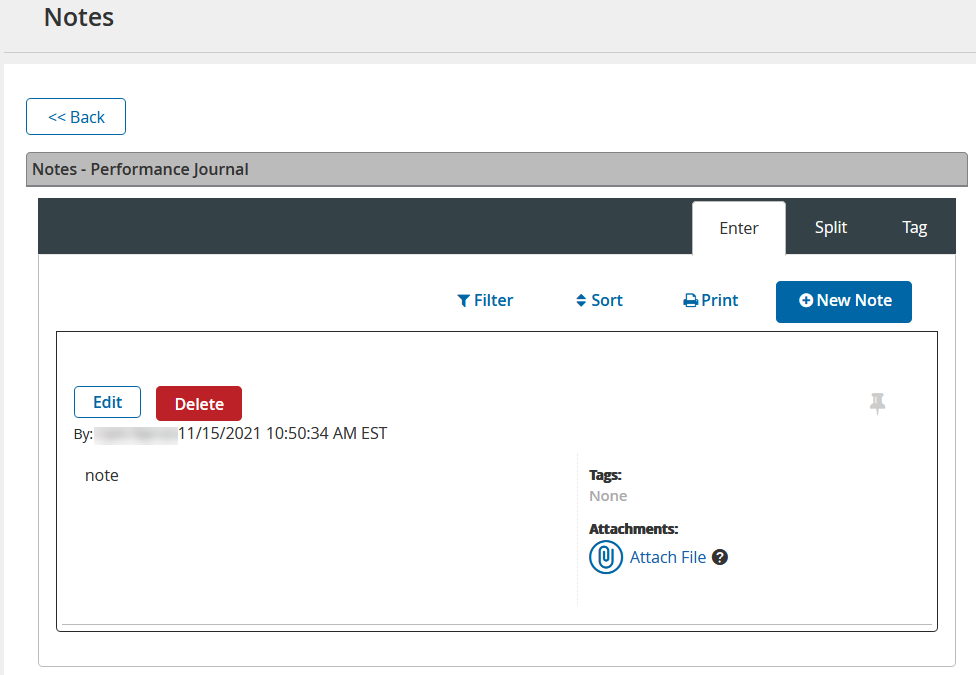
Screenshot below shows view of Notes Library from Performance Journal access.


Notes Library image

NCDPI-NCVPS-Moodle logo
whats new

NCVPS Updates NCEES Moodle Courses to Canvas

NCVPS has updated content in several Professional Development courses in the NCEES PD Catalog, transferring them over from Moodle to NCDPI's Canvas. 


To assist NCEES Professional Development Leads and PSUs that may have these courses on a NCEES PD Playlist or shared in other ways with their staff, please click the link below:

Registration has been removed from these identified Moodle courses. Staff that are in progress in any of these Moodle courses should plan to complete the course by Feb. 25, 2022, after which they will be archived.


Check out the NCVPS Professional Learning website, then navigate to NCEES > Professional Development to search for and start these courses. Staff may also use the NCEES> Professional Development tab > View All link > Refine by Office : NCVPS to view all courses offered by NCVPS through NCEES.


Is your staff new to using DPI's Canvas Courses? 

Do staff get a 403 or cannot access Canvas error message after selecting a Canvas Course in NCEES?  Please send any questions to Home_Base@dpi.nc.gov. The NCDPI Canvas and/or NCEES Product Managers will troubleshoot course access. PSUs do not have to have a local Canvas instance to access DPI's Canvas courses.


Screenshot below shows sample notice on NCVPS courses that will be archived after Feb. 25, 2022.

NCVPS courses to be archived notice

MTSS Updating Courses Notice

Please share the following notice (below) from the DPI IABS team with your staff that are in progress with current MTSS courses in NCEES.


District MTSS Coordinators may contact your  Integrated Academic and Behavior Systems DPI contact with any questions/needs.

MTSS courses to be archived June 30 2022

EdStar Courses with Premium Library banner

NCEES Premium Library w/EdStar Analytics - Webinar Recording

EdStar Analytics is now offering their courses through NCEES Premium Library. If you missed this week's webinar please use the links below:

Districts have also asked about courses for SEL. Vendor Educational Impact has courses available in Premium Library:

Please share with your Professional Development leads.


NCEES Webinar Showcase

NCEES Winter/Spring Webinars

Please click on the titles below to register for the upcoming NCEES Webinars which are held most Tuesdays from 4-5 p.m.

A certificate to turn into your PSU for approval of .1 -.15 CEUs will be provided to participants that complete the feedback survey at the end of each live session. Click here for Webinar Descriptions.


NC Virtual PD

Did you know you have access to FREE professional development courses through IAM/NCEdCloud? (Available to all NC Public and Charter School Teachers/Admins)

Follow these simple steps to access our course directory: 

  • Log in to your IAM/NCEdCloud account
  • Click on the "blue P" to access NCEES
  • Click the Professional Development link on the top menu

This path will take you to a wide variety of FREE courses available to you. Check them out today! All courses are self-enrolled and self-paced.

You may also visiNC Virtual's Professional Learning page for additional information on accessing our FREE professional development.

NCVirtual PD Email

cami office hours logo

NCEES  Office 1/2 Hours 

NCEES Admins - Do you have a NCEES related question? Schedule a Call for an answer:


NEW! NCEES Office 1/2 Hours 

Administrator phone call with Cami Narron, NCEES Education Product Consultant. Click the link below to schedule a 1/2 hour phone call:


https://calendly.com/cami-narron-ncdpi/30min


contact support
ServiceNow new green logo

NCDPI Technology Support Center

NCDPI's Technology Support Center continues to meet your support needs for:

  • Schoolnet 
  • NCEES/Unified Talent
  • IAM/SSO (NCEdCloud) 
  • Staff & Student UID (eScholar)

Support availability:
Web NEW URL: https://ncgov.servicenowservices.com/sp_dpi  -  24/7

Phone:    919-716-1840, Monday - Friday, 7 a.m. to 4 p.m. (excluding state holidays)

Technical support for SIS needs is handled directly by PowerSchool support using Chat, Call or opening a Case ticket.