
SWIFT Update: SWIFT Upgrade and System Availability, Vanity Links, SS Enhancements, Annual Security Review, SWIFT Module Training and EPM Training
This bulletin was sent at 09/04/2025 08:51 AM CDT
PeopleSoft Image Upgrade and System Availability
What's Happening?
Minnesota Management and Budget, the Department of Administration (Office of State Procurement), and Minnesota IT Services are working to upgrade SWIFT, the Supplier Portal, and Mobile Inventory to a more current image of PeopleSoft.
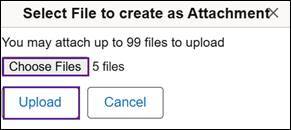
The upgrade features some minor functional enhancements, such as approval notifications, ability to upload multiple attachments in a single step, an option to email notifications for certain transaction types, and others. Also, you may notice some label changes.
The anticipated launch date for this upgrade is Monday, September 15, 2025. SWIFT, including the Supplier Portal and Mobile Inventory, will be unavailable from Saturday, September 13 at 6 am, until Monday morning, September 15, 2025. We will send an email communication once the systems are available.
What do you need to do?
- Be aware that SWIFT, including the Supplier Portal and Mobile Inventory, will be unavailable Saturday, September 13, until the morning of Monday, September 15, 2025.
- For the best user experience, we suggest that you clear your internet browsing history and cache before you log into the Administrative Portal on Monday, September 15.
- Note that the web addresses will remain the same.
- Buyers: Please avoid scheduling events to close during this down time as the Supplier Portal will also be unavailable.
- Please plan around this time to minimize the interruption of critical business functions. We apologize for the inconvenience.
If you have questions about this upgrade, please email the SWIFT Help Desk or call 651-201-8100, Option 2.
View the Clear Browsing History and Cache Quick Reference Guide for information on clearing your internet browser history.
Vanity Links
In preparation for the PeopleSoft Image Upgrade, remember to use and save vanity links to access statewide system portals. A 'vanity URL' is a shorter URL that is more descriptive and automatically redirects a user to the application. Please save these URLs in your browser favorites and use them for communications to employees or suppliers. These shorter URLs replace the need for the much longer and sometimes changing portal URLs.
The following portals have vanity URLs:
- Administrative Portal/SWIFT: http://mn.gov/adminportal
- Self Service Portal: http://mn.gov/selfservice
- Supplier Portal: http://mn.gov/supplier
For instructions on how to save these links to your browser's Favorites, see the Save Vanity URLs Quick Reference Guide. This guide includes instructions for Microsoft Edge, Chrome, and Firefox.
If you have questions about how to save favorites in your browser, contact the SWIFT Help Desk.
Strategic Sourcing Enhancements: SWIFT PeopleTools Image Upgrade – September 15, 2025
SWIFT is scheduled for an upgrade on September 15, 2025. You may notice minor functional enhancements and label changes. This week we highlight what’s new in the Strategic Sourcing module.
1. Multiple Attachments (Event Comments and Attachments).
When you attach documents in the Event Comments and Attachments page, you can now add up to 99 attachments at the same time, rather than selecting each one and adding them individually.
2. Invite Contacts (Bidder Invitations).
As an option, you can send the bid package to individuals who are not yet registered as a bidder or supplier with the State of Minnesota, or to internal contacts who may need to review the event. Instead of adding the names and emails individually, you can now add multiple contacts using a CSV file.

For more information about the steps related to these enhancements, view the updated Create an Event Quick Reference Guide on September 15, 2025.
Annual System Security Review and Verification due September 30, 2025
Minnesota Management and Budget (MMB) requires all state agencies to review the security roles assigned to their employees in statewide systems, including SWIFT, SEMA4, ELM, and the EPM Data Warehouse. An agency’s assigned security administrator coordinates the annual security review process and ensures proper signatures are collected on the verification form. All changes to security roles due to the review process as well as signed verifications are due Friday, September 30, 2025.
- For more information and links to relevant policies, refer to the 2025 Annual Security Review and Verification memo and instructions.pdf.
- Questions and returned verification forms should be directed to the MMB Statewide Systems Security Team at sema4.security.mmb@state.mn.us.
SWIFT Module Training
The SWIFT Training team offers training through a variety of methods at no additional cost to the agency, including:
- SWIFT Quick Reference Guides.
- SWIFT and EPM training videos.
- The EPM Data Warehouse Quick Reference Guides for SWIFT data.
- Individual and group sessions requested through the SWIFT Help Desk.
- Webinars, labs, and eLearning available in Learning Management. Enter "SWIFT" in the Find Learning text entry box.
| MODULE |
SWIFT Webinars & eLearning Sessions run 9 a.m. - 10:30 a.m., unless otherwise noted |
DATES | |
|---|---|---|---|
| INTRO | Introduction to SWIFT Navigation webinar | 9/18/25 |
|
| INTRO | Overview of SWIFT Reporting webinar | 9/18/25 |
|
| INTRO | Introduction to SWIFT Navigation eLearning | Anytime | |
| PO | SWIFT Create Purchase Orders in SWIFT webinar | 9/25/25 | |
EPM Data Warehouse for SWIFT Training
| MODULE |
EPM Data Warehouse Labs for SWIFT Data Sessions run 9 a.m. - 10:30 a.m., unless otherwise noted |
DATES | |
|---|---|---|---|
| EPM | Build My Dashboard for SWIFT Reports lab | 9/11/25 | |
| EPM | Create a SWIFT All Expenditures Report in EPM Lab | 10/1/25 | |
| EPM | Create a SWIFT All Receipts Report in EPM lab | 9/25/25 | |
| EPM | Introduction to the EPM Data Warehouse for SWIFT webinar | 10/7/25 | |
| EPM | SWIFT EPM Formatting Your Report lab | 9/24/25 | |
| EPM | Use SWIFT Standard Reports in EPM lab | 9/9/25 | |
SWIFT Help Desk
Contact the SWIFT Help Desk for any SWIFT-related questions or issues.
Email: SWIFTHelpDesk.MMB@state.mn.us
Phone: 651-201-8100, option 2
Hours: 7:30 a.m. to 4:00 p.m., Monday through Friday (closed holidays)
When contacting the SWIFT Help Desk, make sure to include details about your question or issue, including:
- Your Business Unit
- Description of the issue/question
- SWIFT Module (Accounts Payable, Purchase Orders, etc.)
- Transaction ID (Voucher ID, PO ID, etc.)
- Error message print screen
Additional assistance can be found on the SWIFT Training Guides and Resources page.
SWIFT Update Newsletter
The SWIFT Update is sent to everyone on the SWIFT Update subscription list. To subscribe or unsubscribe to this newsletter, use the links below.
You are subscribed to Accounting - SWIFT Newsletter for Minnesota Management & Budget. Please do not attempt to respond to the sender by clicking Reply or Reply to All. The sender's e-mail box is unable to receive replies.
Subscribe to SWIFT Newsletter | Manage Subscriptions | GovDelivery Help


