
SWIFT Update: SWIFT System Availability, Roll Forward Transfers, PO Terms Update, Freight Charges, SWIFT Questions, EPro Enhancements, SWIFT Module Training and EPM Training
This bulletin was sent at 08/28/2025 12:47 PM CDT
Notice on SWIFT System Availability – Due to PeopleSoft Image Upgrade, September 13-15, 2025 (including Supplier Portal and Mobile Inventory)
SWIFT, including the Supplier Portal and Mobile Inventory, will be unavailable on Saturday, September 13, until Monday, September 15, 2025, for the PeopleSoft Image upgrade.
Please plan around this time to minimize the interruption of critical business functions. We apologize for the inconvenience.
We will send an email communication once the systems are available.
Reminder to Buyers
Please be aware of the system downtime, including the Supplier Portal. Avoid scheduling events to close between September 13 and September 15. Depending on when the system comes up, bidders and suppliers may or may not have time to enter bid responses if an event is scheduled to close over the weekend.
FY 25 Roll Forward Update
Roll forward transfers typically occur every other weekend during pay day weekends. FY 25 was not included in the most recent roll forward process on Friday, August 22 but was included as part of hard close on August 16. The next expected run of the roll forward process is scheduled for the weekend of September 5. If you need to move funds from FY 25 to FY 26 before September 5, refer to the Enter Roll Forward Budget Transfers Quick Reference Guide for instructions on manually rolling dollars forward in SWIFT.
SWIFT Purchase Order ‘Standard Terms and Conditions’ Update - September 1, 2025
Please note that the Standard Terms and Conditions on purchase orders will be updated. The updated language becomes effective in SWIFT and appears on purchase orders starting September 1, 2025. If you view the printable version of a purchase order, Standard Terms and Conditions display at the bottom. Item 8 includes information specific to debarment. The update also includes language specific to certain contract terms not allowed per Minnesota law, Minn. Stat. § 16C.05, subd. 8.
Freight Charges on Requisitions and Purchase Orders
Contract Release T-572(5) TOOLS, INDUSTRIAL SUPPLIES, AND EQUIPMENT—FOR MAINTENANCE, REPAIR, AND OPERATIONS (MRO) – Freight Charges for Oversize, Overweight and Rush Orders
Please note the contractors on this contract release are now allowed to charge shipping charges on oversize and overweight items. Shipping charges may also apply for rush orders.
The shipping charges should be identified on the contractor’s website and in the punchout system when placing purchase orders. Do not delete or cancel shipping charges on the requisitions and purchase orders when using the SWIFT Catalog Punchout system.
For questions about shipping charges on products ordered, contact the contractor’s representative listed to verify any added shipping charges.
Please report to the contract administrator if you find any shipping charges which may be excessive or not needed on products. Efforts will be made to monitor the shipping charges and make sure the charges are appropriate.
The following language is included in the contract release.
FREIGHT/SHIPPING TERMS. All items are shipped FOB Destination, prepaid, and allowed. The Contractor is not allowed to charge for freight except as noted for rush or oversized/overweight orders. Freight charges may be added to orders with Rush Delivery. Additional shipping charges for oversized or overweight items that require special shipping are allowed but must be identified as part of the quoting process. The oversize, overweight and rush order shipping charges depend on the shipping company used by the contractor.
For detailed information, please refer to the posted contract release on the Office of State Procurement's website. For further assistance, please contact the contract administrator, Karen McIntyre.
For SWIFT Punchout system questions, contact the SWIFT Help Desk.
Questions about SWIFT
Need Help? The SWIFT Training team is actively updating and creating new materials for SWIFT users. We encourage you to refer to our many SWIFT Training materials including:
We also understand that live help is often the most useful and immediate route to a solution. The SWIFT Help Desk responds to many questions, issues, and requests to help you get your work done in SWIFT. Whether you are experiencing a technical issue or need guidance on a SWIFT transaction, the SWIFT Help Desk is your main point of contact. Please do not contact SWIFT module leads or trainers directly. The SWIFT Help Desk ensures your matter is forwarded and escalated as needed. In addition, the SWIFT Help Desk documents each interaction, helping us identify larger system issues as well as identifying training and communication gaps.
For agency questions about suppliers, please contact the Vendor File Maintenance Team.
If you have a question about stop payments and warrant handling for suppliers, contact the System Compliance team.
SWIFT PeopleTools Image Upgrade: EProcurement Module Enhancements – September 15, 2025
SWIFT is schedule for an upgrade on September 15, 2025. You may notice minor functional enhancements and label changes. This week we highlight what’s new in the EProcurement module.
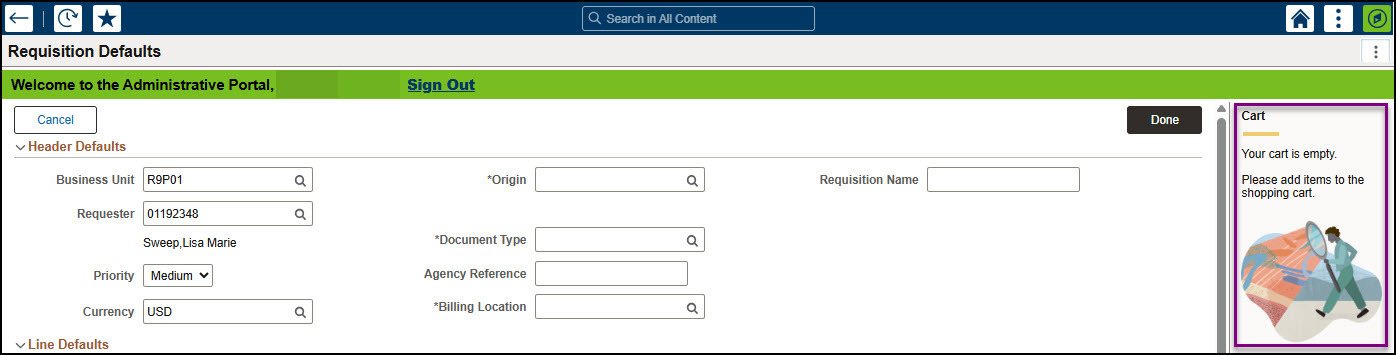
- The Shopping Cart appears on the right side of the page for creating new requisitions. You can see them if you added items.
- The layout in the Distribution Defaults has changed slightly. Select the Show All tab to access the distribution fields.

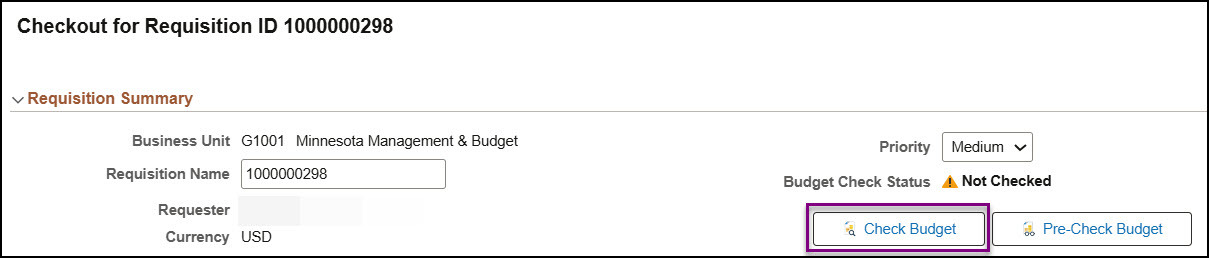
- The Checkout Confirmation page has a streamlined view that allows you to easily see the status and access the Check Budget button.
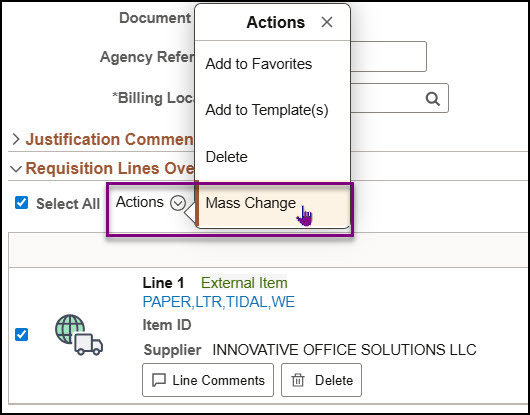
- Mass Change allows you to make changes to multiple lines using one process in the Manage Requisitions page. In this upgrade, Mass Change operates the same, but there is an updated Actions menu option to access it.
SWIFT Module Training
The SWIFT Training team offers training through a variety of methods at no additional cost to the agency, including:
- SWIFT Quick Reference Guides.
- SWIFT and EPM training videos.
- The EPM Data Warehouse Quick Reference Guides for SWIFT data.
- Individual and group sessions requested through the SWIFT Help Desk.
- Webinars, labs, and eLearning available in Learning Management. Enter "SWIFT" in the Find Learning text entry box.
| MODULE |
SWIFT Webinars & eLearning Sessions run 9 a.m. - 10:30 a.m., unless otherwise noted |
DATES | |
|---|---|---|---|
| INTRO | Introduction to SWIFT Navigation webinar | 9/18/25 |
|
| INTRO | Overview of SWIFT Reporting webinar | 9/18/25 |
|
| INTRO | Introduction to SWIFT Navigation eLearning | Anytime | |
| PO | SWIFT Create Purchase Orders in SWIFT webinar | 9/25/25 | |
| SS | SWIFT Strategic Sourcing webinar | 9/3/25 | |
EPM Data Warehouse for SWIFT Training
| MODULE |
EPM Data Warehouse Labs for SWIFT Data Sessions run 9 a.m. - 10:30 a.m., unless otherwise noted |
DATES | |
|---|---|---|---|
| EPM | Build My Dashboard for SWIFT Reports lab | 9/11/25 | |
| EPM | Create a SWIFT All Expenditures Report in EPM Lab | 10/1/25 | |
| EPM | Create a SWIFT All Receipts Report in EPM lab | 9/25/25 | |
| EPM | Introduction to the EPM Data Warehouse for SWIFT webinar | 10/7/25 | |
| EPM | SWIFT EPM Formatting Your Report lab | 9/24/25 | |
| EPM | Use SWIFT Standard Reports in EPM lab | 9/9/25 | |
| EPM |
Understand the SWIFT Data in the EPM Data Warehouse webinar | 9/3/25 | |
SWIFT Help Desk
Contact the SWIFT Help Desk for any SWIFT-related questions or issues.
Email: SWIFTHelpDesk.MMB@state.mn.us
Phone: 651-201-8100, option 2
Hours: 7:30 a.m. to 4:00 p.m., Monday through Friday (closed holidays)
When contacting the SWIFT Help Desk, make sure to include details about your question or issue, including:
- Your Business Unit
- Description of the issue/question
- SWIFT Module (Accounts Payable, Purchase Orders, etc.)
- Transaction ID (Voucher ID, PO ID, etc.)
- Error message print screen
Additional assistance can be found on the SWIFT Training Guides and Resources page.
SWIFT Update Newsletter
The SWIFT Update is sent to everyone on the SWIFT Update subscription list. To subscribe or unsubscribe to this newsletter, use the links below.
You are subscribed to Accounting - SWIFT Newsletter for Minnesota Management & Budget. Please do not attempt to respond to the sender by clicking Reply or Reply to All. The sender's e-mail box is unable to receive replies.
Subscribe to SWIFT Newsletter | Manage Subscriptions | GovDelivery Help


